

- Posts: 11
- Thank you received: 1
page goes blank when change order status backend
13 years 4 months ago #105605
by nielsg
page goes blank when change order status backend was created by nielsg
Hi there,
i'm working with the latest joomla 3.1.1 and the latest hikashop esential 2.1.3.. but i get this error now when i try to update the status of an order in the backend.
any idea what goes wrong?
Uncaught type error: can not set property value of null
<html><head><script type="text/javascript">parent.document.getElementById('filter_status_34').value='confirmed';parent.default_filter_status_34='confirmed';if(typeof(parent.jQuery)!='undefined'){parent.jQuery(parent.document.getElementById('filter_status_34')).trigger('liszt:updated');} window.parent.hikashop.closeBox();</script></head><body></body></html>
Thanks!
Niels
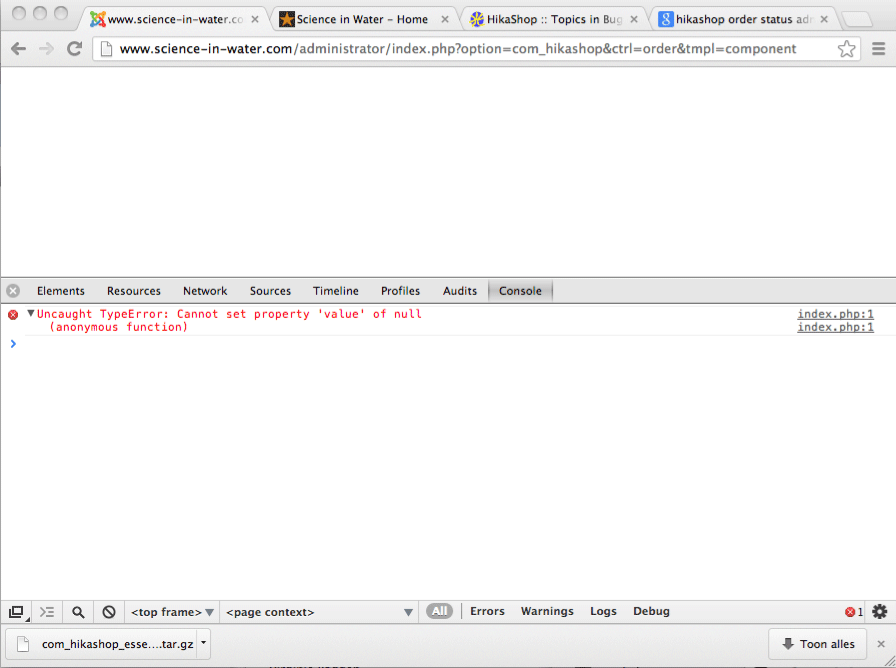
i'm working with the latest joomla 3.1.1 and the latest hikashop esential 2.1.3.. but i get this error now when i try to update the status of an order in the backend.
any idea what goes wrong?
Uncaught type error: can not set property value of null
<html><head><script type="text/javascript">parent.document.getElementById('filter_status_34').value='confirmed';parent.default_filter_status_34='confirmed';if(typeof(parent.jQuery)!='undefined'){parent.jQuery(parent.document.getElementById('filter_status_34')).trigger('liszt:updated');} window.parent.hikashop.closeBox();</script></head><body></body></html>
Thanks!
Niels
Please Log in or Create an account to join the conversation.

13 years 4 months ago #105622
by Jerome
Jerome - Obsidev.com
HikaMarket & HikaSerial developer / HikaShop core dev team.
Replied by Jerome on topic page goes blank when change order status backend
Hi,
The page you display should be displayed in a javascript popup.
In your case, you have the content directly in the all page. So the javascript which makes the link between the javascript popup and his parent (the order page / order listing) can't work properly.
But the order is right updated in the database, just that the interface which is not displayed correctly.
You maybe have a problem with the popup system.
Just in case, please redownload HikaShop 2.1.3, we made one fix last week.
Regards,
The page you display should be displayed in a javascript popup.
In your case, you have the content directly in the all page. So the javascript which makes the link between the javascript popup and his parent (the order page / order listing) can't work properly.
But the order is right updated in the database, just that the interface which is not displayed correctly.
You maybe have a problem with the popup system.
Just in case, please redownload HikaShop 2.1.3, we made one fix last week.
Regards,
Jerome - Obsidev.com
HikaMarket & HikaSerial developer / HikaShop core dev team.
Please Log in or Create an account to join the conversation.
13 years 4 months ago #105629
by nielsg
Replied by nielsg on topic page goes blank when change order status backend
Hi there,
i've downloaded the latestet version and i've just updated all the media/js files of joomla again.. but still no luck..
in firefox the popup stays empty, in chrome the popup shows the info but then fails to save it..
ReferenceError
get stack: function () { [native code] }
message: "WFEditor is not defined"
set stack: function () { [native code] }
__proto__: Error
index.php:111
6
Uncaught TypeError: Cannot set property 'value' of undefined core.js:12
Uncaught TypeError: Cannot set property 'value' of undefined core.js:12
submitform core.js:12
submitbutton core.js:11
onclick index.php:1
(function() {with (this[2]) {with (this[1]) {with (this[0]) {return function(event) {submitbutton('savechangestatus');
};}}}})
i've downloaded the latestet version and i've just updated all the media/js files of joomla again.. but still no luck..
in firefox the popup stays empty, in chrome the popup shows the info but then fails to save it..
ReferenceError
get stack: function () { [native code] }
message: "WFEditor is not defined"
set stack: function () { [native code] }
__proto__: Error
index.php:111
6
Uncaught TypeError: Cannot set property 'value' of undefined core.js:12
Uncaught TypeError: Cannot set property 'value' of undefined core.js:12
submitform core.js:12
submitbutton core.js:11
onclick index.php:1
(function() {with (this[2]) {with (this[1]) {with (this[0]) {return function(event) {submitbutton('savechangestatus');
};}}}})
Please Log in or Create an account to join the conversation.
13 years 4 months ago #105664
by Jerome
Jerome - Obsidev.com
HikaMarket & HikaSerial developer / HikaShop core dev team.
Replied by Jerome on topic page goes blank when change order status backend
Hi,
Why are you having the popup in another tab ?
Regards,
Why are you having the popup in another tab ?
Regards,
Jerome - Obsidev.com
HikaMarket & HikaSerial developer / HikaShop core dev team.
Please Log in or Create an account to join the conversation.
13 years 4 months ago #105930
by nielsg
Replied by nielsg on topic page goes blank when change order status backend
Hi Jerome and others,
1.when i try to change the status of the order from the total list of orders, i get a popup with the new status, and i can fill in a reason of the order change.. and when clicking ok, nothing happens.
2. when i try to change the status of the order from the order itself.. the lightbox opens, i click on OK, and the next URL i get is a "blank" page out of the lightbox..
the URL i get = http://SITURL/administrator/index.php?option=com_hikashop&ctrl=order&tmpl=component > if ik then refresh the page, the order status gets changed, but i totally need to reload the page because the joomla admin framework is missing.
if i check the error listing in chrome when trying option 1 , it starts off with an error regarding a reference.
then when clicking ok i get..
The lightbox works fine everywhere else in hikashop (for example payment plugins),
i've updated to joomla latest version and hikashop.
can anyone tell me what is going wrong?
cheers
niels
1.when i try to change the status of the order from the total list of orders, i get a popup with the new status, and i can fill in a reason of the order change.. and when clicking ok, nothing happens.
2. when i try to change the status of the order from the order itself.. the lightbox opens, i click on OK, and the next URL i get is a "blank" page out of the lightbox..
the URL i get = http://SITURL/administrator/index.php?option=com_hikashop&ctrl=order&tmpl=component > if ik then refresh the page, the order status gets changed, but i totally need to reload the page because the joomla admin framework is missing.
if i check the error listing in chrome when trying option 1 , it starts off with an error regarding a reference.
then when clicking ok i get..
The lightbox works fine everywhere else in hikashop (for example payment plugins),
i've updated to joomla latest version and hikashop.
can anyone tell me what is going wrong?
cheers
niels
Please Log in or Create an account to join the conversation.
13 years 4 months ago #105945
by Jerome
Jerome - Obsidev.com
HikaMarket & HikaSerial developer / HikaShop core dev team.
Replied by Jerome on topic page goes blank when change order status backend
Hi,
Please deactivate your plugin "WFEditor". You have a javascript error in your page created by this plugin and the popup is not initialized & open as a popup but it replace the content of the all page.
You should not see the url "http://SITURL/administrator/index.php?option=com_hikashop&ctrl=order&tmpl=component" in your address bar.
Regards,
Please deactivate your plugin "WFEditor". You have a javascript error in your page created by this plugin and the popup is not initialized & open as a popup but it replace the content of the all page.
You should not see the url "http://SITURL/administrator/index.php?option=com_hikashop&ctrl=order&tmpl=component" in your address bar.
Regards,
Jerome - Obsidev.com
HikaMarket & HikaSerial developer / HikaShop core dev team.
Please Log in or Create an account to join the conversation.
13 years 4 months ago #105955
by nielsg
Replied by nielsg on topic page goes blank when change order status backend
hmmm, do you know where i can turn this of in the JCE editor? i just tested everything with "no editor activated" in the backend and i still get the same errors.
thanks
niels
thanks
niels
Please Log in or Create an account to join the conversation.
13 years 4 months ago #105960
by Jerome
Jerome - Obsidev.com
HikaMarket & HikaSerial developer / HikaShop core dev team.
Replied by Jerome on topic page goes blank when change order status backend
Hi,
Sorry, we do not. We are not experts on JCE editor.
I guess you can unpublish the plugin in the Joomla plugin manager.
Regards,
Sorry, we do not. We are not experts on JCE editor.
I guess you can unpublish the plugin in the Joomla plugin manager.
Regards,
Jerome - Obsidev.com
HikaMarket & HikaSerial developer / HikaShop core dev team.
Please Log in or Create an account to join the conversation.
13 years 4 months ago #106310
by nielsg
Replied by nielsg on topic page goes blank when change order status backend
Hi Jerome,
i've turned of the JCE editor, and changed the config in the backend to NO EDITOR, but the problem remains..
I can change shipping and paymentfee in the order (which work with a popup also) but I can not change the order status.. :S
any thoughts?
cheers
niels
i've turned of the JCE editor, and changed the config in the backend to NO EDITOR, but the problem remains..
I can change shipping and paymentfee in the order (which work with a popup also) but I can not change the order status.. :S
any thoughts?
cheers
niels
Please Log in or Create an account to join the conversation.
13 years 4 months ago #106313
by nielsg
Replied by nielsg on topic page goes blank when change order status backend
FOUND IT!!!
In the end, the Access Manager component was causing the problem. I've turned it off and all is good again.
thanks for your time
Niels
In the end, the Access Manager component was causing the problem. I've turned it off and all is good again.
thanks for your time
Niels
The following user(s) said Thank You: nicolas
Please Log in or Create an account to join the conversation.
Time to create page: 0.342 seconds