
- Posts: 10
- Thank you received: 0
No available warehouse found for your location
- Samytharwat
-
 Topic Author
- Offline
Less
More
13 years 5 months ago #107002
by Samytharwat
No available warehouse found for your location was created by Samytharwat
Hi,
Im using Canada post as shipping method, and I've created my warehouse based on Canada {Check attached error_hikashop.gif}
When user add product to his cart, the system asking for login or register which is fine but there is also an error message telling "No available warehouse found for your location"
So my first question, based on what this message appear!! how the system determine that there is no warehouse even before the user login or register and talking into consideration that I already set CANADA is the default selected country in the drop down list
I've tried to remove the zone area from the warehouse then the message changed into "No shipping address entered" !!!!
Im using PayPal as payment method
Please advise
Samy
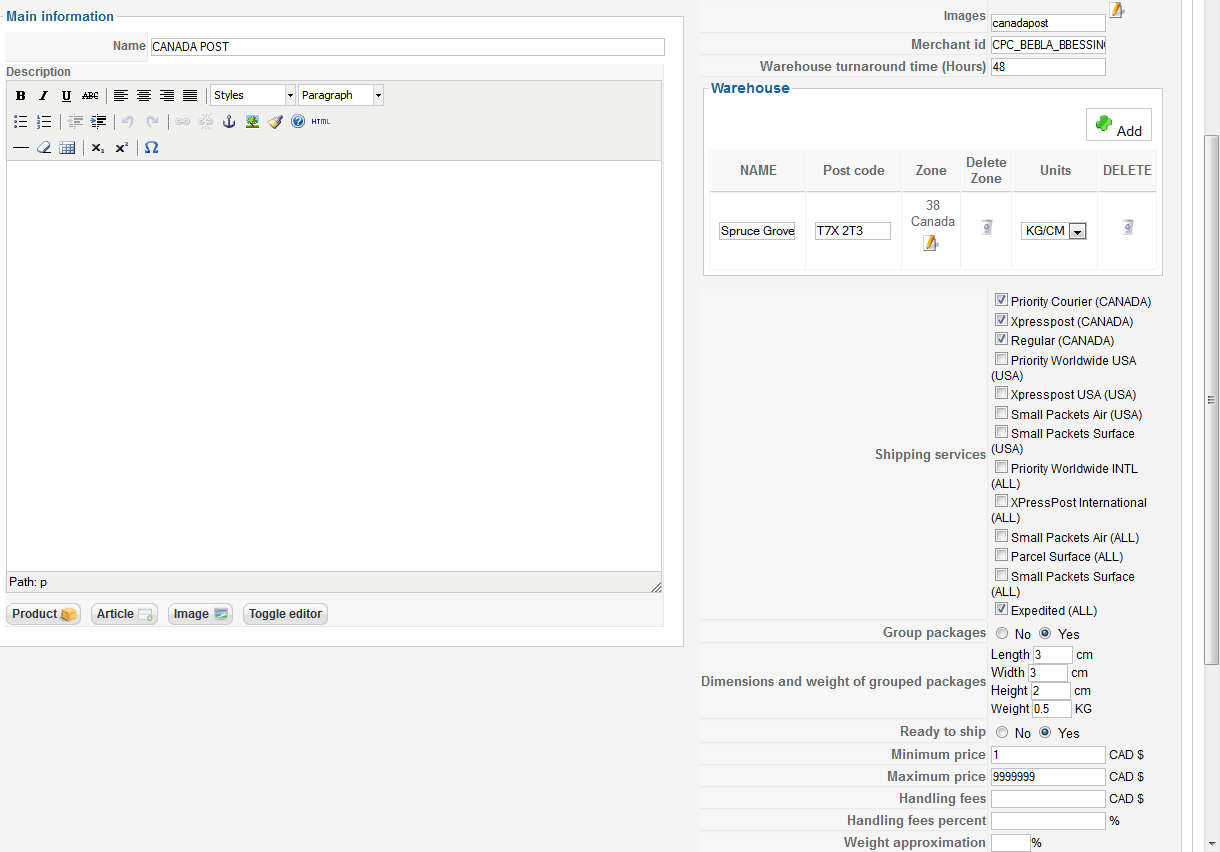
Im using Canada post as shipping method, and I've created my warehouse based on Canada {Check attached error_hikashop.gif}
When user add product to his cart, the system asking for login or register which is fine but there is also an error message telling "No available warehouse found for your location"
So my first question, based on what this message appear!! how the system determine that there is no warehouse even before the user login or register and talking into consideration that I already set CANADA is the default selected country in the drop down list
I've tried to remove the zone area from the warehouse then the message changed into "No shipping address entered" !!!!
Im using PayPal as payment method
Please advise
Samy
Please Log in or Create an account to join the conversation.

Less
More
- Posts: 12953
- Thank you received: 1778
13 years 5 months ago - 13 years 5 months ago #107040
by Mohamed Thelji
Replied by Mohamed Thelji on topic No available warehouse found for your location
Hi,
1. Can you try it with this last version of the canada post shipping plugin and follow each step of the FAQ ?
1. Can you try it with this last version of the canada post shipping plugin and follow each step of the FAQ ?
Last edit: 13 years 5 months ago by Mohamed Thelji.
Please Log in or Create an account to join the conversation.
- Samytharwat
-
Topic Author
- Offline
Less
More
- Posts: 10
- Thank you received: 0
13 years 5 months ago #107048
by Samytharwat
Replied by Samytharwat on topic No available warehouse found for your location
Hi Mohamed,
I installed the updates but it is the same problem.. if you would like I can send you the admin login so you have a look
Samy
I installed the updates but it is the same problem.. if you would like I can send you the admin login so you have a look
Samy
Please Log in or Create an account to join the conversation.
Less
More
- Posts: 12953
- Thank you received: 1778
13 years 5 months ago #107066
by Mohamed Thelji
Replied by Mohamed Thelji on topic No available warehouse found for your location
Ok, and can you try it with all your canada post shipping services enabled ?
Please Log in or Create an account to join the conversation.
- Samytharwat
-
Topic Author
- Offline
Less
More
- Posts: 10
- Thank you received: 0
13 years 5 months ago #107067
by Samytharwat
Replied by Samytharwat on topic No available warehouse found for your location
Im not sure what you mean but I already activated all shipping methods/parameters listed in CP page as in the attached images
The error come from this condition in file canadapost.php
if (empty($usableWarehouses)) {
$messages = 'No available warehouse found for your location';
return true;
}
any ideas?!!
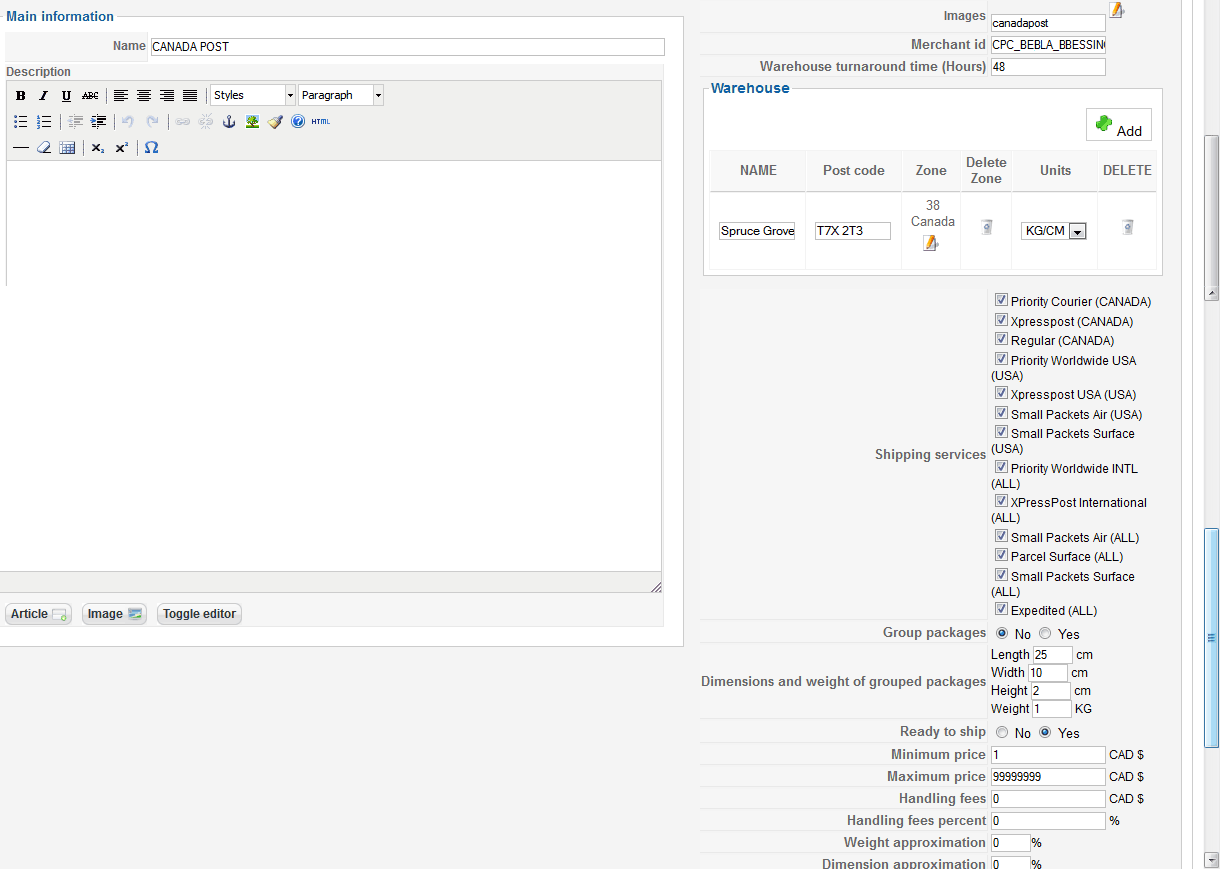
The error come from this condition in file canadapost.php
if (empty($usableWarehouses)) {
$messages = 'No available warehouse found for your location';
return true;
}
any ideas?!!
Please Log in or Create an account to join the conversation.
Less
More
- Posts: 12953
- Thank you received: 1778
13 years 5 months ago - 13 years 5 months ago #107077
by Mohamed Thelji
Replied by Mohamed Thelji on topic No available warehouse found for your location
This condition will just check if the canadapost platform have some available shipping services for your location.
Can you give me a temporary access through a Private Message for testing purpose ?
Thanks.
Can you give me a temporary access through a Private Message for testing purpose ?
Thanks.
Last edit: 13 years 5 months ago by Mohamed Thelji.
Please Log in or Create an account to join the conversation.
Less
More
- Posts: 12953
- Thank you received: 1778
13 years 5 months ago - 13 years 5 months ago #107120
by Mohamed Thelji
Replied by Mohamed Thelji on topic No available warehouse found for your location
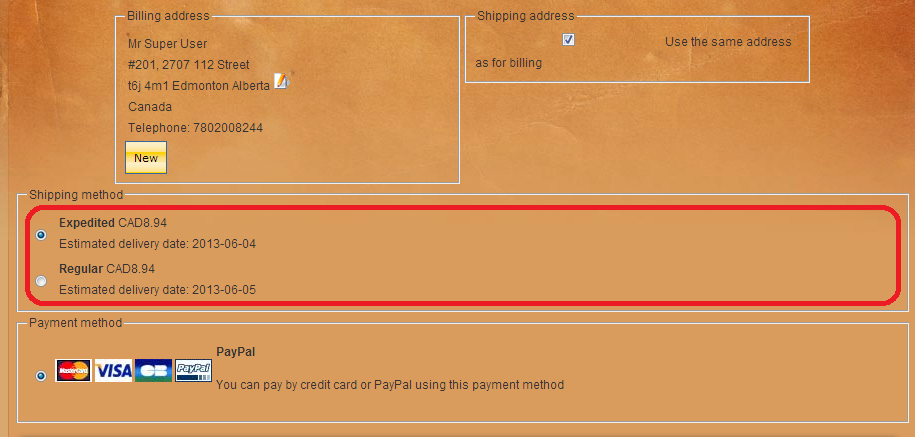
I tried it and it seems to be working fine :
Last edit: 13 years 5 months ago by Mohamed Thelji.
Please Log in or Create an account to join the conversation.
- Samytharwat
-
Topic Author
- Offline
Less
More
- Posts: 10
- Thank you received: 0
13 years 5 months ago #107172
by Samytharwat
Replied by Samytharwat on topic No available warehouse found for your location
the screen you sent here after you login but the error what im talking about before you log - see attached image-
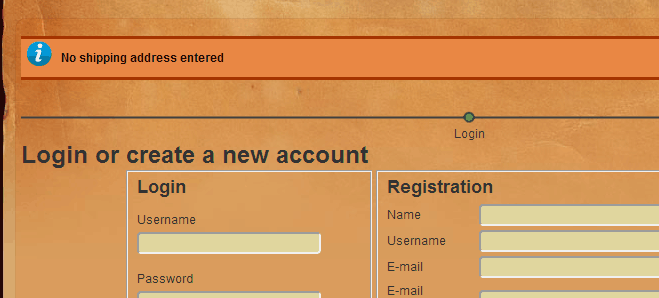
before you login you can see an error "No available warehouse found for your location" and if I removed the zone from the shipping method the error changed to "No Shipping method" !!!!!
If im a user try to buy something and there is an error telling me that no warehouse or no shipping even before creating my account then I'll just close the browser
any thoughts ?!
Samy
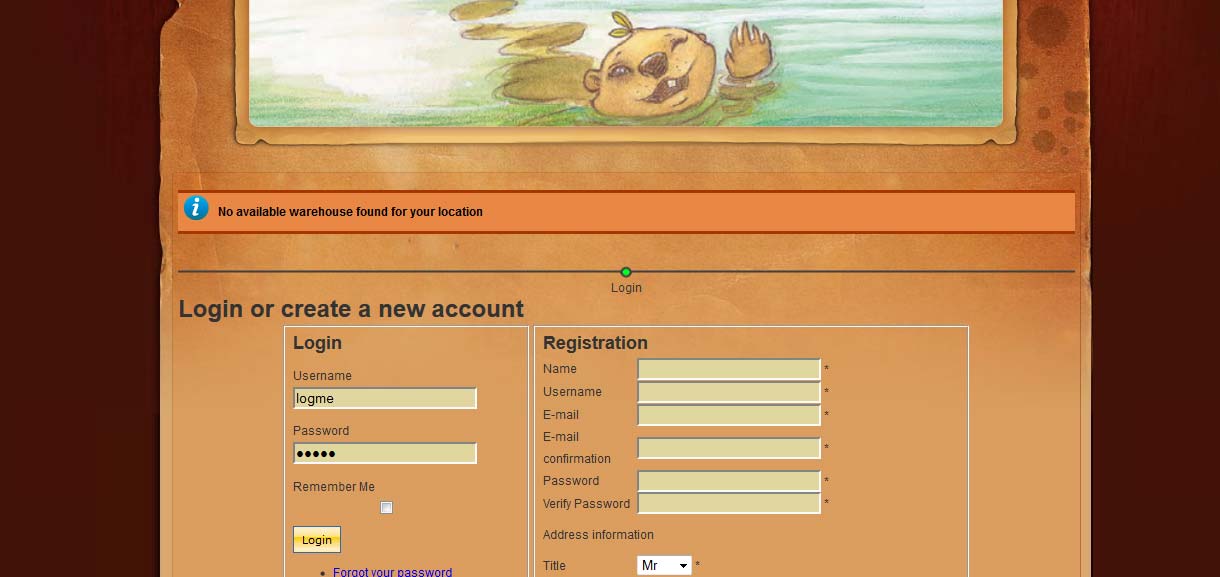
before you login you can see an error "No available warehouse found for your location" and if I removed the zone from the shipping method the error changed to "No Shipping method" !!!!!
If im a user try to buy something and there is an error telling me that no warehouse or no shipping even before creating my account then I'll just close the browser
any thoughts ?!
Samy
Please Log in or Create an account to join the conversation.

13 years 5 months ago #107227
by nicolas
Replied by nicolas on topic No available warehouse found for your location
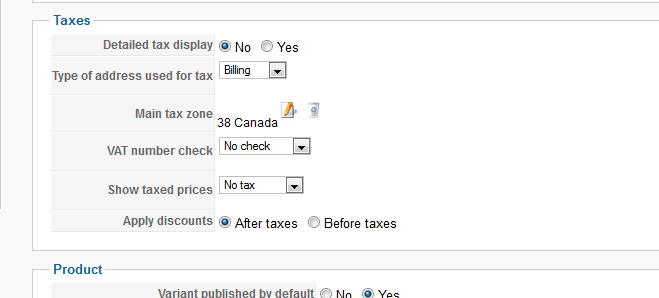
You need to change the "Main tax zone" option of the configuration to Canada so that the default location is in Canada (you will have to login/logout to see the change on the frontend) or remove the restriction that you set on your warehouse so that you can ship outside Canada as well.
Please Log in or Create an account to join the conversation.
- Samytharwat
-
Topic Author
- Offline
Less
More
- Posts: 10
- Thank you received: 0
13 years 5 months ago #107302
by Samytharwat
Replied by Samytharwat on topic No available warehouse found for your location
Okay I tried the following cases:
Case 1:
1- change the tax area in the configuration to Canada only - check attached image
2- Results: still have the same error message
Case 2:
1- removed the zone from the warehouse
2- results: the message changed to "No shipping address entered"
Case 3:
1- removed the zone from the taxes and removed the zone from the warehouse
2- results: the message changed to "No shipping address entered"
the thing is why the system show me error messages regarding the shipping or the warehouse as long as the user didnt even login !!! how the system detect user's country before they log or create account?!!!!!
I believe that the system may show theses messages after the login process not before that
Anyways, any ideas to fix this problem?! and if you need the admin login I can send it via "private message"
Samy
Case 1:
1- change the tax area in the configuration to Canada only - check attached image
2- Results: still have the same error message
Case 2:
1- removed the zone from the warehouse
2- results: the message changed to "No shipping address entered"
Case 3:
1- removed the zone from the taxes and removed the zone from the warehouse
2- results: the message changed to "No shipping address entered"
the thing is why the system show me error messages regarding the shipping or the warehouse as long as the user didnt even login !!! how the system detect user's country before they log or create account?!!!!!
I believe that the system may show theses messages after the login process not before that
Anyways, any ideas to fix this problem?! and if you need the admin login I can send it via "private message"
Samy
Please Log in or Create an account to join the conversation.
13 years 5 months ago #107305
by nicolas
Replied by nicolas on topic No available warehouse found for your location
If you don't want the "No shipping address entered" message, simply configure your checkout workflow in the Checkout tab of the configuration so that the shipping/payment/cart views are on a second step after the login/address selection.
Please Log in or Create an account to join the conversation.
- Samytharwat
-
Topic Author
- Offline
Less
More
- Posts: 10
- Thank you received: 0
13 years 5 months ago #107308
by Samytharwat
Replied by Samytharwat on topic No available warehouse found for your location
It is already in the second step!! the workflow as below:
login_address_shipping_payment_confirm_cart_status_fields,end
Is this bug related to the bug reported in below thread?
www.hikashop.com/en/forum/3-bug-report/3...still-happening.html
login_address_shipping_payment_confirm_cart_status_fields,end
Is this bug related to the bug reported in below thread?
www.hikashop.com/en/forum/3-bug-report/3...still-happening.html
Please Log in or Create an account to join the conversation.
13 years 5 months ago #107309
by nicolas
Replied by nicolas on topic No available warehouse found for your location
No, you have all the views on the same step like that.
I'm talking about having it like that:
login,address_shipping_payment_confirm_cart_status_fields,end
I'm talking about having it like that:
login,address_shipping_payment_confirm_cart_status_fields,end
Please Log in or Create an account to join the conversation.
- Samytharwat
-
Topic Author
- Offline
Less
More
- Posts: 10
- Thank you received: 0
13 years 5 months ago #107313
by Samytharwat
Replied by Samytharwat on topic No available warehouse found for your location
Thank you, It is now working
Please Log in or Create an account to join the conversation.
Time to create page: 0.085 seconds