

- Posts: 97
- Thank you received: 1
Error 404: when clicking on "add to cart" button
15 years 6 months ago #10223
by nomadal
Life is nice but is with somebody else
Replied by nomadal on topic Re: Error 404: when clicking on "add to cart" button
Noooo :-o I haven't touch anything 
Life is nice but is with somebody else
Please Log in or Create an account to join the conversation.
15 years 6 months ago #10227
by nomadal
Life is nice but is with somebody else
Replied by nomadal on topic Re: Error 404: when clicking on "add to cart" button
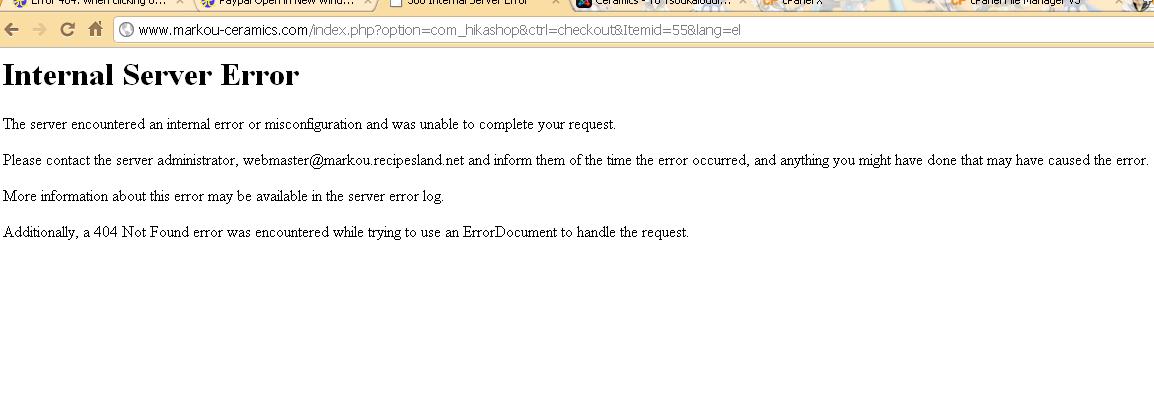
Got again the error
Life is nice but is with somebody else
Please Log in or Create an account to join the conversation.

15 years 6 months ago #10229
by nicolas
Replied by nicolas on topic Re: Error 404: when clicking on "add to cart" button
Ok, so it's not a 404 error but an internal server error. It's quite different 
In that case, you should look at the logs of your server (as the message says in fact) to see what kind of error it is. The location of the error logs as well as the activation of them is different from one hosting company to the other so you might need to ask them how to get the logs of the problem.
Also, could you try to narrow down the causes of the problem ? Does it happen with any product or only for one product ? Does it happen only while logged in ? Only while logged out ? Both ? If you refresh the page, do you still have the problem ?
In that case, you should look at the logs of your server (as the message says in fact) to see what kind of error it is. The location of the error logs as well as the activation of them is different from one hosting company to the other so you might need to ask them how to get the logs of the problem.
Also, could you try to narrow down the causes of the problem ? Does it happen with any product or only for one product ? Does it happen only while logged in ? Only while logged out ? Both ? If you refresh the page, do you still have the problem ?
Please Log in or Create an account to join the conversation.
15 years 6 months ago #10232
by nomadal
Life is nice but is with somebody else
Replied by nomadal on topic Re: Error 404: when clicking on "add to cart" button
Happens with all my products and happens when i'm logged in. Refresh doesn't has any result
Life is nice but is with somebody else
Please Log in or Create an account to join the conversation.
15 years 6 months ago #10234
by nomadal
Life is nice but is with somebody else
Replied by nomadal on topic Re: Error 404: when clicking on "add to cart" button
I don't know... I'm really fedup  some times works some others no, now is working fine :'(
some times works some others no, now is working fine :'( Life is nice but is with somebody else
Please Log in or Create an account to join the conversation.
15 years 6 months ago #10235
by nicolas
Replied by nicolas on topic Re: Error 404: when clicking on "add to cart" button
As I said, you should get the error logs of the server. It's hard to say anything without the real error. Internal server error just means that apache detected an error and stopped the process. It's a standard error message for pretty much anything. But you need to look at the logs to know what the error was.
It could also be a resources limitation on your server which stops the page when it takes too much time to process it... You might want to try a several steps checkout workflow which will reduce the processing for each step... That might just solve the problem...
It could also be a resources limitation on your server which stops the page when it takes too much time to process it... You might want to try a several steps checkout workflow which will reduce the processing for each step... That might just solve the problem...
Please Log in or Create an account to join the conversation.
15 years 6 months ago - 15 years 6 months ago #10236
by nomadal
Life is nice but is with somebody else
Replied by nomadal on topic Re: Error 404: when clicking on "add to cart" button
From Error log
File does not exist: /home/....../public_html/www.markou-ceramics.com/404.shtml
File does not exist: /home/....../public_html/www.markou-ceramics.com/404.shtml
Life is nice but is with somebody else
Last edit: 15 years 6 months ago by nomadal.
Please Log in or Create an account to join the conversation.
15 years 6 months ago #10238
by nicolas
Replied by nicolas on topic Re: Error 404: when clicking on "add to cart" button
Here are some clues about the problem:
www.warriorforum.com/main-internet-marke...lp-joomla-issue.html
As I said previously, the problem might come from your hosting shutting the page because it's too resource intensive. Try to change your workflow to a multi step workflow... That might just do the trick...
As I said previously, the problem might come from your hosting shutting the page because it's too resource intensive. Try to change your workflow to a multi step workflow... That might just do the trick...
Please Log in or Create an account to join the conversation.
15 years 6 months ago #10239
by nomadal
Life is nice but is with somebody else
Replied by nomadal on topic Re: Error 404: when clicking on "add to cart" button
For the moment is ok. But as i've told you i'm totally newbie to all the things. How to change the workflow? What i must put without mistakes?
Life is nice but is with somebody else
Please Log in or Create an account to join the conversation.
15 years 6 months ago #10240
by nicolas
Replied by nicolas on topic Re: Error 404: when clicking on "add to cart" button
The checkout workflow option is explained on that page:
www.hikashop.com/support/documentation/5...config.html#checkout
Please Log in or Create an account to join the conversation.
15 years 6 months ago #10288
by nomadal
Life is nice but is with somebody else
Replied by nomadal on topic Re: Error 404: when clicking on "add to cart" button
Nicolas i've changed the workflow but yesterday during midnight i had the problem again. I've send an e-mail to my provider (in case the problem was coming from them) and today they replied me showing me my error log:
Here are the most recent reports about errors extracted from our Apache error log:
[Sun Mar 06 14:28:18 2011] [error] [client 85.75.213.202] File does not exist: /home/....../public_html/www.markou-ceramics.com/500.shtml, referer: www.markou-ceramics.com/index.php?option...y_pathway=10&lang=el
[Sun Mar 06 14:28:32 2011] [error] [client 85.75.213.202] File does not exist: /home/....../public_html/www.markou-ceramics.com/500.shtml, referer: www.markou-ceramics.com/index.php?option...y_pathway=10&lang=el
[Sun Mar 06 14:29:17 2011] [error] [client 85.75.213.202] File does not exist: /home/...../public_html/www.markou-ceramics.com/500.shtml, referer: www.markou-ceramics.com/index.php?option...y_pathway=10&lang=el
and they told me:
"they appear because of some incorrect requests to non-existing pages, I suggest you to contact your developer regarding this"|
Any clue of what we have to do now?
Here are the most recent reports about errors extracted from our Apache error log:
[Sun Mar 06 14:28:18 2011] [error] [client 85.75.213.202] File does not exist: /home/....../public_html/www.markou-ceramics.com/500.shtml, referer: www.markou-ceramics.com/index.php?option...y_pathway=10&lang=el
[Sun Mar 06 14:28:32 2011] [error] [client 85.75.213.202] File does not exist: /home/....../public_html/www.markou-ceramics.com/500.shtml, referer: www.markou-ceramics.com/index.php?option...y_pathway=10&lang=el
[Sun Mar 06 14:29:17 2011] [error] [client 85.75.213.202] File does not exist: /home/...../public_html/www.markou-ceramics.com/500.shtml, referer: www.markou-ceramics.com/index.php?option...y_pathway=10&lang=el
and they told me:
"they appear because of some incorrect requests to non-existing pages, I suggest you to contact your developer regarding this"|
Any clue of what we have to do now?
Life is nice but is with somebody else
Please Log in or Create an account to join the conversation.
15 years 6 months ago #10296
by nicolas
Replied by nicolas on topic Re: Error 404: when clicking on "add to cart" button
Typical
The error is always in the dev's app...
If the guy had read the error lines, he would have seen that these error messages are generated because the 500.shtml file does not exists. That's a file that the server tries to display after an error 500 appears but it is NOT linked to the 500 error itself.
So that doesn't tell us anything!
More information on that in these pages:
drupal.org/node/1077782
support.open-realty.org/showthread.php?2...-500.shtml-not-found
They also suggest to ask more information to the hosting company when such errors occur.
One thing you could try is to setup a localhost web server using wamp server or something similar and make a copy of you website to that localhost web server. If you get the same error, it will be way easier to debug the problem as you should have proper logs of the issue (maybe an incompatibility with something else installed on your website ?). If you don't get the problem in localhost, then, that means that the problem lies in your hosting company's server configuration and we can't do nothing about it.
I can see now that you don't get the error on the checkout page but only if you go to the first step. So that narrows down the problem. What is your checkout workflow now ?
The error is always in the dev's app...
If the guy had read the error lines, he would have seen that these error messages are generated because the 500.shtml file does not exists. That's a file that the server tries to display after an error 500 appears but it is NOT linked to the 500 error itself.
So that doesn't tell us anything!
More information on that in these pages:
drupal.org/node/1077782
support.open-realty.org/showthread.php?2...-500.shtml-not-found
They also suggest to ask more information to the hosting company when such errors occur.
One thing you could try is to setup a localhost web server using wamp server or something similar and make a copy of you website to that localhost web server. If you get the same error, it will be way easier to debug the problem as you should have proper logs of the issue (maybe an incompatibility with something else installed on your website ?). If you don't get the problem in localhost, then, that means that the problem lies in your hosting company's server configuration and we can't do nothing about it.
I can see now that you don't get the error on the checkout page but only if you go to the first step. So that narrows down the problem. What is your checkout workflow now ?
Please Log in or Create an account to join the conversation.
15 years 6 months ago #10300
by nomadal
Life is nice but is with somebody else
Replied by nomadal on topic Re: Error 404: when clicking on "add to cart" button
login,address,shipping_payment,confirm_cart_coupon_status_fields,end
Life is nice but is with somebody else
Please Log in or Create an account to join the conversation.
15 years 6 months ago #10302
by nicolas
Replied by nicolas on topic Re: Error 404: when clicking on "add to cart" button
Did you edit any of the views of the checkout?
Could you try the checkout workflow: login_address,shipping_payment,confirm_cart_coupon_status_fields,end
If the error appears on the first step again, then that will mean that there is something with the address view which the server doesn't like.
Could you try the checkout workflow: login_address,shipping_payment,confirm_cart_coupon_status_fields,end
If the error appears on the first step again, then that will mean that there is something with the address view which the server doesn't like.
Please Log in or Create an account to join the conversation.
15 years 6 months ago #10304
by nomadal
Life is nice but is with somebody else
Replied by nomadal on topic Re: Error 404: when clicking on "add to cart" button
I've changed it as you've suggested but no error appeared. May in a while will appear hahahaha (i don't know anymore what to do that's why i'm laughing)
Life is nice but is with somebody else
Please Log in or Create an account to join the conversation.
15 years 6 months ago #10305
by nicolas
Replied by nicolas on topic Re: Error 404: when clicking on "add to cart" button
We'll see. Random errors like this often happen because the page is too resources intensive and that your hosting company has a watchdog in place to kill automatically pages which consume too much resources, or it could also be because there are too much websites consuming resources on your server or both... For example, there is a thread about these problems with goDaddy on drupla.org:
drupal.org/node/569402
Some users note that asking the hosting company to move the website to another server solved the problem... So the problem really wasn't drupal but the server...
drupal.org/node/569402
Some users note that asking the hosting company to move the website to another server solved the problem... So the problem really wasn't drupal but the server...
Please Log in or Create an account to join the conversation.
15 years 6 months ago #10310
by nomadal
Life is nice but is with somebody else
Replied by nomadal on topic Re: Error 404: when clicking on "add to cart" button
My other sites that i have on this server have no problem
Life is nice but is with somebody else
Please Log in or Create an account to join the conversation.
15 years 6 months ago #10311
by nicolas
Replied by nicolas on topic Re: Error 404: when clicking on "add to cart" button
Maybe there is less processing done on these websites ? Do you also use hikashop there ?
Please Log in or Create an account to join the conversation.
15 years 6 months ago #10312
by nomadal
Life is nice but is with somebody else
Replied by nomadal on topic Re: Error 404: when clicking on "add to cart" button
No, and yes you've right they don't have so much process.
Life is nice but is with somebody else
Please Log in or Create an account to join the conversation.

15 years 6 months ago #10568
by mt_robson
www.buch-comptoir.de
shop.buch-comptoir.de
[Weltweiter Versand seltener Bücher]
Replied by mt_robson on topic Re: Error 404: when clicking on "add to cart" button
Hi,
I have a similar problem since yesterday:
Frontpage (displaying the categories) works well ( shop.buch-comptoir.de ), however when I click on one of the categories the "404 error" appears.
Thx in advance for help.
Regards, Matt.
I have a similar problem since yesterday:
Frontpage (displaying the categories) works well ( shop.buch-comptoir.de ), however when I click on one of the categories the "404 error" appears.
Thx in advance for help.
Regards, Matt.
www.buch-comptoir.de
shop.buch-comptoir.de
[Weltweiter Versand seltener Bücher]
Please Log in or Create an account to join the conversation.
Time to create page: 0.371 seconds