

- Posts: 23
- Thank you received: 0
Changes in cart "cart is empty"
13 years 3 months ago #113242
by Carey
Changes in cart "cart is empty" was created by Carey
Hello,
I just recently noticed a problem in our cart. When a products quantity is changed in the cart, or an item is deleted but there are still other products in the cart, I get the "Cart is Empty" message. The remaining products stay in the cart and when I click on the checkout button, the cart has been updated correctly. Everything updates correctly except getting a blank page with the "cart is empty", message after making a change.
Thank you for any help.
www.prm-atv.com
I just recently noticed a problem in our cart. When a products quantity is changed in the cart, or an item is deleted but there are still other products in the cart, I get the "Cart is Empty" message. The remaining products stay in the cart and when I click on the checkout button, the cart has been updated correctly. Everything updates correctly except getting a blank page with the "cart is empty", message after making a change.
Thank you for any help.
www.prm-atv.com
Please Log in or Create an account to join the conversation.

13 years 3 months ago #113336
by nicolas
Replied by nicolas on topic Changes in cart "cart is empty"
Hi,
I would recommend you to update HikaShop to the latest version as I can see that you have an old version.
I would recommend you to update HikaShop to the latest version as I can see that you have an old version.
Please Log in or Create an account to join the conversation.
13 years 3 months ago #113421
by Carey
Replied by Carey on topic Changes in cart "cart is empty"
Thank you very much for that. I am always reluctant on updates, as it sometimes cures some issues but creates others. The update did fix my cart problem, thank you again. But now on my order confirmation email I need the shipping method & service to show, for example "UPS Ground", "UPS 2-Day Air", or "USPS International" . I have used the code from this forum post in the past and worked well,(
www.hikashop.com/en/forum/4-how-to/42647...d-name-on-email.html
)but now I only get "UPS" but not the service.
Here is the code I have inserted into the emails
<?php $shippingClass = hikashop_get('class.shipping');
$shipping = $shippingClass->get($data->order_shipping_id);
$shipping->shipping_params = unserialize($shipping->shipping_params);
echo 'Shipping method: '. $shipping->shipping_name; ?>
Thank You
Here is the code I have inserted into the emails
<?php $shippingClass = hikashop_get('class.shipping');
$shipping = $shippingClass->get($data->order_shipping_id);
$shipping->shipping_params = unserialize($shipping->shipping_params);
echo 'Shipping method: '. $shipping->shipping_name; ?>
Thank You
Please Log in or Create an account to join the conversation.

13 years 3 months ago #113531
by Xavier
Replied by Xavier on topic Changes in cart "cart is empty"
Hi,
Thanks to try:
<?php var_dump($shipping); ?>
To see what the object contain, and you should find the variable needed inside the object, the variable displaying the service.
Thanks to try:
<?php var_dump($shipping); ?>
To see what the object contain, and you should find the variable needed inside the object, the variable displaying the service.
Please Log in or Create an account to join the conversation.
13 years 3 months ago #113965
by Carey
Replied by Carey on topic Changes in cart "cart is empty"
Hi,
Either I did not insert that in the correct spot, or it does not work. I notice that now when I go to my orders in hikashop, it no longer shows the shipping service there either. I now have no way of knowing what service my customers chose when they placed their orders.
Please help!
Either I did not insert that in the correct spot, or it does not work. I notice that now when I go to my orders in hikashop, it no longer shows the shipping service there either. I now have no way of knowing what service my customers chose when they placed their orders.
Please help!
Please Log in or Create an account to join the conversation.
13 years 3 months ago #114040
by Xavier
Replied by Xavier on topic Changes in cart "cart is empty"
Hi,
The code to use is:
In the orders (backend) the shipping method used is displayed in the "additional informations".
The code to use is:
Code:
<?php $shippingClass = hikashop_get('class.shipping');
$shipping = $shippingClass->get($data->order_shipping_id);
$shipping->shipping_params = unserialize($shipping->shipping_params);
var_dump($shipping); ?>
In the orders (backend) the shipping method used is displayed in the "additional informations".
Please Log in or Create an account to join the conversation.
13 years 3 months ago #114202
by Carey
Replied by Carey on topic Changes in cart "cart is empty"
Hi again,
That code did not work either. I am thinking that the code for the email is not the problem. In the backend, my invoice last week before the update showed the shipping service(see screen shot)
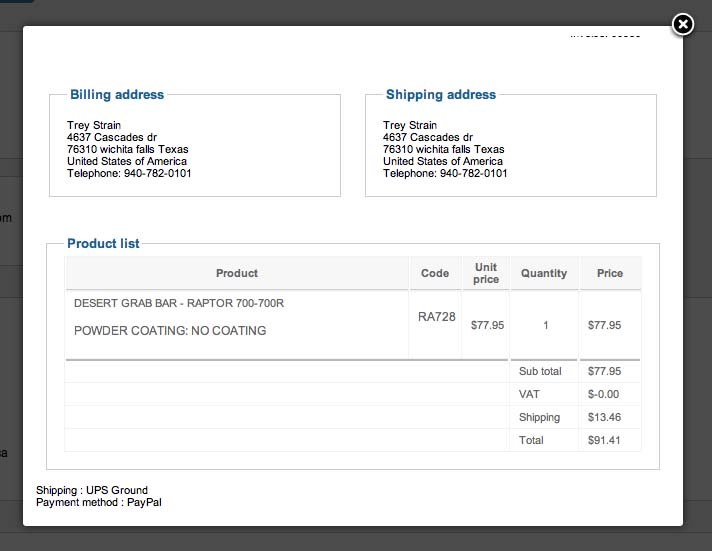
, now it does not say anything(see screenshot).
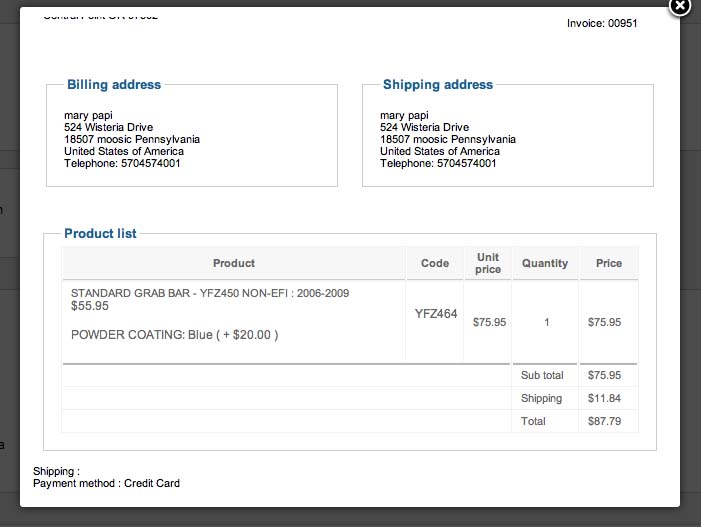
If I click the edit icon in the "additional information", and click the shipping dropdown, it now has a UPS1 which is selected(see screen shot)
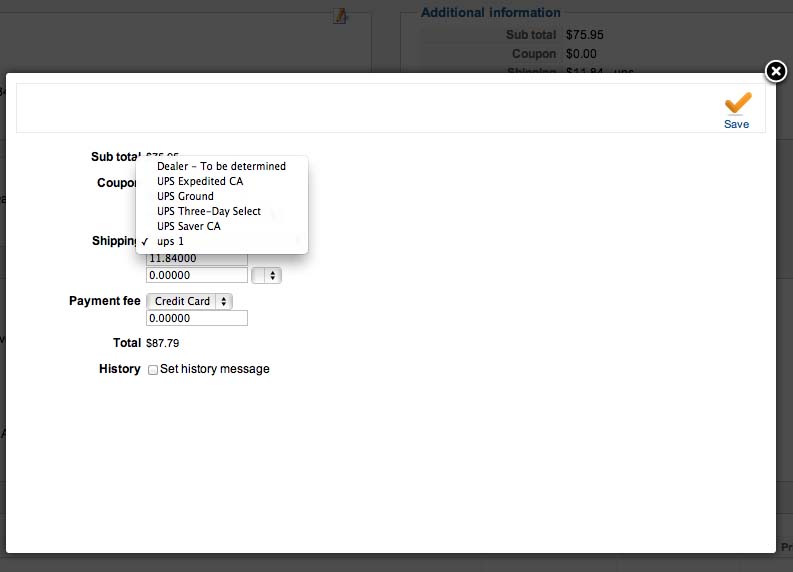
no matter which shipping method is selected. Before the update, it would show the correct shipping method, and ups1 was not even an option(see screen shot)
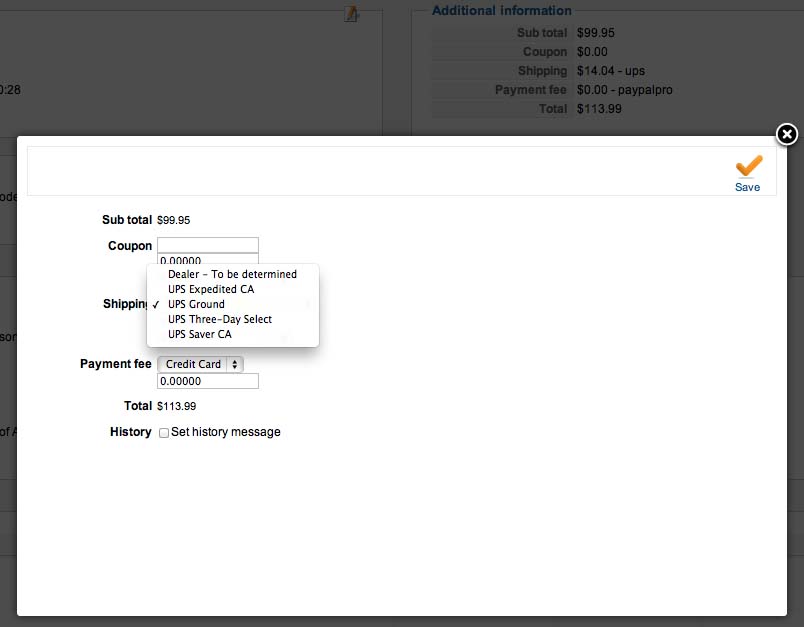
It seems to me that this may be causing the problem. Any idea what it might be? I can pm you my login info if you want to take a look.
Thanks again
That code did not work either. I am thinking that the code for the email is not the problem. In the backend, my invoice last week before the update showed the shipping service(see screen shot)
, now it does not say anything(see screenshot).
If I click the edit icon in the "additional information", and click the shipping dropdown, it now has a UPS1 which is selected(see screen shot)
no matter which shipping method is selected. Before the update, it would show the correct shipping method, and ups1 was not even an option(see screen shot)
It seems to me that this may be causing the problem. Any idea what it might be? I can pm you my login info if you want to take a look.
Thanks again
Please Log in or Create an account to join the conversation.

Less
More
- Posts: 12953
- Thank you received: 1778
13 years 3 months ago #114282
by Mohamed Thelji
Replied by Mohamed Thelji on topic Changes in cart "cart is empty"
Ok, taking a look at it will maybe help us to understand from where your problem is coming so you can send me your back-end access through a Private message  .
.
. Please Log in or Create an account to join the conversation.
13 years 3 months ago #116316
by Carey
Replied by Carey on topic Changes in cart "cart is empty"
I have pm'ed you my login. I wiil need your ip address to allow access to the server due to a security breach.
I have also just realized another error since the update, and will just need to know what code to change on the order creation notification email. If the shipping address, and billing address are different, the order creation email shows both addresses as the billing address, but our "administrator email" comes through with the different address's.
I have also just realized another error since the update, and will just need to know what code to change on the order creation notification email. If the shipping address, and billing address are different, the order creation email shows both addresses as the billing address, but our "administrator email" comes through with the different address's.
Please Log in or Create an account to join the conversation.
13 years 3 months ago #116488
by nicolas
Replied by nicolas on topic Changes in cart "cart is empty"
Hi,
We tried to access your administrator area at www.prm-atv.com/administrator but we have the error:
Forbidden
You don't have permission to access /administrator on this server.
I believe Mohamed already gave you our IP which is:
Part of the message is hidden for the guests. Please log in or register to see it.
We tried to access your administrator area at www.prm-atv.com/administrator but we have the error:
Forbidden
You don't have permission to access /administrator on this server.
I believe Mohamed already gave you our IP which is:
Part of the message is hidden for the guests. Please log in or register to see it.
Please Log in or Create an account to join the conversation.
13 years 3 months ago #116500
by Carey
Replied by Carey on topic Changes in cart "cart is empty"
Your ip should now be added. Thank you for looking into this for me!
Please Log in or Create an account to join the conversation.
13 years 3 months ago - 13 years 3 months ago #116782
by nicolas
Replied by nicolas on topic Changes in cart "cart is empty"
Thanks, I was able to login now and check your settings and the issue.
Please download again the installation package on our website and install it on yours and that should fix that problem.
Please download again the installation package on our website and install it on yours and that should fix that problem.
Last edit: 13 years 3 months ago by nicolas.
Please Log in or Create an account to join the conversation.
13 years 3 months ago #116838
by Carey
Replied by Carey on topic Changes in cart "cart is empty"
Hi,
I was hopeful, but don't see any difference with either issue.
I was hopeful, but don't see any difference with either issue.
Please Log in or Create an account to join the conversation.
13 years 3 months ago #116843
by nicolas
Replied by nicolas on topic Changes in cart "cart is empty"
Please note that you will only see the difference for new orders.
I cannot check your website at the moment as I'm not at the office until tomorrow.
I cannot check your website at the moment as I'm not at the office until tomorrow.
Please Log in or Create an account to join the conversation.
13 years 3 months ago #116867
by Carey
Replied by Carey on topic Changes in cart "cart is empty"
Thank you for the response. I thought that might be the case, so I did run a test order before replying. I also downloaded the Hikashop again, and installed it one more time to be sure, but I don't notice any difference.
Please Log in or Create an account to join the conversation.
13 years 3 months ago #117065
by nicolas
Replied by nicolas on topic Changes in cart "cart is empty"
I was able to reproduce the issue on our end by looking deeper at the issue and did a fix in HikaShop to properly handle the display of the shipping methods name everywhere.
Please download again the installation package on our website and install it on yours and that will fix that problem for good.
Please download again the installation package on our website and install it on yours and that will fix that problem for good.
Please Log in or Create an account to join the conversation.
13 years 2 months ago #117361
by Carey
Replied by Carey on topic Changes in cart "cart is empty"
Okay, thanks Nicolas! That did work to solve it in my back end. I am now able to see what the order shipping method service was. Although it will still not display in my "order creation notification" email. I see in the backend it now shows "UPS-UPS Ground". I have tried the initial code i had been using;
<?php $shippingClass = hikashop_get('class.shipping');
$shipping = $shippingClass->get($data->order_shipping_id);
$shipping->shipping_params = unserialize($shipping->shipping_params);
echo 'Shipping method: '. $shipping->shipping_name; ?>
and I get just "UPS" no matter shipping service is chosen, like it is ony registering the first part of the shipping method but not the service.
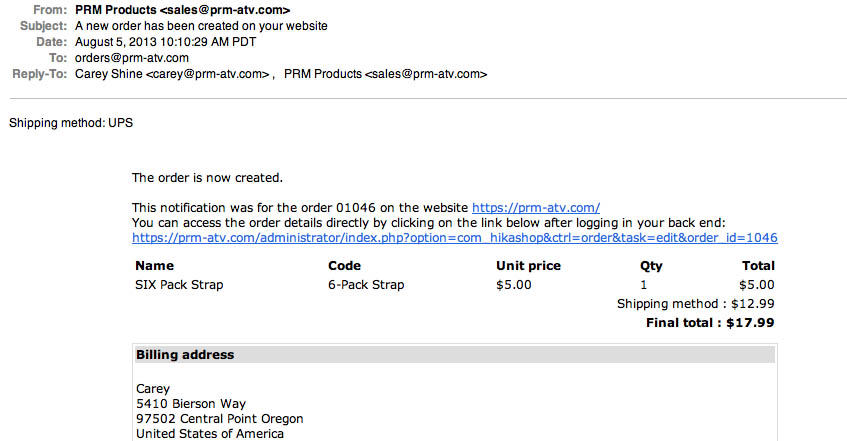
I have also tried the code above that Xavier suggested, but got something really wild;
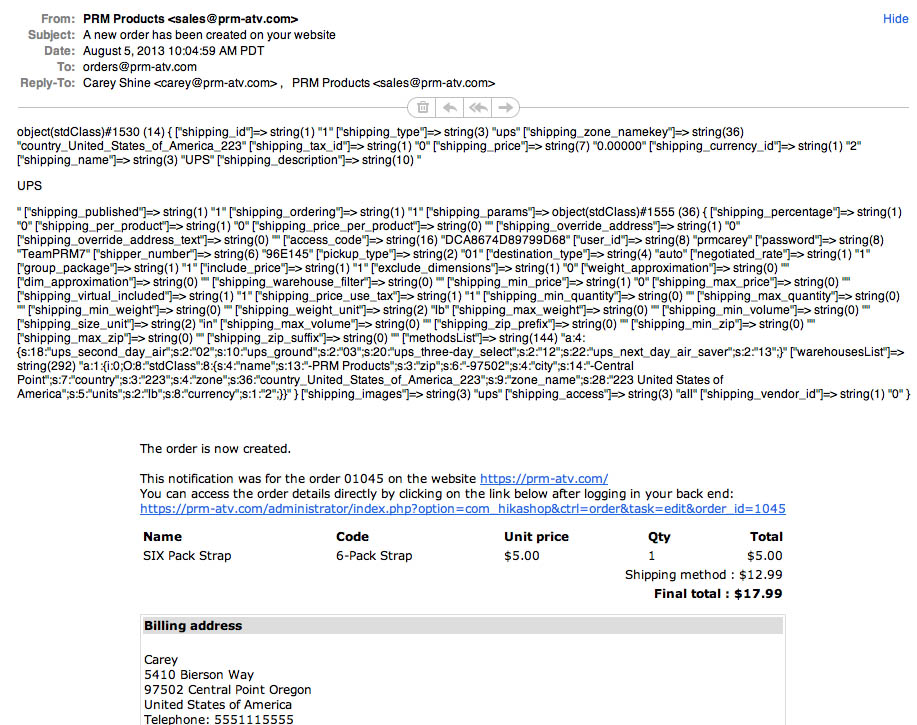
I have also tried this code I found in another thread;
<?php echo 'Shipping Method: '.$data->order_shipping_id; ?>
and get "Shipping Method: 1-7" for UPS 3-Day Select, and "Shipping Method: 1-3" for UPS Ground, indidcating that it is identifying the different services, but not displaying the names.
Any suggestions?
Thank You!
<?php $shippingClass = hikashop_get('class.shipping');
$shipping = $shippingClass->get($data->order_shipping_id);
$shipping->shipping_params = unserialize($shipping->shipping_params);
echo 'Shipping method: '. $shipping->shipping_name; ?>
and I get just "UPS" no matter shipping service is chosen, like it is ony registering the first part of the shipping method but not the service.
I have also tried the code above that Xavier suggested, but got something really wild;
I have also tried this code I found in another thread;
<?php echo 'Shipping Method: '.$data->order_shipping_id; ?>
and get "Shipping Method: 1-7" for UPS 3-Day Select, and "Shipping Method: 1-3" for UPS Ground, indidcating that it is identifying the different services, but not displaying the names.
Any suggestions?
Thank You!
Please Log in or Create an account to join the conversation.
13 years 2 months ago #117537
by Xavier
Replied by Xavier on topic Changes in cart "cart is empty"
Hi,
The code used for the backend is:
So will some adjustments I think that we can display the same values in the email.
PS: I don't tested that code.
The code used for the backend is:
Code:
$shipping_name = $shipping_method . ' ' . $shipping_id;
if(strpos($shipping_id, '-') !== false) {
$shipping_ids = explode('-', $shipping_id, 2);
$shipping = $this->shippingClass->get($shipping_ids[0]);
if(!empty($shipping->shipping_params) && is_string($shipping->shipping_params))
$shipping->shipping_params = unserialize($shipping->shipping_params);
$shippingMethod = hikashop_import('hikashopshipping', $shipping_method);
$methods = $shippingMethod->shippingMethods($shipping);
$shipping_name = $shipping->shipping_name.' - '.$methods[$shipping_id];
}
return $shipping_name;
Code:
$shippingClass = hikashop_get('class.shipping');
$shipping = $shippingClass->get($data->order_shipping_id);
$shipping->shipping_params = unserialize($shipping->shipping_params);
if(!empty($shipping->shipping_params) && is_string($shipping->shipping_params))
$shipping->shipping_params = unserialize($shipping->shipping_params);
$shippingMethod = hikashop_import('hikashopshipping', $shipping_method);
$methods = $shippingMethod->shippingMethods($shipping);
$shipping_name = $shipping->shipping_name.' - '.$methods[$shipping_id];
echo $shipping_name;
PS: I don't tested that code.
Please Log in or Create an account to join the conversation.
13 years 2 months ago #118891
by Carey
Replied by Carey on topic Changes in cart "cart is empty"
That code did not work for me, but I have managed to get something else to work.
I have now discovered a couple other issues. These are both new
Issue #1 - In my payment methods, I have chosen a return url to a page I have created called "Order Completed". The orders have always returned the customer to the correct page upon an order created status. Now they are sent to a page that just says "Thank you for your purchase". I have not found any way to fix this.
Issue # 2 - When an option is added to the cart, and the order is placed, it shows on the order created confirmation and admin emails, as well as the back end order. But when the Paypal payment method is chosen, and you are redirected to Paypal, the option is not included, and the customer is not charged for the option
Please take a look for me.
Thank You!
I have now discovered a couple other issues. These are both new
Issue #1 - In my payment methods, I have chosen a return url to a page I have created called "Order Completed". The orders have always returned the customer to the correct page upon an order created status. Now they are sent to a page that just says "Thank you for your purchase". I have not found any way to fix this.
Issue # 2 - When an option is added to the cart, and the order is placed, it shows on the order created confirmation and admin emails, as well as the back end order. But when the Paypal payment method is chosen, and you are redirected to Paypal, the option is not included, and the customer is not charged for the option
Please take a look for me.
Thank You!
Please Log in or Create an account to join the conversation.

13 years 2 months ago #118990
by Jerome
Jerome - Obsidev.com
HikaMarket & HikaSerial developer / HikaShop core dev team.
Replied by Jerome on topic Changes in cart "cart is empty"
Hi,
You can add this function in the view
After that you can use the code
to retrieve the complete name of the shipping method.
Please create other thread for your other problem. It will be easier for us to help you.
Regards,
You can add this function in the view
Code:
function getShippingName($shipping_method, $shipping_id) {
$shipping_name = $shipping_method . ' ' . $shipping_id;
if(strpos($shipping_id, '-') !== false) {
$shipping_ids = explode('-', $shipping_id, 2);
$shipping = $this->shippingClass->get($shipping_ids[0]);
if(!empty($shipping->shipping_params) && is_string($shipping->shipping_params))
$shipping->shipping_params = unserialize($shipping->shipping_params);
$shippingMethod = hikashop_import('hikashopshipping', $shipping_method);
$methods = $shippingMethod->shippingMethods($shipping);
$shipping_name = $shipping->shipping_name.' - '.$methods[$shipping_id];
}
return $shipping_name;
}
Code:
$shipping_name = getShippingName($data->order_shipping_method,$data->order_shipping_id);
Please create other thread for your other problem. It will be easier for us to help you.
Regards,
Jerome - Obsidev.com
HikaMarket & HikaSerial developer / HikaShop core dev team.
Please Log in or Create an account to join the conversation.
Time to create page: 0.132 seconds