
- Posts: 241
- Thank you received: 5
product available until....
- cberry1971
-
 Topic Author
- Offline
Less
More
12 years 11 months ago - 12 years 11 months ago #131778
by cberry1971
product available until.... was created by cberry1971
When I go to save "product available to" it saves the hour 1 hour prior. Is there a setting I need to change? This did not happen in the past.. could it be daylight savings?
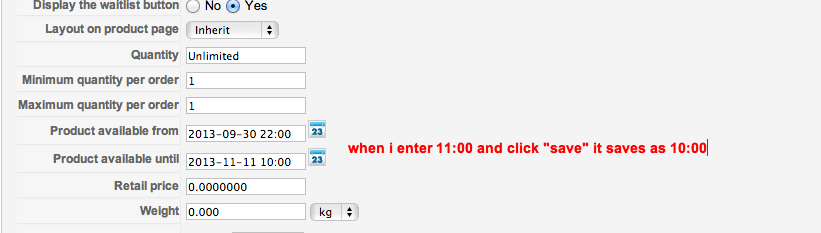
Actually I now notice that each time I open the event and "save and close" it sets the time 1 hour earlier... so 10:00 becomes 9:00 becomes 8:00 etc without touching the field. Just clicking on the event and then "save and close"
Actually I now notice that each time I open the event and "save and close" it sets the time 1 hour earlier... so 10:00 becomes 9:00 becomes 8:00 etc without touching the field. Just clicking on the event and then "save and close"
Last edit: 12 years 11 months ago by cberry1971.
Please Log in or Create an account to join the conversation.

12 years 11 months ago #131811
by nicolas
Replied by nicolas on topic product available until....
Hi,
I cannot reproduce the problem on our end.
How did you configure the timezone in the joomla configuration and in your server settings ?
I cannot reproduce the problem on our end.
How did you configure the timezone in the joomla configuration and in your server settings ?
Please Log in or Create an account to join the conversation.
- cberry1971
-
Topic Author
- Offline
Less
More
- Posts: 241
- Thank you received: 5
12 years 11 months ago #131840
by cberry1971
Replied by cberry1971 on topic product available until....
the time zone is set to my local zone.. "los angeles" in global configuration > location settings
Interestingly the bug does not persist if i remove the "product available from" date/time (eg... leave it blank as in screenshot)
Should I look elsewhere on the server settings question you asked?
Thanks.

Interestingly the bug does not persist if i remove the "product available from" date/time (eg... leave it blank as in screenshot)
Should I look elsewhere on the server settings question you asked?
Thanks.
Please Log in or Create an account to join the conversation.
12 years 11 months ago #131843
by nicolas
Replied by nicolas on topic product available until....
I don't have the issue, regardless of whether I set the "from" field or not.
I can't reproduce the problem with LA as a local zone in the joomla configuration so it's something else.
For the server settings you would have to seek advice with your hosting company if you don't know where to look.
I can't reproduce the problem with LA as a local zone in the joomla configuration so it's something else.
For the server settings you would have to seek advice with your hosting company if you don't know where to look.
Please Log in or Create an account to join the conversation.
- cberry1971
-
Topic Author
- Offline
Less
More
- Posts: 241
- Thank you received: 5
12 years 11 months ago #131911
by cberry1971
Replied by cberry1971 on topic product available until....
sorry to not have a solution yet. been working with the hosting company back and forth. This is the latest from them...
Hello Christopher,
I was able to recreate the issue but I am afraid that I cannot tell you why the submitted data is processed and converted to one hour less than the submitted.
What I can say for sure is that the PHP scripts of your account are configured to use UTC/GMT -8 hours timezone, which is the timezone in LA.
You can confirm this with this simple script, which I created for you:
184.154.228.9/~throwdow/live/time.php
The code used in this script only converts the unix timestamp to human readable format:
Code:
<?
echo "Time now is: ".date('l jS \of F Y h:i:s A',time());
I have created this script to reflect on the moderator's last response in the thread, to which you referred:
Code:
For the server settings you would have to seek advice with your hosting company if you don't know where to look.
To be perfectly specific, the timezone is properly set for your PHP scripts, and I don't see any PHP setting on the server that can convert this way the data you submit. For me personally, this is an issue with the component, and a confirmation for this is that if you leave the field Product available from blank, the submitted data is saved properly. If it was an issue caused by server-side setting both fields would have been affected, regardless if one of them is blank, as they both relate to timestamp value.
My advise is to check back with the component's developers. Since they are unable to recreate the issue, you might need to allow them access so they can troubleshoot the situation. Still, this should be discussed with them as I cannot know what access credentials would they need, I can only assume.
Best Regards,
David S.
Supervisor
Please Log in or Create an account to join the conversation.

12 years 11 months ago #132329
by Jerome
Jerome - Obsidev.com
HikaMarket & HikaSerial developer / HikaShop core dev team.
Replied by Jerome on topic product available until....
Hi,
HikaShop uses Joomla for the processing of the timezone.
If you are right using the latest version of HikaShop (2.2.1 or 2.2.2) it should work perfectly if Joomla, your web server and your PHP are right configured in the same way.
We found some troubles some years ago but it is fix since a long time.
Regards,
HikaShop uses Joomla for the processing of the timezone.
If you are right using the latest version of HikaShop (2.2.1 or 2.2.2) it should work perfectly if Joomla, your web server and your PHP are right configured in the same way.
We found some troubles some years ago but it is fix since a long time.
Regards,
Jerome - Obsidev.com
HikaMarket & HikaSerial developer / HikaShop core dev team.
Please Log in or Create an account to join the conversation.
10 years 5 months ago #238934
by COtto1984
Replied by COtto1984 on topic product available until....
I am having similar troubles with my installation. I'm on the latest version of Joomla and HikaShop. Mine is acting a tad bit differently as it is adding an hour each time I save a product. It does it when I create a new or edit an existing product on both the available from and to date/time fields.
My Global Joomla timezone setting is set as "Chicago".
My Global Joomla timezone setting is set as "Chicago".
Please Log in or Create an account to join the conversation.
10 years 3 weeks ago #251310
by Jerome
Jerome - Obsidev.com
HikaMarket & HikaSerial developer / HikaShop core dev team.
Replied by Jerome on topic product available until....
Hi,
Did you fix your server timezone issue ?
Generally, when your server and Joomla do not have the same timezone configured, such kind of problem can occur.
Regards,
Did you fix your server timezone issue ?
Generally, when your server and Joomla do not have the same timezone configured, such kind of problem can occur.
Regards,
Jerome - Obsidev.com
HikaMarket & HikaSerial developer / HikaShop core dev team.
Please Log in or Create an account to join the conversation.
Time to create page: 0.252 seconds