

- Posts: 7
- Thank you received: 0
Comma in category causes title truncation.
12 years 11 months ago - 12 years 11 months ago #132614
by andylinde
Comma in category causes title truncation. was created by andylinde
Hello,
It seems that when you add a comma in a category title, it causes the title to be truncated at the comma. It also causes the title to display in all caps.
Interestingly, the title still seems to be saved correctly, as I can go in and edit it. If I remove the comma, the error corrects itself.
I don't know if other punctuation causes this, though I have used an ampersand (&) and slash (/) in other category titles without issue.
Screenshots attached!
-- url of the page with the problem -- : non-public site, but the path is ...administrator/index.php?option=com_hikashop&ctrl=category
-- HikaShop version -- : Business 2.2.2
-- Joomla version -- : 3.2.0
-- PHP version -- : 5.3.2
-- Browser(s) name and version -- : Chrome Beta 32
-- Error-message(debug-mod must be tuned on) -- : None thrown
It seems that when you add a comma in a category title, it causes the title to be truncated at the comma. It also causes the title to display in all caps.
Interestingly, the title still seems to be saved correctly, as I can go in and edit it. If I remove the comma, the error corrects itself.
I don't know if other punctuation causes this, though I have used an ampersand (&) and slash (/) in other category titles without issue.
Screenshots attached!
-- url of the page with the problem -- : non-public site, but the path is ...administrator/index.php?option=com_hikashop&ctrl=category
-- HikaShop version -- : Business 2.2.2
-- Joomla version -- : 3.2.0
-- PHP version -- : 5.3.2
-- Browser(s) name and version -- : Chrome Beta 32
-- Error-message(debug-mod must be tuned on) -- : None thrown
Last edit: 12 years 11 months ago by andylinde.
Please Log in or Create an account to join the conversation.

12 years 11 months ago #132628
by Jerome
Jerome - Obsidev.com
HikaMarket & HikaSerial developer / HikaShop core dev team.
Replied by Jerome on topic Comma in category causes title truncation.
Hi,
Thanks for the report.
Please edit the file administrator/components/com_hikashop/classes/category.php and replace
By
It will fix the problem.
We will include this fix in the next HikaShop packages.
Regards,
Thanks for the report.
Please edit the file administrator/components/com_hikashop/classes/category.php and replace
Code:
$val = str_replace(' ','_',strtoupper($category->category_name));
$rows[$k]->translation = JText::_($val);
Code:
$val = str_replace(array(' ',','),'_',strtoupper($category->category_name));
$rows[$k]->translation = JText::_($val);
We will include this fix in the next HikaShop packages.
Regards,
Jerome - Obsidev.com
HikaMarket & HikaSerial developer / HikaShop core dev team.
Please Log in or Create an account to join the conversation.
12 years 11 months ago #132964
by andylinde
Replied by andylinde on topic Comma in category causes title truncation.
Sounds good. Thanks!
Please Log in or Create an account to join the conversation.
12 years 3 months ago #165058
by tinadevi
Replied by tinadevi on topic Comma in category causes title truncation.
Hi,
I have same problem in HikaShop version 2.3.1 business. Please advise.
Thank you
Tina
I have same problem in HikaShop version 2.3.1 business. Please advise.
Thank you
Tina
Please Log in or Create an account to join the conversation.

12 years 3 months ago #165067
by nicolas
Replied by nicolas on topic Comma in category causes title truncation.
Hi,
This patch has been included in HikaShop since then. So the problem is probably different even though the result is the same.
Could you provide a link to the page with the issue and a screenshot of the category options so that we can analyze the issue you have ?
This patch has been included in HikaShop since then. So the problem is probably different even though the result is the same.
Could you provide a link to the page with the issue and a screenshot of the category options so that we can analyze the issue you have ?
Please Log in or Create an account to join the conversation.
12 years 3 months ago #165158
by tinadevi
Replied by tinadevi on topic Comma in category causes title truncation.
Hi Nicolas,
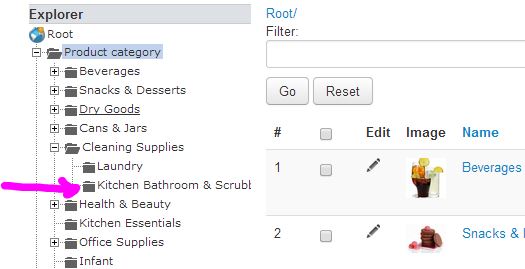
Actually, I feel a bit silly wasting your time with this. The problem is only in the admin area. Here are the screenshots.
No Comma
With Comma
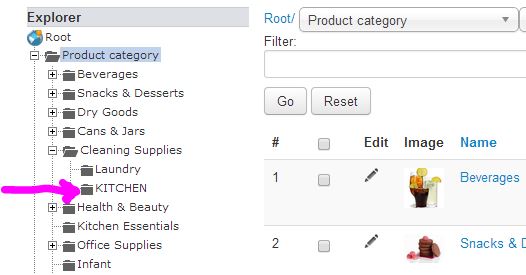
Actually, I feel a bit silly wasting your time with this. The problem is only in the admin area. Here are the screenshots.
No Comma
With Comma
Please Log in or Create an account to join the conversation.

12 years 3 months ago #165159
by Xavier
Replied by Xavier on topic Comma in category causes title truncation.
Hi,
Thanks to update to the version 2.3.2 available from our website.
Regarding your issue, don't you have the category displayed on frontend ? In a menu, or module ?
If it is displayed, is the name correctly displayed ?
Else we will need a backend access in order to see what is happening directly on your website.
You can send it via pm, don't forget to give the link to this topic.
Thanks to update to the version 2.3.2 available from our website.
Regarding your issue, don't you have the category displayed on frontend ? In a menu, or module ?
If it is displayed, is the name correctly displayed ?
Else we will need a backend access in order to see what is happening directly on your website.
You can send it via pm, don't forget to give the link to this topic.
Please Log in or Create an account to join the conversation.
Time to create page: 0.219 seconds