
- Posts: 241
- Thank you received: 5
"Add to cart" button leading to blank screen
- cberry1971
-
 Topic Author
- Offline
Less
More
12 years 9 months ago #134637
by cberry1971
"Add to cart" button leading to blank screen was created by cberry1971
-- url of the page with the problem -- :
www.wodrocket.com/index.php?option=com_h...ct&task=show&cid=605
-- HikaShop version -- : 2.2.2
-- Joomla version -- : 2.5.16
-- Browser(s) name and version -- : Safari 6.1
-- User created
I have had 3 users contact me today and say that when then click the "add to cart" button they are brought to a blue screen with only our top menu bar and footer showing. This has never happened before and I can not tell what the issue is.
They got things working when they switched from Safari 6.1 to Chrome, but I can not make this bug repeat in Safari 6.1.
Is there any way to tell what is causing this? Many thanks.
-- HikaShop version -- : 2.2.2
-- Joomla version -- : 2.5.16
-- Browser(s) name and version -- : Safari 6.1
-- User created
I have had 3 users contact me today and say that when then click the "add to cart" button they are brought to a blue screen with only our top menu bar and footer showing. This has never happened before and I can not tell what the issue is.
They got things working when they switched from Safari 6.1 to Chrome, but I can not make this bug repeat in Safari 6.1.
Is there any way to tell what is causing this? Many thanks.
Please Log in or Create an account to join the conversation.
- cberry1971
-
Topic Author
- Offline
Less
More
- Posts: 241
- Thank you received: 5
12 years 9 months ago #134662
by cberry1971
Replied by cberry1971 on topic "Add to cart" button leading to blank screen
I found a "clue" but not sure why this is happening.
The product (a event) is being sold by a site using a frameset (like iFrame) which might be causing this. It is the only event that we know of doing this so it seems to be the outlier.
Here is the site: legacyseriesevents.com/
1. click the "Register Here for The Sandstorm, December 14th in Wilmington, NC!!" link
2. click "buy tickets" this will take you to hikashop, but all the while, the URL stays as legacyseriesevents.com
Does this cause problem perhaps? Frameset should not cause problems, but it is all I can figure.
The product (a event) is being sold by a site using a frameset (like iFrame) which might be causing this. It is the only event that we know of doing this so it seems to be the outlier.
Here is the site: legacyseriesevents.com/
1. click the "Register Here for The Sandstorm, December 14th in Wilmington, NC!!" link
2. click "buy tickets" this will take you to hikashop, but all the while, the URL stays as legacyseriesevents.com
Does this cause problem perhaps? Frameset should not cause problems, but it is all I can figure.
Please Log in or Create an account to join the conversation.
- cberry1971
-
Topic Author
- Offline
Less
More
- Posts: 241
- Thank you received: 5
12 years 9 months ago - 12 years 9 months ago #134671
by cberry1971
Replied by cberry1971 on topic "Add to cart" button leading to blank screen
Sorry but it is not only the "frameset" issue. Just had another user from this event complaining of the same issues.
www.wodrocket.com/index.php?option=com_h...ct&task=show&cid=960
He hit "Finish" button, and screen did not send to Authorize.net.. just went "blue" which I am sure he meant showed our top menu bar and bottom footer with nothing else.
I asked him to switch from Safari and it worked fine.
www.wodrocket.com/index.php?option=com_h...ct&task=show&cid=960
He hit "Finish" button, and screen did not send to Authorize.net.. just went "blue" which I am sure he meant showed our top menu bar and bottom footer with nothing else.
I asked him to switch from Safari and it worked fine.
Last edit: 12 years 9 months ago by cberry1971.
Please Log in or Create an account to join the conversation.

12 years 9 months ago #134739
by Xavier
Replied by Xavier on topic "Add to cart" button leading to blank screen
Hi,
Thanks to provide a test account in order to test the checkout process.
Thanks to provide a test account in order to test the checkout process.
Please Log in or Create an account to join the conversation.
- cberry1971
-
Topic Author
- Offline
Less
More
- Posts: 241
- Thank you received: 5
12 years 9 months ago #134775
by cberry1971
Replied by cberry1971 on topic "Add to cart" button leading to blank screen
OK. I will PM them to you now.
Please Log in or Create an account to join the conversation.
12 years 9 months ago #134788
by Xavier
Replied by Xavier on topic "Add to cart" button leading to blank screen
Hi,
I have tested on Safari (iPad) with the Internet explorer 11 browser emulator feature to purchase the product www.wodrocket.com/index.php?option=com_h...ct&task=show&cid=605 and the checkout has been processed correctly.
I have been redirected to the Authorize.net website in order to complete the payment.
So the problem is maybe coming from a specific version of Safari.
As we don't work on Mac computers, it's not easy for us to test and debug that.
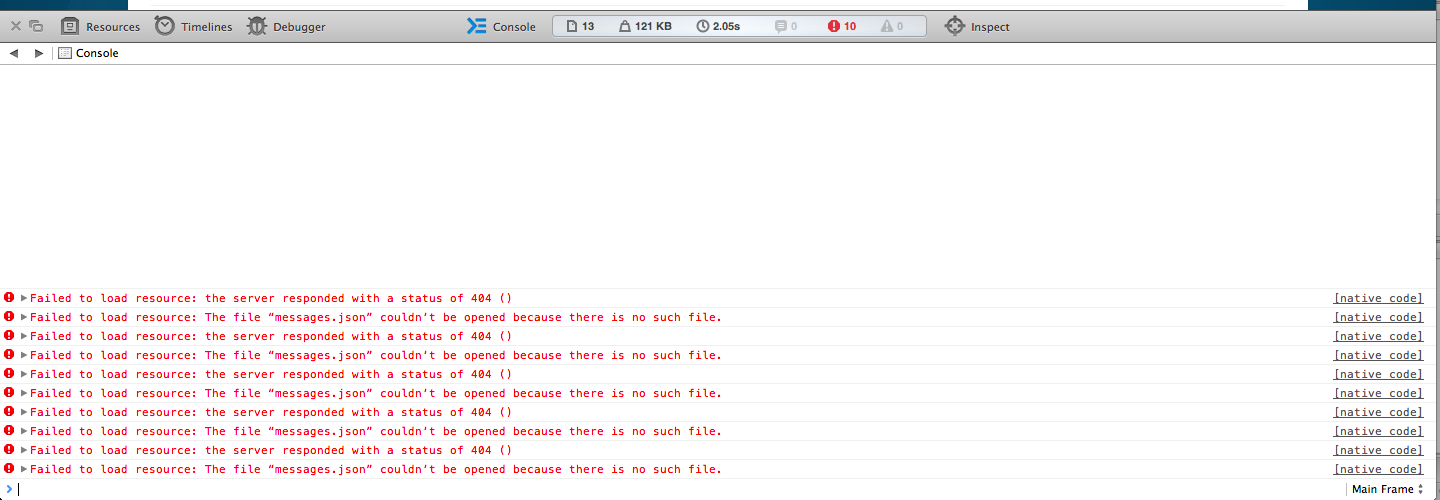
If you can, thanks to check thanks to the safari console, if there is any errors returned when trying to pay via Authorize.net ?
I have tested on Safari (iPad) with the Internet explorer 11 browser emulator feature to purchase the product www.wodrocket.com/index.php?option=com_h...ct&task=show&cid=605 and the checkout has been processed correctly.
I have been redirected to the Authorize.net website in order to complete the payment.
So the problem is maybe coming from a specific version of Safari.
As we don't work on Mac computers, it's not easy for us to test and debug that.
If you can, thanks to check thanks to the safari console, if there is any errors returned when trying to pay via Authorize.net ?
Please Log in or Create an account to join the conversation.
- cberry1971
-
Topic Author
- Offline
Less
More
- Posts: 241
- Thank you received: 5
12 years 9 months ago #134879
by cberry1971
Replied by cberry1971 on topic "Add to cart" button leading to blank screen
The errors read as follows in the screenshot:
Please Log in or Create an account to join the conversation.

Less
More
- Posts: 12953
- Thank you received: 1778
12 years 9 months ago #134967
by Mohamed Thelji
Replied by Mohamed Thelji on topic "Add to cart" button leading to blank screen
I also tested it through chrome/firefox and it was ok for me
Please Log in or Create an account to join the conversation.
Time to create page: 0.214 seconds