
- Posts: 165
- Thank you received: 3
Custom text Field is not working
- jschroeder
-
 Topic Author
- Offline
Less
More
12 years 9 months ago - 12 years 9 months ago #137215
by jschroeder
Custom text Field is not working was created by jschroeder
-- url of the page with the problem -- :
mywebsite.com/mypage
-- HikaShop version -- :2.2.3 Business
-- Joomla version -- : 3.2.1
-- PHP version -- : x.x.x
-- Browser(s) name and version -- : XXXXX x.x.x
-- Error-message(debug-mod must be tuned on) -- : Error_message
Hi i am having a problem whenever i try to use the custom field type "custom text" under product layout. It gives the following error
Warning: Invalid argument supplied for foreach() in /home/xxxx/xxxxx/administrator/components/com_hikashop/types/fields.php on line 134
customtext
Every other type of custom field works but this. How do i fix this? From what I can tell this seems to be a bug. I attached a screenshot for you. Also, I forgot to mention it seems to show every type of custom field after you save this type. I also attached a screenshot for this.
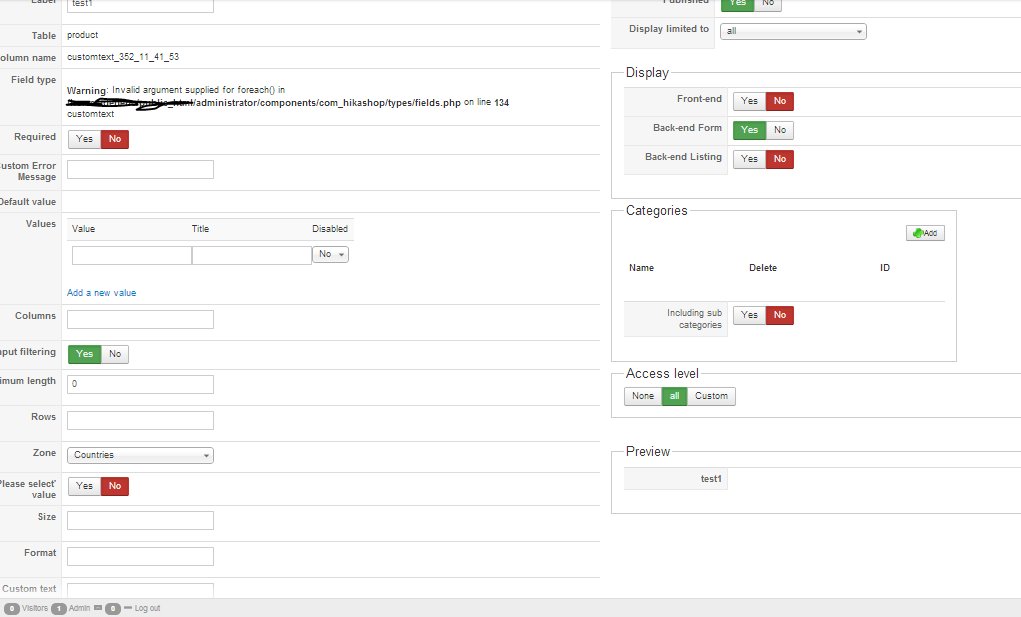
Thanks,
Josh
-- HikaShop version -- :2.2.3 Business
-- Joomla version -- : 3.2.1
-- PHP version -- : x.x.x
-- Browser(s) name and version -- : XXXXX x.x.x
-- Error-message(debug-mod must be tuned on) -- : Error_message
Hi i am having a problem whenever i try to use the custom field type "custom text" under product layout. It gives the following error
Warning: Invalid argument supplied for foreach() in /home/xxxx/xxxxx/administrator/components/com_hikashop/types/fields.php on line 134
customtext
Every other type of custom field works but this. How do i fix this? From what I can tell this seems to be a bug. I attached a screenshot for you. Also, I forgot to mention it seems to show every type of custom field after you save this type. I also attached a screenshot for this.
Thanks,
Josh
Last edit: 12 years 9 months ago by jschroeder.
Please Log in or Create an account to join the conversation.
- jschroeder
-
Topic Author
- Offline
Less
More
- Posts: 165
- Thank you received: 3
12 years 9 months ago - 12 years 9 months ago #137223
by jschroeder
Replied by jschroeder on topic Custom text Field is not working
Another problem after upgrade to 2.2.3 the default values under my text fields are not showing up under my products on the admin.
Edit: Sorry this issue was just a caching issues it is working now.
Edit: Sorry this issue was just a caching issues it is working now.
Last edit: 12 years 9 months ago by jschroeder.
Please Log in or Create an account to join the conversation.

12 years 9 months ago #137346
by Xavier
Replied by Xavier on topic Custom text Field is not working
Hi,
Thanks to edit the file:
"administrator/components/com_hikashop/types/fields.php", function "addJS()" and add the following code at the top of the function after the "{":
Thanks to edit the file:
"administrator/components/com_hikashop/types/fields.php", function "addJS()" and add the following code at the top of the function after the "{":
Code:
$this->load();
Please Log in or Create an account to join the conversation.
- jschroeder
-
Topic Author
- Offline
Less
More
- Posts: 165
- Thank you received: 3
12 years 9 months ago #137401
by jschroeder
Replied by jschroeder on topic Custom text Field is not working
Hi thanks for the quick response. Where do in insert the code at in the file? What line?
Thanks,
Josh
Thanks,
Josh
Please Log in or Create an account to join the conversation.

12 years 9 months ago #137524
by nicolas
Replied by nicolas on topic Custom text Field is not working
As Xavier told you, it should be just after:
Code:
function addJS(&$requiredFields,&$validMessages,$types=array()){
Please Log in or Create an account to join the conversation.
Time to create page: 0.176 seconds