

- Posts: 56
- Thank you received: 2
SQL error on creating taxation rule
12 years 7 months ago #141656
by sideways
SQL error on creating taxation rule was created by sideways
-- url of the page with the problem -- : dshop.se
-- HikaShop version -- : 2.2.3
-- Joomla version -- : 3.1.0
-- PHP version -- : 5.4.6
-- Browser(s) name and version -- : Safari 6.0.5
-- Error-message(debug-mod must be tuned on) -- : Error_message
I get this sql insert error when I try to create a new taxation rule. It is kind of urgent as now I have no taxation at all for my products.
-- HikaShop version -- : 2.2.3
-- Joomla version -- : 3.1.0
-- PHP version -- : 5.4.6
-- Browser(s) name and version -- : Safari 6.0.5
-- Error-message(debug-mod must be tuned on) -- : Error_message
Code:
SQL=INSERT IGNORE INTO `dj6xp_hikashop_taxation` ( `taxation_id`,`category_namekey`,`tax_namekey`,`taxation_cumulative`,`taxation_post_code`,`zone_namekey`,`taxation_type`,`taxation_access`,`taxation_published` ) VALUES ( '0','default_tax','sweden','0','','country_Sweden_203','','all','1' )
I get this sql insert error when I try to create a new taxation rule. It is kind of urgent as now I have no taxation at all for my products.
Please Log in or Create an account to join the conversation.

12 years 7 months ago #141669
by Eliot
Replied by Eliot on topic SQL error on creating taxation rule
Hi there,
Could you login phpmySQL and execute this query on your database? This should return an error message and help to understand the issue.
Could you login phpmySQL and execute this query on your database? This should return an error message and help to understand the issue.
Please Log in or Create an account to join the conversation.
12 years 7 months ago #141681
by sideways
Replied by sideways on topic SQL error on creating taxation rule
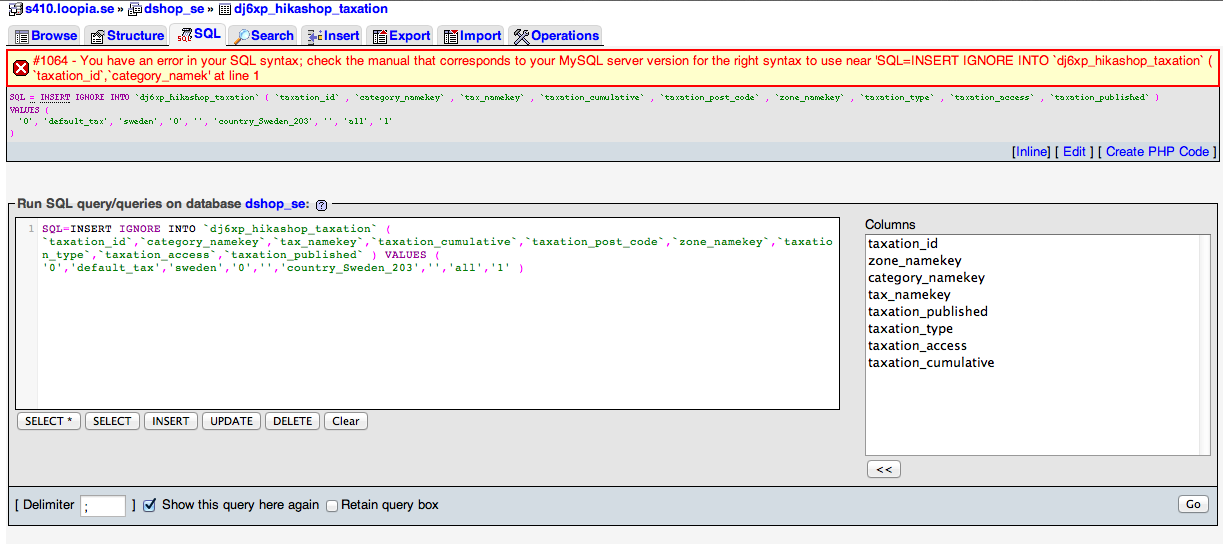
Done, results is in the attached screenshot. I noticed the field taxation_post_code is in the query but not in the database table.
Please Log in or Create an account to join the conversation.

12 years 7 months ago #141707
by nicolas
Replied by nicolas on topic SQL error on creating taxation rule
The SQL query starts after the = sign.
Please run the query:
Please run the query:
Code:
INSERT IGNORE INTO `dj6xp_hikashop_taxation` ( `taxation_id`,`category_namekey`,`tax_namekey`,`taxation_cumulative`,`taxation_post_code`,`zone_namekey`,`taxation_type`,`taxation_access`,`taxation_published` ) VALUES ( '0','default_tax','sweden','0','','country_Sweden_203','','all','1' )
Please Log in or Create an account to join the conversation.
12 years 7 months ago #141710
by sideways
Replied by sideways on topic SQL error on creating taxation rule
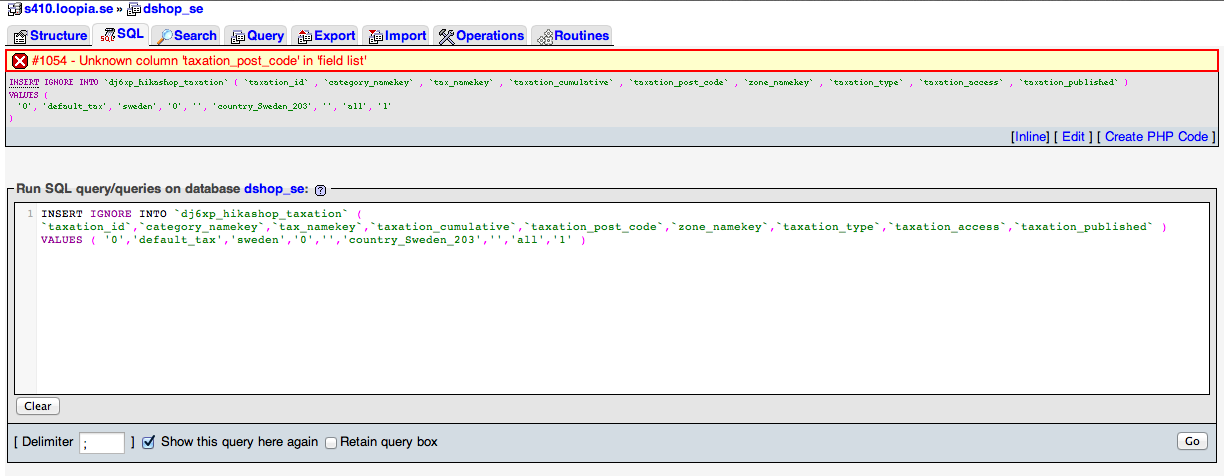
Sorry, my mistake. But my initial suspicion proved right. Result below:
Please Log in or Create an account to join the conversation.
12 years 7 months ago #141712
by nicolas
Replied by nicolas on topic SQL error on creating taxation rule
Yes, the issue is that you have a column missing because of a problem during the update. Add that missing column in the hikashop_taxation table and it will then work. You can do it via the phpmyadmin interface.
Please Log in or Create an account to join the conversation.
12 years 7 months ago #141717
by sideways
Replied by sideways on topic SQL error on creating taxation rule
What datatype is required? Or better still, will you help me formulate the ALTER query so I don't mess things up. 
Please Log in or Create an account to join the conversation.
12 years 7 months ago #141723
by nicolas
Replied by nicolas on topic SQL error on creating taxation rule
a VARCHAR 255. You can find the ALTER query in the file administrator/components/com_hikashop/install.hikashop.php as explained here:
www.hikashop.com/support/support/documen...lity-issues.html#SQL
www.hikashop.com/support/support/documen...lity-issues.html#SQL
Please Log in or Create an account to join the conversation.
Time to create page: 0.196 seconds