

- Posts: 263
- Thank you received: 11
« show select » doesn't respect existing quantity
12 years 2 months ago #164066
by Flooder
« show select » doesn't respect existing quantity was created by Flooder
Hello there,
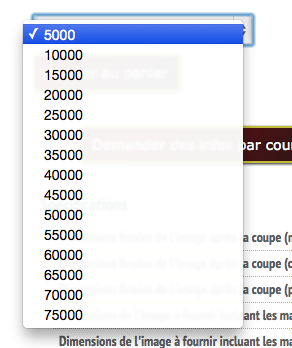
When we choose « Show select » for a product in the field « Quantity layout on product page », the dropbox on the product page doesn't respect existing price quantity.

I have this prices in my product (for example):
5000 for 100 $
20000 for 200 $
100000 for 300 $
But on the product page, we see 5000, 10000, 15000, etc. in the dropbox...
Thanks
Hikashop 2.3.2
Joomla 3.3.0
HikaMarket Multivendor: 1.4.1
When we choose « Show select » for a product in the field « Quantity layout on product page », the dropbox on the product page doesn't respect existing price quantity.
I have this prices in my product (for example):
5000 for 100 $
20000 for 200 $
100000 for 300 $
But on the product page, we see 5000, 10000, 15000, etc. in the dropbox...
Thanks
Hikashop 2.3.2
Joomla 3.3.0
HikaMarket Multivendor: 1.4.1
Please Log in or Create an account to join the conversation.

12 years 2 months ago #164068
by Jerome
Jerome - Obsidev.com
HikaMarket & HikaSerial developer / HikaShop core dev team.
Also helping the HikaShop support team when having some time or couldn't sleep.
By the way, do not send me private message, use the "contact us" form instead.
Replied by Jerome on topic « show select » doesn't respect existing quantity
Hi,
The "show selected" does not work like you tough.
It uses the "min per order" and "max per order" values to fill the drop down box.
It does not use the prices of the quantity.
Regards,
The "show selected" does not work like you tough.
It uses the "min per order" and "max per order" values to fill the drop down box.
It does not use the prices of the quantity.
Regards,
Jerome - Obsidev.com
HikaMarket & HikaSerial developer / HikaShop core dev team.
Also helping the HikaShop support team when having some time or couldn't sleep.
By the way, do not send me private message, use the "contact us" form instead.
Please Log in or Create an account to join the conversation.
12 years 2 months ago #164131
by Flooder
Replied by Flooder on topic « show select » doesn't respect existing quantity
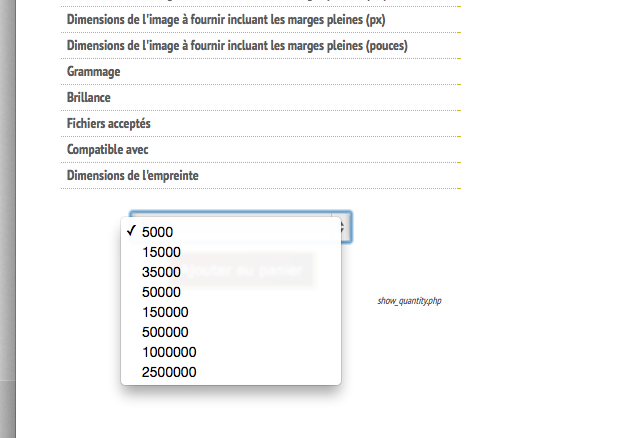
Here is my code to solve this problem. I would need it.
In the show_quantity.php, change this :
For this :
Here is a screenshot :
It is great! ah ah ah
In the show_quantity.php, change this :
Code:
case 'show_select':
if($min_quantity == 0)
$min_quantity = 1;
if($max_quantity == 0)
$max_quantity = (int)$min_quantity * 15;
?>
<div class="hikashop_product_quantity_div hikashop_product_quantity_input_div_select">
<select id="hikashop_product_quantity_select_<?php echo $i; ?>" onchange="var id = this.id.replace('select','field'); document.getElementById(id).value = this.value;">
<?php
for($j = $min_quantity; $j <= $max_quantity; $j += $min_quantity){
echo '<option value="'.$j.'">'.$j.'</option>';
}
?>
</select>
<input id="hikashop_product_quantity_field_<?php echo $i; ?>" type="hidden" value="<?php echo JRequest::getInt('quantity',$min_quantity); ?>" class="hikashop_product_quantity_field" name="quantity" onchange="hikashopCheckQuantityChange('hikashop_product_quantity_field_<?php echo $i; ?>',<?php echo $max_quantity; ?>,<?php echo $min_quantity; ?>);" />
</div>
<div class="hikashop_product_quantity_div hikashop_product_quantity_add_to_cart_div hikashop_product_quantity_add_to_cart_div_select">
<?php echo $html; ?>
</div>
<?php
dumpMessage('show_select');
break;
For this :
Code:
case 'show_select':
//if($min_quantity == 0)
// $min_quantity = 1;
//if($max_quantity == 0)
// $max_quantity = (int)$min_quantity * 15;
//dump($this,'this');
$db = JFactory::getDBO();
$zone = hikashop_getZone();
$currency = hikashop_getCurrency();
$product_id = hikashop_getCID();
$query= 'SELECT * FROM '.hikashop_table('product').' WHERE product_id='.$product_id;
$db->setQuery($query);
$productRows = $db->loadObjectList();
$class = hikashop_get('class.currency');
$class->getListingPrices($productRows, $zone, $currency );
$first = true;
$tableauMinQuantity = array();
foreach ($productRows[0]->prices as $price) {
$min = $price->price_min_quantity;
if ($min == 0) $min = 1;
if (!in_array($min, $tableauMinQuantity)) $tableauMinQuantity[] = $min;
}
asort($tableauMinQuantity);
dump($tableauMinQuantity);
?>
<div class="hikashop_product_quantity_div hikashop_product_quantity_input_div_select">
<select id="hikashop_product_quantity_select_<?php echo $i; ?>" onchange="var id = this.id.replace('select','field'); document.getElementById(id).value = this.value;">
<?php
//for($j = $min_quantity; $j <= $max_quantity; $j += $min_quantity){
// echo '<option value="'.$j.'">'.$j.'</option>';
//}
foreach ($tableauMinQuantity as $num) {
echo '<option value="' . (string)$num . '">' . (string)$num . '</option>';
}
?>
</select>
<input id="hikashop_product_quantity_field_<?php echo $i; ?>" type="hidden" value="<?php echo JRequest::getInt('quantity',$min_quantity); ?>" class="hikashop_product_quantity_field" name="quantity" onchange="hikashopCheckQuantityChange('hikashop_product_quantity_field_<?php echo $i; ?>',<?php echo $max_quantity; ?>,<?php echo $min_quantity; ?>);" />
</div>
<div class="hikashop_product_quantity_div hikashop_product_quantity_add_to_cart_div hikashop_product_quantity_add_to_cart_div_select">
<?php echo $html; ?>
</div>
<?php
dumpMessage('show_select');
break;
Here is a screenshot :
It is great! ah ah ah
The following user(s) said Thank You: Jerome
Please Log in or Create an account to join the conversation.
12 years 2 months ago #164133
by Jerome
Jerome - Obsidev.com
HikaMarket & HikaSerial developer / HikaShop core dev team.
Also helping the HikaShop support team when having some time or couldn't sleep.
By the way, do not send me private message, use the "contact us" form instead.
Replied by Jerome on topic « show select » doesn't respect existing quantity
Hi,
That's the power of view override. You can create your own logical/features in your views
I'll talk with the rest of the team about your quantity selector. Maybe we can add or share this new "quantity selection".
Regards,
That's the power of view override. You can create your own logical/features in your views
I'll talk with the rest of the team about your quantity selector. Maybe we can add or share this new "quantity selection".
Regards,
Jerome - Obsidev.com
HikaMarket & HikaSerial developer / HikaShop core dev team.
Also helping the HikaShop support team when having some time or couldn't sleep.
By the way, do not send me private message, use the "contact us" form instead.
Please Log in or Create an account to join the conversation.
12 years 2 months ago #164188
by Flooder
Replied by Flooder on topic « show select » doesn't respect existing quantity
Great! I like when you use my code!
Please Log in or Create an account to join the conversation.
Time to create page: 0.178 seconds