
- Posts: 241
- Thank you received: 5
Time for "product available" changes after save
- cberry1971
-
 Topic Author
- Offline
Less
More
11 years 10 months ago #179909
by cberry1971
Time for "product available" changes after save was created by cberry1971
-- HikaShop version -- : 2.3.4
-- Joomla version -- : 3.3.6
-- Browser(s) name and version -- : chrome / safari
Hi guys,
Strange bug which I can't work out as it only happens on some products and not others..
awesomescreenshot.com/0ce3uz6s94
I have tried to clear the cache on the browser and another browser... same thing.
Then i tried on another product and not a problem.
Do you know what could be causing this? Many thanks.
-- Joomla version -- : 3.3.6
-- Browser(s) name and version -- : chrome / safari
Hi guys,
Strange bug which I can't work out as it only happens on some products and not others..
awesomescreenshot.com/0ce3uz6s94
I have tried to clear the cache on the browser and another browser... same thing.
Then i tried on another product and not a problem.
Do you know what could be causing this? Many thanks.
Please Log in or Create an account to join the conversation.

Less
More
- Posts: 12953
- Thank you received: 1778
11 years 10 months ago #179954
by Mohamed Thelji
Replied by Mohamed Thelji on topic Time for "product available" changes after save
Hello,
I just tested it on my end and it worked fine :
- Active the Joomla debug mode ("Administration->Global configuration->System->Debug System/Language")
- Set the "error reporting" option of the Joomla configuration to "maximum"
- Test it again so that we can see if it display an error message which will help us to understand from what your issue is coming.
I just tested it on my end and it worked fine :
- Active the Joomla debug mode ("Administration->Global configuration->System->Debug System/Language")
- Set the "error reporting" option of the Joomla configuration to "maximum"
- Test it again so that we can see if it display an error message which will help us to understand from what your issue is coming.
Please Log in or Create an account to join the conversation.
- cberry1971
-
Topic Author
- Offline
Less
More
- Posts: 241
- Thank you received: 5
11 years 10 months ago #179992
by cberry1971
Replied by cberry1971 on topic Time for "product available" changes after save
Ok. thanks. I have activated the error reporting but now still need help as it is still happening.
I have PMd you the login info if you don't mind, have a look.
Thanks.
I have PMd you the login info if you don't mind, have a look.
Thanks.
Please Log in or Create an account to join the conversation.

11 years 10 months ago #180063
by nicolas
Replied by nicolas on topic Time for "product available" changes after save
Hi,
This is a problem with the time zone setting of your Joomla configuration. Please make sure that it is configure properly.
This is a problem with the time zone setting of your Joomla configuration. Please make sure that it is configure properly.
Please Log in or Create an account to join the conversation.
- cberry1971
-
Topic Author
- Offline
Less
More
- Posts: 241
- Thank you received: 5
11 years 10 months ago #180261
by cberry1971
Replied by cberry1971 on topic Time for "product available" changes after save
siteground our hosting company said that the server configurations are correct.
I still can't figure out this issue. It also happens with user's date of birth. In the database the user in the screenshot below shows a date of 1985-07-30, but it displays as 1985-07-29 on the backend...
awesomescreenshot.com/0913vkw768
I still can't figure out this issue. It also happens with user's date of birth. In the database the user in the screenshot below shows a date of 1985-07-30, but it displays as 1985-07-29 on the backend...
awesomescreenshot.com/0913vkw768
Please Log in or Create an account to join the conversation.
- cberry1971
-
Topic Author
- Offline
Less
More
- Posts: 241
- Thank you received: 5
11 years 10 months ago #180333
by cberry1971
Replied by cberry1971 on topic Time for "product available" changes after save
Here is a bit more info from our developer:
I believe that's it is due to timezone used in hikashop ,Please ask hikashop which timezone they are using ?
please go to : www.staging1.wodrocket.com/ajax/cnn.php ,you will notice that the time is not the same because in first it is using default timezone and in the second we are using date_default_timezone_set('America/Los_Angeles');
the time can be different from time of hikashop of 2014 Wodapalooza Winter Classic (Individuals) and that due to the cache .
I believe that's it is due to timezone used in hikashop ,Please ask hikashop which timezone they are using ?
please go to : www.staging1.wodrocket.com/ajax/cnn.php ,you will notice that the time is not the same because in first it is using default timezone and in the second we are using date_default_timezone_set('America/Los_Angeles');
the time can be different from time of hikashop of 2014 Wodapalooza Winter Classic (Individuals) and that due to the cache .
Please Log in or Create an account to join the conversation.

11 years 10 months ago #180338
by Xavier
Replied by Xavier on topic Time for "product available" changes after save
Hi,
We don't have timezone settings in HikaShop, we use the Joomla one, so please check your Joomla timezone settings.
We don't have timezone settings in HikaShop, we use the Joomla one, so please check your Joomla timezone settings.
Please Log in or Create an account to join the conversation.
- cberry1971
-
Topic Author
- Offline
Less
More
- Posts: 241
- Thank you received: 5
11 years 10 months ago #180580
by cberry1971
Replied by cberry1971 on topic Time for "product available" changes after save
That is fine except the whole component is acting strange.
Our timezone settings are not extraordinary:
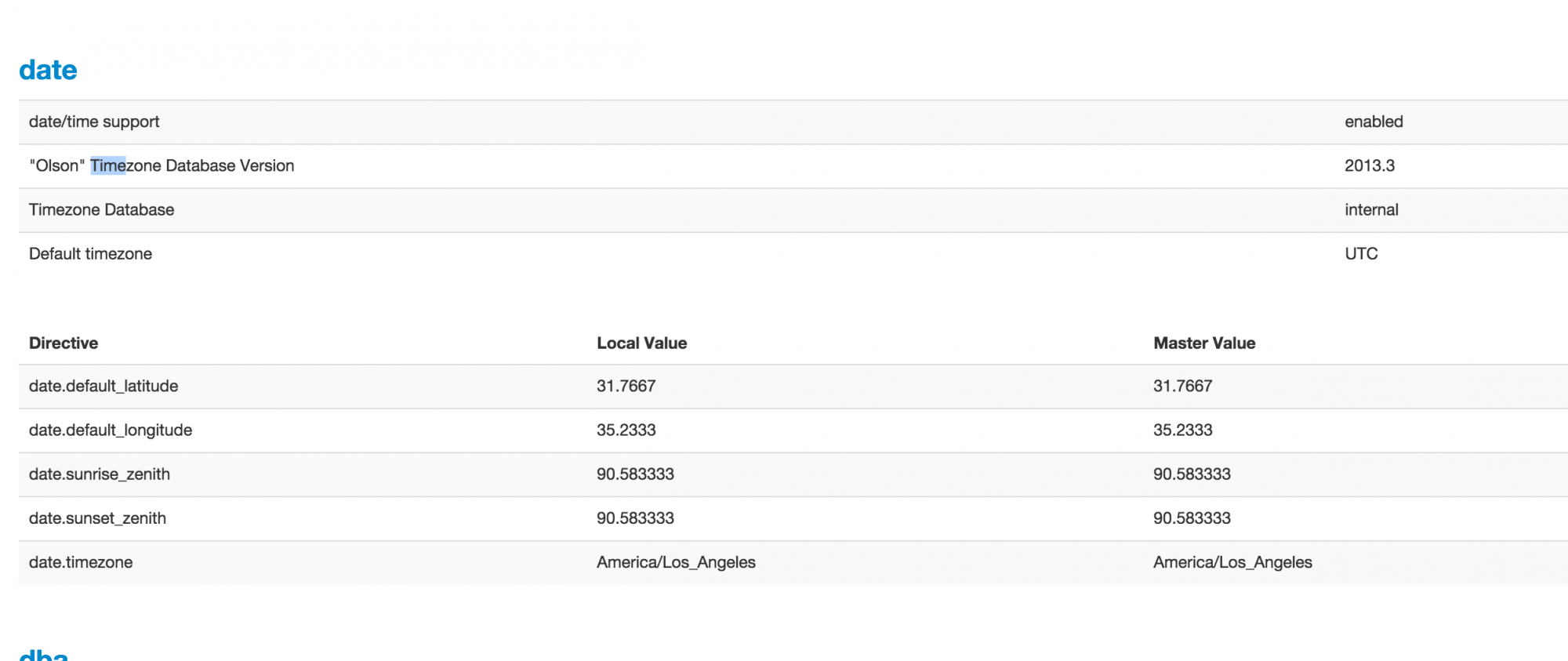
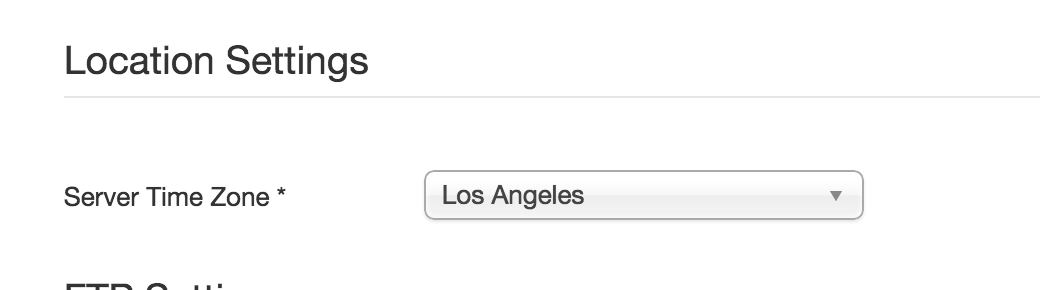
And yet we have crazy hikashop time outcomes as per the above.
Our timezone settings are not extraordinary:
And yet we have crazy hikashop time outcomes as per the above.
Please Log in or Create an account to join the conversation.
- cberry1971
-
Topic Author
- Offline
Less
More
- Posts: 241
- Thank you received: 5
11 years 10 months ago #181611
by cberry1971
Replied by cberry1971 on topic Time for "product available" changes after save
Hi guys,
Just checking in to see if you have had any progress with this ticket as it continues to concern us.
Our developer and hosting company have both concluded that it is a comonent specific bug.
Any help would be really appreciated and thank you for all the hard work. Other than this, I love the component.
Just checking in to see if you have had any progress with this ticket as it continues to concern us.
Our developer and hosting company have both concluded that it is a comonent specific bug.
Any help would be really appreciated and thank you for all the hard work. Other than this, I love the component.
Please Log in or Create an account to join the conversation.

11 years 9 months ago #181919
by Jerome
Jerome - Obsidev.com
HikaMarket & HikaSerial developer / HikaShop core dev team.
Also helping the HikaShop support team when having some time or couldn't sleep.
By the way, do not send me private message, use the "contact us" form instead.
Replied by Jerome on topic Time for "product available" changes after save
Hi,
In Joomla 3 ; when we display a date, we directly call the Joomla JHTML date.
So it means that it is Joomla which display the date based on the given timestamp.
For the save, the calendar is the official Joomla calendar and we convert the date into a timestamp.
During this conversion (the function hikashop_getTime), the Joomla configuration is read in order to get the time offset.
So you might have one hour of difference between your Joomla time offset configuration and the PHP time offset (given by " date('Z') " ).
Regards,
In Joomla 3 ; when we display a date, we directly call the Joomla JHTML date.
So it means that it is Joomla which display the date based on the given timestamp.
For the save, the calendar is the official Joomla calendar and we convert the date into a timestamp.
During this conversion (the function hikashop_getTime), the Joomla configuration is read in order to get the time offset.
So you might have one hour of difference between your Joomla time offset configuration and the PHP time offset (given by " date('Z') " ).
Regards,
Jerome - Obsidev.com
HikaMarket & HikaSerial developer / HikaShop core dev team.
Also helping the HikaShop support team when having some time or couldn't sleep.
By the way, do not send me private message, use the "contact us" form instead.
Please Log in or Create an account to join the conversation.
- cberry1971
-
Topic Author
- Offline
Less
More
- Posts: 241
- Thank you received: 5
11 years 9 months ago - 11 years 9 months ago #182288
by cberry1971
Replied by cberry1971 on topic Time for "product available" changes after save
I would agree with you except this issue is only happening on a few products so it must be a bug...
To create the issue,
go here: www.wodrocket.com/
Credentials removed
1. components > hikashop > products > individual events
2. find (cmd-f) wodapalooza...
3. select "2014 Wodapalooza Winter classic (individuals)"
4. have a look at the timestamp on the field "product available until" awesomescreenshot.com/0513yvtga7
5. click save and see it revert back 1 hour
awesomescreenshot.com/0c23ywy859
awesomescreenshot.com/0a13ywyp4b
If you do the same steps above for "test event" the issue will not happen.
To create the issue,
go here: www.wodrocket.com/
Credentials removed
1. components > hikashop > products > individual events
2. find (cmd-f) wodapalooza...
3. select "2014 Wodapalooza Winter classic (individuals)"
4. have a look at the timestamp on the field "product available until" awesomescreenshot.com/0513yvtga7
5. click save and see it revert back 1 hour
awesomescreenshot.com/0c23ywy859
awesomescreenshot.com/0a13ywyp4b
If you do the same steps above for "test event" the issue will not happen.
Last edit: 11 years 9 months ago by Jerome. Reason: credentials removed
Please Log in or Create an account to join the conversation.
11 years 9 months ago #182497
by Jerome
Jerome - Obsidev.com
HikaMarket & HikaSerial developer / HikaShop core dev team.
Also helping the HikaShop support team when having some time or couldn't sleep.
By the way, do not send me private message, use the "contact us" form instead.
Replied by Jerome on topic Time for "product available" changes after save
Hi,
I unpublished the plugin "HikaShop Mass Action products" and I'm not able to reproduce the issue anymore.
Can you please confirm ?
Regards,
I unpublished the plugin "HikaShop Mass Action products" and I'm not able to reproduce the issue anymore.
Can you please confirm ?
Regards,
Jerome - Obsidev.com
HikaMarket & HikaSerial developer / HikaShop core dev team.
Also helping the HikaShop support team when having some time or couldn't sleep.
By the way, do not send me private message, use the "contact us" form instead.
Please Log in or Create an account to join the conversation.
- cberry1971
-
Topic Author
- Offline
Less
More
- Posts: 241
- Thank you received: 5
11 years 9 months ago #182578
by cberry1971
Replied by cberry1971 on topic Time for "product available" changes after save
Ok. thank you. Is "HikaShop Mass Action products" needed in other areas?
I don't recall if we turned it on for another reason.
Thanks.
I don't recall if we turned it on for another reason.
Thanks.
Please Log in or Create an account to join the conversation.
- cberry1971
-
Topic Author
- Offline
Less
More
- Posts: 241
- Thank you received: 5
11 years 9 months ago #182582
by cberry1971
Replied by cberry1971 on topic Time for "product available" changes after save
Most importantly, is this a bug that can be fixed as unpublishing the HikaShop Mass Action Products does not resolve for us... nor is it a viable solve.
here it is published: awesomescreenshot.com/0b53zg9f9e (unpublishing does not change the bug)
here it is published: awesomescreenshot.com/0b53zg9f9e (unpublishing does not change the bug)
Please Log in or Create an account to join the conversation.
11 years 9 months ago #182595
by nicolas
Replied by nicolas on topic Time for "product available" changes after save
Hi,
That plugin is needed only when you create mass actions for the product data, which you didn't. So you don't need it and can leave it disabled.
As Jerome, I've done a test with the product you're talking about but I'm not able to reproduce the problem anymore on your website backend:
screencast-o-matic.com/watch/c2liDReZid
That plugin is needed only when you create mass actions for the product data, which you didn't. So you don't need it and can leave it disabled.
As Jerome, I've done a test with the product you're talking about but I'm not able to reproduce the problem anymore on your website backend:
screencast-o-matic.com/watch/c2liDReZid
The following user(s) said Thank You: cberry1971
Please Log in or Create an account to join the conversation.
Time to create page: 0.263 seconds