
- Posts: 606
- Thank you received: 13
Tax change does not update in Additional Info
- mohairbears
-
 Topic Author
- Offline
Less
More
11 years 8 months ago #185051
by mohairbears
Tax change does not update in Additional Info was created by mohairbears
-- HikaShop version -- : 2.3.5
-- Joomla version -- : 3.3.6
-- PHP version -- : 5.4.24
-- Browser(s) name and version -- : Firefox
Hi, When making changes to an order in 'additional Information' to the 'shipping' , the 'tax' does not update itself like it does when making changes to the products. The only way to force it to reflect the change is to select another VAT rate on the shipping.
Example: Shipping = £6.12 VAT £1.02, zero both the totals and the VAT rate should reflect the £1.02 change but it does not without the enforced change to shipping vat selection?
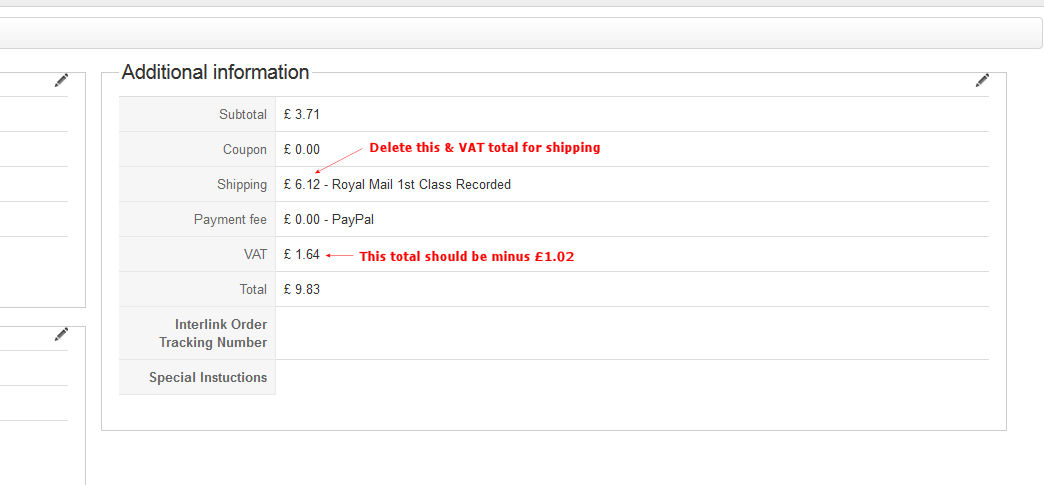
-- Joomla version -- : 3.3.6
-- PHP version -- : 5.4.24
-- Browser(s) name and version -- : Firefox
Hi, When making changes to an order in 'additional Information' to the 'shipping' , the 'tax' does not update itself like it does when making changes to the products. The only way to force it to reflect the change is to select another VAT rate on the shipping.
Example: Shipping = £6.12 VAT £1.02, zero both the totals and the VAT rate should reflect the £1.02 change but it does not without the enforced change to shipping vat selection?
Please Log in or Create an account to join the conversation.
- mohairbears
-
Topic Author
- Offline
Less
More
- Posts: 606
- Thank you received: 13
11 years 8 months ago #185407
by mohairbears
Replied by mohairbears on topic Tax change does not update in Additional Info
Anyone looking at this?
Please Log in or Create an account to join the conversation.

11 years 8 months ago #187385
by Jerome
Jerome - Obsidev.com
HikaMarket & HikaSerial developer / HikaShop core dev team.
Also helping the HikaShop support team when having some time or couldn't sleep.
By the way, do not send me private message, use the "contact us" form instead.
Replied by Jerome on topic Tax change does not update in Additional Info
Hi,
I am sorry for the late answer.
We tried to reproduce your issue and I also retry to reproduce it at this moment.
I clicked on the button to edit the additional information, I changed the shipping tax price (which was 0 for the test order) to another price (1.0) and I got a positive result, the global tax changed as required.
I also tried in the other way (reducing the shipping tax).
So I can't reproduce your issue in my local website.
Would it be possible to have more details about your order ?
Why do you write that the VAT should be "1.02" and not "1.64" ?
Once again, sorry for the late answer.
Regards,
I am sorry for the late answer.
We tried to reproduce your issue and I also retry to reproduce it at this moment.
I clicked on the button to edit the additional information, I changed the shipping tax price (which was 0 for the test order) to another price (1.0) and I got a positive result, the global tax changed as required.
I also tried in the other way (reducing the shipping tax).
So I can't reproduce your issue in my local website.
Would it be possible to have more details about your order ?
Why do you write that the VAT should be "1.02" and not "1.64" ?
Once again, sorry for the late answer.
Regards,
Jerome - Obsidev.com
HikaMarket & HikaSerial developer / HikaShop core dev team.
Also helping the HikaShop support team when having some time or couldn't sleep.
By the way, do not send me private message, use the "contact us" form instead.
Please Log in or Create an account to join the conversation.
- mohairbears
-
Topic Author
- Offline
Less
More
- Posts: 606
- Thank you received: 13
11 years 8 months ago #187409
by mohairbears
Replied by mohairbears on topic Tax change does not update in Additional Info
Hi, Sorry I did fix this, there was another tax rule in my database so I just deleted that and all ok now.
rgds
rgds
Please Log in or Create an account to join the conversation.
Time to create page: 0.244 seconds