
- Posts: 34
- Thank you received: 0
Can't upload photo
- co88agency
-
 Topic Author
- Offline
Less
More
11 years 1 month ago #214524
by co88agency
Can't upload photo was created by co88agency
-- HikaShop version -- : 2.5.0
-- Joomla version -- : 3.4.4
-- PHP version -- : 5.5.0
-- Browser(s) name and version -- : All browsers
-- Error-message(debug-mod must be tuned on) -- : Display no errors
Hi,
I can't upload photo in product. I select a photo from my pc and i click on "upload" but it doesn't work, nothing happens, the button does not work...
Can someone help me?
Thanks,
Best regards,
Loredana
-- Joomla version -- : 3.4.4
-- PHP version -- : 5.5.0
-- Browser(s) name and version -- : All browsers
-- Error-message(debug-mod must be tuned on) -- : Display no errors
Hi,
I can't upload photo in product. I select a photo from my pc and i click on "upload" but it doesn't work, nothing happens, the button does not work...
Can someone help me?
Thanks,
Best regards,
Loredana
Please Log in or Create an account to join the conversation.

11 years 1 month ago #214525
by Jerome
Jerome - Obsidev.com
HikaMarket & HikaSerial developer / HikaShop core dev team.
Replied by Jerome on topic Can't upload photo
Hi,
Please provide a screenshot of your interface.
There is no button with "upload" title ; so I suppose that you have some javascript errors in your page.
Regards,
Please provide a screenshot of your interface.
There is no button with "upload" title ; so I suppose that you have some javascript errors in your page.
Regards,
Jerome - Obsidev.com
HikaMarket & HikaSerial developer / HikaShop core dev team.
Please Log in or Create an account to join the conversation.
11 years 1 month ago #214610
by bluverso
Replied by bluverso on topic Can't upload photo
Hi,
the problem is the same to me after that I install Joomla 3.4.4 on 3.4.3.
I don't touch anything in my javascript but I can't upload any photo and i can't control my tags too.
- If I click on upload green button on firefox the console tells "TypeError: window.hkUploaderList.hikashop_product_image is undefined"
- If I click on upload green button on chrome the console tells "Uncaught TypeError: Cannot read property 'uploadFile' of undefinedonclick @ index.php?option=com_hikashop&ctrl=product&task=edit&cid[]=313:808"
- If I click on the simple upload file button I can choose a file but after I save the product there is no image uploaded.
Please help
Thank you
Roberto
the problem is the same to me after that I install Joomla 3.4.4 on 3.4.3.
I don't touch anything in my javascript but I can't upload any photo and i can't control my tags too.
- If I click on upload green button on firefox the console tells "TypeError: window.hkUploaderList.hikashop_product_image is undefined"
- If I click on upload green button on chrome the console tells "Uncaught TypeError: Cannot read property 'uploadFile' of undefinedonclick @ index.php?option=com_hikashop&ctrl=product&task=edit&cid[]=313:808"
- If I click on the simple upload file button I can choose a file but after I save the product there is no image uploaded.
Please help
Thank you
Roberto
Please Log in or Create an account to join the conversation.
11 years 1 month ago #214617
by Jerome
Jerome - Obsidev.com
HikaMarket & HikaSerial developer / HikaShop core dev team.
Replied by Jerome on topic Can't upload photo
Hi,
With Joomla 3.4.4 you can have javascript issue due to some modal titles.
Please apply the official Joomla modification : github.com/joomla/joomla-cms/pull/7845/files
It should avoid the first javascript issue and let the uploaders be initialized correctly.
Regards,
With Joomla 3.4.4 you can have javascript issue due to some modal titles.
Please apply the official Joomla modification : github.com/joomla/joomla-cms/pull/7845/files
It should avoid the first javascript issue and let the uploaders be initialized correctly.
Regards,
Jerome - Obsidev.com
HikaMarket & HikaSerial developer / HikaShop core dev team.
Please Log in or Create an account to join the conversation.
11 years 1 month ago #214651
by bluverso
Replied by bluverso on topic Can't upload photo
Thank you.
Problem solved.
Problem solved.
Please Log in or Create an account to join the conversation.
- co88agency
-
Topic Author
- Offline
Less
More
- Posts: 34
- Thank you received: 0
11 years 1 month ago #214795
by co88agency
Replied by co88agency on topic Can't upload photo
Thank you!
Now is ok, problem solved!!!
Now is ok, problem solved!!!
Please Log in or Create an account to join the conversation.
Less
More
- Posts: 14
- Thank you received: 0
11 years 4 days ago #218004
by james@esgmail.com
Replied by james@esgmail.com on topic Can't upload photo
Hi-
I'm having problems having images load as well.
Attached pls see product page. If I list the column in my CSV as 'files' rather than 'images' the file name uploads but does not populate as an image. If I name the CSV column as 'images' I do not get any listing on the product page.
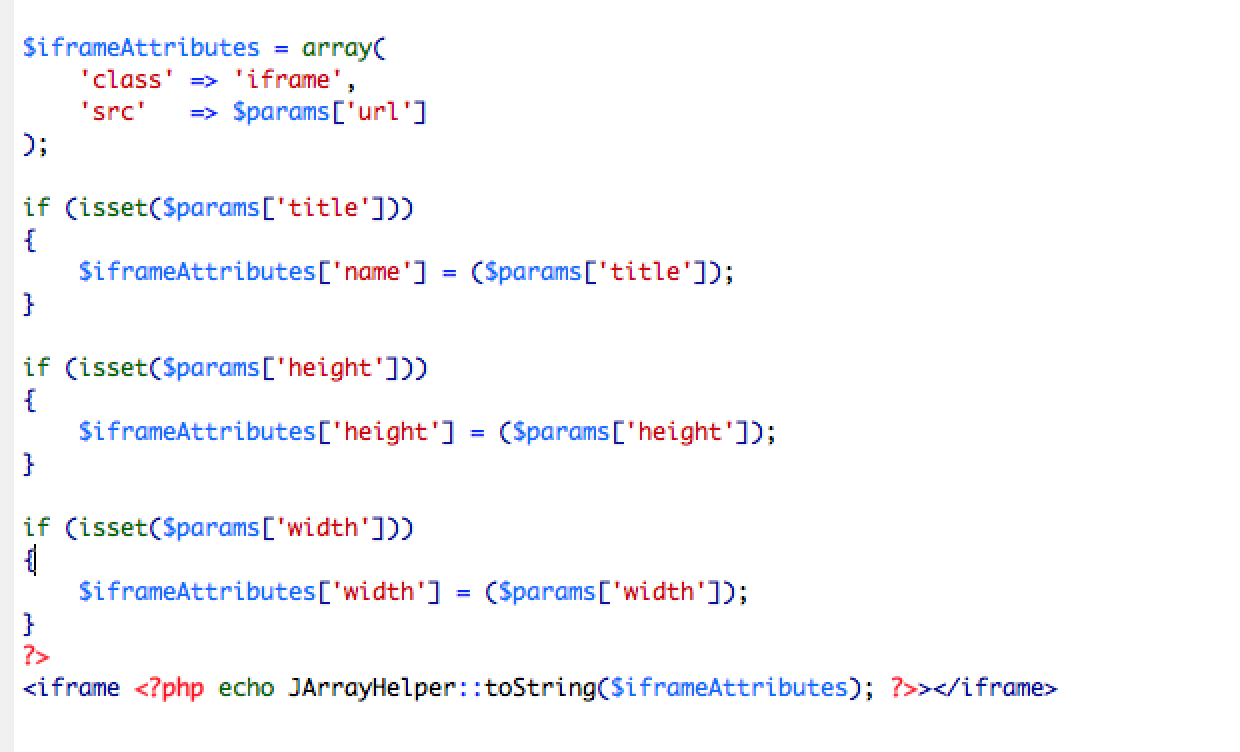
I have done the updates in the Iframe.php referred to in the discussion below. (Please advise if the fix should be applied to lines 45 and 50 as I have done as well.)
My images are in the 'media/com_hikashop/upload/safe' folder.
Can you advise regarding making the images viewable?
Thanks!
James
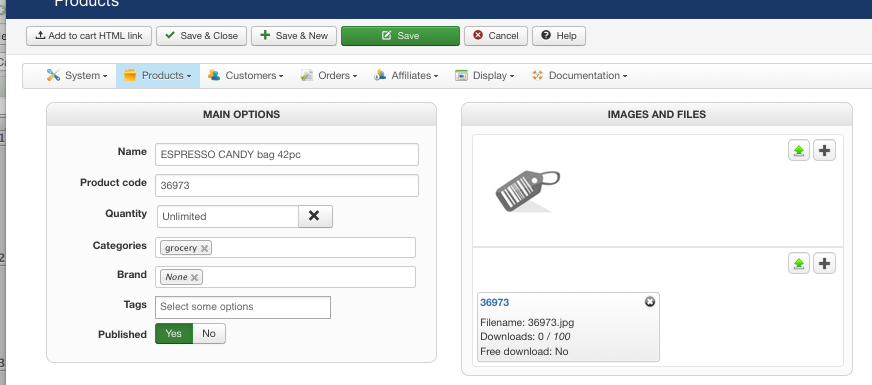
I'm having problems having images load as well.
Attached pls see product page. If I list the column in my CSV as 'files' rather than 'images' the file name uploads but does not populate as an image. If I name the CSV column as 'images' I do not get any listing on the product page.
I have done the updates in the Iframe.php referred to in the discussion below. (Please advise if the fix should be applied to lines 45 and 50 as I have done as well.)
My images are in the 'media/com_hikashop/upload/safe' folder.
Can you advise regarding making the images viewable?
Thanks!
James
Please Log in or Create an account to join the conversation.
11 years 4 days ago #218057
by Jerome
Jerome - Obsidev.com
HikaMarket & HikaSerial developer / HikaShop core dev team.
Replied by Jerome on topic Can't upload photo
Hi,
We can see that you do not have javascript error in your page because the upload blocks are displayed fine.
(If you had javascript issue, you would see the "HTML file selectors" elements directly in the page)
Now regarding your sentence
Regards,
We can see that you do not have javascript error in your page because the upload blocks are displayed fine.
(If you had javascript issue, you would see the "HTML file selectors" elements directly in the page)
Now regarding your sentence
I'm afraid that I do not understand what you're trying to do.If I list the column in my CSV as 'files' rather than 'images' the file name uploads but does not populate as an image. If I name the CSV column as 'images' I do not get any listing on the product page.
Regards,
Jerome - Obsidev.com
HikaMarket & HikaSerial developer / HikaShop core dev team.
Please Log in or Create an account to join the conversation.
Less
More
- Posts: 14
- Thank you received: 0
11 years 4 days ago #218059
by james@esgmail.com
Replied by james@esgmail.com on topic Can't upload photo
I am trying to display the images.
My comment is that it will bring in a file if I mark the CSV column 'file' as in the attached screen shot. (36973.jpg)
If I title the column as 'images' I do not get anything in the images area on the product page. Images are uploaded by FTP in the Safe folder, which is where I find the images if I upload them one by one from the product set up page.
How can I get the CSV to link to the image files.
Thanks!
James.
My comment is that it will bring in a file if I mark the CSV column 'file' as in the attached screen shot. (36973.jpg)
If I title the column as 'images' I do not get anything in the images area on the product page. Images are uploaded by FTP in the Safe folder, which is where I find the images if I upload them one by one from the product set up page.
How can I get the CSV to link to the image files.
Thanks!
James.
Please Log in or Create an account to join the conversation.
11 years 3 days ago #218062
by Jerome
Jerome - Obsidev.com
HikaMarket & HikaSerial developer / HikaShop core dev team.
Replied by Jerome on topic Can't upload photo
Hi,
I'm sorry but I don't see any link with the current topic ("can't upload photo").
Please do not duplicate questions in different threads for the same issue :
www.hikashop.com/forum/import-export-csv...t-don-t-display.html
Regards,
I'm sorry but I don't see any link with the current topic ("can't upload photo").
Please do not duplicate questions in different threads for the same issue :
www.hikashop.com/forum/import-export-csv...t-don-t-display.html
Regards,
Jerome - Obsidev.com
HikaMarket & HikaSerial developer / HikaShop core dev team.
Please Log in or Create an account to join the conversation.
Less
More
- Posts: 14
- Thank you received: 0
11 years 3 days ago #218190
by james@esgmail.com
Replied by james@esgmail.com on topic Can't upload photo
Hello Jerome - the other post is regarding CSV upload and getting the product data. That issue was solved. This post thread is regarding photo upload and seeing it. Where do you want this conversation?
Can't go forward with our project until images can be uploaded.
Thank you!
Can't go forward with our project until images can be uploaded.
Thank you!
Please Log in or Create an account to join the conversation.
11 years 2 days ago #218200
by Jerome
Jerome - Obsidev.com
HikaMarket & HikaSerial developer / HikaShop core dev team.
Replied by Jerome on topic Can't upload photo
Hi,
Please explain clearly your upload issue for the part which is in the same exact subject that this topic.
Otherwise, if it's related for an unknown reason with "CSV", please create a new thread.
Regards,
Please explain clearly your upload issue for the part which is in the same exact subject that this topic.
Otherwise, if it's related for an unknown reason with "CSV", please create a new thread.
Regards,
Jerome - Obsidev.com
HikaMarket & HikaSerial developer / HikaShop core dev team.
Please Log in or Create an account to join the conversation.
10 years 11 months ago #219170
by claudio
Replied by claudio on topic Can't upload photo
-- HikaShop version -- : 2.6.0
-- Joomla version -- : 3.4.5
Hi,
I have the some issues ... I can't upload photo in product. When I select a photo from and click on "+" nothing happens
Can someone help me?
Thanks,
Claudio
-- Joomla version -- : 3.4.5
Hi,
I have the some issues ... I can't upload photo in product. When I select a photo from and click on "+" nothing happens
Can someone help me?
Thanks,
Claudio
Please Log in or Create an account to join the conversation.
10 years 11 months ago #219173
by Jerome
Jerome - Obsidev.com
HikaMarket & HikaSerial developer / HikaShop core dev team.
Replied by Jerome on topic Can't upload photo
Hi,
To start ; please understand that the support team already gave the different solution in that thread.
By reading our answers you can already have all required information and solutions.
So !
Please take a look at your product edition page and see if you have the HTML file input displayed.
For example, the screenshot of the message #214610 display that element
www.hikashop.com/media/kunena/attachment...18_alle_11_40_19.png
Because it's possible to see that element, it indicates that there is a Javascript error in the page ; so the HikaShop uploader is not initialized properly and can't upload any file.
In that case, it's generally the Joomla 3.4.4 / 3.4.5 issue with the modals.
CF : github.com/joomla/joomla-cms/pull/7845/files
If it is not related to the Joomal modal ; it could be related to another Javascript error.
In that case you need to catch the error message in your browser console, so we can see the source of the problem and see how to solve it.
Regards,
To start ; please understand that the support team already gave the different solution in that thread.
By reading our answers you can already have all required information and solutions.
So !
Please take a look at your product edition page and see if you have the HTML file input displayed.
For example, the screenshot of the message #214610 display that element
www.hikashop.com/media/kunena/attachment...18_alle_11_40_19.png
Because it's possible to see that element, it indicates that there is a Javascript error in the page ; so the HikaShop uploader is not initialized properly and can't upload any file.
In that case, it's generally the Joomla 3.4.4 / 3.4.5 issue with the modals.
CF : github.com/joomla/joomla-cms/pull/7845/files
If it is not related to the Joomal modal ; it could be related to another Javascript error.
In that case you need to catch the error message in your browser console, so we can see the source of the problem and see how to solve it.
Regards,
Jerome - Obsidev.com
HikaMarket & HikaSerial developer / HikaShop core dev team.
Please Log in or Create an account to join the conversation.
10 years 11 months ago #219221
by claudio
Replied by claudio on topic Can't upload photo
Solved!
Thank you
Thank you
Please Log in or Create an account to join the conversation.
Time to create page: 0.364 seconds