
- Posts: 640
- Thank you received: 16
BIG PROBLEM - Can't acces Hikashop Module Options
- PeterChain
-
 Topic Author
- Offline
Less
More
10 years 11 months ago - 10 years 11 months ago #216913
by PeterChain
BIG PROBLEM - Can't acces Hikashop Module Options was created by PeterChain
-- HikaShop version -- : 2.6.0
-- Joomla version -- : 3.4.4
I hope you can take a look at this problem even it is weekend.
Since I updated today to HikaShop 2.6.0 and HikaMArket 1.6.0 I cannot acces my hikashop content modules options anymore.
Also I can't access Falang alternative language in the modules although Falang works everywhere else.
Also there is no more A menu Options and Module Options in the HikaShop Component -> Display menu-
This is now really a big problem as I lost control of all important things HikaShop.
Is this a general bug or something in my site may have been rotten?
I checked the HikaShop permissions section and everything is set to ALL
Thank you.
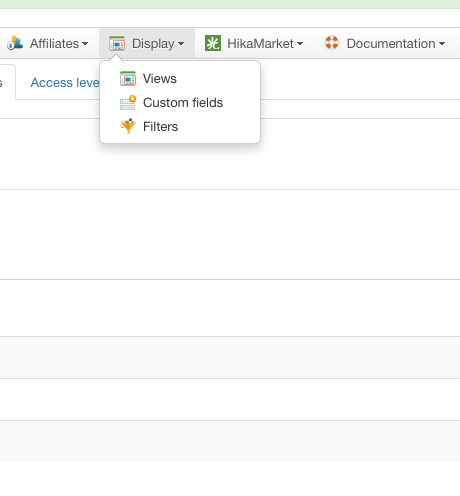
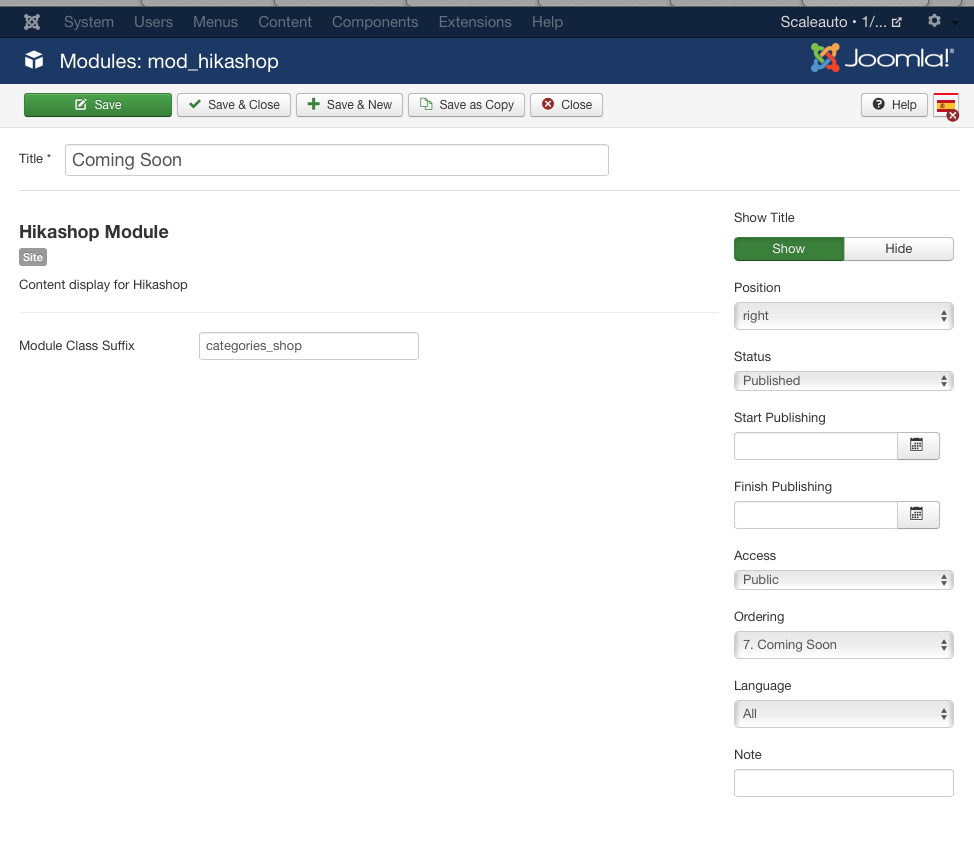
UPDATE: In fact when trying to edit a HikaShop module no tabs are showing at all. For other non HikaShop modules they all show.
-- Joomla version -- : 3.4.4
I hope you can take a look at this problem even it is weekend.
Since I updated today to HikaShop 2.6.0 and HikaMArket 1.6.0 I cannot acces my hikashop content modules options anymore.
Also I can't access Falang alternative language in the modules although Falang works everywhere else.
Also there is no more A menu Options and Module Options in the HikaShop Component -> Display menu-
This is now really a big problem as I lost control of all important things HikaShop.
Is this a general bug or something in my site may have been rotten?
I checked the HikaShop permissions section and everything is set to ALL
Thank you.
UPDATE: In fact when trying to edit a HikaShop module no tabs are showing at all. For other non HikaShop modules they all show.
Last edit: 10 years 11 months ago by PeterChain. Reason: UPDATE info
Please Log in or Create an account to join the conversation.
- PeterChain
-
Topic Author
- Offline
Less
More
- Posts: 640
- Thank you received: 16
10 years 11 months ago #216920
by PeterChain
Replied by PeterChain on topic BIG PROBLEM - Can't acces Hikashop Module Options
FYI I went back to HikaShop 2.5 so all HikaShop module Options where recovered.
I don't know if is really safe to go backwards form 2.6 to 2.5 but at least it worked apparently.
If you have more reports on this issue or any suspecions on what can be causing this in the case is not a HikaBug I will appreciate your report.
Thank you and enjoy weekend.
I don't know if is really safe to go backwards form 2.6 to 2.5 but at least it worked apparently.
If you have more reports on this issue or any suspecions on what can be causing this in the case is not a HikaBug I will appreciate your report.
Thank you and enjoy weekend.
Please Log in or Create an account to join the conversation.

10 years 11 months ago #216951
by nicolas
Replied by nicolas on topic BIG PROBLEM - Can't acces Hikashop Module Options
Hi,
The tabs do display just fine on our end when editing HikaShop modules. And I guess that's the same for everyone else or we would get bombed with support requests on that as the options of the modules are a key component of setting up HikaShop.
So there must be some problem with your website.
I've even tested it with Falang just now and it works fine:
take.ms/boTMF
The tabs do display just fine on our end when editing HikaShop modules. And I guess that's the same for everyone else or we would get bombed with support requests on that as the options of the modules are a key component of setting up HikaShop.
So there must be some problem with your website.
I've even tested it with Falang just now and it works fine:
take.ms/boTMF
Please Log in or Create an account to join the conversation.
- PeterChain
-
Topic Author
- Offline
Less
More
- Posts: 640
- Thank you received: 16
10 years 11 months ago #216956
by PeterChain
Replied by PeterChain on topic BIG PROBLEM - Can't acces Hikashop Module Options
Thank you Nicolas for your quick response.
I just reinstalled 2.6 after going backwards to 2.5 and the problem comes again.
I am uploading now the site online and wills end you the access so maybe you will be so kind to have a look.
For what I've seen checking the console in safari seems like the <ul> for tabs is created but the <li></li> are not rendered in the page.
Strangely is happening only to hikashop modules and only when installing HikeSahop 2.6
I will send you acces in a matter of 20 minutes I hope.
Regards,
I just reinstalled 2.6 after going backwards to 2.5 and the problem comes again.
I am uploading now the site online and wills end you the access so maybe you will be so kind to have a look.
For what I've seen checking the console in safari seems like the <ul> for tabs is created but the <li></li> are not rendered in the page.
Strangely is happening only to hikashop modules and only when installing HikeSahop 2.6
I will send you acces in a matter of 20 minutes I hope.
Regards,
Please Log in or Create an account to join the conversation.
- PeterChain
-
Topic Author
- Offline
Less
More
- Posts: 640
- Thank you received: 16
10 years 11 months ago #216957
by PeterChain
Replied by PeterChain on topic BIG PROBLEM - Can't acces Hikashop Module Options
Hi Nicolas,
I sent site access through your Contact form.
As for the server side of my site the problem remains the same as when it was on localhost.
Briefly:
Modules related to hikashop won't show the tabs so can't access HikaShop options.
Additionaly Falang opens a blank popup although when editing the module translation through the Falang component full access is allowed to the translation fields. Any suggestion will be appreciated.
And, in case there is no solution by now I ask:
Is it acceptable to go back to 2.5 without hidden risks? I did once and looked like working everything right, but couldn't check everything of the Hikashop system.
Thank you.
I sent site access through your Contact form.
As for the server side of my site the problem remains the same as when it was on localhost.
Briefly:
Modules related to hikashop won't show the tabs so can't access HikaShop options.
Additionaly Falang opens a blank popup although when editing the module translation through the Falang component full access is allowed to the translation fields. Any suggestion will be appreciated.
And, in case there is no solution by now I ask:
Is it acceptable to go back to 2.5 without hidden risks? I did once and looked like working everything right, but couldn't check everything of the Hikashop system.
Thank you.
Please Log in or Create an account to join the conversation.

10 years 11 months ago #216993
by Jerome
Jerome - Obsidev.com
HikaMarket & HikaSerial developer / HikaShop core dev team.
Also helping the HikaShop support team when having some time or couldn't sleep.
By the way, do not send me private message, use the "contact us" form instead.
Replied by Jerome on topic BIG PROBLEM - Can't acces Hikashop Module Options
Hi,
Sorry, the tabs are showing fine in our side for your website
pasteboard.co/1jJeEHQY.png
Regards,
Sorry, the tabs are showing fine in our side for your website
pasteboard.co/1jJeEHQY.png
Regards,
Jerome - Obsidev.com
HikaMarket & HikaSerial developer / HikaShop core dev team.
Also helping the HikaShop support team when having some time or couldn't sleep.
By the way, do not send me private message, use the "contact us" form instead.
Please Log in or Create an account to join the conversation.
- PeterChain
-
Topic Author
- Offline
Less
More
- Posts: 640
- Thank you received: 16
10 years 11 months ago - 10 years 11 months ago #217003
by PeterChain
Replied by PeterChain on topic BIG PROBLEM - Can't acces Hikashop Module Options
Yes.
And wasn't it somebody of you fixing it?
It did work wrong for the next 4 hours after my post and suddenly it started working fine. And nobody else has access to the site.
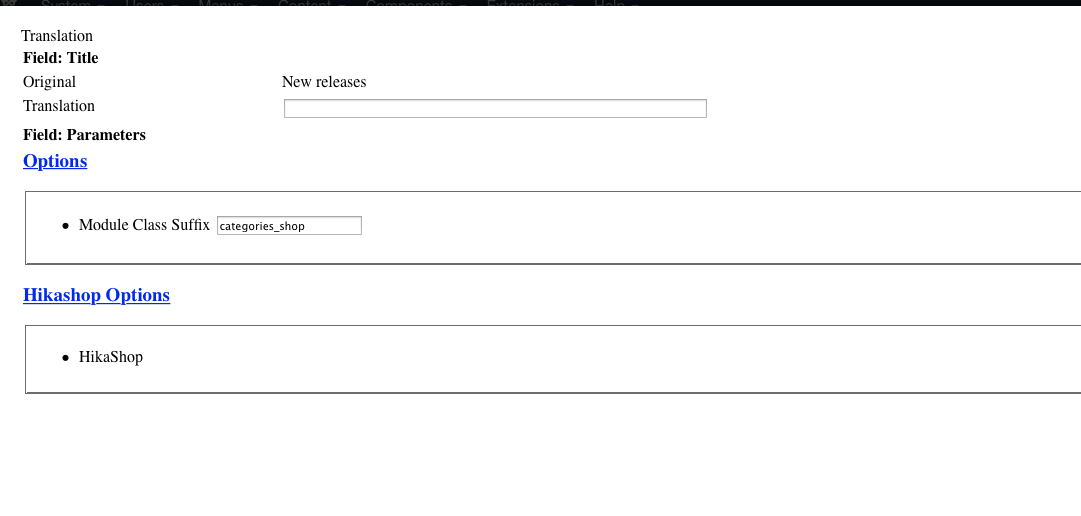
Anyhow the Falang popup is still not showing right nor being accessible.
Only for Hikashop modules. I tested many other modules, articles, plugins, menus and they all do work correctly with the several types of accessing Falang.
Could you take a look?
You can experiment this on the modules 'Coming Soon' and 'New Releases'
And wasn't it somebody of you fixing it?
It did work wrong for the next 4 hours after my post and suddenly it started working fine. And nobody else has access to the site.
Anyhow the Falang popup is still not showing right nor being accessible.
Only for Hikashop modules. I tested many other modules, articles, plugins, menus and they all do work correctly with the several types of accessing Falang.
Could you take a look?
You can experiment this on the modules 'Coming Soon' and 'New Releases'
Last edit: 10 years 11 months ago by PeterChain.
Please Log in or Create an account to join the conversation.
10 years 11 months ago #217021
by Jerome
Jerome - Obsidev.com
HikaMarket & HikaSerial developer / HikaShop core dev team.
Also helping the HikaShop support team when having some time or couldn't sleep.
By the way, do not send me private message, use the "contact us" form instead.
Replied by Jerome on topic BIG PROBLEM - Can't acces Hikashop Module Options
Hi,
I just made a simple test, we did not touch or modify your website/configuration.
The screenshot you posted indicated a PHP fatal error.
Please check your PHP error log (or activate the display of the PHP errors in the page, temporally).
Regards,
I just made a simple test, we did not touch or modify your website/configuration.
The screenshot you posted indicated a PHP fatal error.
Please check your PHP error log (or activate the display of the PHP errors in the page, temporally).
Regards,
Jerome - Obsidev.com
HikaMarket & HikaSerial developer / HikaShop core dev team.
Also helping the HikaShop support team when having some time or couldn't sleep.
By the way, do not send me private message, use the "contact us" form instead.
Please Log in or Create an account to join the conversation.
- PeterChain
-
Topic Author
- Offline
Less
More
- Posts: 640
- Thank you received: 16
10 years 11 months ago - 10 years 11 months ago #217072
by PeterChain
Replied by PeterChain on topic BIG PROBLEM - Can't acces Hikashop Module Options
Thanks for the suggestion.
I put Error Report at maximum and got this message:
( ! ) Fatal error: Cannot use object of type stdClass as array in /Volumes/WebDev/MAMP_files/htdocs/scaleauto2015/administrator/components/com_hikashop/views/modules/view.html.php on line 574
and this is de code starting at line 574 in such file:
Maybe you could guide me on what can be causing this error as this goes too far to my level of understanding.
TO NOTE:
Some HikaShop Content modules work perfectly, others bring this problem
New created modules after the update generate the problem too.
Non content type but HikaShop modules like Cart, Wishlist, Currency Switcher or filter work without problem.
My Falang version is 2.1 wihc was the most up to date until yesterday.
Thank you.
U P D A T E:
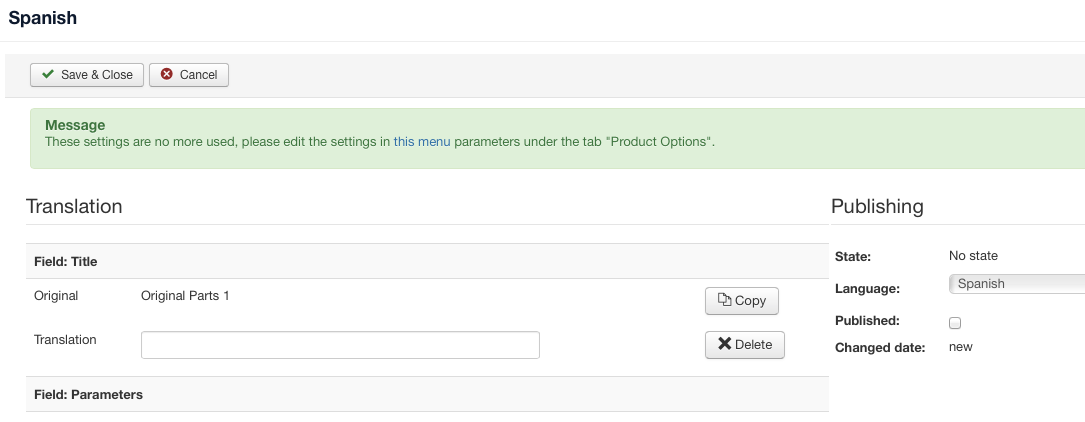
Now I see that hikaShop Content modules never saved after updating to 2.6 remain with this 'green' message when I enter to the Falang section:
But once I do a Save next time they render broken with the above error message.
I put Error Report at maximum and got this message:
( ! ) Fatal error: Cannot use object of type stdClass as array in /Volumes/WebDev/MAMP_files/htdocs/scaleauto2015/administrator/components/com_hikashop/views/modules/view.html.php on line 574
and this is de code starting at line 574 in such file:
Code:
if(isset($this->element['content_type']))
$this->type = $this->element['content_type'];
elseif(isset($module->hikashop_params['content_type']))
$this->type = $module->hikashop_params['content_type'];
else
$this->type = 'product';
$this->noForm = true;
$config = hikashop_config();
$this->default_params = $config->get('default_params');
Maybe you could guide me on what can be causing this error as this goes too far to my level of understanding.
TO NOTE:
Some HikaShop Content modules work perfectly, others bring this problem
New created modules after the update generate the problem too.
Non content type but HikaShop modules like Cart, Wishlist, Currency Switcher or filter work without problem.
My Falang version is 2.1 wihc was the most up to date until yesterday.
Thank you.
U P D A T E:
Now I see that hikaShop Content modules never saved after updating to 2.6 remain with this 'green' message when I enter to the Falang section:
But once I do a Save next time they render broken with the above error message.
Last edit: 10 years 11 months ago by PeterChain. Reason: UPDATE info
Please Log in or Create an account to join the conversation.
- PeterChain
-
Topic Author
- Offline
Less
More
- Posts: 640
- Thank you received: 16
10 years 11 months ago #217090
by PeterChain
Replied by PeterChain on topic BIG PROBLEM - Can't acces Hikashop Module Options
Going further with Mr Google I found that replacing some code the problem goes away and away to a next file and next another, but I get bypassing the original PHP fatal error.
I replaced all isntances in view.html.php of this expression $module->hikashop_params for this one $module->hikashop_params->content_type
Then the same for the file options.php
And then the same of options_display_div.php...
But of course I don't think the solution is to change piles of code on my own, you would have already realized if the problem was really in this code.
I offer this extra data as maybe would help you in arriving to a conclusion on whats is causing my files to seem faulty even they are not.
Thank you.
I replaced all isntances in view.html.php of this expression $module->hikashop_params for this one $module->hikashop_params->content_type
Then the same for the file options.php
And then the same of options_display_div.php...
But of course I don't think the solution is to change piles of code on my own, you would have already realized if the problem was really in this code.
I offer this extra data as maybe would help you in arriving to a conclusion on whats is causing my files to seem faulty even they are not.
Thank you.
Please Log in or Create an account to join the conversation.

10 years 11 months ago #217108
by Xavier
Replied by Xavier on topic BIG PROBLEM - Can't acces Hikashop Module Options
Hi,
The problem should be solved now, some code was missing in the file "components/com_hikashop/fields/hikashopmodule.php". We already had it on our version, but it was not yet released.
Thank you for this report.
The problem should be solved now, some code was missing in the file "components/com_hikashop/fields/hikashopmodule.php". We already had it on our version, but it was not yet released.
Thank you for this report.
The following user(s) said Thank You: PeterChain
Please Log in or Create an account to join the conversation.
- PeterChain
-
Topic Author
- Offline
Less
More
- Posts: 640
- Thank you received: 16
10 years 11 months ago #217201
by PeterChain
Replied by PeterChain on topic BIG PROBLEM - Can't acces Hikashop Module Options
Hi Xavier and Jerome,
thank you for attending this. I am happy that you could fix it and I AM HAPPY THAT FOR ONCE i was not taking your time because a bad mistake of mine as I understand from Xavier's answer.
I already checked quickly and looks to work properly,
Best regards
Peterchain.
thank you for attending this. I am happy that you could fix it and I AM HAPPY THAT FOR ONCE i was not taking your time because a bad mistake of mine as I understand from Xavier's answer.
I already checked quickly and looks to work properly,
Best regards
Peterchain.
Please Log in or Create an account to join the conversation.

10 years 3 weeks ago #249283
by verzevoul
Replied by verzevoul on topic BIG PROBLEM - Can't acces Hikashop Module Options
My version is latest then this post and I get this in administrator when I m trying to translate with falang
HikaShop
Fatal error: Cannot use object of type stdClass as array in /home/webintel/public_html/administrator/components/com_hikashop/views/modules/view.html.php on line 574
HikaShop
Fatal error: Cannot use object of type stdClass as array in /home/webintel/public_html/administrator/components/com_hikashop/views/modules/view.html.php on line 574
Please Log in or Create an account to join the conversation.
10 years 3 weeks ago #249290
by nicolas
Replied by nicolas on topic BIG PROBLEM - Can't acces Hikashop Module Options
Hi,
So which version are you using ?
What code do you have on that line 574 ?
So which version are you using ?
What code do you have on that line 574 ?
Please Log in or Create an account to join the conversation.
10 years 2 weeks ago #249625
by verzevoul
Replied by verzevoul on topic BIG PROBLEM - Can't acces Hikashop Module Options
My version is Your version is 2.6.0
==
if(isset($this->element))
$this->type = $this->element;
elseif(isset($module->hikashop_params))
$this->type = $module->hikashop_params;
else
$this->type = 'product';
==
if(isset($this->element))
$this->type = $this->element;
elseif(isset($module->hikashop_params))
$this->type = $module->hikashop_params;
else
$this->type = 'product';
Please Log in or Create an account to join the conversation.
10 years 2 weeks ago #249628
by nicolas
Replied by nicolas on topic BIG PROBLEM - Can't acces Hikashop Module Options
Hi,
So you have the same version that this person had, the 2.6.0.
This was fixed later on with the 2.6.0: www.hikashop.com/forum/3-bug-report/8797...-options.html#217108
So you must have a build of the release from before that.
Updating your HikaShop should solve the problem.
Alternatively, you could try just replacing the file "components/com_hikashop/fields/hikashopmodule.php" when the one form the latest version install package in (front/fields/hikashopmodule.php). And that should also fix the problem.
So you have the same version that this person had, the 2.6.0.
This was fixed later on with the 2.6.0: www.hikashop.com/forum/3-bug-report/8797...-options.html#217108
So you must have a build of the release from before that.
Updating your HikaShop should solve the problem.
Alternatively, you could try just replacing the file "components/com_hikashop/fields/hikashopmodule.php" when the one form the latest version install package in (front/fields/hikashopmodule.php). And that should also fix the problem.
Please Log in or Create an account to join the conversation.
Time to create page: 0.250 seconds