
- Posts: 149
- Thank you received: 6
Cart QTY update script fail on Products w/ Options
10 years 2 weeks ago #249872
by icomex
Cart QTY update script fail on Products w/ Options was created by icomex
-- HikaShop version -- : 2.6.4
-- Joomla version -- : 3.6.2
-- PHP version -- : 5.6.16
I have an Inventory Product which utilizes three Options. If I add one of these to a Cart with one combination of Options and a Second instance of the same Product with a different combination of Options both items track properly through the Order completion process, but the Qty Update scripts on the Cart display fails. The same buttons on the Checkout Cart appears to work correctly.
It looks like the scripts within the cart display identify the Products to be updated by the Product ID value rather than the Cart Product ID value. The Input fields the User modifies to change the Qty value also appear to have the same shared ID Value because of the same error.
The result is that the javascripts seem to grab the first Qty field's value regardless of which button is clicked. The hidden Qty fields for the Options appear to have unique values and work properly, but whatever method is being triggered doesn't identify the proper Product either and I can't see any Qty changes being made to either product when it runs.
Thanks.
-- Joomla version -- : 3.6.2
-- PHP version -- : 5.6.16
I have an Inventory Product which utilizes three Options. If I add one of these to a Cart with one combination of Options and a Second instance of the same Product with a different combination of Options both items track properly through the Order completion process, but the Qty Update scripts on the Cart display fails. The same buttons on the Checkout Cart appears to work correctly.
It looks like the scripts within the cart display identify the Products to be updated by the Product ID value rather than the Cart Product ID value. The Input fields the User modifies to change the Qty value also appear to have the same shared ID Value because of the same error.
The result is that the javascripts seem to grab the first Qty field's value regardless of which button is clicked. The hidden Qty fields for the Options appear to have unique values and work properly, but whatever method is being triggered doesn't identify the proper Product either and I can't see any Qty changes being made to either product when it runs.
Thanks.
Please Log in or Create an account to join the conversation.

10 years 1 week ago #249897
by nicolas
Replied by nicolas on topic Cart QTY update script fail on Products w/ Options
Hi,
Could you provide a test user account and a link to the cart page on your website so that we could have a better grasp of where is the problem and analyze the situation ?
Could you provide a test user account and a link to the cart page on your website so that we could have a better grasp of where is the problem and analyze the situation ?
Please Log in or Create an account to join the conversation.
10 years 1 week ago - 10 years 1 week ago #249952
by icomex
Replied by icomex on topic Cart QTY update script fail on Products w/ Options
Use the included credentials to log in. Under the menu item "Shop Now!" select "Gift Tins". From that page, select "Custom Tins". Select the one item in this category: the "Custom Nut Lover's Gift Tin". Leave the Color selection as "White", choose three options, and choose a piece of artwork. Add to cart and continue shopping.
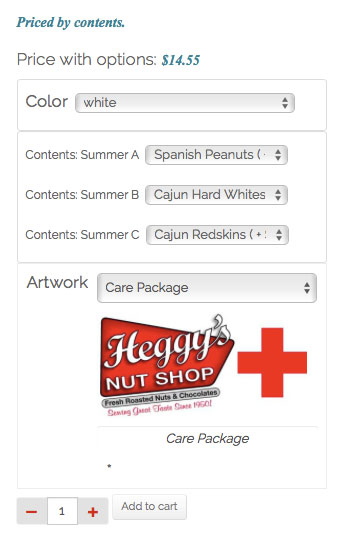
Leave the Color as "White", but modify the Options and Artwork selection. Add to cart once more. Proceed to checkout.
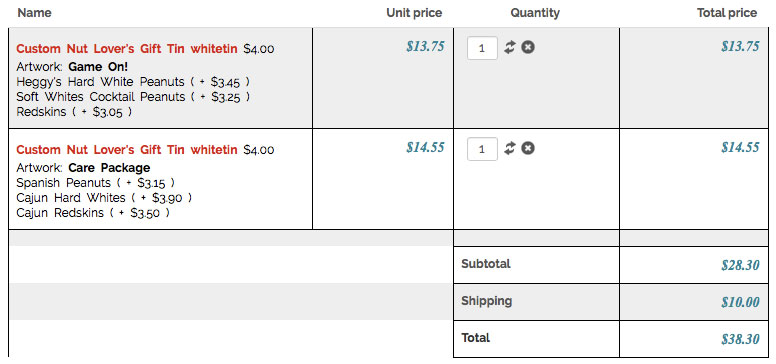
On this form, if you examine the two Qty fields, you will see that they are assigned to different Item numbers.
Now visit the Cart page ( Under the menu item "Shop Now!" select "View Cart"). I have modified the template for this page by suppressing the Image display, which I couldn't suppress using any configuration settings, and suppressing the Status column. I also added altered the text displayed by the Options and added a line to display the Custom Field value, "artwork". I did not modify the text links containing the javascripts.
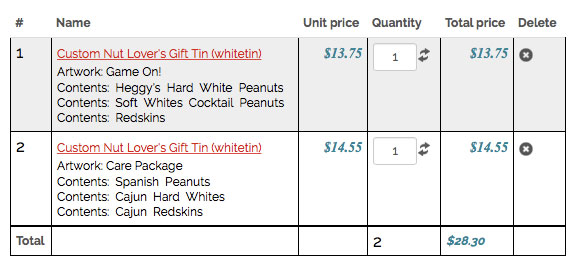
On this form, if you examine the two Qty fields, you will find that they both are assigned to the same item numbers. If you use the qty scripts, they will quickly become out of sync - The many outcomes I have seen include A) no change at all, successful change on one and unsuccessful changes on the other, C) changing the qty of the base Product, but not of the Options (incorrect Total prices), and D) changing qty of the wrong Product.
I have removed my test items from this account's cart. You should be able to start fresh.
Thanks.
Leave the Color as "White", but modify the Options and Artwork selection. Add to cart once more. Proceed to checkout.
On this form, if you examine the two Qty fields, you will see that they are assigned to different Item numbers.
Now visit the Cart page ( Under the menu item "Shop Now!" select "View Cart"). I have modified the template for this page by suppressing the Image display, which I couldn't suppress using any configuration settings, and suppressing the Status column. I also added altered the text displayed by the Options and added a line to display the Custom Field value, "artwork". I did not modify the text links containing the javascripts.
On this form, if you examine the two Qty fields, you will find that they both are assigned to the same item numbers. If you use the qty scripts, they will quickly become out of sync - The many outcomes I have seen include A) no change at all,
successful change on one and unsuccessful changes on the other, C) changing the qty of the base Product, but not of the Options (incorrect Total prices), and D) changing qty of the wrong Product.I have removed my test items from this account's cart. You should be able to start fresh.
Thanks.
Last edit: 10 years 1 week ago by Philip.
Please Log in or Create an account to join the conversation.

10 years 1 week ago #249995
by Philip
Replied by Philip on topic Cart QTY update script fail on Products w/ Options
Hello,
Sorry but you forget to provide the url link...
Awaiting news from you.
Regards
Sorry but you forget to provide the url link...
Awaiting news from you.
Regards
Please Log in or Create an account to join the conversation.
10 years 1 week ago #250020
by icomex
Part of the message is hidden for the guests. Please log in or register to see it.
It was in the form segment of my original topic submission. I assumed you had it. Here it is again.
Replied by icomex on topic Cart QTY update script fail on Products w/ Options
Part of the message is hidden for the guests. Please log in or register to see it.
It was in the form segment of my original topic submission. I assumed you had it. Here it is again.
Please Log in or Create an account to join the conversation.

10 years 1 week ago #250053
by Jerome
Jerome - Obsidev.com
HikaMarket & HikaSerial developer / HikaShop core dev team.
Also helping the HikaShop support team when having some time or couldn't sleep.
By the way, do not send me private message, use the "contact us" form instead.
Replied by Jerome on topic Cart QTY update script fail on Products w/ Options
Hi,
I followed your instructions and here my cart in the checkout.
pasteboard.co/omgfuZis.png
As you can see, the two items have different input name (default display/behavior in HikaShop).
And I was able to change the quantity and update one product :
pasteboard.co/3VBUwjKIl.png
Or the other :
pasteboard.co/3VCmHEl8p.png
Regards,
I followed your instructions and here my cart in the checkout.
pasteboard.co/omgfuZis.png
As you can see, the two items have different input name (default display/behavior in HikaShop).
And I was able to change the quantity and update one product :
pasteboard.co/3VBUwjKIl.png
Or the other :
pasteboard.co/3VCmHEl8p.png
Regards,
Jerome - Obsidev.com
HikaMarket & HikaSerial developer / HikaShop core dev team.
Also helping the HikaShop support team when having some time or couldn't sleep.
By the way, do not send me private message, use the "contact us" form instead.
Please Log in or Create an account to join the conversation.
10 years 1 week ago #250074
by icomex
Replied by icomex on topic Cart QTY update script fail on Products w/ Options
If you check carefully you will see that the cart you took screenshots of is the Checkout Cart, not the View Cart. That one DOES work.
On the View Cart, the QTY ( and DELETE ) buttons do not work on either product. Below are screenshots showing the field names of the QTY fields. As you can see, the names are identical. I can't see how this would correctly identify the specified cart product for either script, since getting the element by ID could not function correctly.
Please try again.
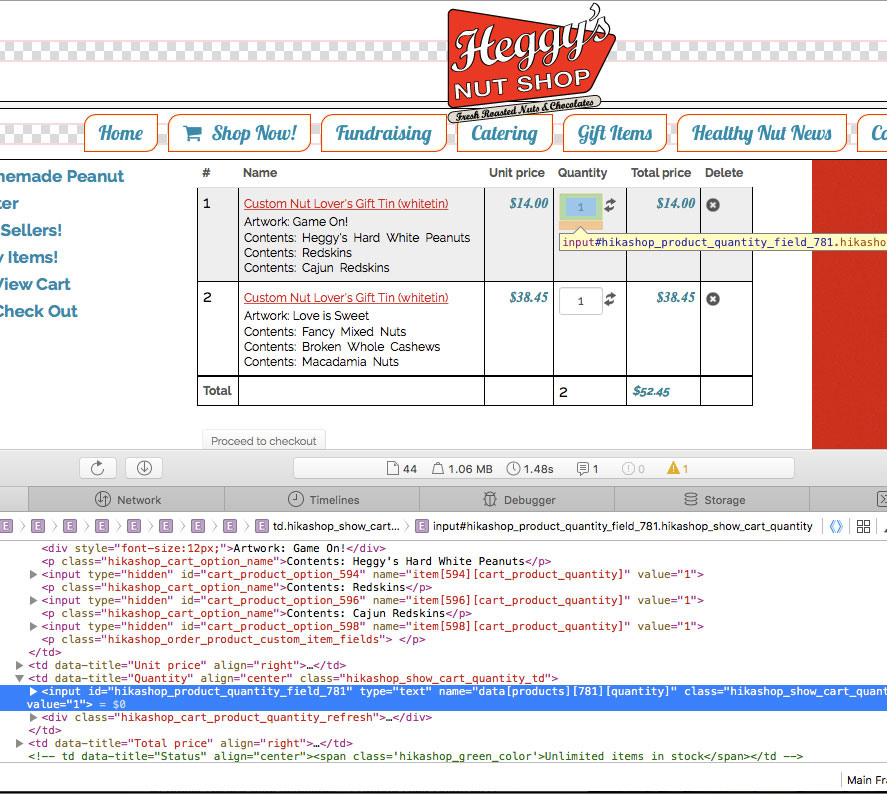
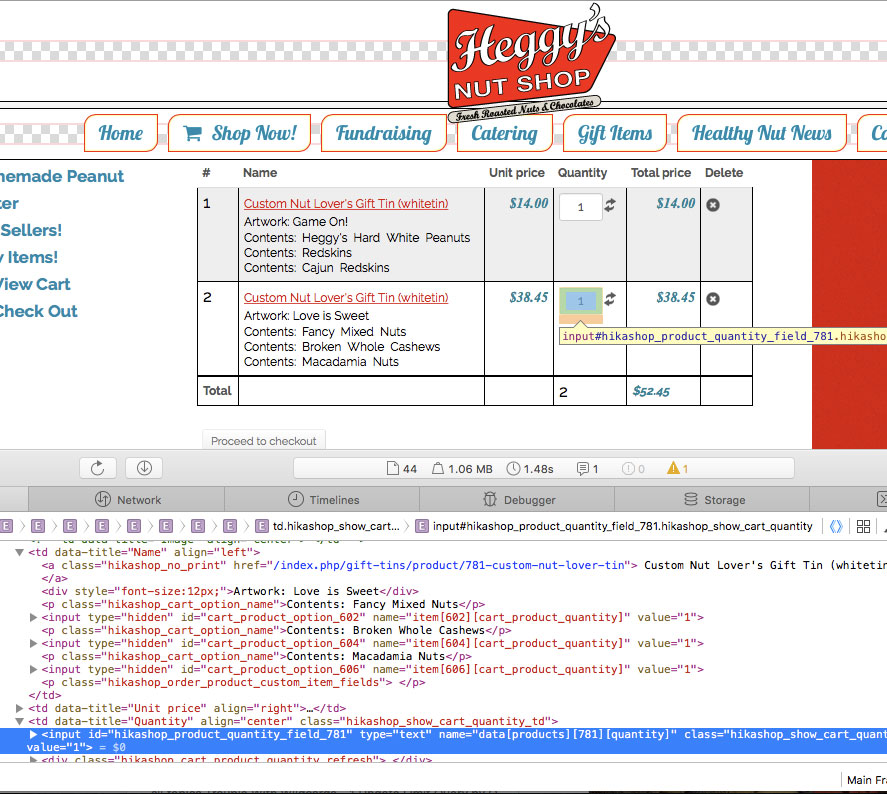
On the View Cart, the QTY ( and DELETE ) buttons do not work on either product. Below are screenshots showing the field names of the QTY fields. As you can see, the names are identical. I can't see how this would correctly identify the specified cart product for either script, since getting the element by ID could not function correctly.
Please try again.
Please Log in or Create an account to join the conversation.
10 years 1 week ago #250185
by nicolas
Replied by nicolas on topic Cart QTY update script fail on Products w/ Options
Hi,
Thank you for all the details.
We were able to reproduce the problem and added patches on our end for that.
If you download the install package on our website via the menu My account>My subscriptions and install it on your website it will add the patches. Make sure that you don't have a view override of the view file cart/showcart via the menu Display>Views or you won't see the change.
Thank you for all the details.
We were able to reproduce the problem and added patches on our end for that.
If you download the install package on our website via the menu My account>My subscriptions and install it on your website it will add the patches. Make sure that you don't have a view override of the view file cart/showcart via the menu Display>Views or you won't see the change.
The following user(s) said Thank You: icomex
Please Log in or Create an account to join the conversation.
10 years 1 week ago #250219
by icomex
Replied by icomex on topic Cart QTY update script fail on Products w/ Options
I will pull down the update and then incorporate the other display modifications I had made to the base file to create a new view override with your patch in place.
Thank you very much!
Thank you very much!
Please Log in or Create an account to join the conversation.
Time to create page: 0.204 seconds