
Remove unnecessary code

7 years 3 months ago #308767
by kyratn
Remove unnecessary code was created by kyratn
-- HikaShop version -- : 1907151726
Hi,
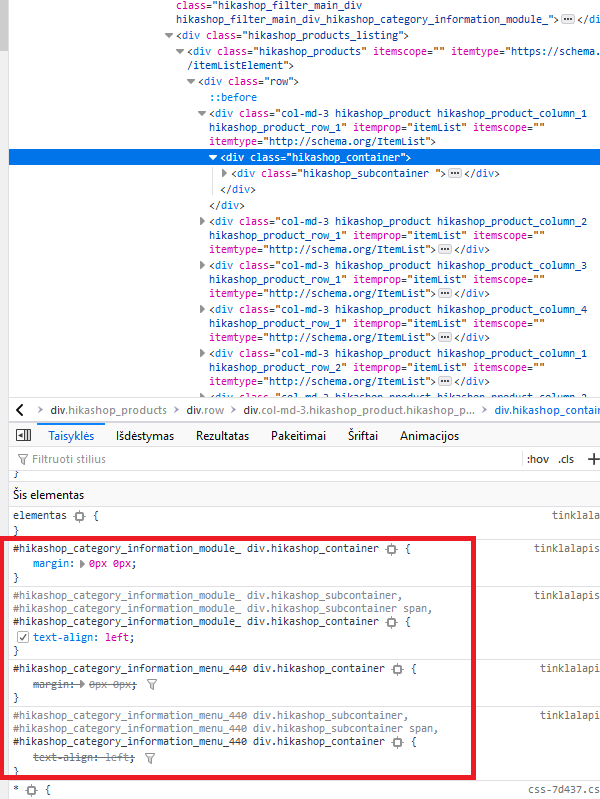
Been adapting template with new Hikashop 4.2.0 and found some hardcoded css probably with "addStyleDeclaration" which shouldn't be used if not needed.
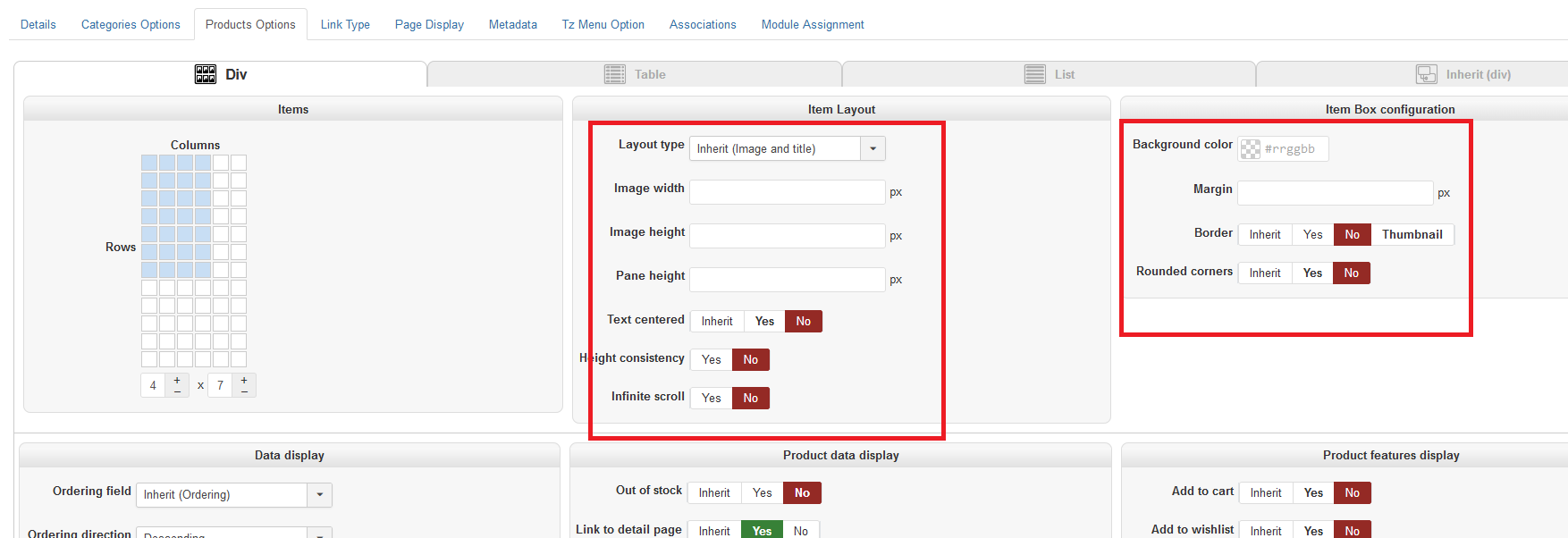
Inside menu item->product options->Item Box configuration and Item Layout we everything have set to "NO".
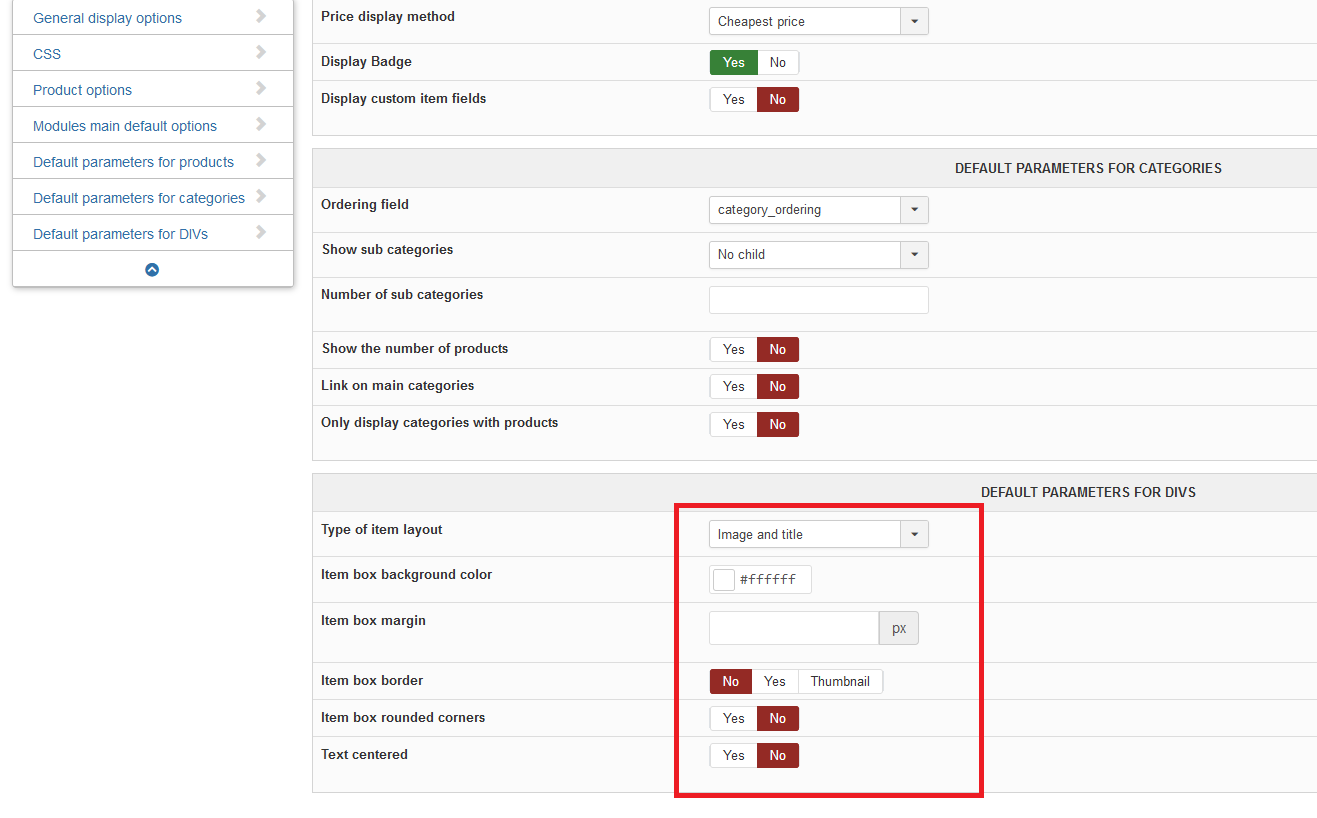
In Configuration->Default parameters for DIVs everything is set set to "NO" too, but some styles are still added which shouldn't be. Like margin and text-align...
Please add some additional check to prevent this.
Thank you
Hi,
Been adapting template with new Hikashop 4.2.0 and found some hardcoded css probably with "addStyleDeclaration" which shouldn't be used if not needed.
Inside menu item->product options->Item Box configuration and Item Layout we everything have set to "NO".
In Configuration->Default parameters for DIVs everything is set set to "NO" too, but some styles are still added which shouldn't be. Like margin and text-align...
Please add some additional check to prevent this.
Thank you
Please Log in or Create an account to join the conversation.
7 years 3 months ago #308774
by kyratn
Replied by kyratn on topic Remove unnecessary code
One more.
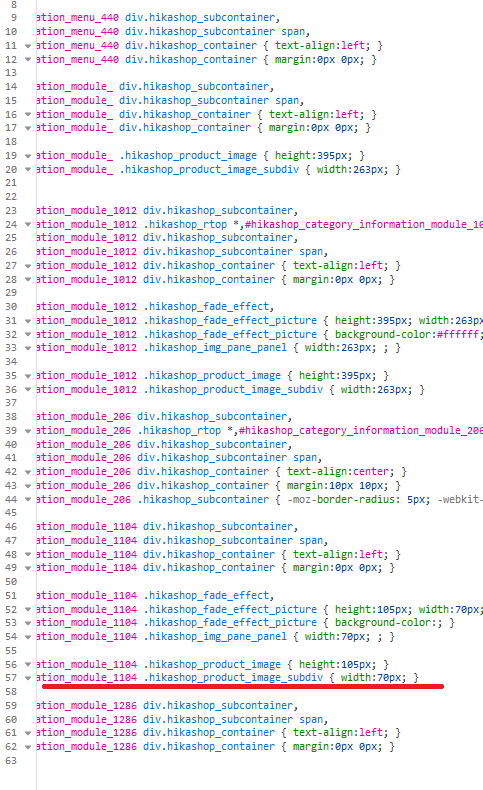
If setting image width and height via module or menu item product options, the style is added too. As you have own grid system i don't think we need this at all....
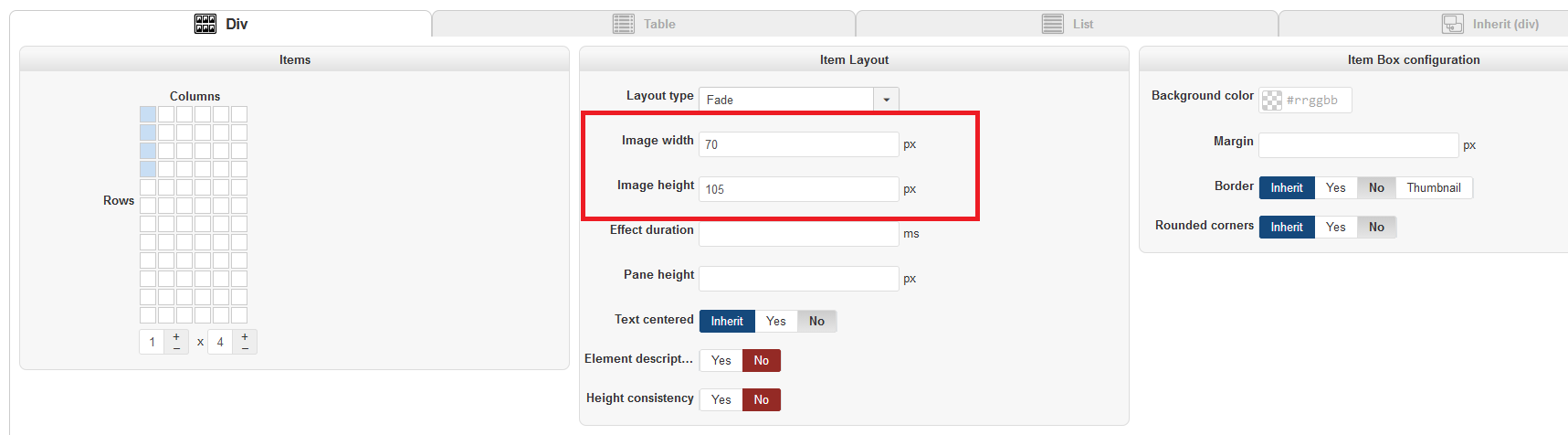
If we remove height and width, thumbs are generated to big.
Thanks
If setting image width and height via module or menu item product options, the style is added too. As you have own grid system i don't think we need this at all....
If we remove height and width, thumbs are generated to big.
Thanks
Please Log in or Create an account to join the conversation.

7 years 3 months ago - 7 years 3 months ago #308769
by nicolas
Replied by nicolas on topic Remove unnecessary code
Hi,
For the margin, we can remove them if not set. For the text-align, you want to keep it so that the text is aligned to the left (in case the template has CSS code aligning all the text centered. Otherwise, the text would be centered while you selected "no" in the "text centered" setting.
Regarding the width, this CSS is necessary for when you have badges on the products as the badges are positioned on top of the main image.
Note that if you want to remove all that CSS, you can add an entry with the namekey no_css_header and the value 1 in the hikashop_config table via your phpmyadmin.
For the margin, we can remove them if not set. For the text-align, you want to keep it so that the text is aligned to the left (in case the template has CSS code aligning all the text centered. Otherwise, the text would be centered while you selected "no" in the "text centered" setting.
Regarding the width, this CSS is necessary for when you have badges on the products as the badges are positioned on top of the main image.
Note that if you want to remove all that CSS, you can add an entry with the namekey no_css_header and the value 1 in the hikashop_config table via your phpmyadmin.
Last edit: 7 years 3 months ago by nicolas.
Please Log in or Create an account to join the conversation.
7 years 3 months ago #308824
by kyratn
Replied by kyratn on topic Remove unnecessary code
Hi,
Added value 1 for no_css_header and it has removed all css. Thank you for such feature.
1. Does it effect back-end? As far i can see there is no difference but still would like to know.
3. Will this be lost after update?
Thank you
Added value 1 for no_css_header and it has removed all css. Thank you for such feature.
1. Does it effect back-end? As far i can see there is no difference but still would like to know.
3. Will this be lost after update?
Thank you
Please Log in or Create an account to join the conversation.
7 years 3 months ago #308828
by kyratn
Replied by kyratn on topic Remove unnecessary code
Just noticed that some css is still added for product image height and width if used:
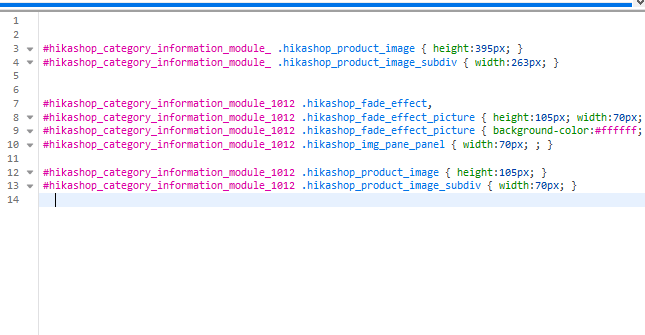
Please Log in or Create an account to join the conversation.
7 years 2 months ago #308846
by kyratn
Replied by kyratn on topic Remove unnecessary code
As my new question is related more to this topic i will ask it here.
1. With new ajax filter, looking at html of product listing i see checkout spinner classes are added twice which makes no sense, check image:
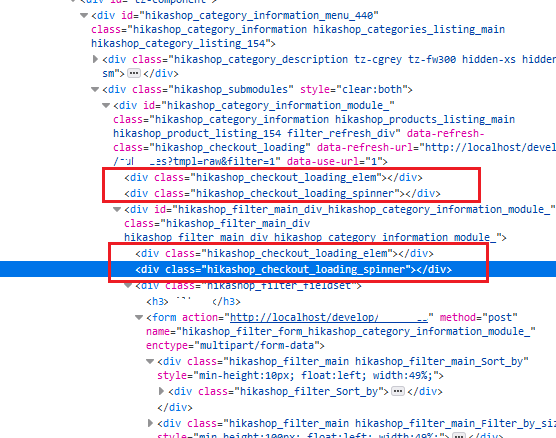
2. And displaying products via hikashop content module those spinner classes are there too. Why would it be here if ajax filtering is done only on product listing?
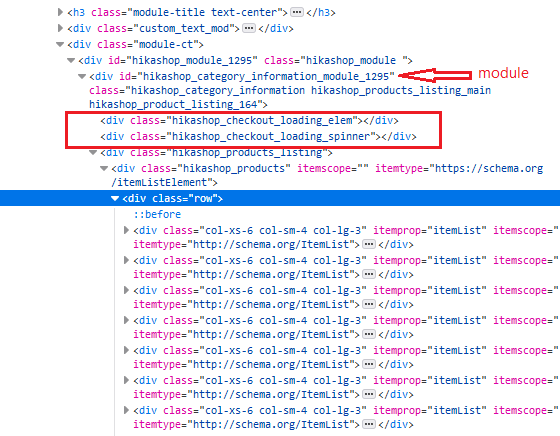
Thanks
1. With new ajax filter, looking at html of product listing i see checkout spinner classes are added twice which makes no sense, check image:
2. And displaying products via hikashop content module those spinner classes are there too. Why would it be here if ajax filtering is done only on product listing?
Thanks
Please Log in or Create an account to join the conversation.
7 years 2 months ago - 7 years 2 months ago #308833
by nicolas
Replied by nicolas on topic Remove unnecessary code
Hi,
No, that's just for this dynamic CSS on the listings, it won't affect elsewhere.
And no, the settings you add / change in the hikashop_config won't change with updates. It's like the settings of the configuration page. They don't change when you update.
And regarding that last bit of CSS, this comes directly from the item layout view file you're using. Some of it is necessary to handle the "fade" layout that you're using for this module. You can find it at the bottom of product / listing_fade.php so you can easily remove it with a view override via the menu Display>Views.
1. and 2. That's good points. While having these there when not needed doesn't create a problem, these are indeed not necessary. I've added a patch to remove them. The patch is online if you want to try.
No, that's just for this dynamic CSS on the listings, it won't affect elsewhere.
And no, the settings you add / change in the hikashop_config won't change with updates. It's like the settings of the configuration page. They don't change when you update.
And regarding that last bit of CSS, this comes directly from the item layout view file you're using. Some of it is necessary to handle the "fade" layout that you're using for this module. You can find it at the bottom of product / listing_fade.php so you can easily remove it with a view override via the menu Display>Views.
1. and 2. That's good points. While having these there when not needed doesn't create a problem, these are indeed not necessary. I've added a patch to remove them. The patch is online if you want to try.
Last edit: 7 years 2 months ago by nicolas.
Please Log in or Create an account to join the conversation.
7 years 2 months ago #308873
by kyratn
Replied by kyratn on topic Remove unnecessary code
Hi,
1. What about load_js and load_css new hidden settings? How can they be used? Does it effect back-end too?
2. Thanks. Having less DOM is always welcome.
Regards
1. What about load_js and load_css new hidden settings? How can they be used? Does it effect back-end too?
2. Thanks. Having less DOM is always welcome.
Regards
Please Log in or Create an account to join the conversation.
7 years 2 months ago #308881
by nicolas
Replied by nicolas on topic Remove unnecessary code
Hi,
1. It doesn't affect the backend. There is no point in removing the CSS/JS in the backend since normally you're using the Joomla template and you don't have to optimize the page speed like you need on the frontend.
You can use them by adding an entry with the namekey load_css or load_js and the value 0 in the table hikashop_config via your phpmyadmin.
1. It doesn't affect the backend. There is no point in removing the CSS/JS in the backend since normally you're using the Joomla template and you don't have to optimize the page speed like you need on the frontend.
You can use them by adding an entry with the namekey load_css or load_js and the value 0 in the table hikashop_config via your phpmyadmin.
Please Log in or Create an account to join the conversation.
7 years 3 weeks ago #311125
by kyratn
Replied by kyratn on topic Remove unnecessary code
Hi,
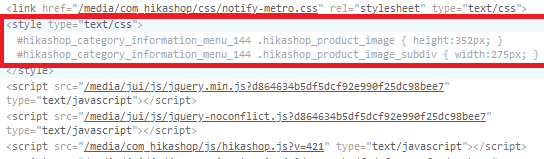
I have succesfully added no_css_header with value 1 and load_css with the value 0 in the hikashop_config. However some css is added in header if product thumbnail size is used via System->Images->Thumbnail (width x height).
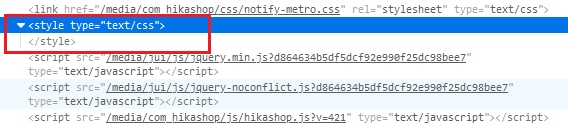
Also if no thumbnail size is added i still see some empty html style attribute in the head, which probably comes from Hikashop... Attaching some screenshots
Thank you
I have succesfully added no_css_header with value 1 and load_css with the value 0 in the hikashop_config. However some css is added in header if product thumbnail size is used via System->Images->Thumbnail (width x height).
Also if no thumbnail size is added i still see some empty html style attribute in the head, which probably comes from Hikashop... Attaching some screenshots
Thank you
Please Log in or Create an account to join the conversation.
7 years 3 weeks ago #311127
by kyratn
Replied by kyratn on topic Remove unnecessary code
Please ignore. Found it at the end in listing_img_title.php 
Please Log in or Create an account to join the conversation.
Time to create page: 0.203 seconds