
- Posts: 51
- Thank you received: 4
Problems displaying item number with two digits
- anders.drejer
-
 Topic Author
- Offline
Less
More
6 years 1 month ago #323108
by anders.drejer
Problems displaying item number with two digits was created by anders.drejer
-- url of the page with the problem -- :
www.balkapetfood.dk/
-- HikaShop version -- : 4.3.0
-- Joomla version -- : 3.9.20
-- PHP version -- : 7.4.9
-- Browser(s) name and version -- : Google Chrome Linux
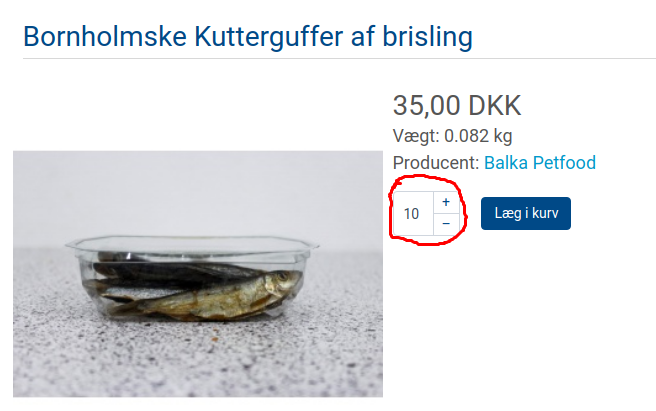
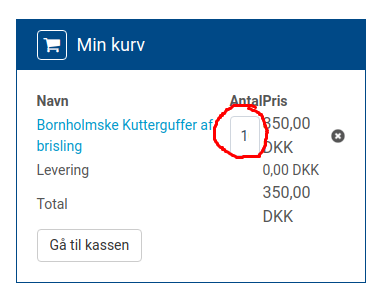
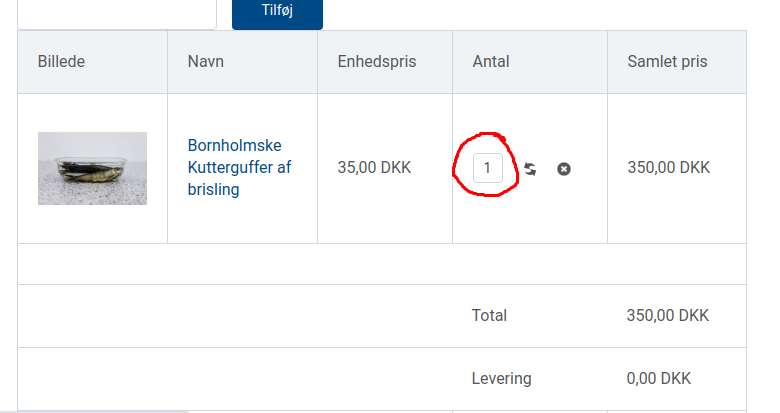
I experience problems showing two digit numbers in the basket and in the checkout process.
If I buy 10 (or more) of a item in the webshop I only see the first digit in my basket and in the final checkout process.
Is there a way to solve this, as this could confuse my customers.
I have attached three screen dumps illustrating the issue.
Best Regards,
Anders
-- HikaShop version -- : 4.3.0
-- Joomla version -- : 3.9.20
-- PHP version -- : 7.4.9
-- Browser(s) name and version -- : Google Chrome Linux
I experience problems showing two digit numbers in the basket and in the checkout process.
If I buy 10 (or more) of a item in the webshop I only see the first digit in my basket and in the final checkout process.
Is there a way to solve this, as this could confuse my customers.
I have attached three screen dumps illustrating the issue.
Best Regards,
Anders
Please Log in or Create an account to join the conversation.

Less
More
- Posts: 12953
- Thank you received: 1778
6 years 1 month ago #323114
by Mohamed Thelji
Replied by Mohamed Thelji on topic Problems displaying item number with two digits
Hello,
Sure, you'll just have to use some CSS code so that you'll be able to correctly see the quantity field's value.
For example, for the product page, using that kind of CSS code will do the job :
For more information about CSS customization :
www.hikashop.com/support/documentation/1...the-display.html#css
Kind regards,
Mohamed.
Sure, you'll just have to use some CSS code so that you'll be able to correctly see the quantity field's value.
For example, for the product page, using that kind of CSS code will do the job :
Code:
.hikashop_product_quantity_main .jsn_quantity_default .hikashop_product_quantity_input_div_default .hikashop_product_quantity_field {
width: 44px!important;
}
.hikashop_product_quantity_main .jsn_quantity_default .hikashop_product_quantity_change_div_default {
width: 22px!important;
}
For more information about CSS customization :
www.hikashop.com/support/documentation/1...the-display.html#css
Kind regards,
Mohamed.
The following user(s) said Thank You: anders.drejer
Please Log in or Create an account to join the conversation.
- anders.drejer
-
Topic Author
- Offline
Less
More
- Posts: 51
- Thank you received: 4
6 years 1 month ago #323170
by anders.drejer
Replied by anders.drejer on topic Problems displaying item number with two digits
Thank you - this did the trick 
Regards,
Anders
Regards,
Anders
Please Log in or Create an account to join the conversation.
Time to create page: 0.174 seconds