
- Posts: 14
- Thank you received: 1
No toolbars eg. save, save and close, etc
- The Wheaten Terrier
-
 Topic Author
- Offline
- I'm trying my best!
Less
More
1 year 1 week ago #369108
by The Wheaten Terrier
Tolerence costs nothing.
Intolerance is intolerable!
No toolbars eg. save, save and close, etc was created by The Wheaten Terrier
-- HikaShop version -- : 6.1.0
-- Joomla version -- : 6.0.0
-- PHP version -- : 8.3
-- Browser(s) name and version -- : Safari
Hi,
When accessing any of the Hickashop menu items such as categories, products listing, etc there is no toolbar for the save, save and close, cancel options plus the page is all totally messed up and showing the HTML.
I am using the latest version of Hickashop business and this is on the backend. I can therefore not create menu items for the frontend or edit current menu items.
Please help.
Many thanks.
-- Joomla version -- : 6.0.0
-- PHP version -- : 8.3
-- Browser(s) name and version -- : Safari
Hi,
When accessing any of the Hickashop menu items such as categories, products listing, etc there is no toolbar for the save, save and close, cancel options plus the page is all totally messed up and showing the HTML.
I am using the latest version of Hickashop business and this is on the backend. I can therefore not create menu items for the frontend or edit current menu items.
Please help.
Many thanks.
Tolerence costs nothing.
Intolerance is intolerable!
Please Log in or Create an account to join the conversation.

1 year 1 week ago #369114
by nicolas
Replied by nicolas on topic No toolbars eg. save, save and close, etc
Hi,
That's strange. Can you check that the "Backend CSS file" setting is set to "default" in the HikaShop configuration page ?
If it's set to "none", then the CSS of HikaShop in the backend would be missing and this can lead to a lot of display problems until you do something to have CSS code in the backend template to cover the missing CSS from HikaShop.
Could you provide some screenshots to illustrate the situation ?
That's strange. Can you check that the "Backend CSS file" setting is set to "default" in the HikaShop configuration page ?
If it's set to "none", then the CSS of HikaShop in the backend would be missing and this can lead to a lot of display problems until you do something to have CSS code in the backend template to cover the missing CSS from HikaShop.
Could you provide some screenshots to illustrate the situation ?
Please Log in or Create an account to join the conversation.
- The Wheaten Terrier
-
Topic Author
- Offline
- I'm trying my best!
Less
More
- Posts: 14
- Thank you received: 1
1 year 1 week ago #369126
by The Wheaten Terrier
Tolerence costs nothing.
Intolerance is intolerable!
Replied by The Wheaten Terrier on topic No toolbars eg. save, save and close, etc
Hi Nicolas,
The CSS is set to default within the configuration of Hikashop and I am using the default Joomla template for the backend also.
I have encountered issues with Joomla 6 and templates not working but only on the frontend and because the backward compatibility plugin is no longer in use on Joomla 6 I believe. This issue does not effect clients sites running on Joomla 5.x.x
I've attached a screen shot as requested.
Cheers,
Z
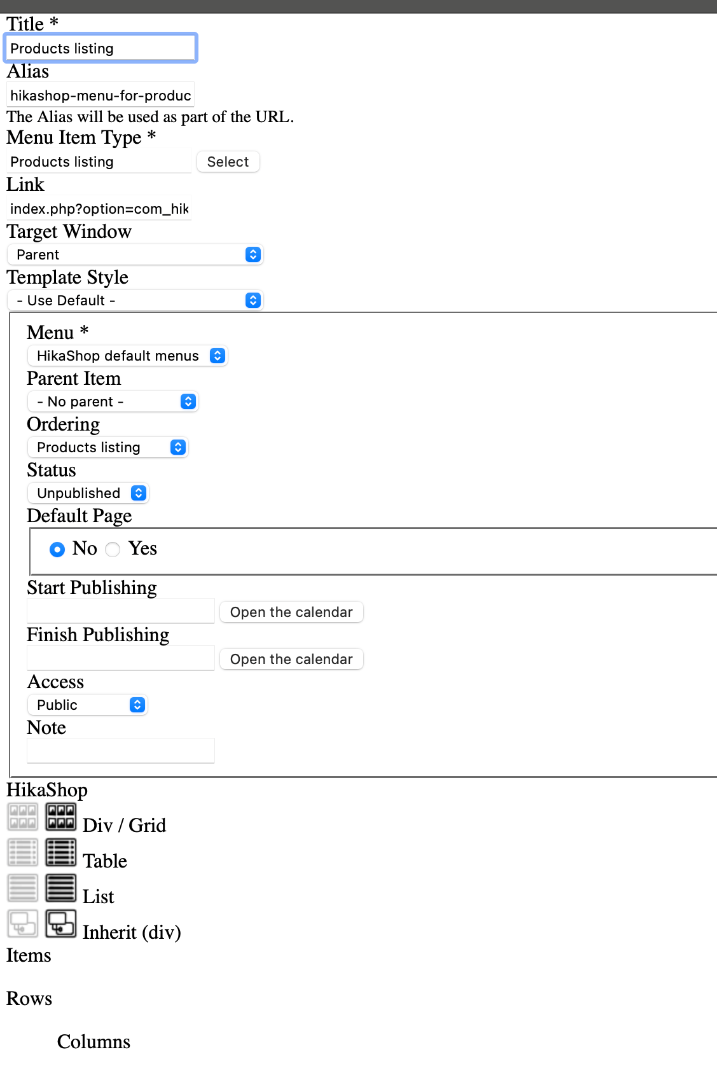 .
.
The CSS is set to default within the configuration of Hikashop and I am using the default Joomla template for the backend also.
I have encountered issues with Joomla 6 and templates not working but only on the frontend and because the backward compatibility plugin is no longer in use on Joomla 6 I believe. This issue does not effect clients sites running on Joomla 5.x.x
I've attached a screen shot as requested.
Cheers,
Z
Tolerence costs nothing.
Intolerance is intolerable!
Please Log in or Create an account to join the conversation.
1 year 1 week ago #369127
by nicolas
Replied by nicolas on topic No toolbars eg. save, save and close, etc
Hi,
This looks like the CSS of HikaShop is completely missing.
I don't have the problem on my end.
Could you provide a backend access in order to check the situation ?
If so, please go through our contact form:
www.hikashop.com/support/contact-us.html
This looks like the CSS of HikaShop is completely missing.
I don't have the problem on my end.
Could you provide a backend access in order to check the situation ?
If so, please go through our contact form:
www.hikashop.com/support/contact-us.html
Please Log in or Create an account to join the conversation.
- The Wheaten Terrier
-
Topic Author
- Offline
- I'm trying my best!
Less
More
- Posts: 14
- Thank you received: 1
1 year 1 week ago #369146
by The Wheaten Terrier
Tolerence costs nothing.
Intolerance is intolerable!
Replied by The Wheaten Terrier on topic No toolbars eg. save, save and close, etc
It gets more bizarre!
I am now unable to access articles in the backend for editing and it results in an error (sorry didn't make a note of the code) but Joomla seems totally broken.
I have disabled all Hikashop components and can now access the content and edit it as normal.
I sent you details of your backend username and password BTW.
Cheers.
I am now unable to access articles in the backend for editing and it results in an error (sorry didn't make a note of the code) but Joomla seems totally broken.
I have disabled all Hikashop components and can now access the content and edit it as normal.
I sent you details of your backend username and password BTW.
Cheers.
Tolerence costs nothing.
Intolerance is intolerable!
Please Log in or Create an account to join the conversation.
Time to create page: 0.084 seconds