
- Posts: 22
- Thank you received: 1
The routing for brand list pages fails in the product detail
- E. van Doorne
-
 Topic Author
- Offline
Less
More
6 months 2 weeks ago #371604
by E. van Doorne
-- HikaShop version -- : 6.4.1
-- Joomla version -- : 5.4.5
-- PHP version -- : 8.3.21
-- Browser(s) name and version -- : Firefox 149.0.2
-- Error-message(debug-mod must be tuned on) -- : Routing for Brand list page failes in product detail view
On the product details page, the block 'show_dimensions' renders a link to the 'brand page', but it always routes to the first menu item.
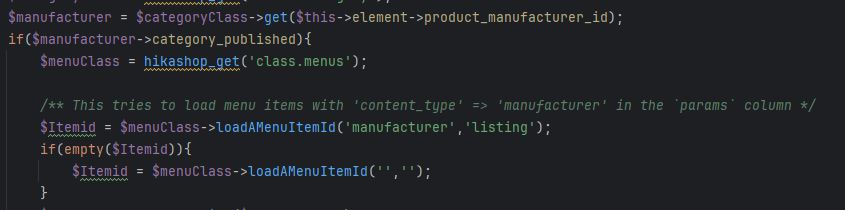
This code calls the hikashopMenuClass (/administrator/components/com_hikashop/classes/menus.php) and tries to search for a menu item that has the key 'content_type' and value 'manufacturer'. No matter what i try i can't manage to create a menu item with those params.

After the code can't find a menu item it returns the first menu item in the list.
-- Joomla version -- : 5.4.5
-- PHP version -- : 8.3.21
-- Browser(s) name and version -- : Firefox 149.0.2
-- Error-message(debug-mod must be tuned on) -- : Routing for Brand list page failes in product detail view
On the product details page, the block 'show_dimensions' renders a link to the 'brand page', but it always routes to the first menu item.
This code calls the hikashopMenuClass (/administrator/components/com_hikashop/classes/menus.php) and tries to search for a menu item that has the key 'content_type' and value 'manufacturer'. No matter what i try i can't manage to create a menu item with those params.
After the code can't find a menu item it returns the first menu item in the list.
Please Log in or Create an account to join the conversation.

6 months 2 weeks ago #371609
by nicolas
Replied by nicolas on topic The routing for brand list pages fails in the product detail
Hello,
Thanks for the detailed report. You identified correctly where the problem was: the menu-item lookup in hikashopMenuClass is matching manufacturer-listing menus too narrowly. Specifically, it is comparing the menu's selected category against a single category id picked by a SELECT with no LIMIT or ORDER BY, so a category-listing menu pointing to a brand other than the one that row happens to return is not recognised as a manufacturer listing, and the fallback then returns an unrelated menu item.
We have broadened the lookup so that any category-listing menu whose selected category has category_type=manufacturer is now accepted, in addition to menus that explicitly carry content_type=manufacturer in their params. The change is in the 6.4.1 branch. Please download the latest 6.4.1 build from your member area on our website and install it over your current installation. After the update your brand link should route through your intended manufacturer-listing menu instead of the first available HikaShop menu.
Thanks for the detailed report. You identified correctly where the problem was: the menu-item lookup in hikashopMenuClass is matching manufacturer-listing menus too narrowly. Specifically, it is comparing the menu's selected category against a single category id picked by a SELECT with no LIMIT or ORDER BY, so a category-listing menu pointing to a brand other than the one that row happens to return is not recognised as a manufacturer listing, and the fallback then returns an unrelated menu item.
We have broadened the lookup so that any category-listing menu whose selected category has category_type=manufacturer is now accepted, in addition to menus that explicitly carry content_type=manufacturer in their params. The change is in the 6.4.1 branch. Please download the latest 6.4.1 build from your member area on our website and install it over your current installation. After the update your brand link should route through your intended manufacturer-listing menu instead of the first available HikaShop menu.
The following user(s) said Thank You: E. van Doorne
Please Log in or Create an account to join the conversation.
- E. van Doorne
-
Topic Author
- Offline
Less
More
- Posts: 22
- Thank you received: 1
6 months 1 week ago #371646
by E. van Doorne
Replied by E. van Doorne on topic The routing for brand list pages fails in the product detail
I have downloaded the 6.4.1 installer, but when saving our brand menu item, the `param` column does not have a 'content_type' defined or filled. I have downloaded the 6.4.1 installer from my account -> my subscriptions -> hikashop multisites -> latest stable version. Do i need to use a different installer?
Please Log in or Create an account to join the conversation.
6 months 1 week ago #371647
by nicolas
Replied by nicolas on topic The routing for brand list pages fails in the product detail
Hi,
No. It doesn't need it. You can use a categories / products listing menu item with the "main category" setting set to the main "brand" category, or a brand.
The system will now automatically look for a menu item matching with the brand, or with a menu item matching with the main brand category.
No. It doesn't need it. You can use a categories / products listing menu item with the "main category" setting set to the main "brand" category, or a brand.
The system will now automatically look for a menu item matching with the brand, or with a menu item matching with the main brand category.
Please Log in or Create an account to join the conversation.
- E. van Doorne
-
Topic Author
- Offline
Less
More
- Posts: 22
- Thank you received: 1
6 months 1 week ago #371680
by E. van Doorne
Replied by E. van Doorne on topic The routing for brand list pages fails in the product detail
We actually already have such menu items in place, both for the main "Brands' category as well as for numerous individual brands. Yet the brand redirects from the individual product's pages do not work and route incorrectly to the first me menu item.
Please Log in or Create an account to join the conversation.
6 months 1 week ago #371682
by nicolas
Replied by nicolas on topic The routing for brand list pages fails in the product detail
Hi,
Since we're not able to reproduce the issue anymore, please provide a backend access and a FTP access so that we can look into the situation on your website directly. Maybe there's a corner case that isn't handled properly.
www.hikashop.com/support/contact-us.html
Since we're not able to reproduce the issue anymore, please provide a backend access and a FTP access so that we can look into the situation on your website directly. Maybe there's a corner case that isn't handled properly.
www.hikashop.com/support/contact-us.html
Please Log in or Create an account to join the conversation.
5 months 3 weeks ago #371883
by nicolas
Replied by nicolas on topic The routing for brand list pages fails in the product detail
Hi,
Thank you for the access. I was able to reproduce the issue and made another patch for it. We've added it on your website and confirm it now works as expected there. We've also included the patch on our end. So, for anyone else with the issue, download again the install package of HikaShop on our website and install it on yours to get the patch.
Thank you for the access. I was able to reproduce the issue and made another patch for it. We've added it on your website and confirm it now works as expected there. We've also included the patch on our end. So, for anyone else with the issue, download again the install package of HikaShop on our website and install it on yours to get the patch.
Please Log in or Create an account to join the conversation.
- E. van Doorne
-
Topic Author
- Offline
Less
More
- Posts: 22
- Thank you received: 1
5 months 3 weeks ago - 5 months 3 weeks ago #371889
by E. van Doorne
Replied by E. van Doorne on topic The routing for brand list pages fails in the product detail
Hello Nicolas, thank you for taking the time to sort this out. If I go to a number of existing individual Product pages on our website, the Brand name stil links to the wrong url. Some other Product pages now give a Brand url that is basically correct, but the brand name gets repeated twice in the url (eg.
mydomain.com/brands/brand-name/brand-name/
)
Do I need to recreate those url's in some way, or is there anything else I need to do in order to make the fix work for existing products/brands and have uniform Brand urls?
Do I need to recreate those url's in some way, or is there anything else I need to do in order to make the fix work for existing products/brands and have uniform Brand urls?
Last edit: 5 months 3 weeks ago by E. van Doorne.
Please Log in or Create an account to join the conversation.
5 months 3 weeks ago #371890
by nicolas
Replied by nicolas on topic The routing for brand list pages fails in the product detail
Mmm. It worked fine on the one product I tested on your website.
Please provide URLs of the products with the 2 issues.
You can go through our contact form if necessary.
Please provide URLs of the products with the 2 issues.
You can go through our contact form if necessary.
Please Log in or Create an account to join the conversation.
- E. van Doorne
-
Topic Author
- Offline
Less
More
- Posts: 22
- Thank you received: 1
5 months 2 weeks ago #371996
by E. van Doorne
Replied by E. van Doorne on topic The routing for brand list pages fails in the product detail
I have posted example url's via the contact form
Please Log in or Create an account to join the conversation.
5 months 2 weeks ago #372001
by nicolas
Replied by nicolas on topic The routing for brand list pages fails in the product detail
Hi,
Thanks for the URLs. I was able to understand the situation, reproduce the issue on my end and make some patch to fix that.
Download again the install package of HikaShop and install it on yours.
Thanks for the URLs. I was able to understand the situation, reproduce the issue on my end and make some patch to fix that.
Download again the install package of HikaShop and install it on yours.
Please Log in or Create an account to join the conversation.
- E. van Doorne
-
Topic Author
- Offline
Less
More
- Posts: 22
- Thank you received: 1
5 months 2 weeks ago #372006
by E. van Doorne
Replied by E. van Doorne on topic The routing for brand list pages fails in the product detail
Hi Nicolas, thanks for the swift action. The patch almost solves it, but not entirely I'm afraid. It appears it works well for products from a brand where a dedicated page with all products from that brand is created. Bur for products from a brand for which no 'brand page' is created, the routing is now different and still not entirely correct. I'll post url's in the contact form.
Please Log in or Create an account to join the conversation.
5 months 2 weeks ago #372007
by nicolas
Replied by nicolas on topic The routing for brand list pages fails in the product detail
Hi,
Thank you for the extra details. I've made a new patch for this. Please try again. It should be good now.
Thank you for the extra details. I've made a new patch for this. Please try again. It should be good now.
Please Log in or Create an account to join the conversation.
- E. van Doorne
-
Topic Author
- Offline
Less
More
- Posts: 22
- Thank you received: 1
5 months 2 weeks ago #372011
by E. van Doorne
Replied by E. van Doorne on topic The routing for brand list pages fails in the product detail
Hello Nicolas, I downloaded and installed the 6.4.1 Multisites version from the website just now and installed it. I'm sorry to day I see no difference in behavior. Details in contact e-mail.
Please Log in or Create an account to join the conversation.
5 months 1 week ago #372016
by nicolas
Replied by nicolas on topic The routing for brand list pages fails in the product detail
Hi,
Thanks. I've made a new patch for this. Please try again. It should be good now.
Thanks. I've made a new patch for this. Please try again. It should be good now.
Please Log in or Create an account to join the conversation.
- E. van Doorne
-
Topic Author
- Offline
Less
More
- Posts: 22
- Thank you received: 1
5 months 1 week ago #372066
by E. van Doorne
Replied by E. van Doorne on topic The routing for brand list pages fails in the product detail
Many thanks for this new patch. This has solved the issue.
The following user(s) said Thank You: nicolas
Please Log in or Create an account to join the conversation.
Time to create page: 0.146 seconds