
- Posts: 13
- Thank you received: 1
Hikashop User Points - calculation problem
- stephanie.pomerleau
-
 Topic Author
- Offline
Less
More
10 years 10 months ago - 10 years 10 months ago #222133
by stephanie.pomerleau
Hikashop User Points - calculation problem was created by stephanie.pomerleau
-- HikaShop version -- : 2.6.0 Business
-- Joomla version -- : 3.4.1
I am having an issue with how points are being earned on purchase.
I want points to be earned as 1 point for 1$ on specific categories only.
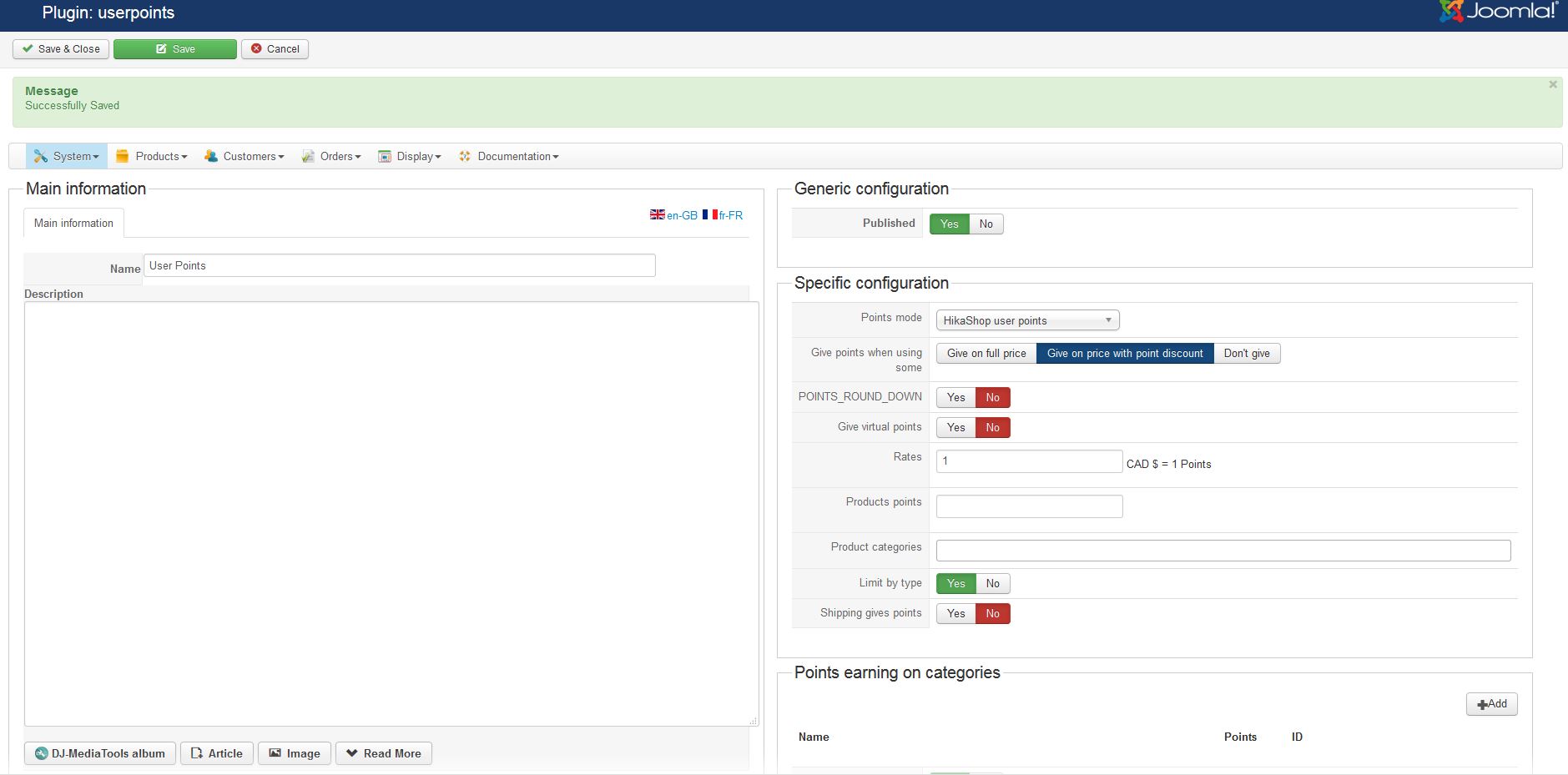
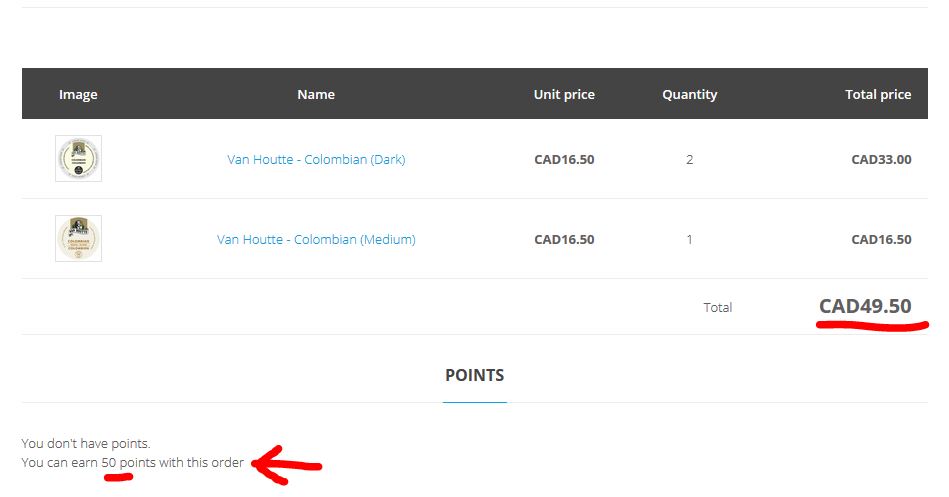
When the plugin is configured to earn 1 point for each dollar, with no product category specified (see: Capture-user-point-plugin-config-01.jpg), everything works as expected. 3 admissible products in the cart for a total of $49.50 earns 50 points (see: Capture-points-no-category-in-config.jpg)
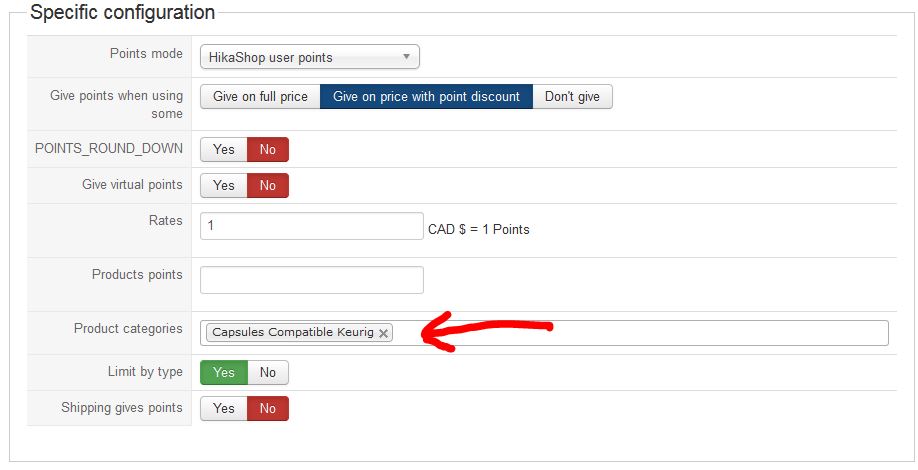
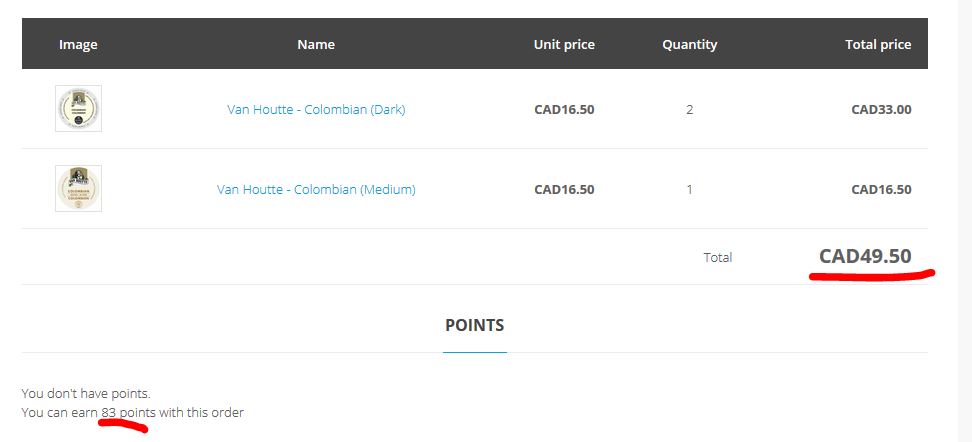
When I add a product category in the "Product categories" field in the configuration (see: Capture-user-point-plugin-config-02.jpg) , the points earned are more than the rate that has been set. 49.50$ earns 83 points, but should only earn 50. (see: Capture-points-with-category-in-config-02.jpg)
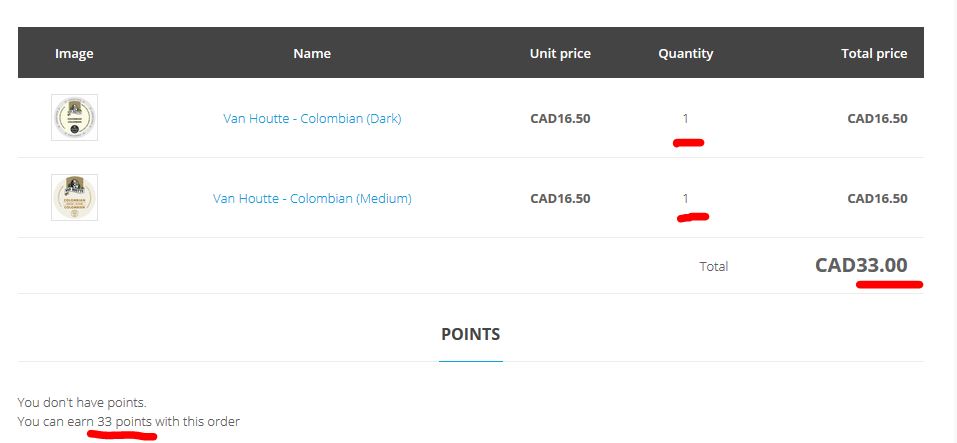
With same configuration settings as previous (with product categories), when I have 2 different products, but in the same category, points are ok. $33 earns 33 points (see: Capture-points-with-category-in-config-02A.jpg)
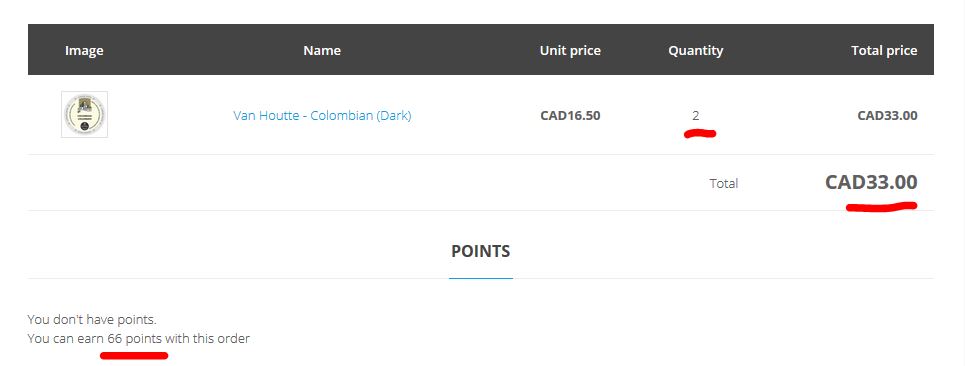
If I have 2 identical products, points are multiplied, and actually earn more than 1 point per 1$. $33 earns 66 points (see: Capture-points-with-category-in-config-02B.jpg)
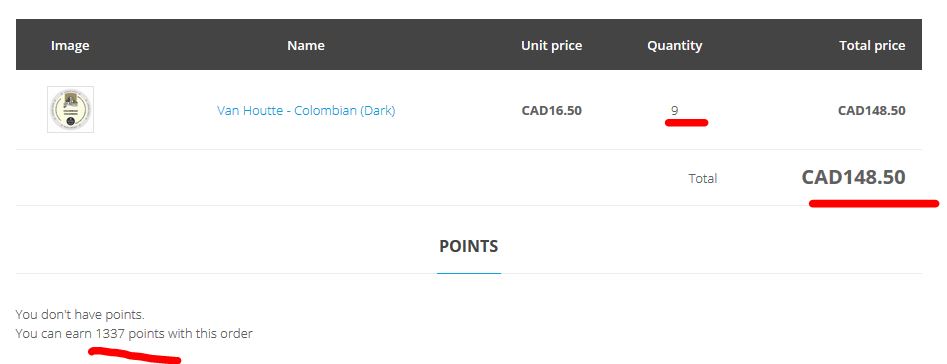
The problem is amplified when I put 9 identical items in the cart. 148.50$ earns 1337 points. (see: Capture-points-with-category-in-config-9-identical-products.jpg).
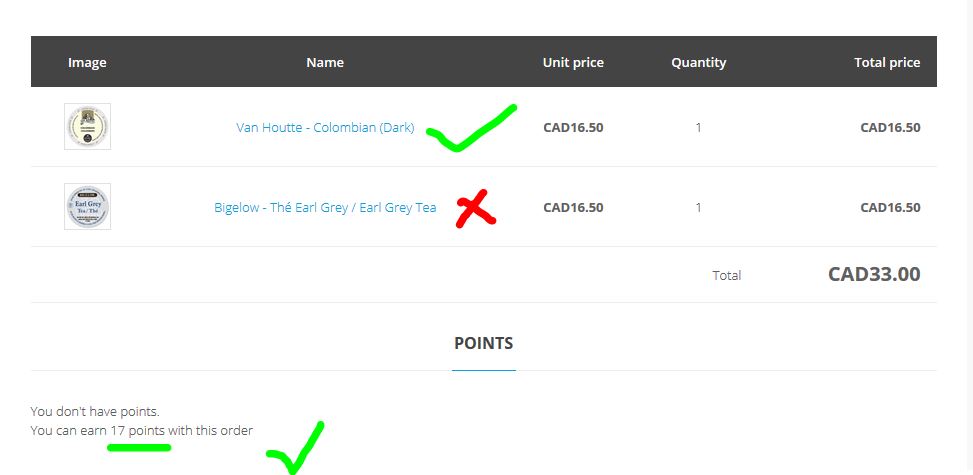
If I test using 1 product in the desired category, and 1 product outside the desired category (deos not earn points), the behaviour is as expected: points on the coffee, but not on the tea. $33 dollars, but only 16.50$ is admissible to points, and 17 points are earned. (see: Capture-points-with-category-in-config-1-product-not-in-category.jpg)
It looks like the points are calculated by multiplying the number of products by the subtotal of the product line (9 x 148.50$ = 1336.50 points, which rounds to 1337).
I don't think this is the expected behaviour, and this should be fixed.
Thanks,
Stephanie
-- Joomla version -- : 3.4.1
I am having an issue with how points are being earned on purchase.
I want points to be earned as 1 point for 1$ on specific categories only.
When the plugin is configured to earn 1 point for each dollar, with no product category specified (see: Capture-user-point-plugin-config-01.jpg), everything works as expected. 3 admissible products in the cart for a total of $49.50 earns 50 points (see: Capture-points-no-category-in-config.jpg)
When I add a product category in the "Product categories" field in the configuration (see: Capture-user-point-plugin-config-02.jpg) , the points earned are more than the rate that has been set. 49.50$ earns 83 points, but should only earn 50. (see: Capture-points-with-category-in-config-02.jpg)
With same configuration settings as previous (with product categories), when I have 2 different products, but in the same category, points are ok. $33 earns 33 points (see: Capture-points-with-category-in-config-02A.jpg)
If I have 2 identical products, points are multiplied, and actually earn more than 1 point per 1$. $33 earns 66 points (see: Capture-points-with-category-in-config-02B.jpg)
The problem is amplified when I put 9 identical items in the cart. 148.50$ earns 1337 points. (see: Capture-points-with-category-in-config-9-identical-products.jpg).
If I test using 1 product in the desired category, and 1 product outside the desired category (deos not earn points), the behaviour is as expected: points on the coffee, but not on the tea. $33 dollars, but only 16.50$ is admissible to points, and 17 points are earned. (see: Capture-points-with-category-in-config-1-product-not-in-category.jpg)
It looks like the points are calculated by multiplying the number of products by the subtotal of the product line (9 x 148.50$ = 1336.50 points, which rounds to 1337).
I don't think this is the expected behaviour, and this should be fixed.
Thanks,
Stephanie
Last edit: 10 years 10 months ago by Jerome. Reason: insert capture in message in order to be able to analyze it
Please Log in or Create an account to join the conversation.

10 years 10 months ago #222143
by Jerome
Jerome - Obsidev.com
HikaMarket & HikaSerial developer / HikaShop core dev team.
Replied by Jerome on topic Hikashop User Points - calculation problem
Hi,
Thanks for that detailed report.
In the plugin, when you have a filter on the product categories, the plugin will check each product and process the sum for all of them which are in the targeted categories :
In that algorithm, we want to get the unit price of the product ; but it looks like in your case it retrieve the global price.
So we will add few lines in order to force the reading of the unit price.
Let me know if it fixes your issue.
Kind regards,
Thanks for that detailed report.
In the plugin, when you have a filter on the product categories, the plugin will check each product and process the sum for all of them which are in the targeted categories :
Code:
$product_price = 0.0;
if(empty($product->prices) && !empty($product->order_product_price)) {
$product_price = (float)hikashop_toFloat(@$product->order_product_price) + (float)hikashop_toFloat(@$product->order_product_tax);
} else if(!empty($product->prices)) {
if(isset($product->prices[0]->price_value_with_tax))
$product_price = $product->prices[0]->price_value_with_tax;
else
$product_price = $product->prices[0]->price_value;
}
if(isset($product->order_product_quantity))
$product_price *= (int)$product->order_product_quantity;
else
$product_price *= (int)$product->cart_product_quantity;
In that algorithm, we want to get the unit price of the product ; but it looks like in your case it retrieve the global price.
So we will add few lines in order to force the reading of the unit price.
Code:
$product_price = 0.0;
if(empty($product->prices) && !empty($product->order_product_price)) {
$product_price = (float)hikashop_toFloat(@$product->order_product_price) + (float)hikashop_toFloat(@$product->order_product_tax);
} else if(!empty($product->prices)) {
$p = $product->prices[0];
if(isset($p->unit_price))
$p = $p->unit_price;
if(isset($p->price_value_with_tax))
$product_price = $p->price_value_with_tax;
else
$product_price = $p->price_value;
}
if(isset($product->order_product_quantity))
$product_price *= (int)$product->order_product_quantity;
else
$product_price *= (int)$product->cart_product_quantity;
Let me know if it fixes your issue.
Kind regards,
Jerome - Obsidev.com
HikaMarket & HikaSerial developer / HikaShop core dev team.
The following user(s) said Thank You: stephanie.pomerleau
Please Log in or Create an account to join the conversation.
- stephanie.pomerleau
-
Topic Author
- Offline
Less
More
- Posts: 13
- Thank you received: 1
10 years 10 months ago - 10 years 10 months ago #222262
by stephanie.pomerleau
Replied by stephanie.pomerleau on topic Hikashop User Points - calculation problem
And where do I find the file that has this code that I need to change? Sorry, I am new at HikaShop 
UPDATE: found the file: plugins/hikashop/userpoints/userpoints.php
UPDATE: found the file: plugins/hikashop/userpoints/userpoints.php
Last edit: 10 years 10 months ago by stephanie.pomerleau. Reason: update info
Please Log in or Create an account to join the conversation.
- stephanie.pomerleau
-
Topic Author
- Offline
Less
More
- Posts: 13
- Thank you received: 1
10 years 10 months ago #222264
by stephanie.pomerleau
Replied by stephanie.pomerleau on topic Hikashop User Points - calculation problem
Your code fixed the problem, thank you!!
The following user(s) said Thank You: Jerome
Please Log in or Create an account to join the conversation.
Time to create page: 0.196 seconds