
- Posts: 165
- Thank you received: 3
google analytics plugin code not tracking correctly.
- jschroeder
-
 Topic Author
- Offline
Less
More
9 years 9 months ago - 9 years 9 months ago #257643
by jschroeder
google analytics plugin code not tracking correctly. was created by jschroeder
-- HikaShop version -- : 2.6.3
-- Joomla version -- : 2.6.4
Hi, I am having a very weird issue. I attached a screenshot of both my plugin settings as well as the report sales for analytics. There is something very off in the analytics plugin in hikashop. It is reporting equal values for both the revenue and tax column in analytics. However, I don't even have tax on any product in the entire cart currently so, I have no idea how this could be happening?
The total sales that should be showing up currently should be approx. twice what it is right now and tax should be 0.
Can you please help me, this is a major issue?
-- Joomla version -- : 2.6.4
Hi, I am having a very weird issue. I attached a screenshot of both my plugin settings as well as the report sales for analytics. There is something very off in the analytics plugin in hikashop. It is reporting equal values for both the revenue and tax column in analytics. However, I don't even have tax on any product in the entire cart currently so, I have no idea how this could be happening?
The total sales that should be showing up currently should be approx. twice what it is right now and tax should be 0.
Can you please help me, this is a major issue?
Last edit: 9 years 9 months ago by jschroeder.
Please Log in or Create an account to join the conversation.

9 years 9 months ago #257681
by nicolas
Replied by nicolas on topic google analytics plugin code not tracking correctly.
Hi,
We've actually added several fixes to the Google Analytics plugin in HikaShop 2.6.4 in order to fix the calculated amounts sent to GA which could be incorrect in some cases.
So you must be in one of these cases.
I would recommend to update to the latest version of HikaShop and the new data which will be sent to GA should be correct. Regarding the data already sent to GA, I'm afraid there is nothing that can be done.
We've actually added several fixes to the Google Analytics plugin in HikaShop 2.6.4 in order to fix the calculated amounts sent to GA which could be incorrect in some cases.
So you must be in one of these cases.
I would recommend to update to the latest version of HikaShop and the new data which will be sent to GA should be correct. Regarding the data already sent to GA, I'm afraid there is nothing that can be done.
Please Log in or Create an account to join the conversation.
- jschroeder
-
Topic Author
- Offline
Less
More
- Posts: 165
- Thank you received: 3
9 years 9 months ago #257713
by jschroeder
Replied by jschroeder on topic google analytics plugin code not tracking correctly.
Thank you for the response I was afraid that was going to be your response. Our client is about through with all the holiday sales so I will have to attempt to upgrade after they are finished. We had a 3rd party price by zip code component made for hikashop 2.6.3 and it is not guaranteed to work with 2.6.4. I will just have to update and thoroughly test everything and hope that the zip code component does not break because from what you said analytics will not be accurate which is a major issue because of the size of the client.
Thanks,
Josh
Thanks,
Josh
Please Log in or Create an account to join the conversation.
9 years 9 months ago #257715
by nicolas
Replied by nicolas on topic google analytics plugin code not tracking correctly.
Hi,
What you can do then is download the 2.6.4 install package, get the google analytics plugin files from the folder back/extensions in the install package, zip them and install them on your website. It should work fine with the 2.6.3 and it will contain the fixes for the calculations.
What you can do then is download the 2.6.4 install package, get the google analytics plugin files from the folder back/extensions in the install package, zip them and install them on your website. It should work fine with the 2.6.3 and it will contain the fixes for the calculations.
Please Log in or Create an account to join the conversation.
- PolishedGeek
-

- Offline
- Official HikaShop Development Partner
9 years 6 months ago #263848
by PolishedGeek
~ Deb Cinkus, CEO
Polished Geek: more with monday․com
eCommerce Business Process Automation Experts
Replied by PolishedGeek on topic google analytics plugin code not tracking correctly.
Were there any patches made to the 2.6.4 Google eCommerce plugin after 2.6.4 was released? We are using it on a client site and experiencing some issues. Wondering if there is a more up to date version available than what we have on file.
Also - where can we download the last official v2.6.4, with all patches? Under the account we only see v 3.x of course.
Also - where can we download the last official v2.6.4, with all patches? Under the account we only see v 3.x of course.
~ Deb Cinkus, CEO
Polished Geek: more with monday․com
eCommerce Business Process Automation Experts
Please Log in or Create an account to join the conversation.
9 years 6 months ago #263854
by nicolas
Replied by nicolas on topic google analytics plugin code not tracking correctly.
Hi,
Yes. We've made a fix patches since then.
I would recommend using the one from HikaShop 3's install package. It will work with the 2.6.4 but will contain all the latest patches.
Yes. We've made a fix patches since then.
I would recommend using the one from HikaShop 3's install package. It will work with the 2.6.4 but will contain all the latest patches.
The following user(s) said Thank You: PolishedGeek
Please Log in or Create an account to join the conversation.
- PolishedGeek
-
- Offline
- Official HikaShop Development Partner
9 years 6 months ago #264130
by PolishedGeek
~ Deb Cinkus, CEO
Polished Geek: more with monday․com
eCommerce Business Process Automation Experts
Replied by PolishedGeek on topic google analytics plugin code not tracking correctly.
Hello - We updated the site with the latest version of the google ecommerce analytics plugin, and the stats are not quite right yet.
We looked at only new orders placed a day after the code was updated, to make sure we were testing against the newest code.
I'm attaching a copy of our configuration settings. We are using direct call, single submission.
1) When comparing the numbers in Google vs. the HikaShop orders, most transactions are showing up DOUBLED in Google for number of transactions, revenue and product sales. This is happening on almost every new order.
2) When a confirmed order is CANCELLED, it is added to the Google Analytics stats again instead of reversed. Cancelling an order ads the revenue again, increases the transaction count and increases the sales revenue for the products on the order. It should be reversing those stats, not increasing them, when an order is marked as Refunded or Cancelled.
We looked at only new orders placed a day after the code was updated, to make sure we were testing against the newest code.
I'm attaching a copy of our configuration settings. We are using direct call, single submission.
1) When comparing the numbers in Google vs. the HikaShop orders, most transactions are showing up DOUBLED in Google for number of transactions, revenue and product sales. This is happening on almost every new order.
2) When a confirmed order is CANCELLED, it is added to the Google Analytics stats again instead of reversed. Cancelling an order ads the revenue again, increases the transaction count and increases the sales revenue for the products on the order. It should be reversing those stats, not increasing them, when an order is marked as Refunded or Cancelled.
~ Deb Cinkus, CEO
Polished Geek: more with monday․com
eCommerce Business Process Automation Experts
Please Log in or Create an account to join the conversation.

9 years 6 months ago #264131
by Jerome
Jerome - Obsidev.com
HikaMarket & HikaSerial developer / HikaShop core dev team.
Also helping the HikaShop support team when having some time or couldn't sleep.
By the way, do not send me private message, use the "contact us" form instead.
Replied by Jerome on topic google analytics plugin code not tracking correctly.
Hello,
The "single submission" algorithm is based on the HikaShop invoice order statuses setting.
So you have to check that you right have statuses for the "invoice" and that the status "confirmed" is right in that list.
Thus, the first time the order will be confirmed (so the order do not have an "order_invoice_id") the submission will be made.
I don't see any code which allow the plugin to record a cancelled order, nor code to handle that specific order status to send a negative value.
And due to the "single submission" setting, I don't even know how it could be possible to not submit several time a cancelled order... (but I first don't understand how a cancel order can be submitted)
So I think we would need more details about your order statuses configuration.
Regards,
The "single submission" algorithm is based on the HikaShop invoice order statuses setting.
Code:
if($this->params->get('single_submission', 0) && in_array($confirmed_status, $invoice_statuses) && !empty($order->old) && !empty($order->old->order_invoice_id))
return true;
Thus, the first time the order will be confirmed (so the order do not have an "order_invoice_id") the submission will be made.
I don't see any code which allow the plugin to record a cancelled order, nor code to handle that specific order status to send a negative value.
And due to the "single submission" setting, I don't even know how it could be possible to not submit several time a cancelled order... (but I first don't understand how a cancel order can be submitted)
So I think we would need more details about your order statuses configuration.
Regards,
Jerome - Obsidev.com
HikaMarket & HikaSerial developer / HikaShop core dev team.
Also helping the HikaShop support team when having some time or couldn't sleep.
By the way, do not send me private message, use the "contact us" form instead.
Please Log in or Create an account to join the conversation.
- PolishedGeek
-
- Offline
- Official HikaShop Development Partner
9 years 6 months ago - 9 years 6 months ago #264172
by PolishedGeek
~ Deb Cinkus, CEO
Polished Geek: more with monday․com
eCommerce Business Process Automation Experts
Replied by PolishedGeek on topic google analytics plugin code not tracking correctly.
Hi, Jerome -
Thanks for the reply over the weekend. I've retested and think that I've narrowed down that the cancellation didn't trigger additional analytics, I cancelled it almost immediately after doing the test and the duplication was not immediate, leading me to believe that the cancellation caused it.
Attached are some screenshots, including the order status settings.
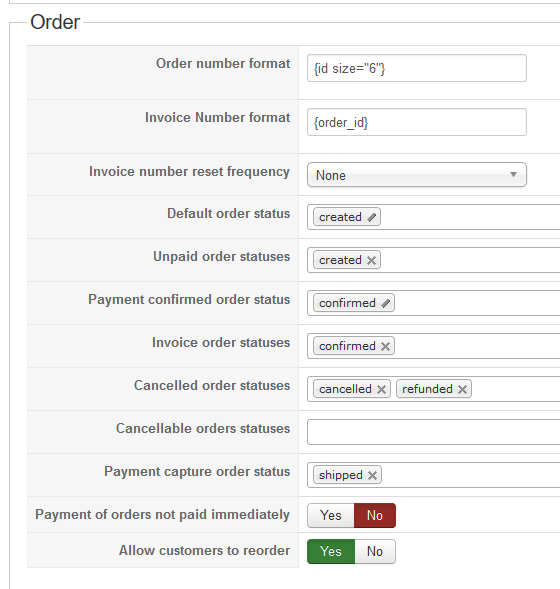
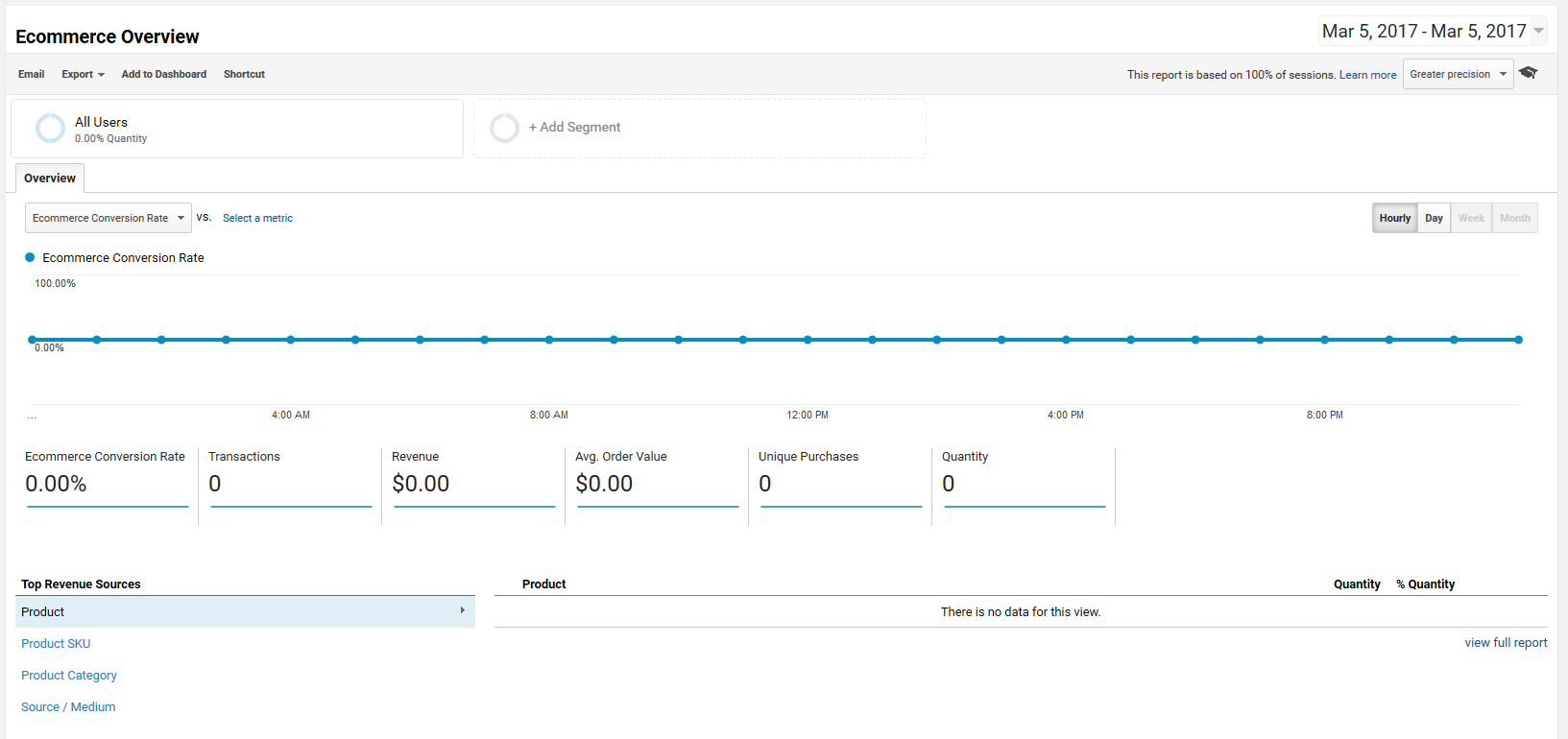
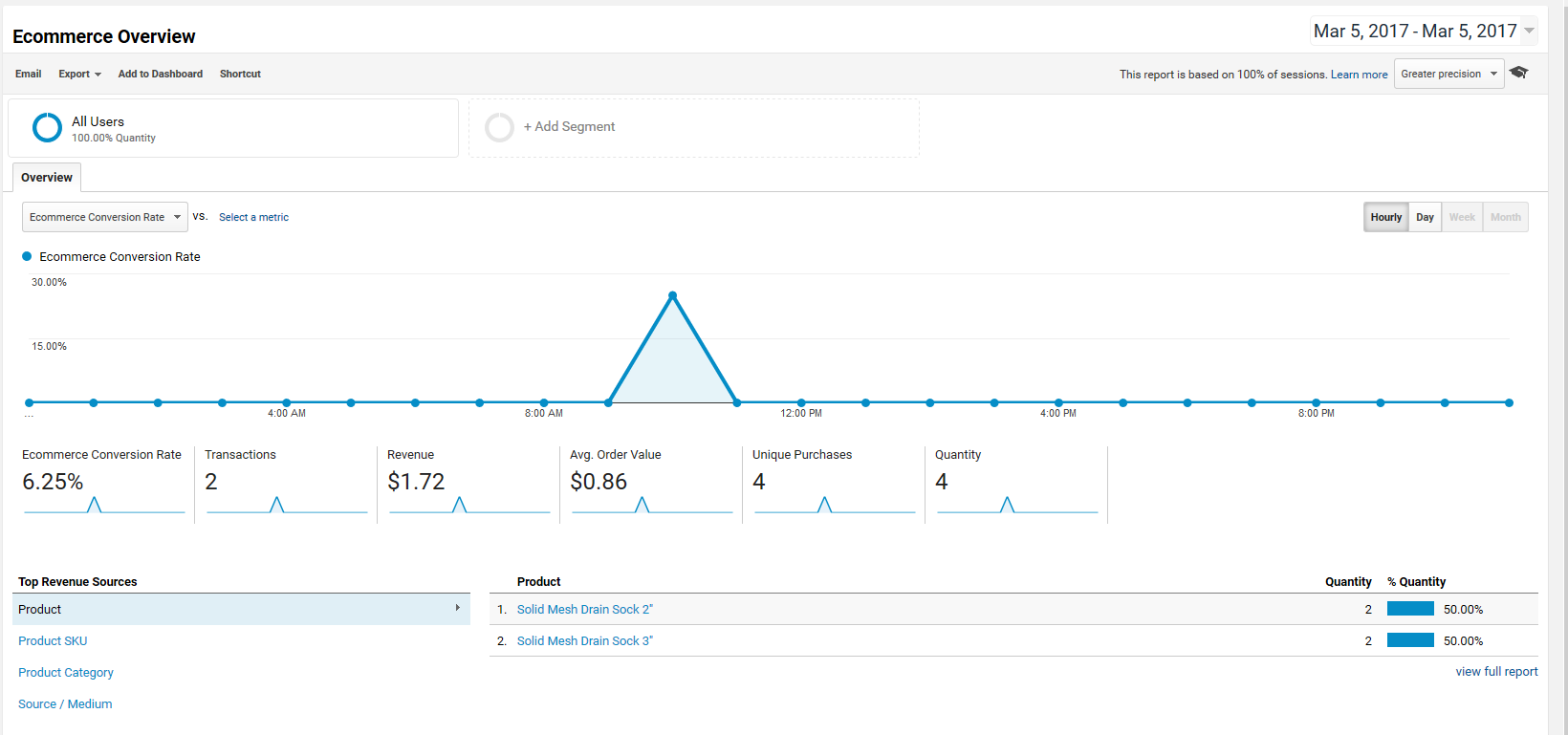
Double entries are definitely happening in the analytics. Everything is being recorded exactly twice as much as it should be.
Google Analytics for today, before my test order
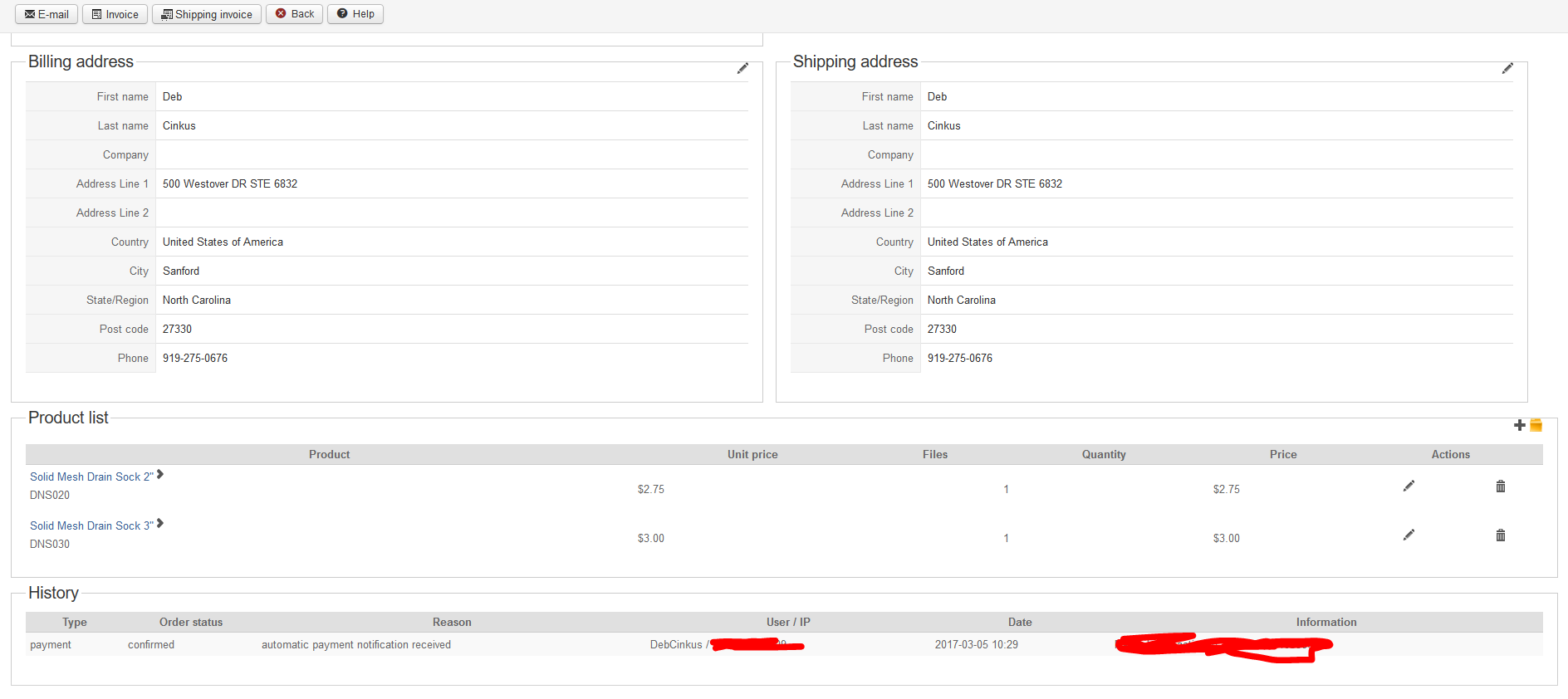
My test order information

Google Analytics doubled
Thanks for the reply over the weekend. I've retested and think that I've narrowed down that the cancellation didn't trigger additional analytics, I cancelled it almost immediately after doing the test and the duplication was not immediate, leading me to believe that the cancellation caused it.
Attached are some screenshots, including the order status settings.
Double entries are definitely happening in the analytics. Everything is being recorded exactly twice as much as it should be.
Google Analytics for today, before my test order
My test order information
Google Analytics doubled
~ Deb Cinkus, CEO
Polished Geek: more with monday․com
eCommerce Business Process Automation Experts
Last edit: 9 years 6 months ago by PolishedGeek. Reason: added titles to images for clarity
Please Log in or Create an account to join the conversation.
9 years 6 months ago #264246
by Jerome
Jerome - Obsidev.com
HikaMarket & HikaSerial developer / HikaShop core dev team.
Also helping the HikaShop support team when having some time or couldn't sleep.
By the way, do not send me private message, use the "contact us" form instead.
Replied by Jerome on topic google analytics plugin code not tracking correctly.
Hello,
I see that you're using not using HikaShop 3.0, so I don't know what version of the plugin you have exactly.
Because your order is created "confirmed", there is just one trigger called. So I don't understand how you can have two transaction on one single trigger.
So it would mean that you also have a call made via the trigger "onAfterRender", which looks weird because the session should not contain the information..
So I would recommend to change the function "googleProcess" to add a new parameter
So in that function, the direct call won't be done if it's in render
And for sure, in the onAfterRender, the function should be call with the new parameter
Let us know if it solve the issue.
Regards,
I see that you're using not using HikaShop 3.0, so I don't know what version of the plugin you have exactly.
Because your order is created "confirmed", there is just one trigger called. So I don't understand how you can have two transaction on one single trigger.
So it would mean that you also have a call made via the trigger "onAfterRender", which looks weird because the session should not contain the information..
So I would recommend to change the function "googleProcess" to add a new parameter
Code:
function googleProcess($order_id = 0, $render = false) {
Code:
if($this->params->get('universal_always_directcall', 0)) {
$call = true;
if($render)
return true;
}
Code:
$content = $this->googleProcess($order_id, true);
if(!empty($content) && is_string($content)) {
Regards,
Jerome - Obsidev.com
HikaMarket & HikaSerial developer / HikaShop core dev team.
Also helping the HikaShop support team when having some time or couldn't sleep.
By the way, do not send me private message, use the "contact us" form instead.
The following user(s) said Thank You: PolishedGeek
Please Log in or Create an account to join the conversation.
- PolishedGeek
-
- Offline
- Official HikaShop Development Partner
9 years 6 months ago #264266
by PolishedGeek
~ Deb Cinkus, CEO
Polished Geek: more with monday․com
eCommerce Business Process Automation Experts
Replied by PolishedGeek on topic google analytics plugin code not tracking correctly.
Hi, Jerome - We are using the latest 3.0 version of the plugin in a 2.6.4 site (I was told in another thread this should be compatible and would have the latest fixes).
Will give your suggestions a try - thanks!
Will give your suggestions a try - thanks!
~ Deb Cinkus, CEO
Polished Geek: more with monday․com
eCommerce Business Process Automation Experts
The following user(s) said Thank You: Jerome
Please Log in or Create an account to join the conversation.
- PolishedGeek
-
- Offline
- Official HikaShop Development Partner
9 years 6 months ago #264314
by PolishedGeek
~ Deb Cinkus, CEO
Polished Geek: more with monday․com
eCommerce Business Process Automation Experts
Replied by PolishedGeek on topic google analytics plugin code not tracking correctly.
Hi, Jerome -
We updated the code as suggested and installed it a few hours ago. The client has had multiple orders since the new code was installed and now the numbers being reported to Google are exactly right!
I hope you will put this code into the standard plugin. It definitely solved the problem of double counted orders in GA.
Thanks!
We updated the code as suggested and installed it a few hours ago. The client has had multiple orders since the new code was installed and now the numbers being reported to Google are exactly right!
I hope you will put this code into the standard plugin. It definitely solved the problem of double counted orders in GA.
Thanks!
~ Deb Cinkus, CEO
Polished Geek: more with monday․com
eCommerce Business Process Automation Experts
Please Log in or Create an account to join the conversation.
9 years 6 months ago #264320
by Jerome
Jerome - Obsidev.com
HikaMarket & HikaSerial developer / HikaShop core dev team.
Also helping the HikaShop support team when having some time or couldn't sleep.
By the way, do not send me private message, use the "contact us" form instead.
Replied by Jerome on topic google analytics plugin code not tracking correctly.
Hi,
It's commit.
I still don't understand why you got that glitch because the "display_ga" variable in the session is reset to 0 when the "direct call" is made, but I commit the patch.
So it will be included in the next release.
Regards,
It's commit.
I still don't understand why you got that glitch because the "display_ga" variable in the session is reset to 0 when the "direct call" is made, but I commit the patch.
So it will be included in the next release.
Regards,
Jerome - Obsidev.com
HikaMarket & HikaSerial developer / HikaShop core dev team.
Also helping the HikaShop support team when having some time or couldn't sleep.
By the way, do not send me private message, use the "contact us" form instead.
The following user(s) said Thank You: PolishedGeek
Please Log in or Create an account to join the conversation.
9 years 5 months ago - 9 years 5 months ago #266256
by Bobwales
Hi Nicolas - I'd like to try the same fix.
Which files should be used please? Those from /administrator/components/com_hikashop/extensions/plg_system_hikashopanalytics ?
And do I just replace those (2.6.1) files with those from 3.0.1 ? Or are there any other steps involved...
Replied by Bobwales on topic google analytics plugin code not tracking correctly.
nicolas wrote: Hi,
Yes. We've made a fix patches since then.
I would recommend using the one from HikaShop 3's install package. It will work with the 2.6.4 but will contain all the latest patches.
Hi Nicolas - I'd like to try the same fix.
Which files should be used please? Those from /administrator/components/com_hikashop/extensions/plg_system_hikashopanalytics ?
And do I just replace those (2.6.1) files with those from 3.0.1 ? Or are there any other steps involved...
Last edit: 9 years 5 months ago by Bobwales.
Please Log in or Create an account to join the conversation.
9 years 5 months ago - 9 years 5 months ago #266264
by Jerome
Jerome - Obsidev.com
HikaMarket & HikaSerial developer / HikaShop core dev team.
Also helping the HikaShop support team when having some time or couldn't sleep.
By the way, do not send me private message, use the "contact us" form instead.
Replied by Jerome on topic google analytics plugin code not tracking correctly.
Hello,
The Joomla plugins are installed in the "plugins" folder of Joomla.
The "extensions" folder under HikaShop is just there to allow HikaShop to install or reinstall his plugins.
And yes, you can just replace the files in the plugin folder with the ones from the install package.
Regards,
The Joomla plugins are installed in the "plugins" folder of Joomla.
The "extensions" folder under HikaShop is just there to allow HikaShop to install or reinstall his plugins.
And yes, you can just replace the files in the plugin folder with the ones from the install package.
Regards,
Jerome - Obsidev.com
HikaMarket & HikaSerial developer / HikaShop core dev team.
Also helping the HikaShop support team when having some time or couldn't sleep.
By the way, do not send me private message, use the "contact us" form instead.
Last edit: 9 years 5 months ago by nicolas.
Please Log in or Create an account to join the conversation.
- PolishedGeek
-
- Offline
- Official HikaShop Development Partner
9 years 4 months ago #269120
by PolishedGeek
~ Deb Cinkus, CEO
Polished Geek: more with monday․com
eCommerce Business Process Automation Experts
Replied by PolishedGeek on topic google analytics plugin code not tracking correctly.
Was this patch incorporated into the latest HikaShop v 3.0.1 package? I downloaded it a day or so ago and don't see this code in the analytics plugin. But perhaps you refactored it a little differently?
~ Deb Cinkus, CEO
Polished Geek: more with monday․com
eCommerce Business Process Automation Experts
Please Log in or Create an account to join the conversation.
9 years 4 months ago #269122
by Jerome
Jerome - Obsidev.com
HikaMarket & HikaSerial developer / HikaShop core dev team.
Also helping the HikaShop support team when having some time or couldn't sleep.
By the way, do not send me private message, use the "contact us" form instead.
Replied by Jerome on topic google analytics plugin code not tracking correctly.
Hello,
The patch has been added in the plugin last month but with slightly differences than the one I proposed here.
Regards,
The patch has been added in the plugin last month but with slightly differences than the one I proposed here.
Regards,
Jerome - Obsidev.com
HikaMarket & HikaSerial developer / HikaShop core dev team.
Also helping the HikaShop support team when having some time or couldn't sleep.
By the way, do not send me private message, use the "contact us" form instead.
The following user(s) said Thank You: PolishedGeek
Please Log in or Create an account to join the conversation.
- PolishedGeek
-
- Offline
- Official HikaShop Development Partner
9 years 4 months ago #269306
by PolishedGeek
~ Deb Cinkus, CEO
Polished Geek: more with monday․com
eCommerce Business Process Automation Experts
Replied by PolishedGeek on topic google analytics plugin code not tracking correctly.
Another question. This plugin requires that the site already be using Google Analytics via a plugin or inserted into the template. Has this been tested with Google Tag Manager as well?
Google Tag Manager can be set up with the GA code to feed analytics data to Google, so when done properly will it work with your ecommerce tracking plugin or do you have to stick to just GA on the site?
Google Tag Manager can be set up with the GA code to feed analytics data to Google, so when done properly will it work with your ecommerce tracking plugin or do you have to stick to just GA on the site?
~ Deb Cinkus, CEO
Polished Geek: more with monday․com
eCommerce Business Process Automation Experts
Please Log in or Create an account to join the conversation.
9 years 4 months ago #269333
by nicolas
Replied by nicolas on topic google analytics plugin code not tracking correctly.
Hi,
We didn't test it with Google Tag Manager.
So I don't know if it can work with it or not.
The subject www.hikashop.com/forum/checkout/890197-a...-before-payment.html seems to indicate that something is missing but I don't know if that's normal or if it's specific to that person due to the way the shop is configured. More information will be needed.
We didn't test it with Google Tag Manager.
So I don't know if it can work with it or not.
The subject www.hikashop.com/forum/checkout/890197-a...-before-payment.html seems to indicate that something is missing but I don't know if that's normal or if it's specific to that person due to the way the shop is configured. More information will be needed.
Please Log in or Create an account to join the conversation.
Time to create page: 0.272 seconds