

- Posts: 34
- Thank you received: 2
Hikashop Cart Design Plugin
5 years 8 months ago #329548
by MH1981
Hikashop Cart Design Plugin was created by MH1981
-- HikaShop version -- : 4.4.1
-- Joomla version -- : 3.9
This morning I purchased the plugin Hikashop Cart Design, when I turn on this plugin a social module disappears on my website.
When I turn it off again, my socials module is back.
Any idea what could go wrong here.
It is also not entirely clear to me what the plugin does exactly or what I can do with it.
Is there perhaps more explanation somewhere?
-- Joomla version -- : 3.9
This morning I purchased the plugin Hikashop Cart Design, when I turn on this plugin a social module disappears on my website.
When I turn it off again, my socials module is back.
Any idea what could go wrong here.
It is also not entirely clear to me what the plugin does exactly or what I can do with it.
Is there perhaps more explanation somewhere?
Please Log in or Create an account to join the conversation.

5 years 8 months ago - 5 years 8 months ago #329579
by Philip
Replied by Philip on topic Hikashop Cart Design Plugin
Hello,
"It is also not entirely clear to me what the plugin does exactly or what I can do with it."
=> Basically this plugin dress up your classic module cart on your website, with new structure, icons and css.
This will be then more easy to customize via Css command with just some color command by example to adjust to your current template.
About your issue with your social module, we aren't sure to understand your issue, then can you complete your question with these elements :
- Backend access (with full access)
- Step by step process in order to see by ourselve the issue (Url to your page with Cart module & Social module, and what you do to test)
Note : Use this Contact us form to provide backend access and add an Url link to this topic in your message.
Awaiting your returns to be able to progress on your subject.
Regards
"It is also not entirely clear to me what the plugin does exactly or what I can do with it."
=> Basically this plugin dress up your classic module cart on your website, with new structure, icons and css.
This will be then more easy to customize via Css command with just some color command by example to adjust to your current template.
About your issue with your social module, we aren't sure to understand your issue, then can you complete your question with these elements :
- Backend access (with full access)
- Step by step process in order to see by ourselve the issue (Url to your page with Cart module & Social module, and what you do to test)
Note : Use this Contact us form to provide backend access and add an Url link to this topic in your message.
Awaiting your returns to be able to progress on your subject.
Regards
Last edit: 5 years 8 months ago by Philip.
Please Log in or Create an account to join the conversation.
5 years 8 months ago - 5 years 8 months ago #329667
by MH1981
Replied by MH1981 on topic Hikashop Cart Design Plugin
With the plugin enabled the Social Icons disappear.

When we disable the plugin Cart Design they come back

requested information is on the way via the contact us button.
When we disable the plugin Cart Design they come back
requested information is on the way via the contact us button.
Last edit: 5 years 8 months ago by MH1981.
Please Log in or Create an account to join the conversation.
5 years 8 months ago #329685
by Philip
Replied by Philip on topic Hikashop Cart Design Plugin
Hello,
Unfortunately your provided references don't work, can you do the required in order to allow us to reach your backend please.
Double checked it, and provided it like previously.
Awaiting your returns.
Regards
Unfortunately your provided references don't work, can you do the required in order to allow us to reach your backend please.
Double checked it, and provided it like previously.
Awaiting your returns.
Regards
Please Log in or Create an account to join the conversation.
5 years 8 months ago - 5 years 8 months ago #329712
by Philip
Replied by Philip on topic Hikashop Cart Design Plugin
Hello,
Ok I process some tests to try to understand what's going on, and I think I have a theory, I will guide you to process a test, follow me step by step :
1. Go to your Cart Design plugin folder :
=> YourWebsite\plugins\hikashop\cart_design
2. Open the file cart_design_view file :
=> Go around line 9, see my screenshot
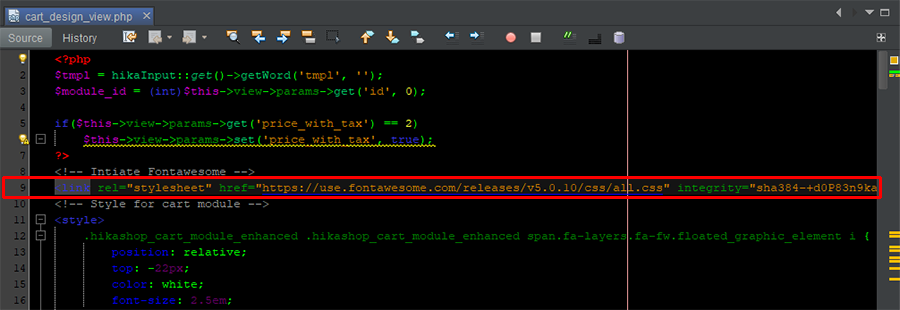
You will have this code :
Can you add these code elements "<!--" & "-->" in order to comment this line to have finally this :
And process a new test with the Design cart published to see if that solve your issue.
Awaiting your returns to progress on your subject.
Regards
Ok I process some tests to try to understand what's going on, and I think I have a theory, I will guide you to process a test, follow me step by step :
1. Go to your Cart Design plugin folder :
=> YourWebsite\plugins\hikashop\cart_design
2. Open the file cart_design_view file :
=> Go around line 9, see my screenshot
You will have this code :
Code:
<link rel="stylesheet" href="https://use.fontawesome.com/releases/v5.0.10/css/all.css" integrity="sha384-+d0P83n9kaQMCwj8F4RJB66tzIwOKmrdb46+porD/OvrJ+37WqIM7UoBtwHO6Nlg" crossorigin="anonymous">
Can you add these code elements "<!--" & "-->" in order to comment this line to have finally this :
Code:
<!--
<link rel="stylesheet" href="https://use.fontawesome.com/releases/v5.0.10/css/all.css" integrity="sha384-+d0P83n9kaQMCwj8F4RJB66tzIwOKmrdb46+porD/OvrJ+37WqIM7UoBtwHO6Nlg" crossorigin="anonymous">
-->
And process a new test with the Design cart published to see if that solve your issue.
Awaiting your returns to progress on your subject.
Regards
Last edit: 5 years 8 months ago by Philip.
The following user(s) said Thank You: MH1981
Please Log in or Create an account to join the conversation.
5 years 8 months ago #329809
by MH1981
Replied by MH1981 on topic Hikashop Cart Design Plugin
Philip,
Thank you this was the solution, the social icons now remain and I can use the cart plugin.
Now let's figure out how and where the plugin works best.
Thanks again.
with kind regards Michel
Thank you this was the solution, the social icons now remain and I can use the cart plugin.
Now let's figure out how and where the plugin works best.
Thanks again.
with kind regards Michel
The following user(s) said Thank You: Philip
Please Log in or Create an account to join the conversation.
Time to create page: 1.634 seconds