

- Posts: 57
- Thank you received: 2
PDF appendix automated
5 years 1 month ago #335905
by Machka
PDF appendix automated was created by Machka
-- url of the page with the problem -- :
svbadtoelz.de
-- HikaShop version -- : 4.4.3
-- Joomla version -- : 3.10.2
-- PHP version -- : 7.4.23
-- Browser(s) name and version -- : all
-- Error-message(debug-mod must be tuned on) -- : none
I bought and installed the PDF-extension, but always had to download this manually. Is there a chance to get this automated appended onto the confirmation Emails instead of having to download it, to write an Email and to append it?
Is there also a chance to get the article numbers included in the summarys of the content (in the PDF) ?
Actually theres only the name, the pic and the price.....
Kind regards
-- HikaShop version -- : 4.4.3
-- Joomla version -- : 3.10.2
-- PHP version -- : 7.4.23
-- Browser(s) name and version -- : all
-- Error-message(debug-mod must be tuned on) -- : none
I bought and installed the PDF-extension, but always had to download this manually. Is there a chance to get this automated appended onto the confirmation Emails instead of having to download it, to write an Email and to append it?
Is there also a chance to get the article numbers included in the summarys of the content (in the PDF) ?
Actually theres only the name, the pic and the price.....
Kind regards
Please Log in or Create an account to join the conversation.

5 years 1 month ago #335911
by nicolas
Replied by nicolas on topic PDF appendix automated
Hi,
The PDF plugin will automatically include the PDF to the order status email sent to the customer when the order is being confirmed.
Is that not working already by default on your end ?
Note that if you're talking about recieve the PDF as the admin, then you could enter your email address in the BCC field of the order status notification email via System>Emails in order to get a copy of the email the customer receives so that you'll get the PDF attached to it, like the customer.
Also, the product quantity is included in there by default. Are you saying it is missing from there ?
Could you provide a copy of a PDF you generated with that issue ?
The PDF plugin will automatically include the PDF to the order status email sent to the customer when the order is being confirmed.
Is that not working already by default on your end ?
Note that if you're talking about recieve the PDF as the admin, then you could enter your email address in the BCC field of the order status notification email via System>Emails in order to get a copy of the email the customer receives so that you'll get the PDF attached to it, like the customer.
Also, the product quantity is included in there by default. Are you saying it is missing from there ?
Could you provide a copy of a PDF you generated with that issue ?
Please Log in or Create an account to join the conversation.
5 years 1 month ago - 5 years 1 month ago #335914
by Machka
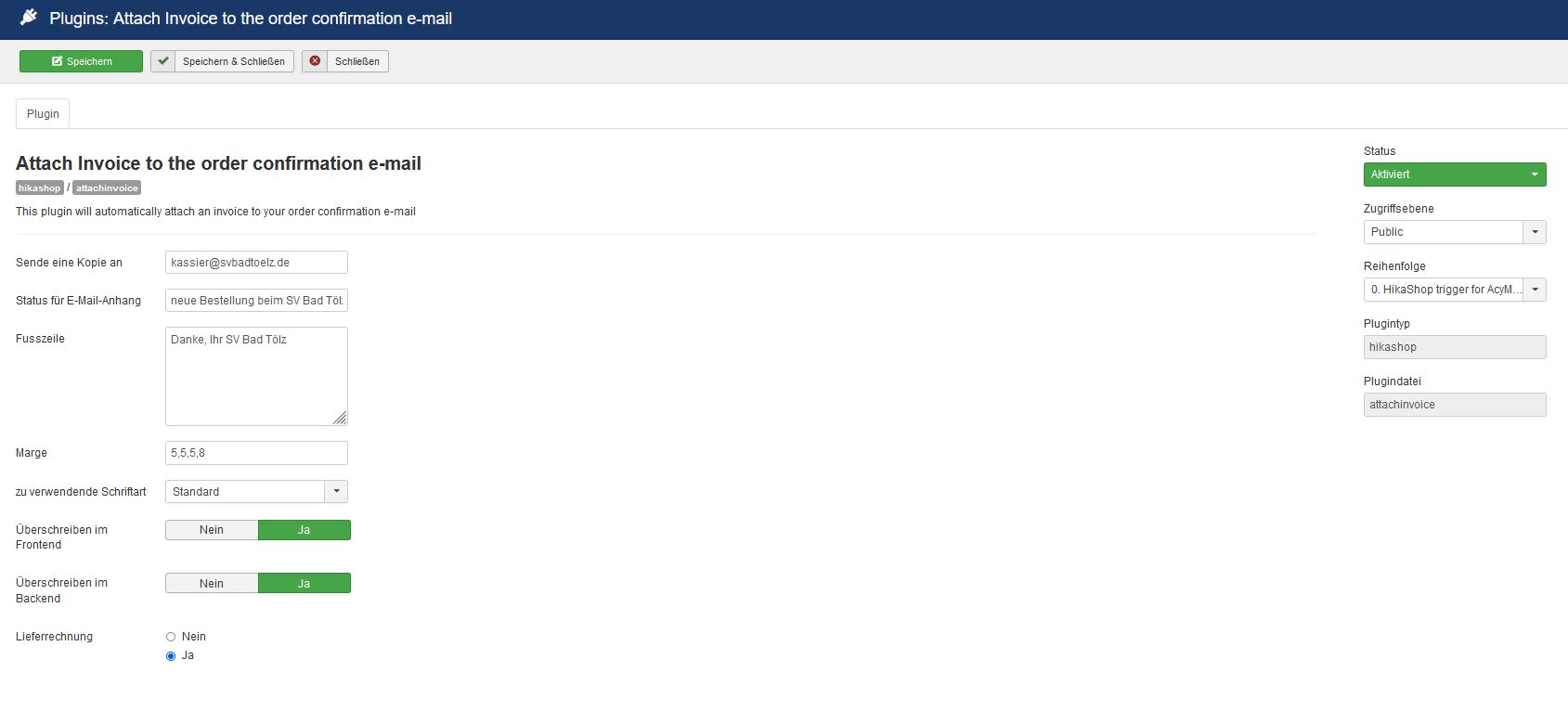 Hello and thx for the quick reply.
I ordered something yesterday and didn´t receive any PDF in my order confirmation. Even when I change the status from open / pending to confirmed and send another Email then, nothing iss appended on the Mail. Sorry for saying so
"The PDF plugin will automatically include the PDF to the order status email sent to the customer when the order is being confirmed.
Is that not working already by default on your end ?" <-- exactly - no pdf by default!
"Also, the product quantity is included in there by default. Are you saying it is missing from there ?" <-- the quantity is included - that´s not the problem... I would love to see the article number.....
kiind regards.
Enrico
Replied by Machka on topic PDF appendix automated
I ordered something yesterday and didn´t receive any PDF in my order confirmation. Even when I change the status from open / pending to confirmed and send another Email then, nothing iss appended on the Mail. Sorry for saying so
"The PDF plugin will automatically include the PDF to the order status email sent to the customer when the order is being confirmed.
Is that not working already by default on your end ?" <-- exactly - no pdf by default!
"Also, the product quantity is included in there by default. Are you saying it is missing from there ?" <-- the quantity is included - that´s not the problem... I would love to see the article number.....
kiind regards.
Enrico
Last edit: 5 years 1 month ago by Machka. Reason: adding picture of activated plugin
Please Log in or Create an account to join the conversation.
5 years 1 month ago #335915
by nicolas
Replied by nicolas on topic PDF appendix automated
Hi,
1. It seems you changed the "status" setting. By default, that field contains the text "confirmed,shipped" which are the order statuses "namekey" (what is stored in the database). I seems you wrote some text in that field and thus, the order statuses don't match with anything anymore and that's why the PDF is not attached to the emails.
I would recommend you to revert this and put back "confirmed,shipped" in there, unless you're using other order statuses than the default ones. In any case, I suppose that your issue comes from there.
2. So you're talking about the "product code". It actually will be added automatically to the PDF invoice if the setting "Display product code" of the HikaShop configuration is turned on. That setting will actually add the product code everywhere: on the product page, on the checkout, in the email notifications etc.
If you want to keep that setting turned off and only display the code in the PDF, then you'll have to modify the file plugins/hikashop/attachinvoice/attachinvoice/invoice.php and change the line:
if ($config->get('show_code')) {
to:
if (true) {
1. It seems you changed the "status" setting. By default, that field contains the text "confirmed,shipped" which are the order statuses "namekey" (what is stored in the database). I seems you wrote some text in that field and thus, the order statuses don't match with anything anymore and that's why the PDF is not attached to the emails.
I would recommend you to revert this and put back "confirmed,shipped" in there, unless you're using other order statuses than the default ones. In any case, I suppose that your issue comes from there.
2. So you're talking about the "product code". It actually will be added automatically to the PDF invoice if the setting "Display product code" of the HikaShop configuration is turned on. That setting will actually add the product code everywhere: on the product page, on the checkout, in the email notifications etc.
If you want to keep that setting turned off and only display the code in the PDF, then you'll have to modify the file plugins/hikashop/attachinvoice/attachinvoice/invoice.php and change the line:
if ($config->get('show_code')) {
to:
if (true) {
Please Log in or Create an account to join the conversation.
5 years 1 month ago #335938
by Machka
Replied by Machka on topic PDF appendix automated
ok and thx - understood. Maybe there should be an explanation to the customer who buys that plugin, that changes may occur trouble. I changed this, to I will see now, if that works.
I also will see if there is the product code in the PDF now. I didn´t see that when I downloaded the invoice in the backend via "download invoice shipment" or invoice.
There the order number wasn´t included....
best regards
I also will see if there is the product code in the PDF now. I didn´t see that when I downloaded the invoice in the backend via "download invoice shipment" or invoice.
There the order number wasn´t included....
best regards
Please Log in or Create an account to join the conversation.
5 years 1 month ago #335942
by nicolas
Replied by nicolas on topic PDF appendix automated
Hi,
We purposefully have a tooltip on each option of the plugin to explain what to do. And thus we thought a documentation is not didn't.
Was the tooltip there not helpful ? Or did you miss it ?
We purposefully have a tooltip on each option of the plugin to explain what to do. And thus we thought a documentation is not didn't.
Was the tooltip there not helpful ? Or did you miss it ?
Please Log in or Create an account to join the conversation.
5 years 1 month ago - 5 years 1 month ago #335949
by Machka
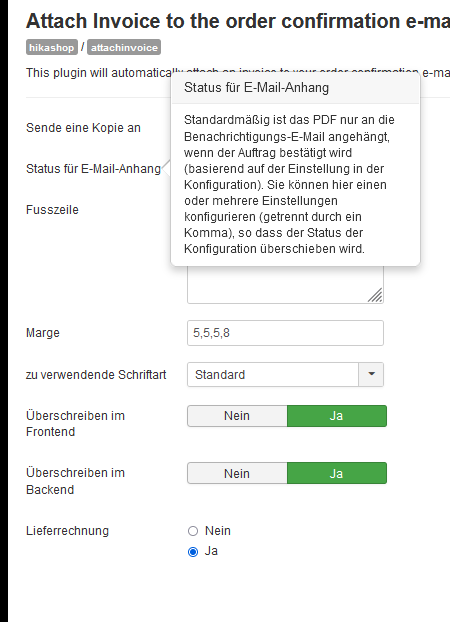
the tooltip doesn´t explain to much... especially not, that the stuff you explained to me is the reason why this text is inserted by default and what other options are possible.
But I still have no idea why the product numbers do not appear on the pdf....
kind regards
Replied by Machka on topic PDF appendix automated
the tooltip doesn´t explain to much... especially not, that the stuff you explained to me is the reason why this text is inserted by default and what other options are possible.
But I still have no idea why the product numbers do not appear on the pdf....
kind regards
Last edit: 5 years 1 month ago by Machka.
Please Log in or Create an account to join the conversation.
5 years 1 month ago #335952
by nicolas
Replied by nicolas on topic PDF appendix automated
Hi,
It seems to be a translation issue.
Here is the text in English :
Regarding the product code, did you activate the "Display product code" setting of the HikaShop configuration ?
And / or did you change the code as explained in www.hikashop.com/forum/integrations/9032...utomated.html#335915 ? Note that if you changed the code in the plugins/hikashop/attachinvoice/attachinvoice/invoice.php file, if you already made an override of that file in media/com_hikashop/plugins/invoice.php then it's the override file which is used and thus you need to do the change in the override file instead of the default file of the plugin.
It seems to be a translation issue.
Here is the text in English :
By default, the PDF invoice is attached only to the notification email when the order is getting confirmed (based on the setting in the configuration). You can configure here one or several statuses (separated by a comma) so that it overrides the status of the configuration. For example, if you enter 'confirmed,shipped,refunded' (without the quotes) the invoice will be included in the email notification if the status of the order is confirmed, shipped or refunded.
Regarding the product code, did you activate the "Display product code" setting of the HikaShop configuration ?
And / or did you change the code as explained in www.hikashop.com/forum/integrations/9032...utomated.html#335915 ? Note that if you changed the code in the plugins/hikashop/attachinvoice/attachinvoice/invoice.php file, if you already made an override of that file in media/com_hikashop/plugins/invoice.php then it's the override file which is used and thus you need to do the change in the override file instead of the default file of the plugin.
Please Log in or Create an account to join the conversation.
5 years 1 month ago #335962
by Machka
Replied by Machka on topic PDF appendix automated
Nope I only changed something, to always get the order numbers displayed in the E-Mail all the time. I never changed it somewhere, to not having it visible.
I also never changed something in the php.....
I also never changed something in the php.....
Please Log in or Create an account to join the conversation.
5 years 1 month ago #335963
by nicolas
Replied by nicolas on topic PDF appendix automated
Hi,
Well, if you didn't do the PHP modification I gave in my first message, nor did you activate the "Display product code" setting of the HikaShop configuration which I also mentioned in my message, it's totally normal that the product code doesn't appear in the PDF invoice.
As I said, you need to do either one to get the product code added to the PDF invoices.
Well, if you didn't do the PHP modification I gave in my first message, nor did you activate the "Display product code" setting of the HikaShop configuration which I also mentioned in my message, it's totally normal that the product code doesn't appear in the PDF invoice.
As I said, you need to do either one to get the product code added to the PDF invoices.
Please Log in or Create an account to join the conversation.
5 years 1 month ago - 5 years 1 month ago #335974
by Machka
Replied by Machka on topic PDF appendix automated
thx for the reply: Can you please mention, where this setting is to find?
I went through the whole settings but didn´t recognize the mentioned setting.....
maybe I´ll find this, when you tell me in English where to find...
"nor did you activate the "Display product code" setting of the HikaShop configuration which I also mentioned in my message, it's totally normal that the product code doesn't appear in the PDF invoice."
and I had to remove the if-switch in the other php-files, to get the product code always shown in the mails and so on. Do I need to do so in the othe php to get it displayed - different to your message - or do I need to remove this to turn it off as you mentioned....
I went through the whole settings but didn´t recognize the mentioned setting.....
maybe I´ll find this, when you tell me in English where to find...
"nor did you activate the "Display product code" setting of the HikaShop configuration which I also mentioned in my message, it's totally normal that the product code doesn't appear in the PDF invoice."
and I had to remove the if-switch in the other php-files, to get the product code always shown in the mails and so on. Do I need to do so in the othe php to get it displayed - different to your message - or do I need to remove this to turn it off as you mentioned....
Last edit: 5 years 1 month ago by Machka.
Please Log in or Create an account to join the conversation.
5 years 1 month ago #335982
by nicolas
Replied by nicolas on topic PDF appendix automated
Hi,
It's in the HikaShop configuration, under the Display tab:
i.imgur.com/hjSk76m.png
The modification I propose is for the PDF invoice. If you want the code to appear on the PDF invoice, regardless of the "Display product code" setting, you can do that modification.
It's in the HikaShop configuration, under the Display tab:
i.imgur.com/hjSk76m.png
The modification I propose is for the PDF invoice. If you want the code to appear on the PDF invoice, regardless of the "Display product code" setting, you can do that modification.
Please Log in or Create an account to join the conversation.
5 years 2 weeks ago #336223
by Machka
Replied by Machka on topic PDF appendix automated
ok - that setting was off. Thanks - now I switched this on.
But I still get no PDF as a customer, when initializing a new order.
Could you plz. help me, finding all possible errors done with that?
Kind regards
Enrico
But I still get no PDF as a customer, when initializing a new order.
Could you plz. help me, finding all possible errors done with that?
Kind regards
Enrico
Please Log in or Create an account to join the conversation.
5 years 2 weeks ago #336226
by nicolas
Replied by nicolas on topic PDF appendix automated
Hi,
So what did you configure in the status setting of the PDF plugin ?
And are your orders being confirmed after the purchase ?
Could you provide a screenshot of the current settings of the plugin and of the settings under the System>Order statuses menu ?
So what did you configure in the status setting of the PDF plugin ?
And are your orders being confirmed after the purchase ?
Could you provide a screenshot of the current settings of the plugin and of the settings under the System>Order statuses menu ?
Please Log in or Create an account to join the conversation.
5 years 2 weeks ago #336238
by Machka
Replied by Machka on topic PDF appendix automated
Hello, thank you and here are the screenshots.
In the plugin-settings I reverted the changes as you suggested and because of my lack knowledge of what happpens to changes of the order status I changed nothing there.
thx for helping me out
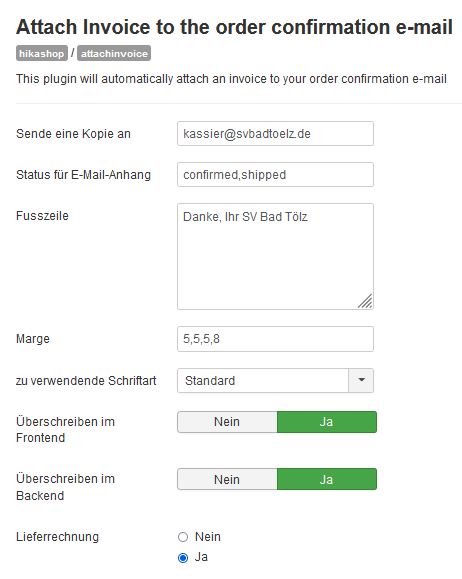

In the plugin-settings I reverted the changes as you suggested and because of my lack knowledge of what happpens to changes of the order status I changed nothing there.
thx for helping me out
Please Log in or Create an account to join the conversation.
5 years 2 weeks ago #336253
by nicolas
Replied by nicolas on topic PDF appendix automated
Hi,
I think that your problem might be linked to the "Rechung" (invoice) column in the System>Order statuses menu.
There, you're supposed to enable the statuses for which you want the invoice to be available to the user.
So normally, you want to activate the "confirmed" and "shipped" status in there.
I think that your problem might be linked to the "Rechung" (invoice) column in the System>Order statuses menu.
There, you're supposed to enable the statuses for which you want the invoice to be available to the user.
So normally, you want to activate the "confirmed" and "shipped" status in there.
The following user(s) said Thank You: Machka
Please Log in or Create an account to join the conversation.
5 years 2 weeks ago #336255
by Machka
Replied by Machka on topic PDF appendix automated
Great, thx for your help. I changed this and hopefully now I will get all we need to have a better workflow
have a good time!
have a good time!
Please Log in or Create an account to join the conversation.
5 years 1 week ago #336368
by Machka
Replied by Machka on topic PDF appendix automated
I´m sorry but I have to let you know, that no PDF is attached to the mails - neither issued for the customer, nor for the admin.
Please lets find together all possible problems and lets solve that, please.
kind refgards
Please lets find together all possible problems and lets solve that, please.
kind refgards
Please Log in or Create an account to join the conversation.
5 years 1 week ago #336407
by nicolas
Replied by nicolas on topic PDF appendix automated
Hi,
In that case, please provide a backend super admin access and a FTP access via our contact form so that we can look into it:
www.hikashop.com/support/contact-us.html
Also, make sure you include a link to this thread for reference.
In that case, please provide a backend super admin access and a FTP access via our contact form so that we can look into it:
www.hikashop.com/support/contact-us.html
Also, make sure you include a link to this thread for reference.
Please Log in or Create an account to join the conversation.
5 years 1 week ago - 5 years 1 week ago #336411
by Machka
Replied by Machka on topic PDF appendix automated
Hi Nicolas,
I just sent this right now. As far as I saw the last email appendix was sent to the admin but not to the customer. but in the Email wasn´t the ordernumber or something our ssupplier could work with...
I would love to get 2 things work after your support: the invoice with article / order number and pictures included and sending it to the customer and the admin.
thx in advance.
sorry forgot to fulfill the last instruction and therefore I sent a second message afterwards...
best regards
I just sent this right now. As far as I saw the last email appendix was sent to the admin but not to the customer. but in the Email wasn´t the ordernumber or something our ssupplier could work with...
I would love to get 2 things work after your support: the invoice with article / order number and pictures included and sending it to the customer and the admin.
thx in advance.
sorry forgot to fulfill the last instruction and therefore I sent a second message afterwards...
best regards
Last edit: 5 years 1 week ago by Machka.
Please Log in or Create an account to join the conversation.
Time to create page: 0.201 seconds