
- Posts: 137
- Thank you received: 4
Hikashop Google Products Plugin generates empty file
- simonkloostra
-
 Topic Author
- Away
Less
More
3 years 6 days ago - 3 years 6 days ago #356287
by simonkloostra
-- HikaShop version -- : 5.0.0
-- Joomla version -- : 4.4.0
-- PHP version -- : 8.1
-- Browser(s) name and version -- : All
-- Error-message(debug-mod must be tuned on) -- : None
I configured and activated the Hikashop Google Products Plugin on my site. However, if I trigger the download with the button at the bottom, only an empty xml file is generated with no products included. Only the channel title and description are included.
I am probably missing something?
Note that on the frontend, I only use the Hikashop add to cart button. The productpages are Joomla articles styled with the Yootheme Pro Builder, don't know if that could be an issue. The products refer to the Joomla page using the canonical URL.
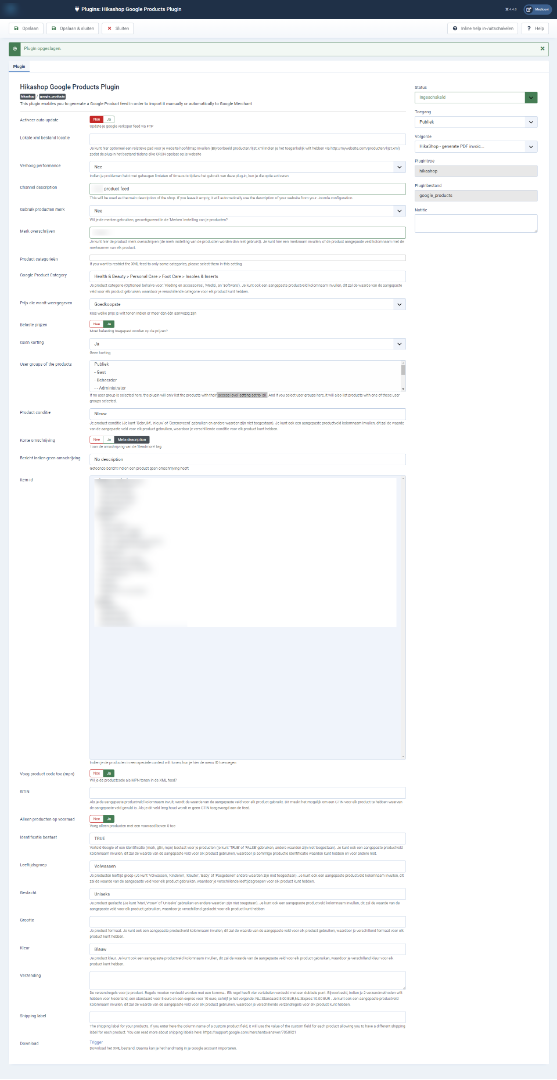
See attached a screenshot of the plugin parameters
-- Joomla version -- : 4.4.0
-- PHP version -- : 8.1
-- Browser(s) name and version -- : All
-- Error-message(debug-mod must be tuned on) -- : None
I configured and activated the Hikashop Google Products Plugin on my site. However, if I trigger the download with the button at the bottom, only an empty xml file is generated with no products included. Only the channel title and description are included.
I am probably missing something?
Note that on the frontend, I only use the Hikashop add to cart button. The productpages are Joomla articles styled with the Yootheme Pro Builder, don't know if that could be an issue. The products refer to the Joomla page using the canonical URL.
See attached a screenshot of the plugin parameters
Last edit: 3 years 6 days ago by simonkloostra.
Please Log in or Create an account to join the conversation.

3 years 6 days ago #356288
by nicolas
Replied by nicolas on topic Hikashop Google Products Plugin generates empty file
Hi,
The image has been scaled down by the forum because it is too big and thus we can't read what's written on it.
Could you upload it elsewhere, or upload smaller chunks of the image ?
I suppose the issue must be with one of the settings in there.
The image has been scaled down by the forum because it is too big and thus we can't read what's written on it.
Could you upload it elsewhere, or upload smaller chunks of the image ?
I suppose the issue must be with one of the settings in there.
Please Log in or Create an account to join the conversation.
- simonkloostra
-
Topic Author
- Away
Less
More
- Posts: 137
- Thank you received: 4
3 years 5 days ago - 3 years 5 days ago #356298
by simonkloostra
Replied by simonkloostra on topic Hikashop Google Products Plugin generates empty file
I guess this should work better?
tinyurl.com/ytjstynx
Note that I also tested this on another site I have, and there it works.... Seems something specific for this site?
tinyurl.com/ytjstynx
Note that I also tested this on another site I have, and there it works.... Seems something specific for this site?
Last edit: 3 years 5 days ago by simonkloostra.
Please Log in or Create an account to join the conversation.

3 years 5 days ago - 3 years 5 days ago #356302
by Philip
Replied by Philip on topic Hikashop Google Products Plugin generates empty file
Hello,
I see that you didn't set any Gtin, while GTIN (and/or MPN) can indeed be required by Google merchant.
The HikaShop Google Products plugin actually has options to provide them to Google.
For example, the "Add Product Code (mpn)" setting of the plugin will use the product code you entered in your products as MPN in your feed.
And you can use the GTIN setting below to add the GTIN.
I would recommend to have a look at all the settings available in the plugin and their tooltips.
And you can also read the Google merchant documentation which explains what is needed for which type of products:
Learn more here AND more information here .
It's all explained in there.
Regards
I see that you didn't set any Gtin, while GTIN (and/or MPN) can indeed be required by Google merchant.
The HikaShop Google Products plugin actually has options to provide them to Google.
For example, the "Add Product Code (mpn)" setting of the plugin will use the product code you entered in your products as MPN in your feed.
And you can use the GTIN setting below to add the GTIN.
I would recommend to have a look at all the settings available in the plugin and their tooltips.
And you can also read the Google merchant documentation which explains what is needed for which type of products:
Learn more here AND more information here .
It's all explained in there.
Regards
Last edit: 3 years 5 days ago by Philip.
Please Log in or Create an account to join the conversation.
- simonkloostra
-
Topic Author
- Away
Less
More
- Posts: 137
- Thank you received: 4
3 years 5 days ago #356306
by simonkloostra
Replied by simonkloostra on topic Hikashop Google Products Plugin generates empty file
Hi Philippe, I think you misread my question. My problem right now is that simply no content is being written to the xml file. It only generates the following code:
So, none of the products is written to the file (while I have active products).
I am aware that I need to work on GTIN and MPN before the file is fully valid, but it starts with actually having the file.
Code:
<?xml version="1.0" encoding="UTF-8" ?>
<rss version="2.0" xmlns:g="http://base.google.com/ns/1.0">
<channel>
<title><![CDATA[ Xxxxxxxx ]]></title>
<description><![CDATA[ Xxxxxxxxxxxproduct feed ]]></description>
<link><![CDATA[ https://xxxxxx.nl/ ]]></link>
</channel>
</rss>
So, none of the products is written to the file (while I have active products).
I am aware that I need to work on GTIN and MPN before the file is fully valid, but it starts with actually having the file.
Please Log in or Create an account to join the conversation.
3 years 4 days ago #356314
by nicolas
Replied by nicolas on topic Hikashop Google Products Plugin generates empty file
Hi,
But it could be that your products don't have a price, or that they have a discount, or that they don't have stock.
Otherwise, I guess we would need a backend access to check things out.
That's hard to say. The settings look fine.Note that I also tested this on another site I have, and there it works.... Seems something specific for this site?
But it could be that your products don't have a price, or that they have a discount, or that they don't have stock.
Otherwise, I guess we would need a backend access to check things out.
Please Log in or Create an account to join the conversation.
- simonkloostra
-
Topic Author
- Away
Less
More
- Posts: 137
- Thank you received: 4
3 years 4 days ago #356328
by simonkloostra
Replied by simonkloostra on topic Hikashop Google Products Plugin generates empty file
The products have stock, no discount or anything else I could think of. The shop works fine otherwise and I am selling products.
So, if you could take a look at the backend, yes please.
It's been a long time since I needed support, I cannot see where I can supply login credentials, can you let me know?
So, if you could take a look at the backend, yes please.
It's been a long time since I needed support, I cannot see where I can supply login credentials, can you let me know?
Please Log in or Create an account to join the conversation.
3 years 4 days ago #356337
by nicolas
Replied by nicolas on topic Hikashop Google Products Plugin generates empty file
Hi,
Please go through our contact form:
www.hikashop.com/support/contact-us.html
Make sure you include a link to this thread in your message.
Please go through our contact form:
www.hikashop.com/support/contact-us.html
Make sure you include a link to this thread in your message.
Please Log in or Create an account to join the conversation.
- simonkloostra
-
Topic Author
- Away
Less
More
- Posts: 137
- Thank you received: 4
3 years 4 days ago #356351
by simonkloostra
Replied by simonkloostra on topic Hikashop Google Products Plugin generates empty file
I just sent you login credentials.
Please Log in or Create an account to join the conversation.
3 years 3 days ago #356354
by nicolas
Replied by nicolas on topic Hikashop Google Products Plugin generates empty file
Hi,
I checked your settings and everything looks fine.
I need to do some debugging in order to find what's going on.
Could you also provide a FTP access via our contact form please ?
www.hikashop.com/support/contact-us.html
I checked your settings and everything looks fine.
I need to do some debugging in order to find what's going on.
Could you also provide a FTP access via our contact form please ?
www.hikashop.com/support/contact-us.html
Please Log in or Create an account to join the conversation.
- simonkloostra
-
Topic Author
- Away
Less
More
- Posts: 137
- Thank you received: 4
3 years 3 days ago #356364
by simonkloostra
Replied by simonkloostra on topic Hikashop Google Products Plugin generates empty file
I supplied the credentails.
Please Log in or Create an account to join the conversation.
- simonkloostra
-
Topic Author
- Away
Less
More
- Posts: 137
- Thank you received: 4
3 years 2 days ago #356397
by simonkloostra
Replied by simonkloostra on topic Hikashop Google Products Plugin generates empty file
Do you have any news on this matter?
Thanks.
Thanks.
Please Log in or Create an account to join the conversation.
3 years 2 days ago #356403
by nicolas
Replied by nicolas on topic Hikashop Google Products Plugin generates empty file
Hi,
Yes, I didn't had the time to look into it yesterday, but I was able to today.
The issue is that the plugin doesn't take into account products which are only linked to the main category of the shop.
That's usually not a problem as people normally have categories in their shop but I can see you didn't create any category.
I've added the patch on your website with the FTP access provided, and we'll also include the same fix on our end.
Yes, I didn't had the time to look into it yesterday, but I was able to today.
The issue is that the plugin doesn't take into account products which are only linked to the main category of the shop.
That's usually not a problem as people normally have categories in their shop but I can see you didn't create any category.
I've added the patch on your website with the FTP access provided, and we'll also include the same fix on our end.
Please Log in or Create an account to join the conversation.
- simonkloostra
-
Topic Author
- Away
Less
More
- Posts: 137
- Thank you received: 4
3 years 2 days ago #356405
by simonkloostra
Replied by simonkloostra on topic Hikashop Google Products Plugin generates empty file
Ah, perfect. It is just a shop with a few products, so there will never be a need to categorize here.
Thanks for checking this out.
Let me know once you finished all your investigations so I can disable the support accounts for security reasons.
Thanks for checking this out.
Let me know once you finished all your investigations so I can disable the support accounts for security reasons.
Please Log in or Create an account to join the conversation.
3 years 2 days ago #356409
by nicolas
Replied by nicolas on topic Hikashop Google Products Plugin generates empty file
Hi,
It's finished so you can disable them.
It's finished so you can disable them.
Please Log in or Create an account to join the conversation.
- simonkloostra
-
Topic Author
- Away
Less
More
- Posts: 137
- Thank you received: 4
2 years 11 months ago #356440
by simonkloostra
Replied by simonkloostra on topic Hikashop Google Products Plugin generates empty file
I am still having one issue unfortunately. It concerns the Gtin feld.
I configured a custom product field called "gtin" and filled the products with the Gtins. Then I used the column name in the plugin so that the Gtin should be used in the xml file. Hoever, the Gtin is not written, while everything else now looks fine. I don't know if this could be related to the bug you fixed last week?
Find here screenshots of my setup in case I made a mistake:
Plugin setup: tinyurl.com/ysjozzxm
Custom field setup : tinyurl.com/yoxnpvce
Product setup: tinyurl.com/yu7vtyla
I configured a custom product field called "gtin" and filled the products with the Gtins. Then I used the column name in the plugin so that the Gtin should be used in the xml file. Hoever, the Gtin is not written, while everything else now looks fine. I don't know if this could be related to the bug you fixed last week?
Find here screenshots of my setup in case I made a mistake:
Plugin setup: tinyurl.com/ysjozzxm
Custom field setup : tinyurl.com/yoxnpvce
Product setup: tinyurl.com/yu7vtyla
Please Log in or Create an account to join the conversation.
- simonkloostra
-
Topic Author
- Away
Less
More
- Posts: 137
- Thank you received: 4
2 years 11 months ago #356441
by simonkloostra
Replied by simonkloostra on topic Hikashop Google Products Plugin generates empty file
I just re-enabled the support user I supplied credentials for last week just in case you want to check the backend of the site.
Please Log in or Create an account to join the conversation.
2 years 11 months ago #356443
by nicolas
Replied by nicolas on topic Hikashop Google Products Plugin generates empty file
Hi,
Here are the guidelines for the XML feed:
support.google.com/merchants/answer/7052112?hl=en
And here, you have the section relative to the product identifiers:
support.google.com/merchants/answer/7052...#product_identifiers
Among the parameters there, you have the "identifiers exists":
You need indicate in that parameter that your products have an identifier, and the GTIN is among then.
Since you didn't enter anything in the "identifier exists" setting of the plugin, the plugin is not providing it in the XML, and if it were to provide the GTIN, it would generate an error when importing the XML.
So in the "identifier exists" setting, enter "TRUE" and the GTIN will then be taken into account in the XML.
Here are the guidelines for the XML feed:
support.google.com/merchants/answer/7052112?hl=en
And here, you have the section relative to the product identifiers:
support.google.com/merchants/answer/7052...#product_identifiers
Among the parameters there, you have the "identifiers exists":
You need indicate in that parameter that your products have an identifier, and the GTIN is among then.
Since you didn't enter anything in the "identifier exists" setting of the plugin, the plugin is not providing it in the XML, and if it were to provide the GTIN, it would generate an error when importing the XML.
So in the "identifier exists" setting, enter "TRUE" and the GTIN will then be taken into account in the XML.
Please Log in or Create an account to join the conversation.
- simonkloostra
-
Topic Author
- Away
Less
More
- Posts: 137
- Thank you received: 4
2 years 11 months ago #356448
by simonkloostra
Replied by simonkloostra on topic Hikashop Google Products Plugin generates empty file
Hi Nicholas, I actually already had set the "identifier exists" to "true", but apparently the plugin only adds Gtins when the value is written in caps: "TRUE". Indeed doing so creates the Gtins.
Actually, I try to closely follow the Merchant Center recommendations, and at support.google.com/merchants/answer/6324478?hl=en it is advised to specify the value in non-caps.
Because the plugin only allows you to enter the value in caps, in the XML file, the value for <g:identifier_exists> is now also written in caps. Not sure if this could be an issue, but I think, allowing to set the value in non-caps would be better.
But for now, I have an xml-file with all values needed filled in.
Actually, I try to closely follow the Merchant Center recommendations, and at support.google.com/merchants/answer/6324478?hl=en it is advised to specify the value in non-caps.
Because the plugin only allows you to enter the value in caps, in the XML file, the value for <g:identifier_exists> is now also written in caps. Not sure if this could be an issue, but I think, allowing to set the value in non-caps would be better.
But for now, I have an xml-file with all values needed filled in.
Please Log in or Create an account to join the conversation.
Time to create page: 0.118 seconds