
- Posts: 12
- Thank you received: 0
Create Related Products column in Administrator
- jnascimento
-
 Topic Author
- Offline
Less
More
12 years 4 weeks ago #174300
by jnascimento
Create Related Products column in Administrator was created by jnascimento
Hello,
I'm trying to change the Administrator products listing to show the related products link in the list. (image in attachment
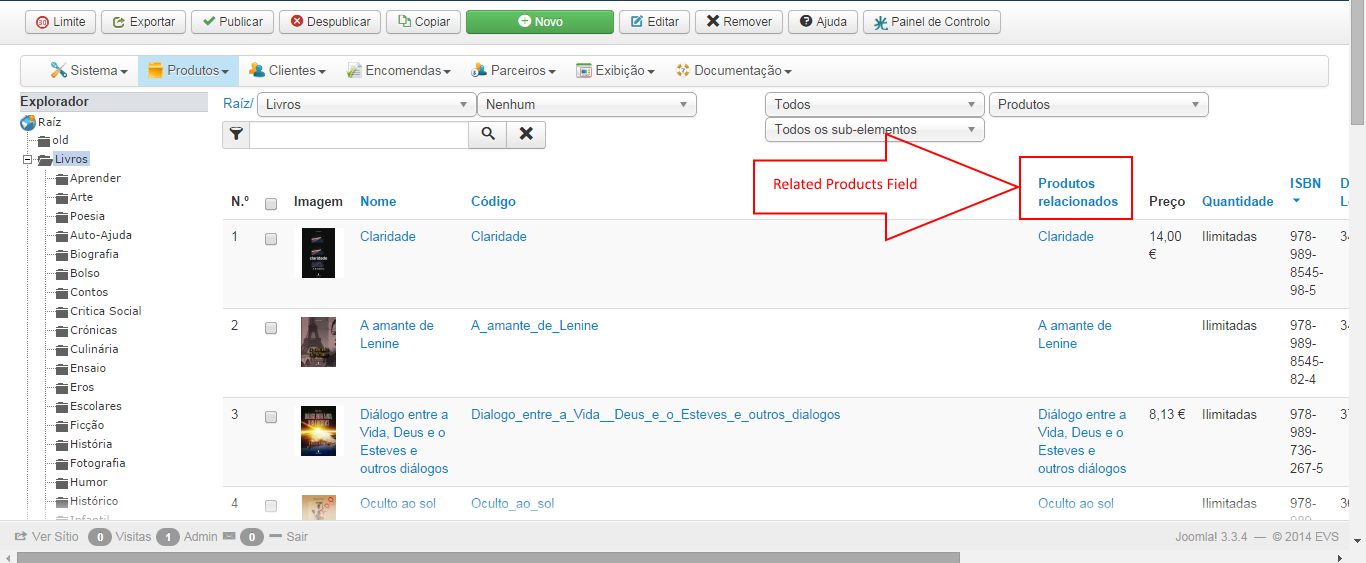
So far i was able to add the Title by adding the <td> on the right place.
My difficulty now is that i cannot get the related products title in the fields.
I enter this code in the product/listing.php file:
<td align="center">
<?php if($this->manage){ ?>
<a href="<?php echo hikashop_completeLink('product&task=edit&cid[]='.$row->product_related_id); ?>">
<?php } ?>
<?php echo $row->product_name; ?>
<?php if($this->manage){ ?>
</a>
<?php } ?>
</td>
But what i get is only the same product name...
Can you please tell me what can i do to make this possible?
I'm trying to change the Administrator products listing to show the related products link in the list. (image in attachment
So far i was able to add the Title by adding the <td> on the right place.
My difficulty now is that i cannot get the related products title in the fields.
I enter this code in the product/listing.php file:
<td align="center">
<?php if($this->manage){ ?>
<a href="<?php echo hikashop_completeLink('product&task=edit&cid[]='.$row->product_related_id); ?>">
<?php } ?>
<?php echo $row->product_name; ?>
<?php if($this->manage){ ?>
</a>
<?php } ?>
</td>
But what i get is only the same product name...
Can you please tell me what can i do to make this possible?
Please Log in or Create an account to join the conversation.

12 years 4 weeks ago - 12 years 4 weeks ago #174342
by Jerome
Jerome - Obsidev.com
HikaMarket & HikaSerial developer / HikaShop core dev team.
Replied by Jerome on topic Create Related Products column in Administrator
Hi,
Doing such modification require some development/PHP skills.
You have to perform an SQL query in order to get the related products for the products you will list.
For the moment the code display the product name of the current product in the loop ; but if you do not have loaded the related products, you won't be able to display them.
Regards,
Doing such modification require some development/PHP skills.
You have to perform an SQL query in order to get the related products for the products you will list.
For the moment the code display the product name of the current product in the loop ; but if you do not have loaded the related products, you won't be able to display them.
Code:
$query = 'SELECT a.*,b.* FROM '.hikashop_table('product_related').' AS a LEFT JOIN '.hikashop_table('product').' AS b ON a.product_related_id=b.product_id WHERE a.product_related_type=\'related\' AND a.product_id = '.$row->product_id;
$database->setQuery($query);
$related_products = $database->loadObjectList();
Regards,
Jerome - Obsidev.com
HikaMarket & HikaSerial developer / HikaShop core dev team.
Last edit: 12 years 4 weeks ago by Jerome.
Please Log in or Create an account to join the conversation.
- jnascimento
-
Topic Author
- Offline
Less
More
- Posts: 12
- Thank you received: 0
12 years 3 weeks ago #174472
by jnascimento
Replied by jnascimento on topic Create Related Products column in Administrator
Thanks for the reply.
I'm sorry i'm still "very young" on PHP coding.
I'm trying to apply this to the code but i'm not having results with it.
Im doing this:
I'm calling the product_name after requesting the query but it's not working.
Can you help with this little bit of code?
Thanks
I'm sorry i'm still "very young" on PHP coding.
I'm trying to apply this to the code but i'm not having results with it.
Im doing this:
Code:
<td>
<?php
$query = 'SELECT a.*,b.* FROM '.hikashop_table('product_related').' AS a LEFT JOIN '.hikashop_table('product').' AS b ON a.product_related_id=b.product_id WHERE a.product_related_type=\'related\' AND a.product_id = '.$row->product_id;
$database->setQuery($query);
$related_products = $database->loadObjectList();
?>
<?php echo $row->product_name; ?>
</td>
I'm calling the product_name after requesting the query but it's not working.
Can you help with this little bit of code?
Thanks
Please Log in or Create an account to join the conversation.

Less
More
- Posts: 12953
- Thank you received: 1778
12 years 3 weeks ago - 12 years 3 weeks ago #174511
by Mohamed Thelji
Replied by Mohamed Thelji on topic Create Related Products column in Administrator
Hello,
The code that Jerome gave you will just allow you to load the related products details on the "$related_products" object, now you'll just have to check what you have on that object and display the link of your related products.
Using that kind of code will probably do the job :
The code that Jerome gave you will just allow you to load the related products details on the "$related_products" object, now you'll just have to check what you have on that object and display the link of your related products.
Using that kind of code will probably do the job :
Code:
$database = JFactory::getDBO();
$query = 'SELECT a.*,b.* FROM '.hikashop_table('product_related').' AS a LEFT JOIN '.hikashop_table('product').' AS b ON a.product_related_id=b.product_id WHERE a.product_related_type=\'related\' AND a.product_id = '.$row->product_id;
$database->setQuery($query);
$related_products = $database->loadObjectList();
foreach($related_products as $key => $related_product){
if(!empty($related_product)){
?>
<a href="<?php echo hikashop_completeLink('product&task=edit&cid[]='.$related_product->product_id); ?>">
<?php
echo $related_product->product_name.'</br>';
?>
</a><?php
}
}
Last edit: 12 years 3 weeks ago by Mohamed Thelji.
Please Log in or Create an account to join the conversation.
- jnascimento
-
Topic Author
- Offline
Less
More
- Posts: 12
- Thank you received: 0
12 years 3 weeks ago #174566
by jnascimento
Replied by jnascimento on topic Create Related Products column in Administrator
Thanks for the reply... i try it under the <td></td> and it didn't work... i'm getting a blank page...
Please Log in or Create an account to join the conversation.
- jnascimento
-
Topic Author
- Offline
Less
More
- Posts: 12
- Thank you received: 0
12 years 3 weeks ago #174623
by jnascimento
Replied by jnascimento on topic Create Related Products column in Administrator
IT's working now...
This is what i have done:
Many thanks for your support!
Best Regards,
This is what i have done:
Code:
<td>
<?php
$database = JFactory::getDBO();
$query = 'SELECT a.*,b.* FROM '.hikashop_table('product_related').' AS a LEFT JOIN '.hikashop_table('product').' AS b ON a.product_related_id=b.product_id WHERE a.product_related_type=\'related\' AND a.product_id = '.$row->product_id;
$database->setQuery($query);
$related_products = $database->loadObjectList();
foreach($related_products as $key => $related_product){
if(!empty($related_product)){
?>
<a href="<?php echo hikashop_completeLink('product&task=edit&cid[]='.$related_product->product_id); ?>">
<?php
echo $related_product->product_name.'</br>';
?>
</a>
<?php
}
}
?>
</td>
Many thanks for your support!
Best Regards,
Please Log in or Create an account to join the conversation.
12 years 3 weeks ago #174639
by Jerome
Jerome - Obsidev.com
HikaMarket & HikaSerial developer / HikaShop core dev team.
Replied by Jerome on topic Create Related Products column in Administrator
Hi,
Good to know that it is working now.
When you got full blank page, do not hesitate to check your PHP error log or to activate the Joomla debug mode (in the joomla global configuration).
You can also change the "error reporting" to "maxium" in the Joomla global configuration (server).
Regards,
Good to know that it is working now.
When you got full blank page, do not hesitate to check your PHP error log or to activate the Joomla debug mode (in the joomla global configuration).
You can also change the "error reporting" to "maxium" in the Joomla global configuration (server).
Regards,
Jerome - Obsidev.com
HikaMarket & HikaSerial developer / HikaShop core dev team.
Please Log in or Create an account to join the conversation.
Time to create page: 0.078 seconds