
- Posts: 575
- Thank you received: 11
Which API to use for custom field & characteristic
- ler@singmuiheng.com
-
 Topic Author
- Offline
Less
More
10 years 5 months ago #237455
by ler@singmuiheng.com
-- HikaShop version -- : 2.6.2
-- Joomla version -- : 3.5.2
-- PHP version -- : 5.4.45
We would like to do some customization on characteristic and custom field to control pricing and quantity of product order
may i know which API is for manipulate these?
-- Joomla version -- : 3.5.2
-- PHP version -- : 5.4.45
We would like to do some customization on characteristic and custom field to control pricing and quantity of product order
may i know which API is for manipulate these?
Please Log in or Create an account to join the conversation.

10 years 5 months ago #237466
by nicolas
Replied by nicolas on topic Which API to use for custom field & characteristic
Hi,
You probably want to look at the plugin that we provide in the section "How to sell products by Width and Length ?" of our FAQ:
www.hikashop.com/support/documentation/106-faq.html#cart
You probably want to look at the plugin that we provide in the section "How to sell products by Width and Length ?" of our FAQ:
www.hikashop.com/support/documentation/106-faq.html#cart
Please Log in or Create an account to join the conversation.
- ler@singmuiheng.com
-
Topic Author
- Offline
Less
More
- Posts: 575
- Thank you received: 11
10 years 5 months ago - 10 years 5 months ago #238164
by ler@singmuiheng.com
Replied by ler@singmuiheng.com on topic Which API to use for custom field & characteristic
Dear Nicolas
thanks for this plugin, this is exactly what we are looking for when use together with display limited to function
however when we change the custom field from text -> single dropdown, it doesn't seem to work any more
below are our edited code, please let us know if we make something wrong
thanks for this plugin, this is exactly what we are looking for when use together with display limited to function
however when we change the custom field from text -> single dropdown, it doesn't seem to work any more
below are our edited code, please let us know if we make something wrong
Code:
<?php
jimport('joomla.plugin.plugin');
class plgSystemCustom_quantity_width_length extends JPlugin{
}
if(!function_exists('hikashop_product_price_for_quantity_in_cart') && !function_exists('hikashop_product_price_for_quantity_in_order')) {
function hikashop_product_price_for_quantity_in_cart(&$product){
$currencyClass = hikashop_get('class.currency');
$quantity = @$product->cart_product_quantity;
if(!empty($product->left2) && !empty($product->right2)){
$quantity = $quantity*2;
}
$currencyClass->quantityPrices($product->prices,$quantity,$product->cart_product_total_quantity);
}
function hikashop_product_price_for_quantity_in_order(&$product){
$quantity = $product->order_product_quantity;
if(!empty($product->left2) && !empty($product->right2)){
$quantity = $quantity*2;
}
$product->order_product_total_price_no_vat = $product->order_product_price*$quantity;
$product->order_product_total_price = ($product->order_product_price+$product->order_product_tax)*$quantity;
}
}
Last edit: 10 years 5 months ago by nicolas. Reason: code tags missing
Please Log in or Create an account to join the conversation.
10 years 5 months ago #238178
by nicolas
Replied by nicolas on topic Which API to use for custom field & characteristic
Hi,
In your code, the important part is:
There, you basically say: when the custom fields "left2" and "right2" have been filled/selected, multiple the quantity of the product by 2.
But you actually don't use the values selected in the fields. Please look again at the code of the plugin we provide in our FAQ. You'll see there that we do use the values of the fields to update the quantity:
In your code, the important part is:
Code:
if(!empty($product->left2) && !empty($product->right2)){
$quantity = $quantity*2;
}
But you actually don't use the values selected in the fields. Please look again at the code of the plugin we provide in our FAQ. You'll see there that we do use the values of the fields to update the quantity:
Code:
$quantity = $quantity*$product->length*$product->width;
Please Log in or Create an account to join the conversation.
- ler@singmuiheng.com
-
Topic Author
- Offline
Less
More
- Posts: 575
- Thank you received: 11
10 years 3 months ago #244157
by ler@singmuiheng.com
Replied by ler@singmuiheng.com on topic Which API to use for custom field & characteristic
Dear Nicolas
the plugin are working all fine but we face a problem when we enable point reward
the rewarded point do not have the quantity x 2 calculation
is it possible to correct this on the same plugin or it should modify the userpoint plugin code?
the plugin are working all fine but we face a problem when we enable point reward
the rewarded point do not have the quantity x 2 calculation
is it possible to correct this on the same plugin or it should modify the userpoint plugin code?
Please Log in or Create an account to join the conversation.
10 years 3 months ago #244179
by nicolas
Replied by nicolas on topic Which API to use for custom field & characteristic
Hi,
Can you provide the code of the plugin you're using and a screenshot of the settings of your user points plugin ?
Can you provide the code of the plugin you're using and a screenshot of the settings of your user points plugin ?
Please Log in or Create an account to join the conversation.
- ler@singmuiheng.com
-
Topic Author
- Offline
Less
More
- Posts: 575
- Thank you received: 11
10 years 3 months ago #244243
by ler@singmuiheng.com
Replied by ler@singmuiheng.com on topic Which API to use for custom field & characteristic
Attached our plugin for everyone, some minor modification and creation of custom field is needed in order to use this plugin
it is suitable to change the quantity/pricing base on the custom field customer selected
below are the code, we simply determine the field selected and multiply the final checkout value by 2
however, the point award was not multiply by 2
this is the point plugin setting page
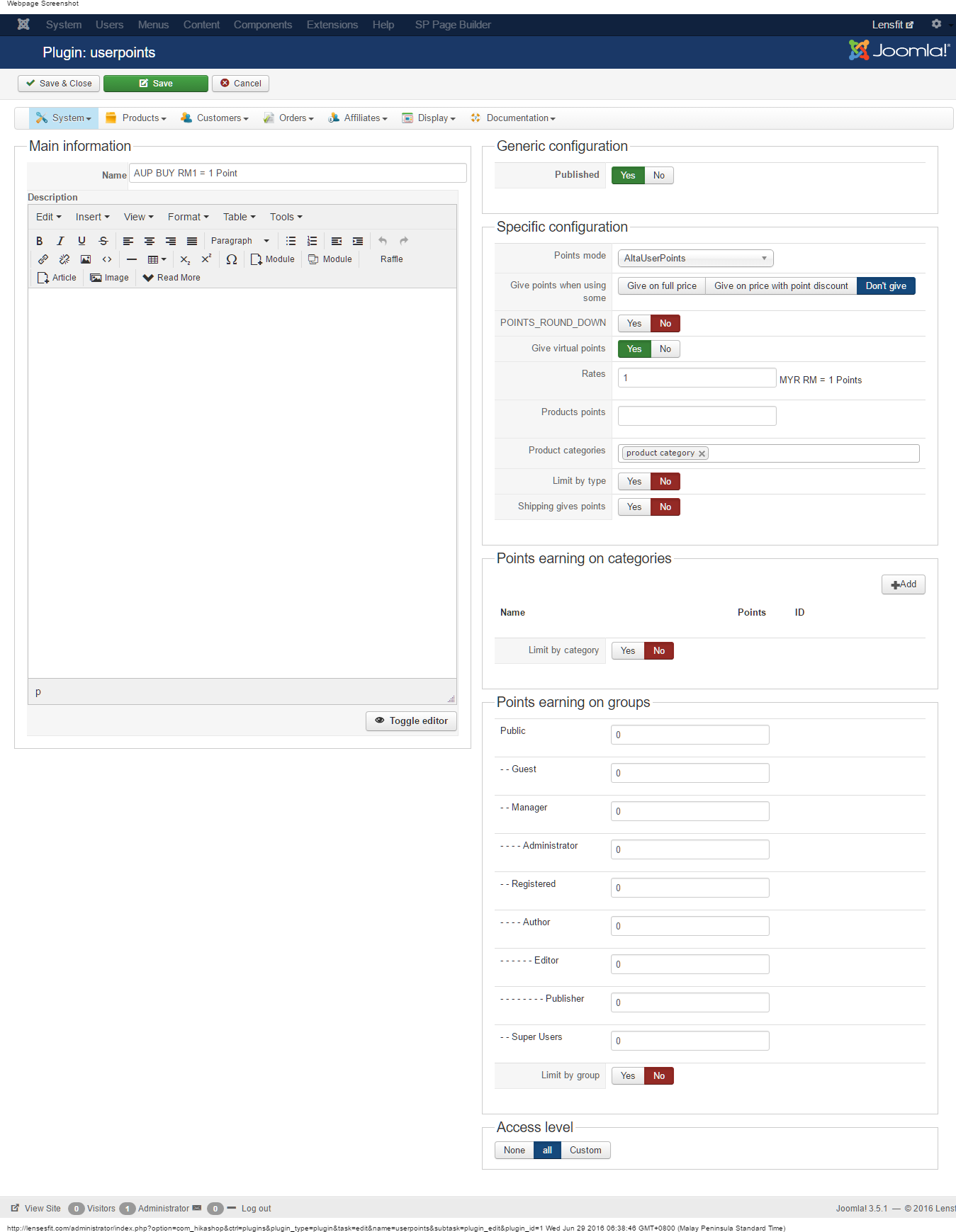
it is suitable to change the quantity/pricing base on the custom field customer selected
below are the code, we simply determine the field selected and multiply the final checkout value by 2
however, the point award was not multiply by 2
Code:
<?php
jimport('joomla.plugin.plugin');
class plgSystemCustom_quantity_width_length extends JPlugin{
}
if(!function_exists('hikashop_product_price_for_quantity_in_cart') && !function_exists('hikashop_product_price_for_quantity_in_order')) {
function hikashop_product_price_for_quantity_in_cart(&$product){
$currencyClass = hikashop_get('class.currency');
$quantity = @$product->cart_product_quantity;
if((!empty($product->left2) && !empty($product->right2)) || (!empty($product->left3) && !empty($product->right3)) || (!empty($product->left_0to850) && !empty($product->right_0to850)) || (!empty($product->left_05to10) && !empty($product->right_05to10)) ||
(!empty($product->left_0to9) && !empty($product->right_0to9)) || (!empty($product->left_075to9) && !empty($product->right_075to9)) ||(!empty($product->left_1to9) && !empty($product->right_1to9)) || (!empty($product->left_0to6) && !empty($product->right_0to6)) || (!empty($product->left_050to12) && !empty($product->right_050to12))) {
$quantity = $quantity*2;
}
$currencyClass->quantityPrices($product->prices,$quantity,$product->cart_product_total_quantity);
}
function hikashop_product_price_for_quantity_in_order(&$product){
$quantity = $product->order_product_quantity;
if((!empty($product->left2) && !empty($product->right2)) || (!empty($product->left3) && !empty($product->right3)) || (!empty($product->left_0to850) && !empty($product->right_0to850)) || (!empty($product->left_05to10) && !empty($product->right_05to10)) ||
(!empty($product->left_0to9) && !empty($product->right_0to9)) || (!empty($product->left_075to9) && !empty($product->right_075to9)) ||(!empty($product->left_1to9) && !empty($product->right_1to9)) || (!empty($product->left_0to6) && !empty($product->right_0to6)) || (!empty($product->left_050to12) && !empty($product->right_050to12))) {
$quantity = $quantity*2;
}
$product->order_product_total_price_no_vat = $product->order_product_price*$quantity;
$product->order_product_total_price = ($product->order_product_price+$product->order_product_tax)*$quantity;
}
}
this is the point plugin setting page
The following user(s) said Thank You: Xavier
Please Log in or Create an account to join the conversation.
- ler@singmuiheng.com
-
Topic Author
- Offline
Less
More
- Posts: 575
- Thank you received: 11
10 years 2 months ago #244512
by ler@singmuiheng.com
Replied by ler@singmuiheng.com on topic Which API to use for custom field & characteristic
Dear Xavier
Our problem is not solved yet
Main problem, although the checout price is multiply by 2
the awarded point is not
Is it possible to manipulate the awarded point during checkout of this plugin?
Our problem is not solved yet
Main problem, although the checout price is multiply by 2
the awarded point is not
Is it possible to manipulate the awarded point during checkout of this plugin?
Please Log in or Create an account to join the conversation.
10 years 2 months ago #244579
by nicolas
Replied by nicolas on topic Which API to use for custom field & characteristic
Hi,
You should try removing the "product category" category from the "product categories" setting of your user points plugin. With it, the system has to recalculate the amount of the products which will give points, starting from the unit price of the products in the order ( and thus, it circumvents the price calculation override that you've implemented). If you remove it, it directly uses the total of the order and thus it will take into account your override of the calculations.
You should try removing the "product category" category from the "product categories" setting of your user points plugin. With it, the system has to recalculate the amount of the products which will give points, starting from the unit price of the products in the order ( and thus, it circumvents the price calculation override that you've implemented). If you remove it, it directly uses the total of the order and thus it will take into account your override of the calculations.
Please Log in or Create an account to join the conversation.
Time to create page: 0.239 seconds