
Decimal quantity plugin not working anymore

9 years 6 months ago #265832
by Rixters
Decimal quantity plugin not working anymore was created by Rixters
-- HikaShop version -- : 3.0.1
-- Joomla version -- : 3.6.5
-- PHP version -- : 3.6.x
-- Browser(s) name and version -- : FF
Hi Hika team,
A while ago I made a plugin to use a custom field to set a decimal quantity for a product. I noticed that a couple of people are using the plugin so I would like to get things fixed.
Due to the changes in Hikashop 3 the plugin isn't working anymore. Can you tell me how I can update the cart? Previously I used the following code to update the individual products in the cart:
As reference , you can find the code on line 97 in the repo.
github.com/RickR2H/hikashop-decimal-quan.../custom_pricer2h.php
The original post about the plugin:
www.hikashop.com/forum/development/88546...a-plugin.html#245183
Thanks in advance!
-- Joomla version -- : 3.6.5
-- PHP version -- : 3.6.x
-- Browser(s) name and version -- : FF
Hi Hika team,
A while ago I made a plugin to use a custom field to set a decimal quantity for a product. I noticed that a couple of people are using the plugin so I would like to get things fixed.
Due to the changes in Hikashop 3 the plugin isn't working anymore. Can you tell me how I can update the cart? Previously I used the following code to update the individual products in the cart:
Code:
$currencyClass->quantityPrices($product->prices,$quantity,$product->cart_product_total_quantity);
As reference , you can find the code on line 97 in the repo.
github.com/RickR2H/hikashop-decimal-quan.../custom_pricer2h.php
The original post about the plugin:
www.hikashop.com/forum/development/88546...a-plugin.html#245183
Thanks in advance!
Please Log in or Create an account to join the conversation.

9 years 6 months ago #265896
by nicolas
Replied by nicolas on topic Decimal quantity plugin not working anymore
Hi,
I've tested the plugin myself and there is no change between HikaShop 2.x and HikaShop 3.x with it.
It works exactly the same.
However I did see a bug in the plugin.
If you set the taxes setting of the plugin to "no taxes", then, the price of the product on the checkout is the value you entered in the custom field and that's because you have that code:
instead of
I've tested the plugin myself and there is no change between HikaShop 2.x and HikaShop 3.x with it.
It works exactly the same.
However I did see a bug in the plugin.
If you set the taxes setting of the plugin to "no taxes", then, the price of the product on the checkout is the value you entered in the custom field and that's because you have that code:
Code:
$product->prices[$k]->price_value = $product->$column;
$product->prices[$k]->price_value_with_tax = $product->$column;
Code:
$product->prices[$k]->price_value = $product_price;
$product->prices[$k]->price_value_with_tax = $product_price;
Please Log in or Create an account to join the conversation.
9 years 6 months ago #265923
by Rixters
Replied by Rixters on topic Decimal quantity plugin not working anymore
Hi Nicolas,
I made some improvements to the plugin and everything seems to work now. There is only one issue that remains. In the old plugin I could manupulate the field value shown under the product title in the cart by using the following code:
You can see my old code on line 94 and 95 in the repo.
Unfortunately this isn't working anymore. Do you have an idea how to change this info in the cart? Now only the field label is shown...
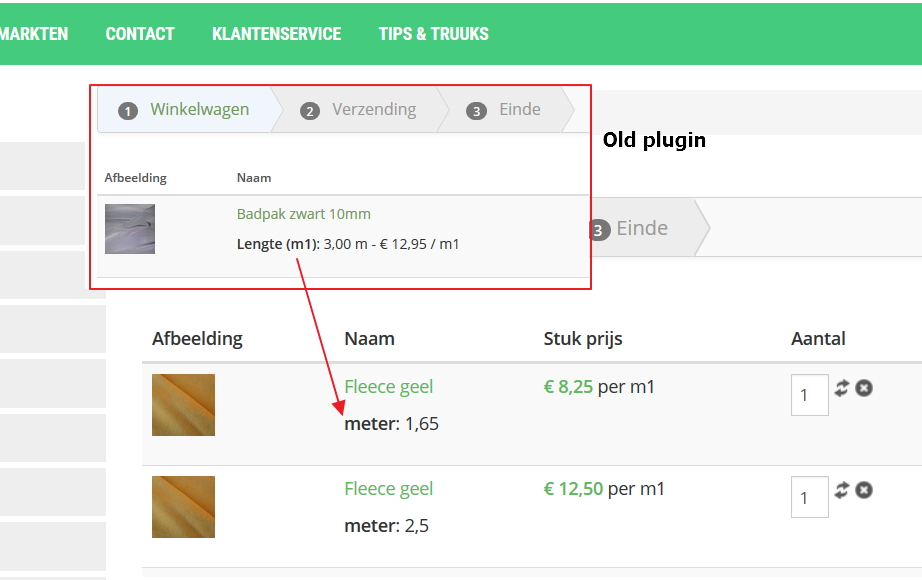
I hope you can help me!
Regards!
I made some improvements to the plugin and everything seems to work now. There is only one issue that remains. In the old plugin I could manupulate the field value shown under the product title in the cart by using the following code:
Code:
$product->$column = $product->$column . ' m - € ' . number_format(round($original_product_price, 2), 2, ',', ' ') .' / m1';
Unfortunately this isn't working anymore. Do you have an idea how to change this info in the cart? Now only the field label is shown...
I hope you can help me!
Regards!
Please Log in or Create an account to join the conversation.
9 years 6 months ago #265946
by nicolas
Replied by nicolas on topic Decimal quantity plugin not working anymore
Yes, we kind of blocked that.
You can change that by editing the file "show_block_cart" and changing the code:
to:
You can change that by editing the file "show_block_cart" and changing the code:
Code:
$item = $cart->cart_products[$i];
Code:
$item = $cart->products[$i];
Please Log in or Create an account to join the conversation.
9 years 6 months ago #265992
by Rixters
Replied by Rixters on topic Decimal quantity plugin not working anymore
Hi Nico,
Thanks! But maybe I have an other solution... The item price next to the title in the cart is updates on changing the custom field. Is it possible to just manipulate this values without changing the product total price? Then in this case the price in m1, the field value And the total price * field value is shown. Ideally I don't want to use overrides to keep thins as consistent and future proof as possible!
Thanks in advance!
Thanks! But maybe I have an other solution... The item price next to the title in the cart is updates on changing the custom field. Is it possible to just manipulate this values without changing the product total price? Then in this case the price in m1, the field value And the total price * field value is shown. Ideally I don't want to use overrides to keep thins as consistent and future proof as possible!
Thanks in advance!
Please Log in or Create an account to join the conversation.
9 years 6 months ago #265995
by nicolas
Replied by nicolas on topic Decimal quantity plugin not working anymore
Hi,
Then, I would recommend instead to implement the onAfterCartProductsLoad trigger in your plugin:
www.hikashop.com/support/documentation/6...fterCartProductsLoad
That way, you can modify the array $cart->cart_products to change the value of the custom item field after the prices and products have been loaded and calculated for the cart.
In fact, you could even change the prices there too, but you would have to update the totals as well in that case so it would be more complex.
Then, I would recommend instead to implement the onAfterCartProductsLoad trigger in your plugin:
www.hikashop.com/support/documentation/6...fterCartProductsLoad
That way, you can modify the array $cart->cart_products to change the value of the custom item field after the prices and products have been loaded and calculated for the cart.
In fact, you could even change the prices there too, but you would have to update the totals as well in that case so it would be more complex.
Please Log in or Create an account to join the conversation.
9 years 5 months ago #266186
by Rixters
Replied by Rixters on topic Decimal quantity plugin not working anymore
Thanks for your help!
Got the plugin working again!
Got the plugin working again!
The following user(s) said Thank You: Jerome
Please Log in or Create an account to join the conversation.
Time to create page: 0.188 seconds