

- Posts: 8
- Thank you received: 0
call plugin on order display administrator and custom fields
9 years 2 weeks ago #280212
by Skelgaard
Hi,
is there a method i can call in my plugin to get a shipping plugin to be showed in the administrator order view (/administrator/index.php?option=com_hikashop&ctrl=order&task=edit&cid[]=1) page ?
also is there a way i can check or even create a custom field upon running a plugin, so that i can make sure the custom fields i need, exists and if not just create them automatic ?
regards
Jesper
is there a method i can call in my plugin to get a shipping plugin to be showed in the administrator order view (/administrator/index.php?option=com_hikashop&ctrl=order&task=edit&cid[]=1) page ?
also is there a way i can check or even create a custom field upon running a plugin, so that i can make sure the custom fields i need, exists and if not just create them automatic ?
regards
Jesper
Please Log in or Create an account to join the conversation.

9 years 2 weeks ago #280246
by nicolas
Replied by nicolas on topic call plugin on order display administrator and custom fields
Hi,
Yes. The Display API triggers onHikashopBeforeDisplayView(&$view) and onHikashopAfterDisplayView(&$view) are called on all the views of HikaShop, including this one:
www.hikashop.com/support/documentation/6...ntation.html#display
So you can implement these triggers, check the current controller and task in the URL or in the $view object and then add your HTML where you want.
Yes. The Display API triggers onHikashopBeforeDisplayView(&$view) and onHikashopAfterDisplayView(&$view) are called on all the views of HikaShop, including this one:
www.hikashop.com/support/documentation/6...ntation.html#display
So you can implement these triggers, check the current controller and task in the URL or in the $view object and then add your HTML where you want.
The following user(s) said Thank You: Skelgaard
Please Log in or Create an account to join the conversation.
9 years 2 weeks ago - 9 years 2 weeks ago #280259
by Skelgaard
Replied by Skelgaard on topic call plugin on order display administrator and custom fields
hi nicolas,
thanx that answers one of two questions
can you answer the other also ?
thanx that answers one of two questions
can you answer the other also ?
Last edit: 9 years 2 weeks ago by Skelgaard.
Please Log in or Create an account to join the conversation.
9 years 2 weeks ago #280286
by Skelgaard
Replied by Skelgaard on topic call plugin on order display administrator and custom fields
on onHikashopAfterDisplayView how do i get any config parameters set in the plugin backend from the
var $pluginConfig = array(
'username' => array('USERNAME', 'input'),
'password' => array('PASSWORD', 'input'),
'customerid' => array('CUSTID', 'input'),
'contactid' => array('CONTID', 'input'),
);
parameter
var $pluginConfig = array(
'username' => array('USERNAME', 'input'),
'password' => array('PASSWORD', 'input'),
'customerid' => array('CUSTID', 'input'),
'contactid' => array('CONTID', 'input'),
);
parameter
Please Log in or Create an account to join the conversation.

Less
More
- Posts: 12953
- Thank you received: 1778
9 years 1 week ago #280309
by Mohamed Thelji
Replied by Mohamed Thelji on topic call plugin on order display administrator and custom fields
Hi,
For the custom fields, you can check with a MySQL query in the constructor of your plugin class and insert it in the hikashop_field table if missing with another MySQL query and finally add the column with a third MySQL query.
So it sure is possible.
Regarding the plugin parameters it will actually depends on the type of plugin you are using, the best solution will be to directly check the code of our plugins.
For the custom fields, you can check with a MySQL query in the constructor of your plugin class and insert it in the hikashop_field table if missing with another MySQL query and finally add the column with a third MySQL query.
So it sure is possible.
Regarding the plugin parameters it will actually depends on the type of plugin you are using, the best solution will be to directly check the code of our plugins.
Please Log in or Create an account to join the conversation.
9 years 1 week ago #280344
by Skelgaard
Replied by Skelgaard on topic call plugin on order display administrator and custom fields
Regarding the plugin parameters:
i have not found any solutions in any shipping plugins i have been able to use... go an idea which plugin i should look into.
i will look at the sql for the fields, though you should make a hikashop call that can check fields and create them.
i have not found any solutions in any shipping plugins i have been able to use... go an idea which plugin i should look into.
i will look at the sql for the fields, though you should make a hikashop call that can check fields and create them.
Please Log in or Create an account to join the conversation.
9 years 1 week ago #280345
by nicolas
Replied by nicolas on topic call plugin on order display administrator and custom fields
Hi,
We thought that you were talking about custom fields that you can create via the menu Display>Custom fields. If you're talking about fields that you want to add to a random view and not go through the standard custom field system of HikaShop, then it's something else.
It's really easy to display input fields in a view:
That will display input fields in the view.
We thought that you were talking about custom fields that you can create via the menu Display>Custom fields. If you're talking about fields that you want to add to a random view and not go through the standard custom field system of HikaShop, then it's something else.
It's really easy to display input fields in a view:
Code:
public function onHikashopAfterDisplayView(&$view) {
$viewName = $viewObj->getName();
$layout = $viewObj->getLayout();
if($viewName == 'order' && $layout == 'edit')
echo 'my additional HTML with my input fields';
}
Please Log in or Create an account to join the conversation.
9 years 1 week ago #280363
by Skelgaard
Replied by Skelgaard on topic call plugin on order display administrator and custom fields
well yes and no... that part i have working... but within that, i need to get some of the variables defined in the screenshot attached
they have been defined like this
so now i need to get to that info that the user admin have added in the configuration in the plugin
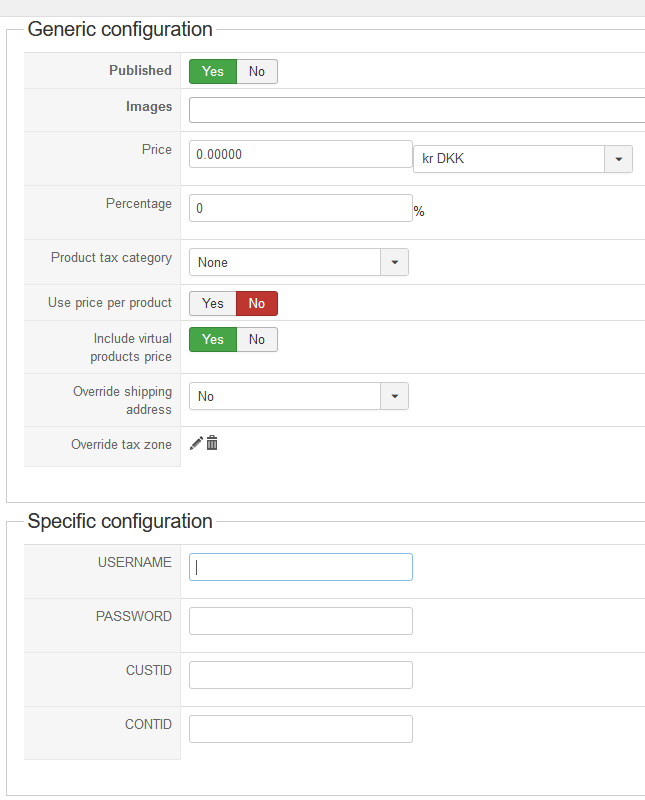
they have been defined like this
Code:
class plgHikaShopshippingCustom extends hikashopShippingPlugin {
var $multiple = true;
var $name = 'custom';
var $doc_form = 'custom';
var $pluginConfig = array(
'username' => array('USERNAME', 'input'),
'password' => array('PASSWORD', 'input'),
'customerid' => array('CUSTID', 'input'),
'contactid' => array('CONTID', 'input'),
);
so now i need to get to that info that the user admin have added in the configuration in the plugin
Please Log in or Create an account to join the conversation.
9 years 1 week ago #280370
by nicolas
Replied by nicolas on topic call plugin on order display administrator and custom fields
Hi,
So it looks like you're developing a shipping plugin.
In that case, you can use such code:
That will display the value you entered in the "customerid" field of the shipping method selected in the order on the order page of the backend.
So it looks like you're developing a shipping plugin.
In that case, you can use such code:
Code:
$shippingClass = hikashop_get('class.shipping');
$shipping = $shippingClass->get($view->order->order_shipping_id);
echo $shipping->shipping_params->customerid;
Please Log in or Create an account to join the conversation.
9 years 1 week ago #280434
by Skelgaard
Replied by Skelgaard on topic call plugin on order display administrator and custom fields
thanx got access to the shipping_params and that is working
now about checking the fields in mysql, i did
but i get
so either there is more needed than adding this, as i can see the field in mysql, but i can't use it from frontend but looks fine in the administrator area
now about checking the fields in mysql, i did
Code:
$db = JFactory::getDbo();
$query = $db->getQuery(true);
$query->select($db->quoteName('field_realname'))
->from($db->quoteName('#__hikashop_field'))
->where($db->quoteName('field_realname') . ' = '. $db->quote('pakkeshop'))
->andwhere($db->quoteName('field_table') . ' = '. $db->quote('order'))
;
$db->setQuery($query);
if ($db->loadResult() === null)
{
$query = $db->getQuery(true);
$query->clear();
$db->setQuery("INSERT INTO `hjemmebryg_hikashop_field` (`field_table`, `field_realname`, `field_namekey`, `field_type`, `field_value`, `field_published`, `field_ordering`, `field_options`, `field_core`, `field_required`, `field_default`, `field_access`, `field_categories`, `field_with_sub_categories`, `field_products`, `field_frontcomp`, `field_backend`, `field_backend_listing`, `field_display`) VALUES('order', 'GLS Pakkeshop ID', 'pakkeshop', 'text', '', 1, 4, 'a:16:{s:15:\"limit_to_parent\";s:0:\"\";s:12:\"errormessage\";s:0:\"\";s:5:\"regex\";s:0:\"\";s:9:\"attribute\";s:0:\"\";s:11:\"placeholder\";s:0:\"\";s:6:\"inline\";s:1:\"0\";s:4:\"cols\";s:0:\"\";s:9:\"filtering\";s:1:\"1\";s:9:\"maxlength\";s:1:\"0\";s:4:\"rows\";s:0:\"\";s:9:\"zone_type\";s:7:\"country\";s:12:\"pleaseselect\";s:1:\"0\";s:4:\"size\";s:0:\"\";s:6:\"format\";s:5:\"d/m/Y\";s:5:\"allow\";s:0:\"\";s:8:\"readonly\";s:1:\"0\";}', 0, 0, '', 'all', 'all', 0, '', 0, 1, 0, ';front_order=0;invoice=0;back_shipping_invoice=0;order_edit=0;mail_order_notif=0;mail_status_notif=0;mail_order_creation=0;mail_admin_notif=0;mail_payment_notif=0;')");
$db->execute();
}
but i get
Code:
1054 - Unknown column 'pakkeshop' in 'field list'
Please Log in or Create an account to join the conversation.
9 years 1 week ago #280463
by nicolas
Replied by nicolas on topic call plugin on order display administrator and custom fields
Hi,
Did you add the pakkeshop column in the hikashop_order as Mohamed explained in his previous message ?
Did you add the pakkeshop column in the hikashop_order as Mohamed explained in his previous message ?
and finally add the column with a third MySQL query
The following user(s) said Thank You: Skelgaard
Please Log in or Create an account to join the conversation.
9 years 1 week ago #280464
by Skelgaard
Replied by Skelgaard on topic call plugin on order display administrator and custom fields
i thats what i missed... i will try that
Please Log in or Create an account to join the conversation.
9 years 1 week ago #280465
by Skelgaard
Replied by Skelgaard on topic call plugin on order display administrator and custom fields
thanx all... got it all working
Please Log in or Create an account to join the conversation.
Time to create page: 0.433 seconds