
Need another one button "add to cart and go to the cart"
- progreccor
-
 Topic Author
- Offline
- SEO, webdesign
Less
More
8 years 9 months ago #284653
by progreccor
Я не явлюсь официальной службой поддержки!
Я здесь добровольно!
Хочешь получить купон на скидку Hikashop? Спроси меня как!
-- HikaShop version -- : 3.2.1
I need to create two buttons "add to cart" on the product page.
1. Traditional add to cart that is work well.
2. And "Add to cart and go to the cart"
The second button need to add to the cart current product and after that go to the cart,
What is the optimal way for this?
I need to create two buttons "add to cart" on the product page.
1. Traditional add to cart that is work well.
2. And "Add to cart and go to the cart"
The second button need to add to the cart current product and after that go to the cart,
What is the optimal way for this?
Я не явлюсь официальной службой поддержки!
Я здесь добровольно!
Хочешь получить купон на скидку Hikashop? Спроси меня как!
Please Log in or Create an account to join the conversation.

Less
More
- Posts: 12953
- Thank you received: 1778
8 years 9 months ago #284660
by Mohamed Thelji
Replied by Mohamed Thelji on topic Need another one button "add to cart and go to the cart"
Hello,
The solution will be to directly use some views override for the "Add to cart and go to the cart" button and use a link like the link that you can find when using the "Add to cart HTML link" option through your product configuration page.
The solution will be to directly use some views override for the "Add to cart and go to the cart" button and use a link like the link that you can find when using the "Add to cart HTML link" option through your product configuration page.
Please Log in or Create an account to join the conversation.
- progreccor
-
Topic Author
- Offline
- SEO, webdesign
8 years 9 months ago #284710
by progreccor
Я не явлюсь официальной службой поддержки!
Я здесь добровольно!
Хочешь получить купон на скидку Hikashop? Спроси меня как!
Replied by progreccor on topic Need another one button "add to cart and go to the cart"
I got this code
But it doesn't work .... Don't add to cart any product....
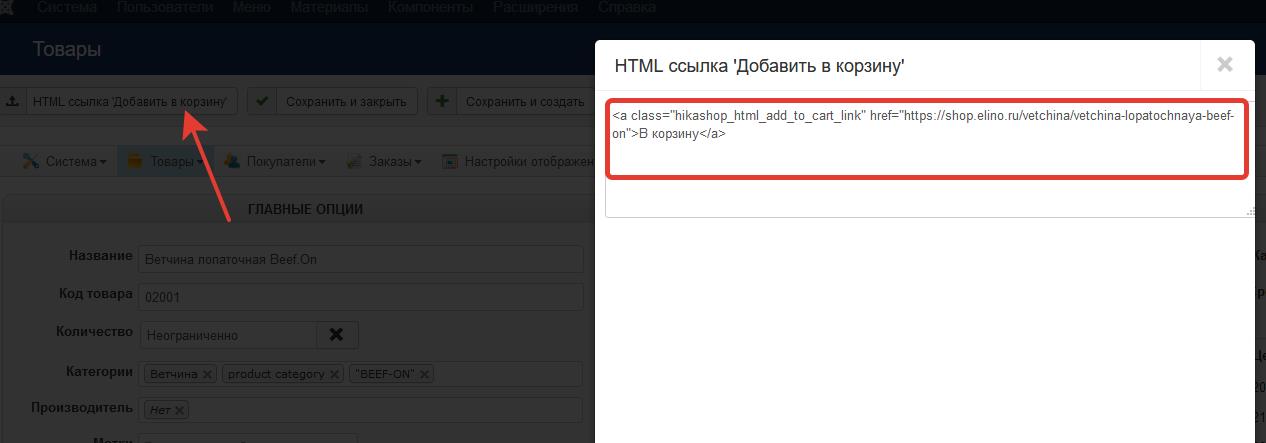
Code:
<a class="hikashop_html_add_to_cart_link" href="https://shop.elino.ru/vetchina/vetchina-lopatochnaya-beef-on">В корзину</a>
But it doesn't work .... Don't add to cart any product....
Я не явлюсь официальной службой поддержки!
Я здесь добровольно!
Хочешь получить купон на скидку Hikashop? Спроси меня как!
Please Log in or Create an account to join the conversation.

8 years 9 months ago - 8 years 9 months ago #284712
by nicolas
Replied by nicolas on topic Need another one button "add to cart and go to the cart"
Hi,
It's actually a bug of that popup when the canonical URL of the product is filled.
Change the code:
to:
in the file administrator/components/com_hikashop/controllers/product.php and it will then provide a correct link in the HTML of the popup.
We'll add that patch for the next version of HikaShop which is to be released soon.
It's actually a bug of that popup when the canonical URL of the product is filled.
Change the code:
Code:
echo '<textarea style="width:100%" rows="5"><a class="hikashop_html_add_to_cart_link" href="'. hikashop_contentLink('product&task=updatecart&qty=1&cid='.$product_id, $product, false, false, false, true).'">'.JText::_('ADD_TO_CART').'</a></textarea>';
Code:
$menusClass = hikashop_get('class.menus');
$id = $menusClass->loadAMenuItemId('','');
if(!empty($id))
$id = '&Itemid='.$id;
echo '<textarea style="width:100%" rows="5"><a class="hikashop_html_add_to_cart_link" href="'. hikashop_completeLink('product&task=updatecart&qty=1&cid='.$product_id.$id, false, false, false, true).'">'.JText::_('ADD_TO_CART').'</a></textarea>';
We'll add that patch for the next version of HikaShop which is to be released soon.
Last edit: 8 years 9 months ago by nicolas.
The following user(s) said Thank You: progreccor
Please Log in or Create an account to join the conversation.
Time to create page: 0.197 seconds