

- Posts: 282
- Thank you received: 42
How to refresh a module with ajax based on checkout shipping method?
5 years 7 months ago - 5 years 7 months ago #331120
by oxido
-- url of the page with the problem -- :
-- HikaShop version -- : 4.4.1
-- Joomla version -- : 3.9.25
Hi,
I have create a module which is taking his details from the cart.
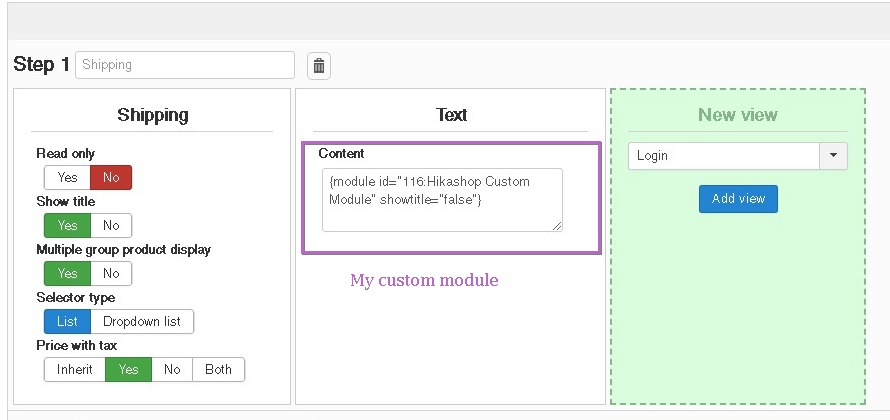
I configurated this module to be visible in Hikashop Checkout, using the text view, by adding this tag to load the module.
.
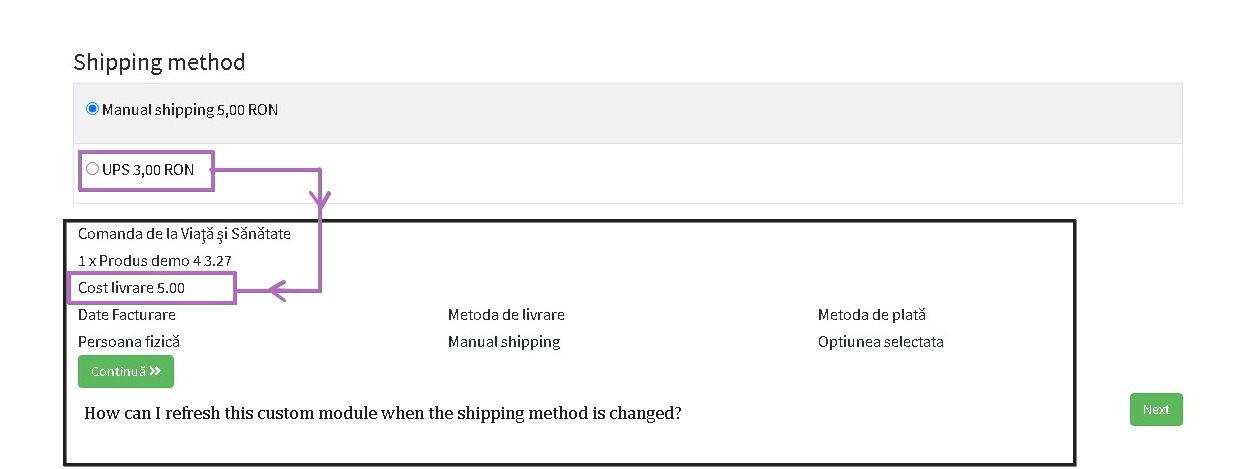
And now, i need the module to refresh himself when the shipping method is changed, how can I do this?
Please give me as many details, javascript it's not my strong point.
Loading the module in checkout
Visible in Front-page
This message contains confidential information
-- HikaShop version -- : 4.4.1
-- Joomla version -- : 3.9.25
Hi,
I have create a module which is taking his details from the cart.
I configurated this module to be visible in Hikashop Checkout, using the text view, by adding this tag to load the module.
Code:
{module id="116:Hikashop Custom Module" showtitle="false"}
And now, i need the module to refresh himself when the shipping method is changed, how can I do this?
Please give me as many details, javascript it's not my strong point.
Loading the module in checkout
Visible in Front-page
Last edit: 5 years 7 months ago by oxido. Reason: I have attached the module.
Please Log in or Create an account to join the conversation.

5 years 7 months ago #331146
by nicolas
Replied by nicolas on topic How to refresh a module with ajax based on checkout shipping method?
Hi,
Well, a simple solution would be to add the code of your module directly in one of the view files which is refreshed when the shipping method is changed.
For example, you have the "status" view which just displays the selected shipping and payment methods. If you don't use it, you could repurpose it with your own code to display your custom content on the checkout and the show_block_status where you would add your code already has the javascript code to refresh itself when the shipping method is changed:
Now if you want to stick to your solution with the loadposition in the "text" view, you would need to add such similar javascript to the show_block_text view file via the menu Display>Views.
Well, a simple solution would be to add the code of your module directly in one of the view files which is refreshed when the shipping method is changed.
For example, you have the "status" view which just displays the selected shipping and payment methods. If you don't use it, you could repurpose it with your own code to display your custom content on the checkout and the show_block_status where you would add your code already has the javascript code to refresh itself when the shipping method is changed:
Code:
<script type="text/javascript">
if(!window.checkout) window.checkout = {};
window.Oby.registerAjax(['checkout.shipping.updated','checkout.payment.updated'], function(params){
window.checkout.refreshStatus(<?php echo (int)$this->step; ?>, <?php echo (int)$this->module_position; ?>);
});
window.checkout.refreshStatus = function(step, id) { return window.checkout.refreshBlock('status', step, id); };
</script>
The following user(s) said Thank You: oxido
Please Log in or Create an account to join the conversation.
5 years 5 months ago #332041
by oxido
Replied by oxido on topic How to refresh a module with ajax based on checkout shipping method?
For future me and others:
edit the view: checkout / show_block_status.php
Now you can set any module to be visible to this position, and it will be refreshed by ajax.
PS. Thx nicolas!
edit the view: checkout / show_block_status.php
Code:
// Create a position for module: checkout-position
// prepare content to be rendered corectly with "content.prepare".
echo JHtml::_('content.prepare', '{loadposition checkout-position}');
PS. Thx nicolas!
Please Log in or Create an account to join the conversation.
Time to create page: 0.185 seconds