
- Posts: 3
- Thank you received: 0
Product or category creation end with error
- Yovtchevsky
-
 Topic Author
- Offline
Less
More
12 years 7 months ago #147468
by Yovtchevsky
Product or category creation end with error was created by Yovtchevsky
-- HikaShop version -- Starter 2.3.0
-- Joomla version -- : 3.2.3
-- PHP version -- : 5.4.24
-- Browser(s) name and version -- Mozilla 27.0.1 and Internet Explorer 11
-- Error-message(debug-mod must be tuned on) -- SQL=SELECT template FROM jos_templates_menu WHERE client_id = 0 AND menuid = 0
When creating product or category, reseived error " SQL=SELECT template FROM jos_templates_menu WHERE client_id = 0 AND menuid = 0 "
The instalation is fresh. No products or categoryes are added.
Trying few times - same result.
Uninstalled HikaShop, removed SQL datrabases and reinstalled again - received same error.
Joomla debuging is turned on, but i have no idea what code is executed during error.
In Joomla debug console, previous SQL query was:
SELECT *
FROM jos_hikashop_field as a
WHERE a.`field_published` = 1
AND a.field_table='product'
AND ((field_with_sub_categories=0
AND (field_categories="all" OR field_categories LIKE '%,2,%'))OR (field_with_sub_categories=1
AND (field_categories="all" OR field_categories LIKE '%,1,%' OR field_categories LIKE '%,2,%')))
ORDER BY a.`field_ordering` ASC
Any ideas?!
Best regards
Kiril
-- Joomla version -- : 3.2.3
-- PHP version -- : 5.4.24
-- Browser(s) name and version -- Mozilla 27.0.1 and Internet Explorer 11
-- Error-message(debug-mod must be tuned on) -- SQL=SELECT template FROM jos_templates_menu WHERE client_id = 0 AND menuid = 0
When creating product or category, reseived error " SQL=SELECT template FROM jos_templates_menu WHERE client_id = 0 AND menuid = 0 "
The instalation is fresh. No products or categoryes are added.
Trying few times - same result.
Uninstalled HikaShop, removed SQL datrabases and reinstalled again - received same error.
Joomla debuging is turned on, but i have no idea what code is executed during error.
In Joomla debug console, previous SQL query was:
SELECT *
FROM jos_hikashop_field as a
WHERE a.`field_published` = 1
AND a.field_table='product'
AND ((field_with_sub_categories=0
AND (field_categories="all" OR field_categories LIKE '%,2,%'))OR (field_with_sub_categories=1
AND (field_categories="all" OR field_categories LIKE '%,1,%' OR field_categories LIKE '%,2,%')))
ORDER BY a.`field_ordering` ASC
Any ideas?!
Best regards
Kiril
Please Log in or Create an account to join the conversation.

12 years 7 months ago #147471
by Jerome
Jerome - Obsidev.com
HikaMarket & HikaSerial developer / HikaShop core dev team.
Replied by Jerome on topic Product or category creation end with error
Hi,
Can you please provide a screenshot of your error ?
HikaShop does not do any SQL query on the table "templates_menu".
If you can set the PHP error reporting to "maximum" in your Joomla global configuration. It can display you more details during the error.
Regards,
Can you please provide a screenshot of your error ?
HikaShop does not do any SQL query on the table "templates_menu".
If you can set the PHP error reporting to "maximum" in your Joomla global configuration. It can display you more details during the error.
Regards,
Jerome - Obsidev.com
HikaMarket & HikaSerial developer / HikaShop core dev team.
Please Log in or Create an account to join the conversation.
- Yovtchevsky
-
Topic Author
- Offline
Less
More
- Posts: 3
- Thank you received: 0
12 years 7 months ago - 12 years 7 months ago #147574
by Yovtchevsky
Replied by Yovtchevsky on topic Product or category creation end with error
Hi Jerome,
Now i'm trying to setup brand new joomla + hikashop installation to see what will happend. If problem persist - i can send you admin password to help me to investigate the problem.
As additional information i can tell You that during exection of code, i can see for a parth of second that some parts of something like menu is displayed in the left of page, and after that the error is showing. No mather how deep i set debug level in server onfiguration tab of joomla - no additional info is displayed.
As attachment is screenshot of error page
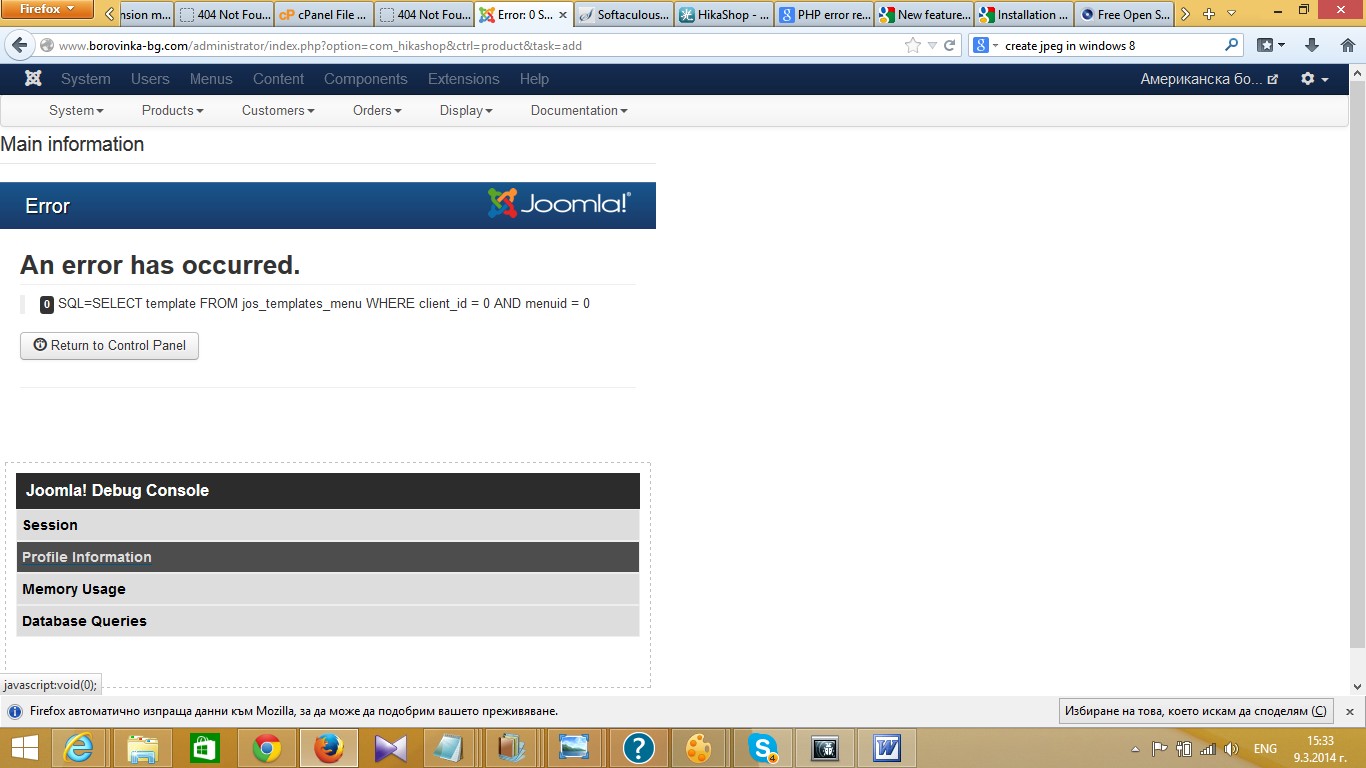
On the new installation of joomla and hikashop everything is OK.
On the old one, i have uninstalled all 3d party extensions but the problem persist. The problem is only when creating hikashop product or category.... Everything other in hikashop running well.
Regardas
Kiril
Now i'm trying to setup brand new joomla + hikashop installation to see what will happend. If problem persist - i can send you admin password to help me to investigate the problem.
As additional information i can tell You that during exection of code, i can see for a parth of second that some parts of something like menu is displayed in the left of page, and after that the error is showing. No mather how deep i set debug level in server onfiguration tab of joomla - no additional info is displayed.
As attachment is screenshot of error page
On the new installation of joomla and hikashop everything is OK.
On the old one, i have uninstalled all 3d party extensions but the problem persist. The problem is only when creating hikashop product or category.... Everything other in hikashop running well.
Regardas
Kiril
Last edit: 12 years 7 months ago by Yovtchevsky.
Please Log in or Create an account to join the conversation.
- Yovtchevsky
-
Topic Author
- Offline
Less
More
- Posts: 3
- Thank you received: 0
12 years 7 months ago #147587
by Yovtchevsky
Replied by Yovtchevsky on topic Product or category creation end with error
The problem i solved (but not investigated fully)...
Starting with using database with new installation - product creation done.
After that - copying major folders (main joomla folders) folder by folder from good installation to bad one and checking on every step.
Found that problem is in plugins folder.
Continuing investigation with subfolders in plugins folder, i'm finding that problem is in editors folder.
I have archive of bad folder, but i don't have time, to investigate where in editors subfolders is difference.
May be later will try to find the exact solution.
Regards
Kiril Yovtchevsky
Starting with using database with new installation - product creation done.
After that - copying major folders (main joomla folders) folder by folder from good installation to bad one and checking on every step.
Found that problem is in plugins folder.
Continuing investigation with subfolders in plugins folder, i'm finding that problem is in editors folder.
I have archive of bad folder, but i don't have time, to investigate where in editors subfolders is difference.
May be later will try to find the exact solution.
Regards
Kiril Yovtchevsky
Please Log in or Create an account to join the conversation.

Less
More
- Posts: 12953
- Thank you received: 1778
12 years 7 months ago #147614
by Mohamed Thelji
Replied by Mohamed Thelji on topic Product or category creation end with error
Ok, so it was probably coming from one of your plugins, thanks for your feedback  .
.
. Please Log in or Create an account to join the conversation.
Time to create page: 0.267 seconds