
- Posts: 1
- Thank you received: 0
JSError and Display of images in content module
- sophieshiatsu
-
 Topic Author
- Offline
Less
More
11 years 11 months ago #179386
by sophieshiatsu
JSError and Display of images in content module was created by sophieshiatsu
-- HikaShop version -- : 2.3.4
-- Joomla version -- : 3.3.6
-- Browser(s) name and version -- : All
I'm using a Joomlabamboo joomla 3 template with t3 framework. They recommend to use hikashop with the template and show it working in their template live demo demo.joomlabamboo.com/index.php?theme=feb14
1. The JS ERROR: In the Tabs position of the menu eg About Us and Featured Products you had to click on the Tab Menu Item to see the content instead of it showing on opening the page. The error was coming from <"/joomla/media/com_hikashop/js/vote.js" type="text/javascipt"> so when I disabled the voting option it worked.
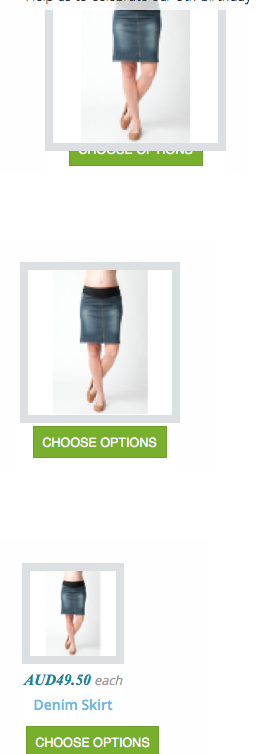
2. When the hikashop module was in a grid position in the template and the screen was wide the thumbnail expanded over the image title, price etc.. so you couldn;t see it. When the screen shrunk to eg ipad width the thumbnail image was smaller so all the headings could be seen. See image below.
-- Joomla version -- : 3.3.6
-- Browser(s) name and version -- : All
I'm using a Joomlabamboo joomla 3 template with t3 framework. They recommend to use hikashop with the template and show it working in their template live demo demo.joomlabamboo.com/index.php?theme=feb14
1. The JS ERROR: In the Tabs position of the menu eg About Us and Featured Products you had to click on the Tab Menu Item to see the content instead of it showing on opening the page. The error was coming from <"/joomla/media/com_hikashop/js/vote.js" type="text/javascipt"> so when I disabled the voting option it worked.
2. When the hikashop module was in a grid position in the template and the screen was wide the thumbnail expanded over the image title, price etc.. so you couldn;t see it. When the screen shrunk to eg ipad width the thumbnail image was smaller so all the headings could be seen. See image below.
Please Log in or Create an account to join the conversation.

11 years 11 months ago #179516
by Jerome
Jerome - Obsidev.com
HikaMarket & HikaSerial developer / HikaShop core dev team.
Replied by Jerome on topic JSError and Display of images in content module
Hi,
Would it be possible to have more details about the JS error you got when the vote was enable ?
I rewrite the "vote.js" lib in order to be stand alone and not use mootools or jquery ; so I am surprise that it cause some errors, I made a lot of tests but it is possible that the HTML in the template for the vote is no more compatible with the lib.
That's why it would be interesting to know the issue so we can add some checks in the lib to avoid the error and be compatible with the templates custom display.
About your second point, I think the issue is related to the template ; I really don't know what we can do in HikaShop to fix that.
Regards,
Would it be possible to have more details about the JS error you got when the vote was enable ?
I rewrite the "vote.js" lib in order to be stand alone and not use mootools or jquery ; so I am surprise that it cause some errors, I made a lot of tests but it is possible that the HTML in the template for the vote is no more compatible with the lib.
That's why it would be interesting to know the issue so we can add some checks in the lib to avoid the error and be compatible with the templates custom display.
About your second point, I think the issue is related to the template ; I really don't know what we can do in HikaShop to fix that.
Regards,
Jerome - Obsidev.com
HikaMarket & HikaSerial developer / HikaShop core dev team.
Please Log in or Create an account to join the conversation.
11 years 11 months ago - 11 years 11 months ago #180509
by lionel75
Replied by lionel75 on topic JSError and Display of images in content module
Hi
you have to give the url of the page with the wrong setting ( issue ) to be able to have a look t othe code and give an answer .
The study of the page seem to show that / there is
1 no problem /issue !
2 the site use iframe and thus the main server is not a joomla CMS !!
3 30 breakpoints ( issue ? with max-width 620 no information )
4 the name of the template is ignite
5 the template use K2 jquery for layout ?
6 toggle menu in @media (max-width: 1030px) manage in seletor "#navwrap button.btn-navbar span " by
display:inline-table
color : #dddd !important
7 T3 framework if it use bootstrap is hidden by the detect tool so some default configuration must occur and notfollow the standart way asset are name in bootstrap !! ( bootstrap.xx.css is not here) .
i think that javascript for vote insert/ add html code near the image location and use predefine css selector that create the issue.
a) Does this occur in any browser width (mobile desktop width even desktop can be resize to mobile width) ?
b) Does this occur only on specific device width ( ipad samsung device specific ref/name) ? .
c) Do you know what are the differences beetween you page and the joomlabamboo webpage demo ?
regard's
you have to give the url of the page with the wrong setting ( issue ) to be able to have a look t othe code and give an answer .
The study of the page seem to show that / there is
1 no problem /issue !
2 the site use iframe and thus the main server is not a joomla CMS !!
3 30 breakpoints ( issue ? with max-width 620 no information )
4 the name of the template is ignite
5 the template use K2 jquery for layout ?
6 toggle menu in @media (max-width: 1030px) manage in seletor "#navwrap button.btn-navbar span " by
display:inline-table
color : #dddd !important
7 T3 framework if it use bootstrap is hidden by the detect tool so some default configuration must occur and notfollow the standart way asset are name in bootstrap !! ( bootstrap.xx.css is not here) .
i think that javascript for vote insert/ add html code near the image location and use predefine css selector that create the issue.
a) Does this occur in any browser width (mobile desktop width even desktop can be resize to mobile width) ?
b) Does this occur only on specific device width ( ipad samsung device specific ref/name) ? .
c) Do you know what are the differences beetween you page and the joomlabamboo webpage demo ?
regard's
Last edit: 11 years 11 months ago by lionel75.
Please Log in or Create an account to join the conversation.
Time to create page: 0.160 seconds