
- Posts: 640
- Thank you received: 16
Mass action value update using PHP code
- PeterChain
-
 Topic Author
- Offline
Less
More
11 years 7 months ago #193002
by PeterChain
Mass action value update using PHP code was created by PeterChain
-- HikaShop version -- : 2.3.5
After an OnBeforeUpdate event I want product_description fieldcontent to be updated with the values of several custom_fields. Like:
Is it possible to do?
How should be the code be written inside the text box marked in red?
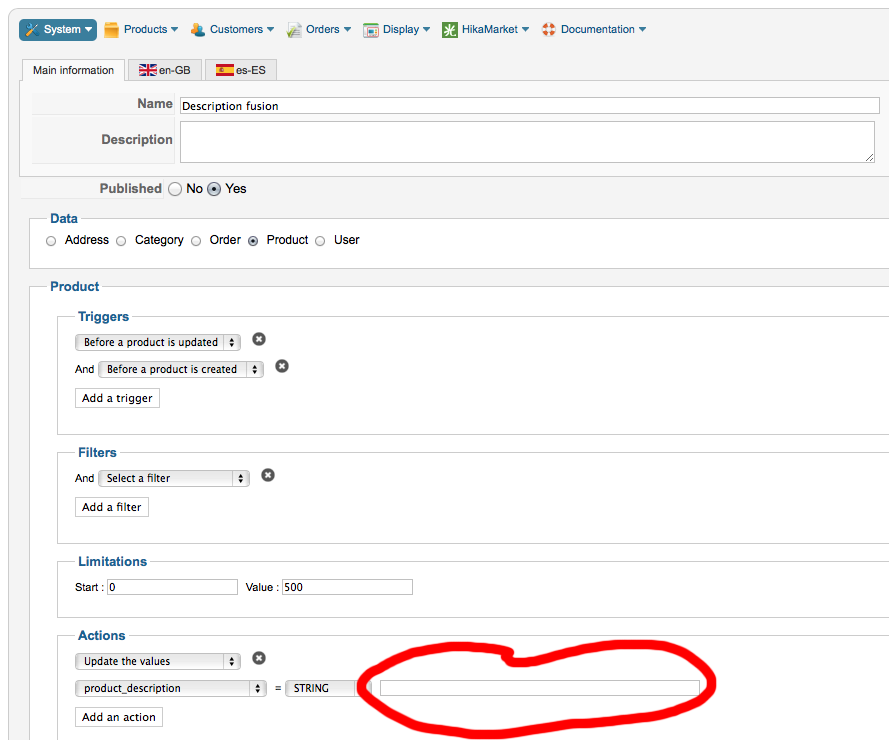
After an OnBeforeUpdate event I want product_description fieldcontent to be updated with the values of several custom_fields. Like:
Code:
"Special Weight:'.this->product_special_weight.' Color: '.this->product_color
Is it possible to do?
How should be the code be written inside the text box marked in red?
Please Log in or Create an account to join the conversation.

11 years 7 months ago #193057
by Xavier
Replied by Xavier on topic Mass action value update using PHP code
Hi,
You have to use that syntax:
You have to use that syntax:
Code:
Special Weight: {product_special_weight} Color: {product_color}
Please Log in or Create an account to join the conversation.
- PeterChain
-
Topic Author
- Offline
Less
More
- Posts: 640
- Thank you received: 16
11 years 7 months ago #193084
by PeterChain
Replied by PeterChain on topic Mass action value update using PHP code
Good, this looks quite simple!
And, would be possible to include a Category Name or a Brand Name?
As far as I know the names of category are stored in another table so this would require some special syntax or some SQL query involved... unless you have a trick for this which would be great
And, would be possible to include a Category Name or a Brand Name?
As far as I know the names of category are stored in another table so this would require some special syntax or some SQL query involved... unless you have a trick for this which would be great
Please Log in or Create an account to join the conversation.
11 years 7 months ago #193087
by Xavier
Replied by Xavier on topic Mass action value update using PHP code
Hi,
At this time it is only possible to fill with values of the same table...
To have other entries it will require more requests.
Else you can create custom product field, and populate them with the desired data
At this time it is only possible to fill with values of the same table...
To have other entries it will require more requests.
Else you can create custom product field, and populate them with the desired data
Please Log in or Create an account to join the conversation.
- PeterChain
-
Topic Author
- Offline
Less
More
- Posts: 640
- Thank you received: 16
11 years 7 months ago #193176
by PeterChain
Replied by PeterChain on topic Mass action value update using PHP code
Thank you. To go further in understanding the functionalities of mass actions which look very powerful could you explain me what is the function of the action "Display the results" ?
Where and when are the results displayed?
Can they be piped to a field, variable or 'something' where it can be picked form?
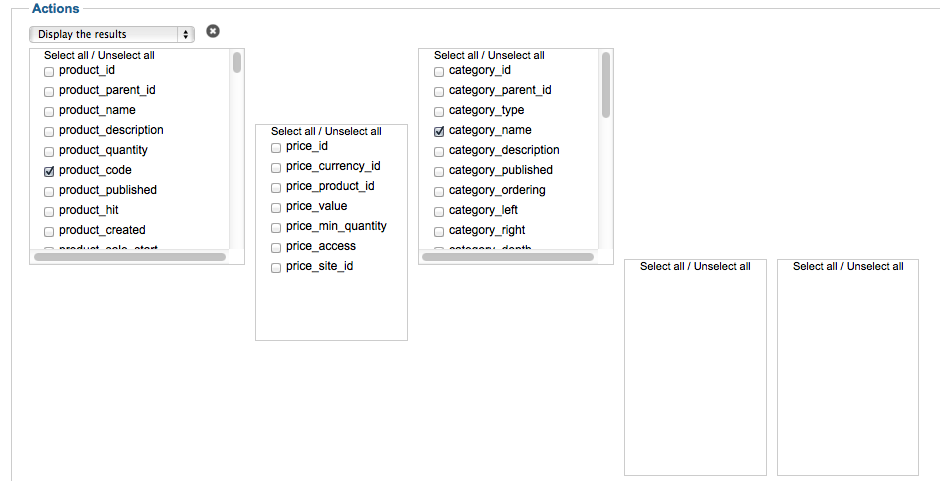
Have you plans to create more extensive documentation in the topic of Mass Action? It would help a lot to have some more examples or and extra explanations.
Where and when are the results displayed?
Can they be piped to a field, variable or 'something' where it can be picked form?
Have you plans to create more extensive documentation in the topic of Mass Action? It would help a lot to have some more examples or and extra explanations.
Please Log in or Create an account to join the conversation.
11 years 7 months ago #193265
by Xavier
Replied by Xavier on topic Mass action value update using PHP code
Hi,
The "Display the results" action allow to display the desired results when clicking on the "Process" button.
It can't work with a trigger, it must only be used when in backend.
The it will display a table with all the results, and the subtility is that this table is dynamic, you can clic on one row and change a value directly. So it can help to save time
Yes, we must improve the mass action documentation, do more tutorials etc. It is on our Todo list, and I have to do that as soon as possible
The "Display the results" action allow to display the desired results when clicking on the "Process" button.
It can't work with a trigger, it must only be used when in backend.
The it will display a table with all the results, and the subtility is that this table is dynamic, you can clic on one row and change a value directly. So it can help to save time
Yes, we must improve the mass action documentation, do more tutorials etc. It is on our Todo list, and I have to do that as soon as possible
The following user(s) said Thank You: PeterChain
Please Log in or Create an account to join the conversation.
- PeterChain
-
Topic Author
- Offline
Less
More
- Posts: 640
- Thank you received: 16
10 years 10 months ago - 10 years 10 months ago #223211
by PeterChain
Replied by PeterChain on topic Mass action value update using PHP code
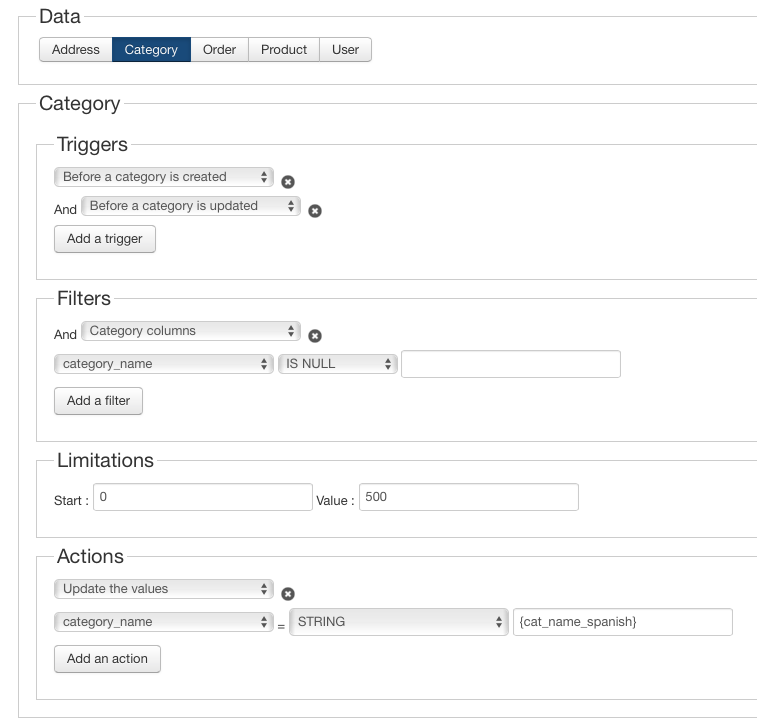
I tried Xavier's suggestion for categories without success:
I did this
but as a result after saving I get this
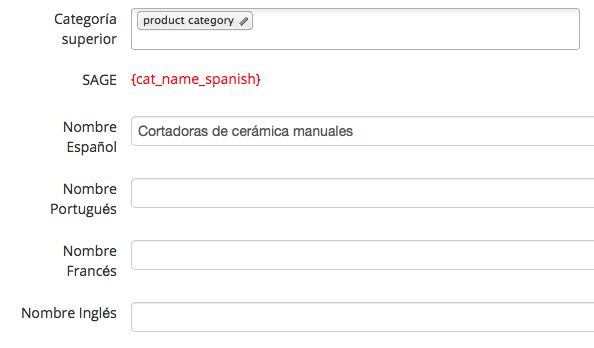
am I missing something?
You have to use that syntax:
Special Weight: {product_special_weight} Color: {product_color}
I did this
but as a result after saving I get this
am I missing something?
Last edit: 10 years 10 months ago by PeterChain.
Please Log in or Create an account to join the conversation.
10 years 10 months ago #223296
by Xavier
Replied by Xavier on topic Mass action value update using PHP code
Hi,
The correct syntax is finally:
You have to select "Operation" instead of "String", and "cat_name_spanish" must be a valid category custom field column name.
The correct syntax is finally:
category.cat_name_spanish
You have to select "Operation" instead of "String", and "cat_name_spanish" must be a valid category custom field column name.
Please Log in or Create an account to join the conversation.
- PeterChain
-
Topic Author
- Offline
Less
More
- Posts: 640
- Thank you received: 16
10 years 10 months ago #223315
by PeterChain
Replied by PeterChain on topic Mass action value update using PHP code
Ok, this looks good but sadly not working:
I made this
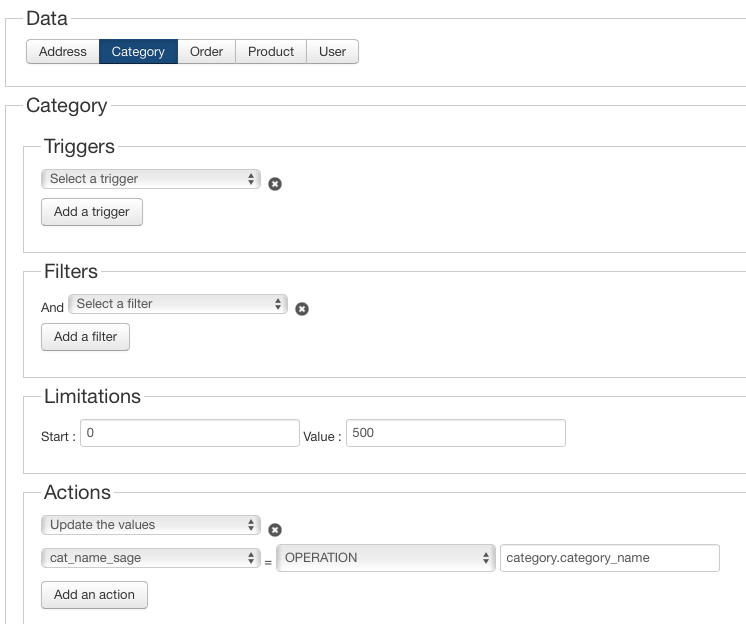
the custom field exists

and I get this error message

I guess there is some wrong or "unflexible" code as the query tries to invoke hk_cat where my phpAdmin shows me this other table as the one holding the categories: tpjtx_hikashop_category
Of course I only have means to decide the general joomla prefix tpjtx_ but no the names of the hikashop tables.
Could you confirm that is a code thing and not a bad understanding of Mas Actions from my side?
Regards,
I made this
the custom field exists
and I get this error message
I guess there is some wrong or "unflexible" code as the query tries to invoke hk_cat where my phpAdmin shows me this other table as the one holding the categories: tpjtx_hikashop_category
Of course I only have means to decide the general joomla prefix tpjtx_ but no the names of the hikashop tables.
Could you confirm that is a code thing and not a bad understanding of Mas Actions from my side?
Regards,
Please Log in or Create an account to join the conversation.
10 years 10 months ago #223327
by Xavier
Replied by Xavier on topic Mass action value update using PHP code
Hi,
This is indeed a code issue, not a bad understanding.
But I was not able to reproduce the issue on my end, do you have the latest version of HikaShop ?
Any overrides on the plugin "hikashop / massaction_category" ?
This is indeed a code issue, not a bad understanding.
But I was not able to reproduce the issue on my end, do you have the latest version of HikaShop ?
Any overrides on the plugin "hikashop / massaction_category" ?
Please Log in or Create an account to join the conversation.
- PeterChain
-
Topic Author
- Offline
Less
More
- Posts: 640
- Thank you received: 16
10 years 10 months ago - 10 years 10 months ago #223407
by PeterChain
Replied by PeterChain on topic Mass action value update using PHP code
You have the latest stable version of HikaShop Business: 2.6.0
no overrides
––––––––––––––––
And this is how is referenced in the code for /plugins/hikashop/massaction_category/massaction_category.php
read at line 63
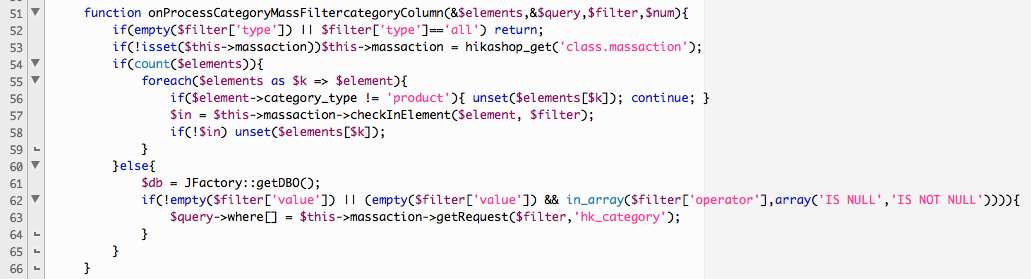
file version

may I change 'hk_category' for hikashop_category' in all files containing it?
it sounds radical and dirty... but if we don't find why is going this way it maybe effective
no overrides
––––––––––––––––
And this is how is referenced in the code for /plugins/hikashop/massaction_category/massaction_category.php
read at line 63
file version
may I change 'hk_category' for hikashop_category' in all files containing it?
it sounds radical and dirty... but if we don't find why is going this way it maybe effective
Last edit: 10 years 10 months ago by PeterChain.
Please Log in or Create an account to join the conversation.
- PeterChain
-
Topic Author
- Offline
Less
More
- Posts: 640
- Thank you received: 16
10 years 10 months ago #223412
by PeterChain
Replied by PeterChain on topic Mass action value update using PHP code
original file attached.
Maybe is of use to you
Maybe is of use to you
Please Log in or Create an account to join the conversation.
10 years 10 months ago - 10 years 10 months ago #223432
by Xavier
Replied by Xavier on topic Mass action value update using PHP code
Hi,
Please install this plugin, this will solve the issue:
This was caused by your custom field name. We were taking it and exploding it on '_' so we were using in this case the prefix "cat" and not "category". I changed that to force the "category" alias as we are only applying changes on the category columns.
Please install this plugin, this will solve the issue:
This attachment is hidden for guests.
Please log in or register to see it.
Please log in or register to see it.
This was caused by your custom field name. We were taking it and exploding it on '_' so we were using in this case the prefix "cat" and not "category". I changed that to force the "category" alias as we are only applying changes on the category columns.
Last edit: 10 years 10 months ago by Xavier.
Please Log in or Create an account to join the conversation.
Time to create page: 0.134 seconds