

- Posts: 103
- Thank you received: 1
Images in back end products list are too big
11 years 6 months ago - 11 years 6 months ago #196333
by lechong1
Images in back end products list are too big was created by lechong1
-- HikaShop version -- : 2.4.0
-- Joomla version -- : 3.4.1
-- PHP version -- : 5.3.27
-- Browser(s) name and version -- : chrome
-- Error-message(debug-mod must be tuned on) -- : images in back end products list are too big
I found the Images in back end products list are too big,pls see it in attachment.
Can i make it smaller?
At the same time i don't want to change the thumbnail height and width.because if I change it,in my front page of category view ,the images are also small,that is not good.
Anywhere to define the image backend individually?
Thank you,
Jacky
-- Joomla version -- : 3.4.1
-- PHP version -- : 5.3.27
-- Browser(s) name and version -- : chrome
-- Error-message(debug-mod must be tuned on) -- : images in back end products list are too big
I found the Images in back end products list are too big,pls see it in attachment.
Can i make it smaller?
At the same time i don't want to change the thumbnail height and width.because if I change it,in my front page of category view ,the images are also small,that is not good.
Anywhere to define the image backend individually?
Thank you,
Jacky
Last edit: 11 years 6 months ago by lechong1. Reason: solved
Please Log in or Create an account to join the conversation.

11 years 6 months ago #196365
by Xavier
Replied by Xavier on topic Images in back end products list are too big
Hi,
The image thumbnail size settings should not interract with the image size in the backend of HikaShop.
I think that your template is overriding one of our properties which make the images bigger than they should be.
So you can edit the backend template css file and add this kind of css property:
The image thumbnail size settings should not interract with the image size in the backend of HikaShop.
I think that your template is overriding one of our properties which make the images bigger than they should be.
So you can edit the backend template css file and add this kind of css property:
Code:
.admin #adminForm .hikashop_product_listing .hikashop_product_image{
width: 50px !important;
}
Please Log in or Create an account to join the conversation.
11 years 6 months ago #196429
by lechong1
Replied by lechong1 on topic Images in back end products list are too big
Hi:
Is the css file here? I added your codes but it don't work.
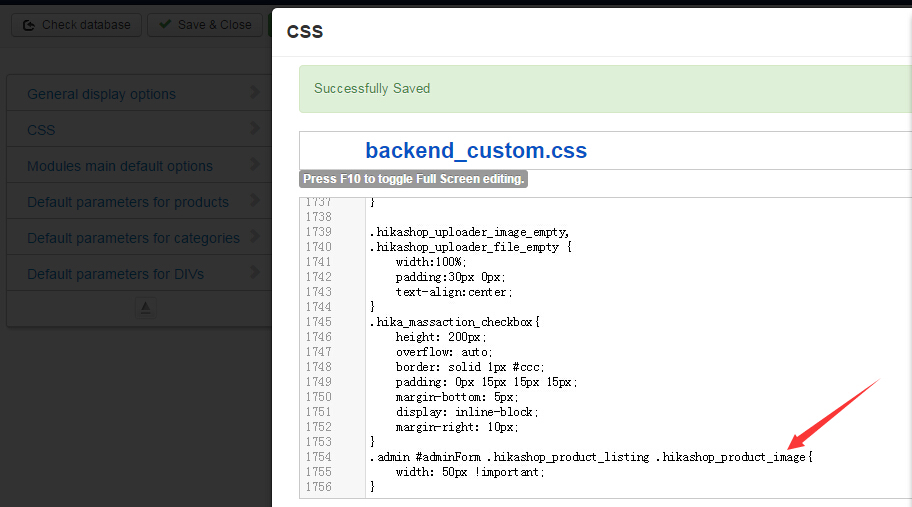
Is the css file here? I added your codes but it don't work.
Please Log in or Create an account to join the conversation.

Less
More
- Posts: 12953
- Thank you received: 1778
11 years 6 months ago #196437
by Mohamed Thelji
Replied by Mohamed Thelji on topic Images in back end products list are too big
Hello Jacky,
As xavier said, your issue is probably coming from the fact that your template is overriding the default CSS code, can you try it with another back-end template (one of the default joomla template) ?
As xavier said, your issue is probably coming from the fact that your template is overriding the default CSS code, can you try it with another back-end template (one of the default joomla template) ?
Please Log in or Create an account to join the conversation.
11 years 6 months ago #196504
by lechong1
Replied by lechong1 on topic Images in back end products list are too big
I installed hikashop again ,problem solved,
thank you.
thank you.
Please Log in or Create an account to join the conversation.
11 years 1 month ago - 11 years 1 month ago #214549
by Ultra
Replied by Ultra on topic Images in back end products list are too big
Hi,
I have a problem with size image on the front side of all products. Each container is a different size. How that the containers are the same size and image keep ratio.
Sorry for my very bad english.
I have a problem with size image on the front side of all products. Each container is a different size. How that the containers are the same size and image keep ratio.
Sorry for my very bad english.
Last edit: 11 years 1 month ago by Ultra.
Please Log in or Create an account to join the conversation.

11 years 1 month ago #214557
by Jerome
Jerome - Obsidev.com
HikaMarket & HikaSerial developer / HikaShop core dev team.
Replied by Jerome on topic Images in back end products list are too big
Hi,
When you configure your product listing, you can set the "height" and the "width".
In your case you have to specify a smaller "height" to force your long images to be smaller.
www.hikashop.com/support/support/documen...d.html#products_menu
Otherwise, with the next version of HikaShop (2.6.0) ; there will be a script which will create a height consistency in listings.
Regards,
When you configure your product listing, you can set the "height" and the "width".
In your case you have to specify a smaller "height" to force your long images to be smaller.
www.hikashop.com/support/support/documen...d.html#products_menu
Otherwise, with the next version of HikaShop (2.6.0) ; there will be a script which will create a height consistency in listings.
Regards,
Jerome - Obsidev.com
HikaMarket & HikaSerial developer / HikaShop core dev team.
Please Log in or Create an account to join the conversation.
Time to create page: 0.314 seconds