
- Posts: 640
- Thank you received: 16
'Upload free download files' setting in configurat
- PeterChain
-
 Topic Author
- Offline
Less
More
10 years 11 months ago #222739
by PeterChain
'Upload free download files' setting in configurat was created by PeterChain
-- HikaShop version -- : 2.6.0
-- Joomla version -- : 3.45
-- PHP version -- : 5.4.38
Is there such an option for HikaShop like it is in HikaMarket?
I was not able to find it.
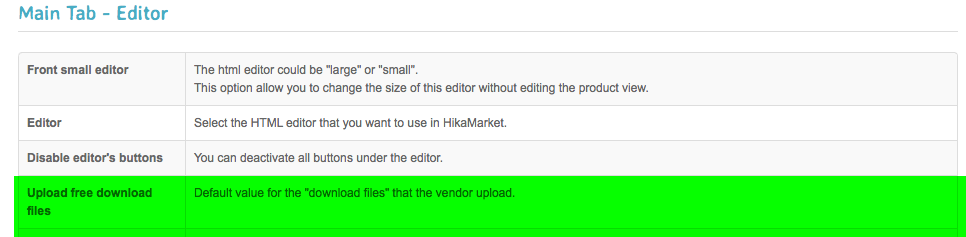
-- Joomla version -- : 3.45
-- PHP version -- : 5.4.38
Is there such an option for HikaShop like it is in HikaMarket?
I was not able to find it.
Please Log in or Create an account to join the conversation.

10 years 11 months ago #222741
by Jerome
Jerome - Obsidev.com
HikaMarket & HikaSerial developer / HikaShop core dev team.
Replied by Jerome on topic 'Upload free download files' setting in configurat
Hi,
The setting exists in HikaShop but it is still an hidden setting.
So for the moment you need to add the entry in the hikashop_config table.
The namekey is the same than in HikaMarket
I'll see with the rest of the HikaShop dev team if we can add the setting available in the configuration interface.
Regards,
The setting exists in HikaShop but it is still an hidden setting.
So for the moment you need to add the entry in the hikashop_config table.
The namekey is the same than in HikaMarket
Code:
upload_file_free_download
Regards,
Jerome - Obsidev.com
HikaMarket & HikaSerial developer / HikaShop core dev team.
Please Log in or Create an account to join the conversation.
- PeterChain
-
Topic Author
- Offline
Less
More
- Posts: 640
- Thank you received: 16
10 years 11 months ago - 10 years 11 months ago #222772
by PeterChain
Replied by PeterChain on topic 'Upload free download files' setting in configurat
Thank I did and effectively it works, the file gets uploaded as Free download: Yes
Sadly this leads me to discover that also from the backend now the file turns to Free download: No after saving or applying the same way it happens in frontend as stated in this other post:
www.hikashop.com/support/forum/22-market...r-saving.html#222769
So now I don't think the template has nothing to do with this problem.
UPDATE:
I tried this both in remote server at Rochenhost and in my localhost with MAMP, the behavior is the same. It simply turns to off after saving.
With fresh component, neutral templates, different standard setup PHPs.
I'm really astonished that this is not happening in your side. Any idea what any other factor can break this?
Sadly this leads me to discover that also from the backend now the file turns to Free download: No after saving or applying the same way it happens in frontend as stated in this other post:
www.hikashop.com/support/forum/22-market...r-saving.html#222769
So now I don't think the template has nothing to do with this problem.
UPDATE:
I tried this both in remote server at Rochenhost and in my localhost with MAMP, the behavior is the same. It simply turns to off after saving.
With fresh component, neutral templates, different standard setup PHPs.
I'm really astonished that this is not happening in your side. Any idea what any other factor can break this?
Last edit: 10 years 11 months ago by PeterChain.
Please Log in or Create an account to join the conversation.

10 years 11 months ago #222828
by nicolas
Replied by nicolas on topic 'Upload free download files' setting in configurat
Hi,
You can change the code:
to:
in the file administrator/components/com_hikashop/controllers/product.php in order to fix that.
A similar change can be do in components/com_hikamarket/controllers/product.php
You can change the code:
Code:
$fileClass = hikashop_get('class.file');
$status = $fileClass->save($file, $file_type);
$ret->file_id = $status;
$ret->params->file_id = $status;
if($file_type != 'product') {
$ret->params->file_free_download = $config->get('upload_file_free_download', false);
$ret->params->file_limit = -1;
$ret->params->file_size = @filesize($uploadConfig['upload_dir'] . @$uploadConfig['options']['sub_folder'] . $file->file_name);
}
Code:
if($file_type != 'product') {
$file->file_free_download = $config->get('upload_file_free_download', false);
$file->file_limit = 0;
}
$fileClass = hikashop_get('class.file');
$status = $fileClass->save($file, $file_type);
$ret->file_id = $status;
$ret->params->file_id = $status;
if($file_type != 'product') {
$ret->params->file_free_download = $file->file_free_download;
$ret->params->file_limit = $file->file_limit;
$ret->params->file_size = @filesize($uploadConfig['upload_dir'] . @$uploadConfig['options']['sub_folder'] . $file->file_name);
}
A similar change can be do in components/com_hikamarket/controllers/product.php
Please Log in or Create an account to join the conversation.

10 years 8 months ago #230856
by jameswadsworth
Replied by jameswadsworth on topic 'Upload free download files' setting in configurat
While the hack works, it would be very nice to have this as on option under the files configuration. Could you possibly add this to the next release please?
Please Log in or Create an account to join the conversation.
10 years 8 months ago #230912
by jameswadsworth
Replied by jameswadsworth on topic 'Upload free download files' setting in configurat
If any one wants to add to the possibility to change this in the file config add the following code:
in the file administrator/components/com_hikashop/views/config/main.php in the <!-- FILES --> and add the string
UPLOAD_FILE_FREE_DOWNLOAD="Upload file as free download"
in the file /language/en-GB/en-GB.com_hikashop.ini file
Code:
<tr>
<td class="key"><?php echo JText::_('UPLOAD_FILE_FREE_DOWNLOAD'); ?></td>
<td><?php
echo JHtml::_('dacshopselect.booleanlist', 'config[upload_file_free_download]','',$this->config->get('upload_file_free_download'));
?></td>
</tr>
UPLOAD_FILE_FREE_DOWNLOAD="Upload file as free download"
in the file /language/en-GB/en-GB.com_hikashop.ini file
Please Log in or Create an account to join the conversation.

10 years 8 months ago #230869
by Xavier
Replied by Xavier on topic 'Upload free download files' setting in configurat
Hi,
This patch is already included in the latest version of HikaShop.
What is your version, 2.6.1 ?
This patch is already included in the latest version of HikaShop.
What is your version, 2.6.1 ?
The following user(s) said Thank You: jameswadsworth
Please Log in or Create an account to join the conversation.
10 years 8 months ago #231799
by jameswadsworth
Replied by jameswadsworth on topic 'Upload free download files' setting in configurat
Ah yes. Downloaded 2.6.1 and all is good. Very efficient as usual
Please Log in or Create an account to join the conversation.
Time to create page: 0.141 seconds