

- Posts: 155
- Thank you received: 4
error opening translation tab
10 years 8 months ago #230157
by Cattelan
error opening translation tab was created by Cattelan
-- HikaShop version -- : latest
-- Joomla version -- : lates
-- Error-message(debug-mod must be tuned on) -- : Notice: Undefined index: translatable in roottosite/administrator/components/com_hikashop/views/product/tmpl/edit_translation.php on line 74
Hallo.
deinstalled falang some time ago and now i have reinstalled the latest version again. I wanted to execute my first translation and i got this error message.
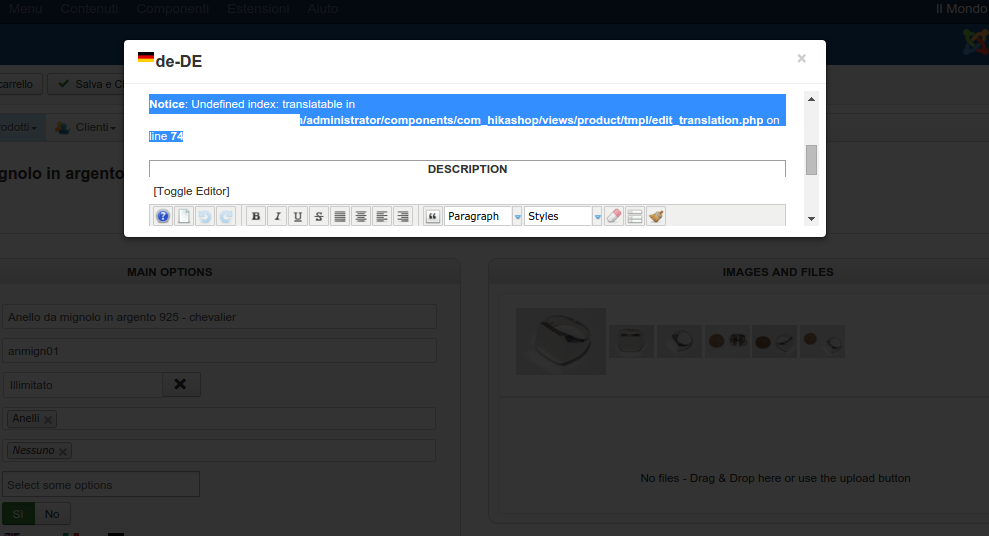
what can i do? Also the translations are not shown
-- Joomla version -- : lates
-- Error-message(debug-mod must be tuned on) -- : Notice: Undefined index: translatable in roottosite/administrator/components/com_hikashop/views/product/tmpl/edit_translation.php on line 74
Hallo.
deinstalled falang some time ago and now i have reinstalled the latest version again. I wanted to execute my first translation and i got this error message.
what can i do? Also the translations are not shown
Please Log in or Create an account to join the conversation.

10 years 8 months ago #230226
by Farida
Replied by Farida on topic error opening translation tab
Hello,
To remove the notice, you have to replace into each line this part $this->fields[$fieldName]->field_options
by @$this->fields[$fieldName]->field_options
in the file administrator\components\com_hikashop\views\product\tmpl\edit_translation.php
To remove the notice, you have to replace into each line this part $this->fields[$fieldName]->field_options
by @$this->fields[$fieldName]->field_options
in the file administrator\components\com_hikashop\views\product\tmpl\edit_translation.php
The following user(s) said Thank You: Cattelan
Please Log in or Create an account to join the conversation.
10 years 8 months ago #230310
by Cattelan
Replied by Cattelan on topic error opening translation tab
Thanks for your reply. The error disappeared. Is there a reason why the windows is so small and i cannot make it wider??
Please Log in or Create an account to join the conversation.
10 years 8 months ago #230349
by Farida
Replied by Farida on topic error opening translation tab
Can you try to change the display popup mode, you have to go in the system configuration/display/general display options and choose another popup mode.
Please Log in or Create an account to join the conversation.

10 years 8 months ago - 10 years 8 months ago #230547
by Rouanda72
Replied by Rouanda72 on topic error opening translation tab
On our side, when can open the translation Windows but we are not able to save the translations. Nothing happening when we use the left-upper button "Save"
Last edit: 10 years 8 months ago by Rouanda72.
Please Log in or Create an account to join the conversation.
10 years 8 months ago #230560
by patoushka
Replied by patoushka on topic error opening translation tab
Same thing for me. When I click on the save button, nothing happen.
Please Log in or Create an account to join the conversation.

10 years 8 months ago #230584
by nicolas
Replied by nicolas on topic error opening translation tab
Hi,
Please try to change the "popup mode" of the HikaShop configuration to "vex". Do you still have the problem ?
If yes, could you look for the error message in the error console of your browser when on that page ?
Please try to change the "popup mode" of the HikaShop configuration to "vex". Do you still have the problem ?
If yes, could you look for the error message in the error console of your browser when on that page ?
Please Log in or Create an account to join the conversation.
10 years 8 months ago #230680
by Cattelan
Replied by Cattelan on topic error opening translation tab
Hallo.
I changed the popup mode to vex and the windows now is abot 640x480 size and it's ok.
But the problem still persits that the translation is not working.
this i got from the chrome ctrl+shift J
Thanks for your reply
I changed the popup mode to vex and the windows now is abot 640x480 size and it's ok.
But the problem still persits that the translation is not working.
this i got from the chrome ctrl+shift J
Code:
JQMIGRATE: Logging is active
jquery-migrate.js:41 JQMIGRATE: jQuery is not compatible with Quirks Mode
jquery-migrate.js:43 console.trace()migrateWarn @ jquery-migrate.js:43
Thanks for your reply
Please Log in or Create an account to join the conversation.
10 years 8 months ago #230831
by nicolas
Replied by nicolas on topic error opening translation tab
Hi,
Can you provide a backend access so that we can look at the issue on your website because we're not able to reproduce it and these logging messages don't help.
You can provide the credentials and a link to this thread via our contact form:
www.hikashop.com/support/contact-us.html
Can you provide a backend access so that we can look at the issue on your website because we're not able to reproduce it and these logging messages don't help.
You can provide the credentials and a link to this thread via our contact form:
www.hikashop.com/support/contact-us.html
Please Log in or Create an account to join the conversation.

Less
More
- Posts: 12953
- Thank you received: 1778
10 years 8 months ago #230877
by Mohamed Thelji
Replied by Mohamed Thelji on topic error opening translation tab
Hello,
Can you please give us step by step instructions to reproduce your issue so that we can directly reproduce it on your website ?
I just tested it with the "Orecchino da naso in oro 18 carati" for example and it seems to be working fine.
Can you please give us step by step instructions to reproduce your issue so that we can directly reproduce it on your website ?
I just tested it with the "Orecchino da naso in oro 18 carati" for example and it seems to be working fine.
Please Log in or Create an account to join the conversation.
10 years 8 months ago #230918
by Cattelan
Replied by Cattelan on topic error opening translation tab
Hallo.
Thanks for your reply. Yes it seems to work now. i tried it also this afternoon.
The last time i was trying where after reinstalling falang and after making the changes you asked me to to.
First i thought it can be a cache problem so i left trying it. I tried it today another time while you where logged in my site and it worked on my end also.
Can i make some tests for you? i saw also other users had this issue.
Now on my side it's working
Thanks for your reply
Thanks for your reply. Yes it seems to work now. i tried it also this afternoon.
The last time i was trying where after reinstalling falang and after making the changes you asked me to to.
First i thought it can be a cache problem so i left trying it. I tried it today another time while you where logged in my site and it worked on my end also.
Can i make some tests for you? i saw also other users had this issue.
Now on my side it's working
Thanks for your reply
Please Log in or Create an account to join the conversation.
Time to create page: 0.436 seconds