
- Posts: 25
- Thank you received: 0
€ 15,00 Custom Field price plugin for order custom fields
- MichaelGary
-
 Topic Author
- Offline
Less
More
9 years 5 months ago - 9 years 5 months ago #269807
by MichaelGary
Hello,
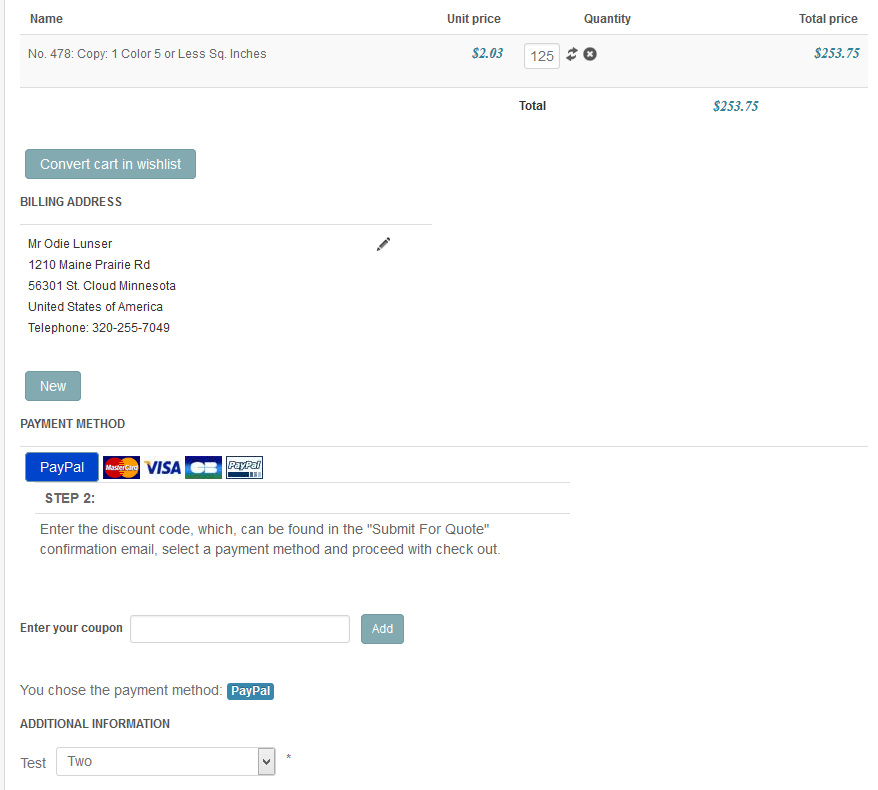
I purchased the Custom Field price plugin for order custom fields and cannot make it work. Please see the attached
configuration and cat images. Can you tell me what I am doing wrong.
www.hikashop.com/component/hikashop/prod...2.html#configuration
I was under the impression that this plug in allows you to assign a price to an item in a custom field and that the
custom field price would be added to the product price in the total on the cart. Do I not properly understand what this
plugin is suppose to do?
Also, there is no way to make the custom order field show up anywhere else in the cart? Only at the very bottom?
Lastly, if this plugin is actually suppose to assign a price to an item in a custom field and ad it to the total, would
there be any way to modify it so that it can work as a Custom Item Filed price plugin?
Thanks
I purchased the Custom Field price plugin for order custom fields and cannot make it work. Please see the attached
configuration and cat images. Can you tell me what I am doing wrong.
www.hikashop.com/component/hikashop/prod...2.html#configuration
I was under the impression that this plug in allows you to assign a price to an item in a custom field and that the
custom field price would be added to the product price in the total on the cart. Do I not properly understand what this
plugin is suppose to do?
Also, there is no way to make the custom order field show up anywhere else in the cart? Only at the very bottom?
Lastly, if this plugin is actually suppose to assign a price to an item in a custom field and ad it to the total, would
there be any way to modify it so that it can work as a Custom Item Filed price plugin?
Thanks
Last edit: 9 years 5 months ago by MichaelGary.
Please Log in or Create an account to join the conversation.

9 years 5 months ago #269810
by Jerome
Jerome - Obsidev.com
HikaMarket & HikaSerial developer / HikaShop core dev team.
Replied by Jerome on topic € 15,00 Custom Field price plugin for order custom fields
Hello,
If you take a look at the values in your field configuration you will see
While in the plugin you configured
Please understand that the plugin is "stupid" in the way that it check the exact value, as text.
So you can configure your field to use the values "1", "2" and "3" or configure the plugin to match the values "1.00", "2.00" and "3.00"
But in any case, you have to use the same content if you want the plugin to have a match.
Regards,
If you take a look at the values in your field configuration you will see
Code:
1.00
2.00
3.00
Code:
1
2
3
So you can configure your field to use the values "1", "2" and "3" or configure the plugin to match the values "1.00", "2.00" and "3.00"
But in any case, you have to use the same content if you want the plugin to have a match.
Regards,
Jerome - Obsidev.com
HikaMarket & HikaSerial developer / HikaShop core dev team.
Please Log in or Create an account to join the conversation.
- MichaelGary
-
Topic Author
- Offline
Less
More
- Posts: 25
- Thank you received: 0
9 years 5 months ago - 9 years 5 months ago #269974
by MichaelGary
Replied by MichaelGary on topic € 15,00 Custom Field price plugin for order custom fields
Jerome,
"use the values "1", "2" and "3" or configure the plugin to match the values "1.00", "2.00" and "3.00"
Your plugin strips whole numbers with a decimal and zeros in the tenths place. It does not allow 1.00, 2.00, 3.00 etc.
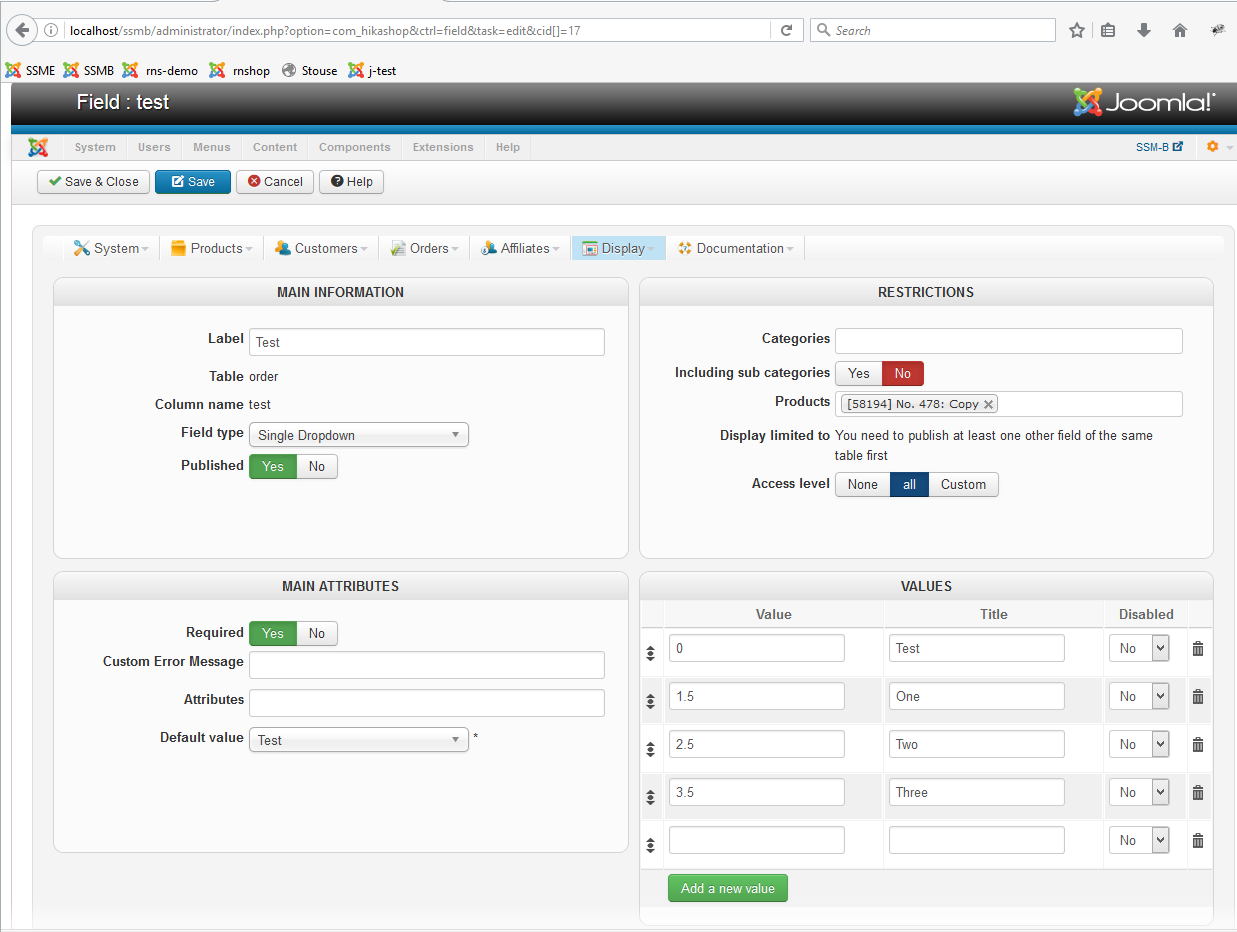
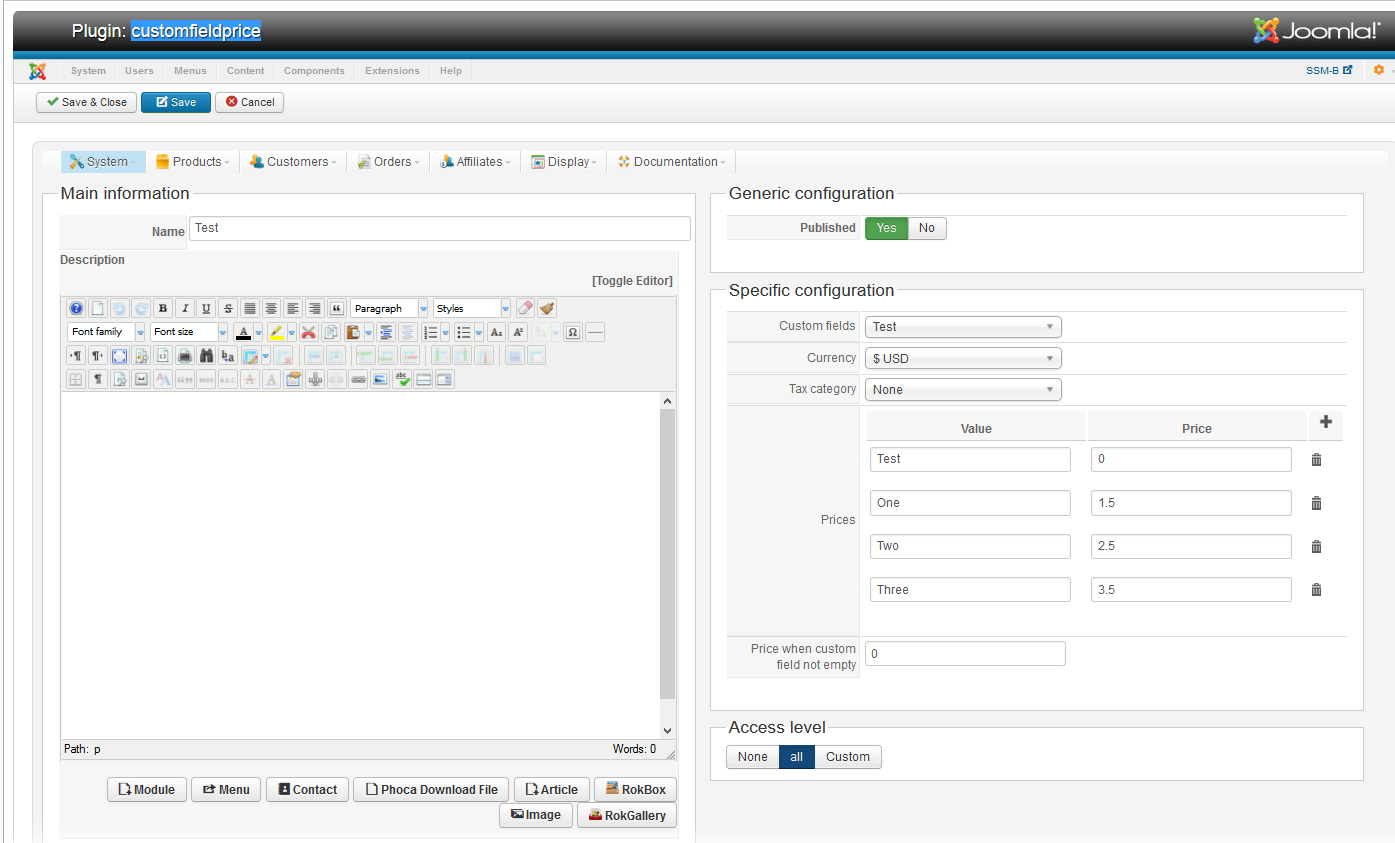

"use the values "1", "2" and "3" or configure the plugin to match the values "1.00", "2.00" and "3.00"
Your plugin strips whole numbers with a decimal and zeros in the tenths place. It does not allow 1.00, 2.00, 3.00 etc.
Last edit: 9 years 5 months ago by MichaelGary.
Please Log in or Create an account to join the conversation.
9 years 5 months ago #269975
by Jerome
Jerome - Obsidev.com
HikaMarket & HikaSerial developer / HikaShop core dev team.
Replied by Jerome on topic € 15,00 Custom Field price plugin for order custom fields
Hello,
Once again you inverse the usage of "value" and "title".
You need to put the exact same content in the column "value" of the custom field and in the column "value" of the plugin.
Otherwise, you can't have a match.
Please read really carefully and follow the exact indications ; otherwise it won't work !
Custom field :
Custom field price configuration :
Once again you inverse the usage of "value" and "title".
You need to put the exact same content in the column "value" of the custom field and in the column "value" of the plugin.
Otherwise, you can't have a match.
Please read really carefully and follow the exact indications ; otherwise it won't work !
Custom field :
Code:
value | title
0 | Text
1 | One
2 | Two
3 | Three
Custom field price configuration :
Code:
value | price
0 | 0.0
1 | 1.5
2 | 2.5
3 | 3.5
Jerome - Obsidev.com
HikaMarket & HikaSerial developer / HikaShop core dev team.
Please Log in or Create an account to join the conversation.
Time to create page: 0.152 seconds