

- Posts: 139
- Thank you received: 10
label/title/description seems odd for check out module?
8 years 10 months ago #283791
by paurray
label/title/description seems odd for check out module? was created by paurray
-- HikaShop version -- : 3.2.1
-- Joomla version -- : 3.8.2
-- PHP version -- : PHP 7.1.7 .
-- Browser(s) name and version -- : firefox
-- Error-message(debug-mod must be tuned on) -- : N/A
Hi Hika Shop Team
I am trying to configure the Hika Shop Cart Module
So for e.g. I am playing with the settings as shown in the first screen shot.
There are a couple of things that seem odd to me…
e.g. 01 second screen shot: 02Mini-cart-Yes-Front-End
Is it normal that I have a button called “Proceed to checkout” with what appears to a label/title/description above it “Proceed to checkout”?
e.g. 02 second third screen shot: 03Mini-cart-Drop-Down-Cart-Front-End-Down
Is it normal that I have a button called “Proceed to checkout” with what appears to a label/title/description above it “Proceed to checkout”?
and
Is it normal that I have an item called “Image Name” with what appears to a label/title/description?
thanks
Paul
-- Joomla version -- : 3.8.2
-- PHP version -- : PHP 7.1.7 .
-- Browser(s) name and version -- : firefox
-- Error-message(debug-mod must be tuned on) -- : N/A
Hi Hika Shop Team
I am trying to configure the Hika Shop Cart Module
So for e.g. I am playing with the settings as shown in the first screen shot.
There are a couple of things that seem odd to me…
e.g. 01 second screen shot: 02Mini-cart-Yes-Front-End
Is it normal that I have a button called “Proceed to checkout” with what appears to a label/title/description above it “Proceed to checkout”?
e.g. 02 second third screen shot: 03Mini-cart-Drop-Down-Cart-Front-End-Down
Is it normal that I have a button called “Proceed to checkout” with what appears to a label/title/description above it “Proceed to checkout”?
and
Is it normal that I have an item called “Image Name” with what appears to a label/title/description?
thanks
Paul
Please Log in or Create an account to join the conversation.

8 years 10 months ago #283817
by nicolas
Replied by nicolas on topic label/title/description seems odd for check out module?
Hi,
These are not normal.
All I can think of, is either that you customized the file "cart" of the view "product" to do that, or more realistically that you added translation overrides to change these texts.
These are not normal.
All I can think of, is either that you customized the file "cart" of the view "product" to do that, or more realistically that you added translation overrides to change these texts.
Please Log in or Create an account to join the conversation.
8 years 10 months ago #283838
by paurray
Replied by paurray on topic label/title/description seems odd for check out module?
Hi Nicolas
Just double checking here:
What is the exact path/name of the file that you are talking about here?
With respect to translation to the best of my knowledge I never touched anything!
My site is in english only
thanks
Paul
Just double checking here:
All I can think of, is either that you customized the file "cart" of the view "product" to do that
What is the exact path/name of the file that you are talking about here?
With respect to translation to the best of my knowledge I never touched anything!
My site is in english only
thanks
Paul
Please Log in or Create an account to join the conversation.
8 years 10 months ago - 8 years 10 months ago #283840
by paurray
Replied by paurray on topic label/title/description seems odd for check out module?
ps are you by any chance referring to either of these files:
i) components\com_hikashop\views\product\tmpl\add_to_cart_ajax.php
ii) components\com_hikashop\views\product\tmpl\quantity.php
?
i) components\com_hikashop\views\product\tmpl\add_to_cart_ajax.php
ii) components\com_hikashop\views\product\tmpl\quantity.php
?
Last edit: 8 years 10 months ago by paurray.
Please Log in or Create an account to join the conversation.

8 years 10 months ago - 8 years 10 months ago #283856
by Philip
Replied by Philip on topic label/title/description seems odd for check out module?
Hello,
We analyse the cart.php code, and you are just in a specific case that right know leads to this result, and so thank you for your return !
We will work to optimize the view code for our next release, but meanwhile I will bring you a solution.
Go in Main HikaShop Configuration, then go on Display dropdown and select Views :

Then use the 3 dropdown filter, to find the cart View

Then "switch off" this code part :

That may do the trick, hope this will fit your needs.
Regards
We analyse the cart.php code, and you are just in a specific case that right know leads to this result, and so thank you for your return !
We will work to optimize the view code for our next release, but meanwhile I will bring you a solution.
Go in Main HikaShop Configuration, then go on Display dropdown and select Views :
Then use the 3 dropdown filter, to find the cart View
Then "switch off" this code part :
That may do the trick, hope this will fit your needs.
Regards
Last edit: 8 years 10 months ago by Philip.
Please Log in or Create an account to join the conversation.
8 years 10 months ago #283895
by paurray
Replied by paurray on topic label/title/description seems odd for check out module?
Hi Philip
Thank you for your detailed explanation.
I could still do with some help on this.
As I am not a coder.
I went here:
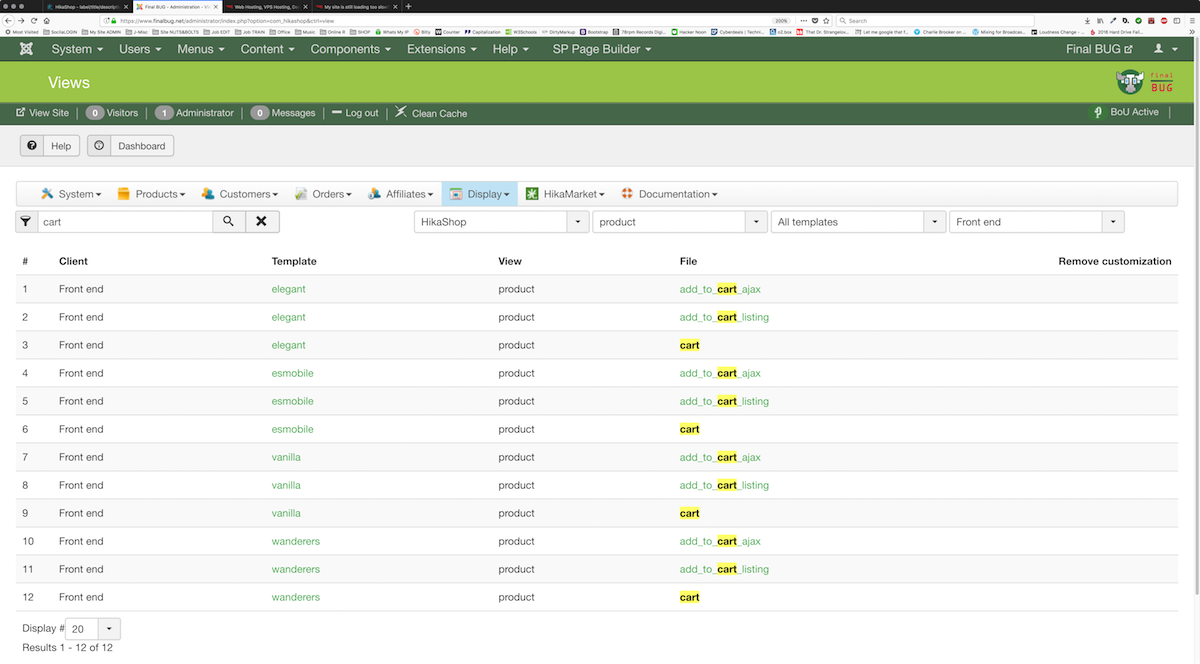
And looked for line 170 where you wanted me to add code but am seeing something very different to in your screen shot:
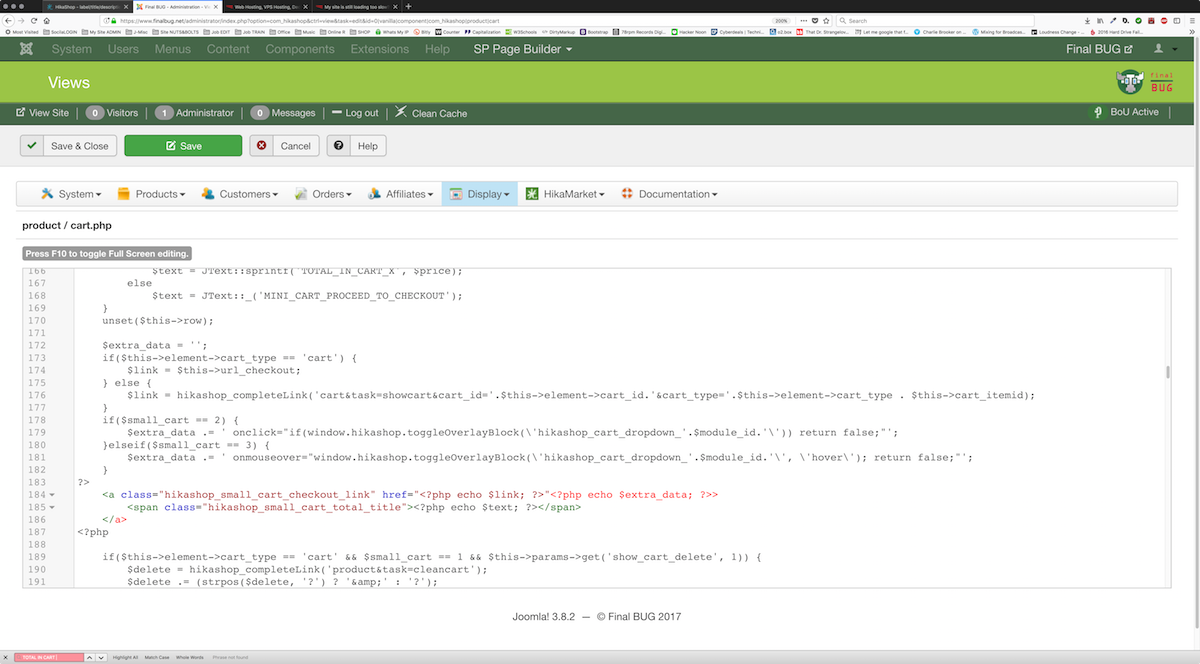
Also I tried searching for “TOTAL IN CART X” which I can clearly see in your screen shot and I can not find it!
I am probably making some stupid mistake.
Do you think that you could trouble shoot this for me?
thanks
Paul
Thank you for your detailed explanation.
I could still do with some help on this.
As I am not a coder.
I went here:
And looked for line 170 where you wanted me to add code but am seeing something very different to in your screen shot:
Also I tried searching for “TOTAL IN CART X” which I can clearly see in your screen shot and I can not find it!
I am probably making some stupid mistake.
Do you think that you could trouble shoot this for me?
thanks
Paul
Please Log in or Create an account to join the conversation.
8 years 10 months ago #283898
by nicolas
Replied by nicolas on topic label/title/description seems odd for check out module?
Hi,
I see the code Philippe was talking about at the top of the code in your screenshot... Sure the line numbers are a bit off, but not by much.
I see the code Philippe was talking about at the top of the code in your screenshot... Sure the line numbers are a bit off, but not by much.
Please Log in or Create an account to join the conversation.
8 years 10 months ago #283944
by paurray
Replied by paurray on topic label/title/description seems odd for check out module?
Hi, hi
ok I know that this is Kindergarten stuff but I got my head around adding this two lines of code.
they remove the description for Mini cart = Yes
but not for Mini cart = No
i.e. I still see "ImageName" when Mini cart = No
kindly advise
Paul
ok I know that this is Kindergarten stuff but I got my head around adding this two lines of code.
they remove the description for Mini cart = Yes
but not for Mini cart = No
i.e. I still see "ImageName" when Mini cart = No
kindly advise
Paul
Please Log in or Create an account to join the conversation.
8 years 10 months ago #283958
by nicolas
Replied by nicolas on topic label/title/description seems odd for check out module?
Hi,
It's not "ImageName". It's the title "Image" for the column of the images of the products and the title "Name" for the column of the names of the products.
If you want to remove these, you can use some simple CSS to hide them.
For example:
.hikashop_cart_title{ display:none; }
It's not "ImageName". It's the title "Image" for the column of the images of the products and the title "Name" for the column of the names of the products.
If you want to remove these, you can use some simple CSS to hide them.
For example:
.hikashop_cart_title{ display:none; }
Please Log in or Create an account to join the conversation.
8 years 10 months ago - 8 years 10 months ago #283986
by paurray
Replied by paurray on topic label/title/description seems odd for check out module?
Hi Nikolas
Stupid question this is a work around right because something does not work 100% as it should?
So at some point when there is an update this code will become redundant right?
Is there a some kind o CSS Over Write file some where, where I put this code, if so could you tell me where?
thanks in advance
Paul
Stupid question this is a work around right because something does not work 100% as it should?
So at some point when there is an update this code will become redundant right?
Is there a some kind o CSS Over Write file some where, where I put this code, if so could you tell me where?
thanks in advance
Paul
Last edit: 8 years 10 months ago by paurray.
Please Log in or Create an account to join the conversation.
8 years 10 months ago #283988
by nicolas
Replied by nicolas on topic label/title/description seems odd for check out module?
Hi,
No, that's normal.
You have a table of products in the cart. each row can have different information: the image, the name, the price, the quantity, a delete button, etc.
So there is a title on top of each column of the table, like on any other listing of HikaShop.
You can add your CSS to the style CSS of HikaShop under the Display tab of the HikaShop configuration:
www.hikashop.com/support/documentation/1...ize-the-display.html
No, that's normal.
You have a table of products in the cart. each row can have different information: the image, the name, the price, the quantity, a delete button, etc.
So there is a title on top of each column of the table, like on any other listing of HikaShop.
You can add your CSS to the style CSS of HikaShop under the Display tab of the HikaShop configuration:
www.hikashop.com/support/documentation/1...ize-the-display.html
Please Log in or Create an account to join the conversation.
8 years 10 months ago #284170
by paurray
Replied by paurray on topic label/title/description seems odd for check out module?
Hi Nicolas
Got it.
thanks
Paul
Got it.
thanks
Paul
Please Log in or Create an account to join the conversation.
Time to create page: 0.355 seconds