
- Posts: 424
- Thank you received: 11
Question about the admin email..
- BluepointWebdesign
-
 Topic Author
- Offline
Less
More
8 years 6 months ago - 8 years 6 months ago #291275
by BluepointWebdesign
 -- HikaShop version -- : 3.3.0
-- Joomla version -- : 3.8.6
-- PHP version -- : 6.x.x
Hello,
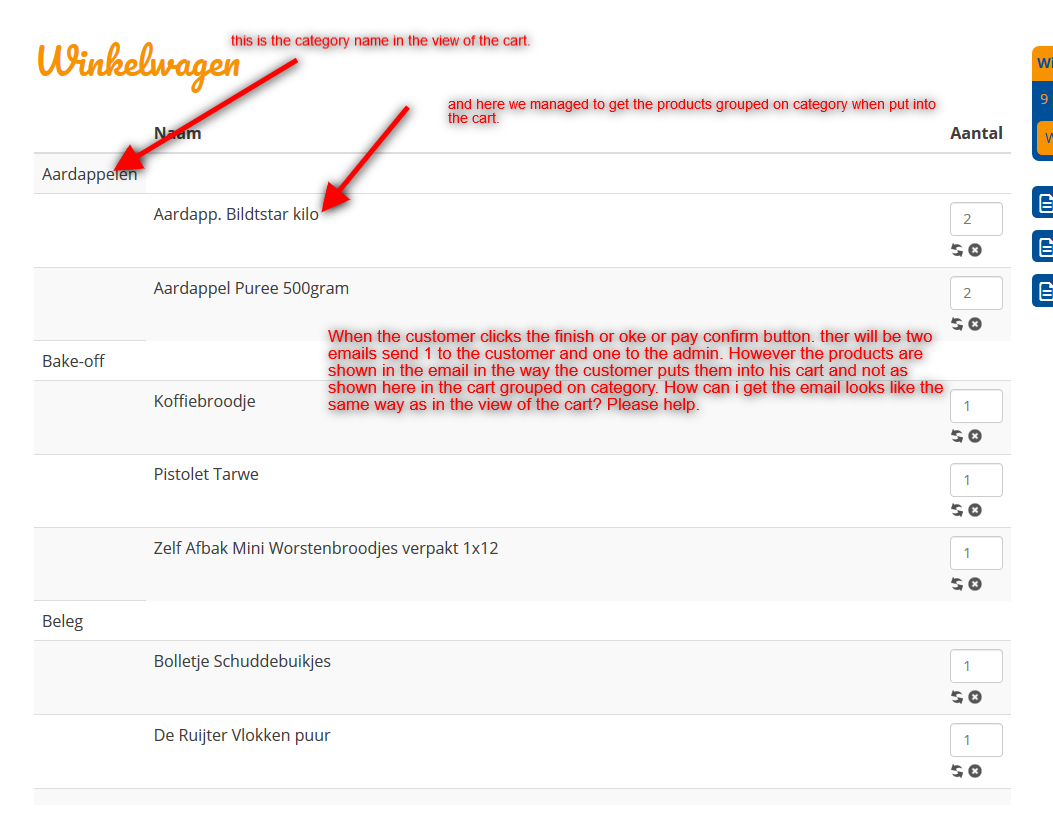
I would like that the products are shown in the email in the same way as in the view of the cart. How can i do that.
I made some modifications in the cart so that the products are grouped on category with category name.. See attachment. I would like to know how i can change the admin email so i will have the same look in the email that is send to the admin.
Can you help?
The upload of files doesn't work at the moment the screenshot i have is only 140kb?
Question about the admin email.. was created by BluepointWebdesign
-- Joomla version -- : 3.8.6
-- PHP version -- : 6.x.x
Hello,
I would like that the products are shown in the email in the same way as in the view of the cart. How can i do that.
I made some modifications in the cart so that the products are grouped on category with category name.. See attachment. I would like to know how i can change the admin email so i will have the same look in the email that is send to the admin.
Can you help?
The upload of files doesn't work at the moment the screenshot i have is only 140kb?
Last edit: 8 years 6 months ago by BluepointWebdesign. Reason: trying to the attachement in .. and succes.! :)
Please Log in or Create an account to join the conversation.

8 years 6 months ago - 8 years 6 months ago #291292
by Philip
Replied by Philip on topic Question about the admin email..
Hello,
You can custom your Emails, for this :
- Go to Main HikaShop Configuration => System => Emails
- Then select your concerned Emails and click on the its name to edit it
- Here, you will be able to custom your Emails Display
image missing https://cdn.pbrd.co/images/HgoB2Rx.png
And, use the Help button to display documentation that will guide you to better understand the way to proceed your customization.
Hope this will help you.
Regards
You can custom your Emails, for this :
- Go to Main HikaShop Configuration => System => Emails
- Then select your concerned Emails and click on the its name to edit it
- Here, you will be able to custom your Emails Display
image missing https://cdn.pbrd.co/images/HgoB2Rx.png
And, use the Help button to display documentation that will guide you to better understand the way to proceed your customization.
Hope this will help you.
Regards
Last edit: 8 years 6 months ago by Philip.
Please Log in or Create an account to join the conversation.
- BluepointWebdesign
-
Topic Author
- Offline
Less
More
- Posts: 424
- Thank you received: 11
8 years 6 months ago #291304
by BluepointWebdesign
Replied by BluepointWebdesign on topic Question about the admin email..
Hello i think you missunderstood me a little, how to customize the display is clear to me .. we also did customize the email.. see attachtement.
As you can see i am able to get the product category name next to the product from that particular category, how can i group the products by category and not as it is shown in the pdf.. the product are now on the list in the way that they have been put in the cart.
Do you have an idea??
This attachment is hidden for guests.
Please log in or register to see it.
Please log in or register to see it.
As you can see i am able to get the product category name next to the product from that particular category, how can i group the products by category and not as it is shown in the pdf.. the product are now on the list in the way that they have been put in the cart.
Do you have an idea??
Please Log in or Create an account to join the conversation.

8 years 6 months ago #291320
by nicolas
Replied by nicolas on topic Question about the admin email..
Hi,
Well, in the preload of the email, you need to add a new foreach on the products, before the one that already exists where you load the categories of each product, and reorder the products array based on these categories.
You can use such PHP function to sort the products array with a specific algorithm of your making:
www.php.net/manual/en/function.uasort.php
Once the products are in the order you want them in, the second foreach that is already there by default will display the products in your order.
Now, if you want to group them in different tables, that's also possible but more complex as you need to go through the templating of the email system. So you'll have to duplicate the LINEVAR tags and in fact the whole products listing table into several listings and have your preload add the products into different arrays of objects so that they can be displayed separately.
Well, in the preload of the email, you need to add a new foreach on the products, before the one that already exists where you load the categories of each product, and reorder the products array based on these categories.
You can use such PHP function to sort the products array with a specific algorithm of your making:
www.php.net/manual/en/function.uasort.php
Once the products are in the order you want them in, the second foreach that is already there by default will display the products in your order.
Now, if you want to group them in different tables, that's also possible but more complex as you need to go through the templating of the email system. So you'll have to duplicate the LINEVAR tags and in fact the whole products listing table into several listings and have your preload add the products into different arrays of objects so that they can be displayed separately.
Please Log in or Create an account to join the conversation.
- BluepointWebdesign
-
Topic Author
- Offline
Less
More
- Posts: 424
- Thank you received: 11
8 years 6 months ago #291583
by BluepointWebdesign
Replied by BluepointWebdesign on topic Question about the admin email..
To understand correctly, in the cart views i have made an array and foreach to get the products in category and together as shown in my first attachment of the cart (Winkelwagen) Can i use the same foreach to get the products to be shown in that particular way on the mail?
Please Log in or Create an account to join the conversation.
8 years 6 months ago #291584
by nicolas
Replied by nicolas on topic Question about the admin email..
Hi,
The variables in the preload and the variables in the cart view are not the same and not with the same name. So you can use the exact same code.
However, you can use roughly the same code, by adapting it to the situation.
The variables in the preload and the variables in the cart view are not the same and not with the same name. So you can use the exact same code.
However, you can use roughly the same code, by adapting it to the situation.
Please Log in or Create an account to join the conversation.
- BluepointWebdesign
-
Topic Author
- Offline
Less
More
- Posts: 424
- Thank you received: 11
8 years 6 months ago - 8 years 6 months ago #291658
by BluepointWebdesign
Replied by BluepointWebdesign on topic Question about the admin email..
Hello,
As you can see in the pdf i sent earlier i managed to get the category name in the email.. But had to that with this code ..
Had to query the database because where the preload gets his data from is no database table..
But how can i sort this one ?? i am still struggling..
Or when i sent you the code i use in the cart view is it possible then that you can help me with the right variables?
THanks.
Mark
As you can see in the pdf i sent earlier i managed to get the category name in the email.. But had to that with this code ..
Code:
//$jsonItem = json_encode($item->order_product_id);
$con = mysqli_connect('localhost', 'janjongerius_mvdmbp', '3F0S3e^tq2Ql', 'janjongerius_JO45BP', 3306);
$query_product = mysqli_query($con,"SELECT * FROM pa8ju_hikashop_product_category WHERE product_id = ".$item->product_id." LIMIT 1");
while($run_query_product = mysqli_fetch_array($query_product)){
$product_Category = $run_query_product['category_id'];
}
$query_category = mysqli_query($con,"SELECT * FROM pa8ju_hikashop_category WHERE category_id = ".$product_Category." LIMIT 1");
while($run_query_category = mysqli_fetch_array($query_category)){
$product_Category_name = $run_query_category['category_name'];
asort($product_Category_name);
}
?>
<?php
$unit_category = $item->order_product_category;
$cartProduct['PRODUCT_CATEGORY'] = $product_Category_name;
But how can i sort this one ?? i am still struggling..
Or when i sent you the code i use in the cart view is it possible then that you can help me with the right variables?
THanks.
Mark
Last edit: 8 years 6 months ago by nicolas. Reason: add code tags for better readability.
Please Log in or Create an account to join the conversation.
8 years 6 months ago #291665
by nicolas
Replied by nicolas on topic Question about the admin email..
As I said, you need to have a first foreach where you do the sorting on top of the foreach which already exists...
You can't put all your code in the foreach already there since you can't sort an array that's already being processed.
So you need something like that:
You can't put all your code in the foreach already there since you can't sort an array that's already being processed.
So you need something like that:
Code:
//an array where you'll have the products being sorted
$sortingArray = array();
foreach($data->cart->products as $item) {
// your code to load the category name
// ....
$sortingArray[$product_Category_name] = $item;
}
// sort the whole array based on the category name
ksort($sortingArray);
// replace the array of products by your sorted array
$data->cart->products = $sortingArray;
// then, the normal foreach of the preload which uses the data of the products.
// ...
Please Log in or Create an account to join the conversation.
- BluepointWebdesign
-
Topic Author
- Offline
Less
More
- Posts: 424
- Thank you received: 11
8 years 6 months ago - 8 years 6 months ago #291804
by BluepointWebdesign
Replied by BluepointWebdesign on topic Question about the admin email..
Struggling a bit with the array to sort.. i now got this:
But when i want to put my code into this array to sort it as in the cart..
This peace of code is the one i use in the cart..
But with the array now i only get this on the mail see pdf.
Code:
//an array where you'll have the products being sorted
$sortingArray = array();
foreach($data->cart->products as $item) {
$sortingArray[] = array("name"=>"$productCategory->category_name","id"=>"$productCategory->category_id.", "productInCategory"=> $productCategory->product_id);
$sortingArray[$product_Category_name] = $item;
}
// sort the whole array based on the category name
ksort($sortingArray);
// replace the array of products by your sorted array
$data->cart->products = $sortingArray;
//End of sortingarray
This peace of code is the one i use in the cart..
Code:
$categoryArray = array();
$previousCategoryName = "";
$productInCategory = "";
foreach($this->cart->products as $opt_p => $product) {
foreach($product->categories as $opt_k => $productCategory) {
$categoryArray[] = array("name"=>"$productCategory->category_name","id"=>"$productCategory->category_id.", "productInCategory"=> $productCategory->product_id);
}
}
asort($categoryArray);
//print_r($categoryArray);
foreach($categoryArray as $index => $data) {
//print_r($data);
foreach($data as $index2 => $data2) {
if($index2 == 'name'){
$categoryName = $data2;
}
if($index2 == 'id'){
$categoryID = $data2;
}
if($index2 == 'productInCategory'){
$productInCategory = $data2;
}
}
if ($categoryName != $previousCategoryName) {
?>
<tr><td><?php echo $categoryName; ?></td></tr>
<?php
}
$previousCategoryName = $categoryName;
foreach($this->cart->products as $k => $product) {
if ($product->product_id == $productInCategory) {
$cart_product = $this->cart->cart_products[$opt_p];
This attachment is hidden for guests.
Please log in or register to see it.
Please log in or register to see it.
Last edit: 8 years 6 months ago by nicolas.
Please Log in or Create an account to join the conversation.
8 years 6 months ago #291815
by nicolas
Replied by nicolas on topic Question about the admin email..
Hi,
Please use the code tags in your messages, otherwise, it's much harder to read...
In your first piece of code, you've added the code:
where I said that you should load the product category name. I don't know what this code is about but it's not what I said you should do.
First, the $productCategory variable doesn't exist yet.
Second, you already had the code:
So if you replace my comment by that code, you should have then the products properly sorted $data->cart->products and you can just leave the standard way of displaying the products after that, as I wrote my my previous message.
So I don't understand what you're trying to do in the second piece of code.
Finally, please understand that this is a user support forum. I'm already going way beyond what I'm supposed to do here to help you.
Please use the code tags in your messages, otherwise, it's much harder to read...
In your first piece of code, you've added the code:
Code:
$sortingArray[] = array("name"=>"$productCategory->category_name","id"=>"$productCategory->category_id.", "productInCategory"=> $productCategory->product_id);
First, the $productCategory variable doesn't exist yet.
Second, you already had the code:
Code:
$con = mysqli_connect('localhost', 'janjongerius_mvdmbp', '3F0S3e^tq2Ql', 'janjongerius_JO45BP', 3306);
$query_product = mysqli_query($con,"SELECT * FROM pa8ju_hikashop_product_category WHERE product_id = ".$item->product_id." LIMIT 1");
while($run_query_product = mysqli_fetch_array($query_product)){
$product_Category = $run_query_product['category_id'];
}
$query_category = mysqli_query($con,"SELECT * FROM pa8ju_hikashop_category WHERE category_id = ".$product_Category." LIMIT 1");
while($run_query_category = mysqli_fetch_array($query_category)){
$product_Category_name = $run_query_category['category_name'];
}
So I don't understand what you're trying to do in the second piece of code.
Finally, please understand that this is a user support forum. I'm already going way beyond what I'm supposed to do here to help you.
Please Log in or Create an account to join the conversation.
- BluepointWebdesign
-
Topic Author
- Offline
Less
More
- Posts: 424
- Thank you received: 11
8 years 6 months ago #292080
by BluepointWebdesign
Replied by BluepointWebdesign on topic Question about the admin email..
Thanks for you answer. I understand that this is a support forum.
I will try to load the category name with a foreach as you said.
In the second peace of my precious message i had put the code i use in the checkout to get he category name and sort it ..
it does not seem to work. Thanks for so far on this support..
I think i can find the way to load the product category name.
Thanks.
I will try to load the category name with a foreach as you said.
In the second peace of my precious message i had put the code i use in the checkout to get he category name and sort it ..
it does not seem to work. Thanks for so far on this support..
I think i can find the way to load the product category name.
Thanks.
Please Log in or Create an account to join the conversation.
- BluepointWebdesign
-
Topic Author
- Offline
Less
More
- Posts: 424
- Thank you received: 11
8 years 5 months ago #292642
by BluepointWebdesign
Replied by BluepointWebdesign on topic Question about the admin email..
Unfortnatly i can not figure it out.
The only way to get the category names in the email is what is did in my second peace of code which you did not understand
This peace of code:
But i can not get sorted then on category.
So how does the foreach work then?
The only way to get the category names in the email is what is did in my second peace of code which you did not understand
This peace of code:
Code:
$con = mysqli_connect('localhost', 'janjongerius_mvdmbp', '3F0S3e^tq2Ql', 'janjongerius_JO45BP', 3306);
$query_product = mysqli_query($con,"SELECT * FROM pa8ju_hikashop_product_category WHERE product_id = ".$item->product_id." LIMIT 1");
while($run_query_product = mysqli_fetch_array($query_product)){
$product_Category = $run_query_product['category_id'];
}
$query_category = mysqli_query($con,"SELECT * FROM pa8ju_hikashop_category WHERE category_id = ".$product_Category." LIMIT 1");
while($run_query_category = mysqli_fetch_array($query_category)){
$product_Category_name = $run_query_category['category_name'];
}
?>
<?php
$cartProduct['PRODUCT_CATEGORY'] = $product_Category_name;
So how does the foreach work then?
Please Log in or Create an account to join the conversation.
8 years 5 months ago #292644
by nicolas
Replied by nicolas on topic Question about the admin email..
Hi,
It should be easy will all the pointers I already gave.
You just have to replace that line of code:
with that code:
It should be easy will all the pointers I already gave.
You just have to replace that line of code:
Code:
foreach($data->cart->products as $item) {
Code:
//an array where you'll have the products being sorted
$sortingArray = array();
foreach($data->cart->products as $item) {
// your code to load the category name
$con = mysqli_connect('localhost', 'janjongerius_mvdmbp', '3F0S3e^tq2Ql', 'janjongerius_JO45BP', 3306);
$query_product = mysqli_query($con,"SELECT * FROM pa8ju_hikashop_product_category WHERE product_id = ".$item->product_id." LIMIT 1");
while($run_query_product = mysqli_fetch_array($query_product)){
$product_Category = $run_query_product['category_id'];
}
$query_category = mysqli_query($con,"SELECT * FROM pa8ju_hikashop_category WHERE category_id = ".$product_Category." LIMIT 1");
while($run_query_category = mysqli_fetch_array($query_category)){
$product_Category_name = $run_query_category['category_name'];
$sortingArray[$product_Category_name] = $item;
}
}
// sort the whole array based on the category name
ksort($sortingArray);
// replace the array of products by your sorted array
$data->cart->products = $sortingArray;
// then, the normal foreach of the preload which uses the data of the products.
foreach($data->cart->products as $item) {
Please Log in or Create an account to join the conversation.
- BluepointWebdesign
-
Topic Author
- Offline
Less
More
- Posts: 424
- Thank you received: 11
8 years 4 months ago #293544
by BluepointWebdesign
Replied by BluepointWebdesign on topic Question about the admin email..
Hi,
I followed all off your pointers. And the category names are being sorted. But I only got now 1 issue left.. If i have mutliple products from one category it will only show 1 product from that category. But i can not figure out why?
Is it because of this?
I followed all off your pointers. And the category names are being sorted. But I only got now 1 issue left.. If i have mutliple products from one category it will only show 1 product from that category. But i can not figure out why?
Is it because of this?
Code:
$sortingArray[$product_Category_name] = $item;
Please Log in or Create an account to join the conversation.
8 years 4 months ago #293545
by nicolas
Replied by nicolas on topic Question about the admin email..
Hi,
Yes. it's because of that line.
The simplest is to change that line to:
Yes. it's because of that line.
The simplest is to change that line to:
Code:
$sortingArray[$product_Category_name.'_'.$item->order_product_id] = $item;
The following user(s) said Thank You: BluepointWebdesign
Please Log in or Create an account to join the conversation.
- BluepointWebdesign
-
Topic Author
- Offline
Less
More
- Posts: 424
- Thank you received: 11
8 years 4 months ago #293594
by BluepointWebdesign
Replied by BluepointWebdesign on topic Question about the admin email..
Thanks, It works super now! 
I am verry happy
I am verry happy
Please Log in or Create an account to join the conversation.
Time to create page: 0.227 seconds