
- Posts: 7
- Thank you received: 1
Options with Variants do not show the variants description in Product listing.
- sportsaction2000
-
 Topic Author
- Offline
Less
More
7 years 11 months ago - 7 years 11 months ago #300053
by sportsaction2000
Options with Variants do not show the variants description in Product listing. was created by sportsaction2000
-- HikaShop version -- : 4.0.0
-- Joomla version -- : 3.9.0
-- PHP version -- : 7.2.10
-- Browser(s) name and version -- : Version 70.0.3538.77 (Official Build) (64-bit)
-- Error-message(debug-mod must be tuned on) -- : No error on page....variant description not showing.
I added the Option "Bypass Series" to the Product Aura, the Option "Bypass Series" has two active Variants. While the variants show on the product Aura, their variant descriptions do not...it only shows the default description.
In addition the Option is Optional, I am really having difficulty with being able to allow options the client can pick but are not mandatory. Just about every product for a Bath and Kitchen renovation has options that are NOT mandatory. FOr example: client picks a bathtub....it has several Variants based on left side install right install which are mandatory to select. BUT Optional to this are the doors that surround the Bathtub which are in their own respective Category and also optional drains and hardware they MAY select as an Option but are not Mandatory. I will have several thousand products to create with Options that are optional and also as above those options are actual products with their own variants ion which the variant description must show when they select that Option.
-- Joomla version -- : 3.9.0
-- PHP version -- : 7.2.10
-- Browser(s) name and version -- : Version 70.0.3538.77 (Official Build) (64-bit)
-- Error-message(debug-mod must be tuned on) -- : No error on page....variant description not showing.
I added the Option "Bypass Series" to the Product Aura, the Option "Bypass Series" has two active Variants. While the variants show on the product Aura, their variant descriptions do not...it only shows the default description.
In addition the Option is Optional, I am really having difficulty with being able to allow options the client can pick but are not mandatory. Just about every product for a Bath and Kitchen renovation has options that are NOT mandatory. FOr example: client picks a bathtub....it has several Variants based on left side install right install which are mandatory to select. BUT Optional to this are the doors that surround the Bathtub which are in their own respective Category and also optional drains and hardware they MAY select as an Option but are not Mandatory. I will have several thousand products to create with Options that are optional and also as above those options are actual products with their own variants ion which the variant description must show when they select that Option.
Last edit: 7 years 11 months ago by sportsaction2000. Reason: Forgot to add the additional issue directly related to the first post.
Please Log in or Create an account to join the conversation.

7 years 11 months ago #300062
by nicolas
Replied by nicolas on topic Options with Variants do not show the variants description in Product listing.
Hi,
1. The description icon on the option name is supposed to be the description of the main product of the option not the variants. So it's actually normal it doesn't refresh when you change the variant selected in the option.
We didn't think it would make sense.
I personally still don't think it would.
Moreover, if you want to change that, it won't be so easy as the tooltips are initialized by Joomla when the page is loaded. So changing the content of the tooltip dynamically would require some custom javascript to clear the tooltip and reinitialize it.
It's not impossible to do if you're a developer and you know well PHP/javascript but otherwise I don't see any way to do that.
2. There are two ways to go about that:
- you add an additional "no" value to the characteristics and add the corresponding variant in the option product and select it as default. That way, the option will default to that "no" variant.
- you can also add a "no" choice for all the options with variants:
www.hikashop.com/forum/product-category-...t-option.html#138030
1. The description icon on the option name is supposed to be the description of the main product of the option not the variants. So it's actually normal it doesn't refresh when you change the variant selected in the option.
We didn't think it would make sense.
I personally still don't think it would.
Moreover, if you want to change that, it won't be so easy as the tooltips are initialized by Joomla when the page is loaded. So changing the content of the tooltip dynamically would require some custom javascript to clear the tooltip and reinitialize it.
It's not impossible to do if you're a developer and you know well PHP/javascript but otherwise I don't see any way to do that.
2. There are two ways to go about that:
- you add an additional "no" value to the characteristics and add the corresponding variant in the option product and select it as default. That way, the option will default to that "no" variant.
- you can also add a "no" choice for all the options with variants:
www.hikashop.com/forum/product-category-...t-option.html#138030
Please Log in or Create an account to join the conversation.
- sportsaction2000
-
Topic Author
- Offline
Less
More
- Posts: 7
- Thank you received: 1
7 years 11 months ago - 7 years 10 months ago #300122
by sportsaction2000
I looked for the code
"$this->values = array();
to:
$this->values = array(JHTML::_('select.option', 0,JText::_('HIKASHOP_NO')));
and removing the line:
$value = $variant->product_id; "
in the Options View but it is not there here is what I see but I still do not know what to change to add the "no" value to it.
[Moderator : There is no point to post a code view that we already know and have.
Plus, don't forget that this forum aim is to be used by other people, and so a long message detracts from the good reading, next time using attachments.]
Replied by sportsaction2000 on topic Options with Variants do not show the variants description in Product listing.
nicolas wrote: Hi,
1. The description icon on the option name is supposed to be the description of the main product of the option not the variants. So it's actually normal it doesn't refresh when you change the variant selected in the option.
We didn't think it would make sense.
I personally still don't think it would.
Moreover, if you want to change that, it won't be so easy as the tooltips are initialized by Joomla when the page is loaded. So changing the content of the tooltip dynamically would require some custom javascript to clear the tooltip and reinitialize it.
It's not impossible to do if you're a developer and you know well PHP/javascript but otherwise I don't see any way to do that.
2. There are two ways to go about that:
- you add an additional "no" value to the characteristics and add the corresponding variant in the option product and select it as default. That way, the option will default to that "no" variant.
- you can also add a "no" choice for all the options with variants:
www.hikashop.com/forum/product-category-...t-option.html#138030
I looked for the code
"$this->values = array();
to:
$this->values = array(JHTML::_('select.option', 0,JText::_('HIKASHOP_NO')));
and removing the line:
$value = $variant->product_id; "
in the Options View but it is not there here is what I see but I still do not know what to change to add the "no" value to it.
[Moderator : There is no point to post a code view that we already know and have.
Plus, don't forget that this forum aim is to be used by other people, and so a long message detracts from the good reading, next time using attachments.]
Last edit: 7 years 10 months ago by Philip.
The following user(s) said Thank You: fernando.alh
Please Log in or Create an account to join the conversation.

7 years 10 months ago - 7 years 10 months ago #300132
by Philip
Replied by Philip on topic Options with Variants do not show the variants description in Product listing.
Hello,
Nicolas means create a new variant value in the relative setting page, from Main HikaShop Configuration page, go on Products dropdown and select Characteristics, see my screenshot to better understand the context :

That's why, we don't get your point about your code in this topic.
Regards
Nicolas means create a new variant value in the relative setting page, from Main HikaShop Configuration page, go on Products dropdown and select Characteristics, see my screenshot to better understand the context :
That's why, we don't get your point about your code in this topic.
Regards
Last edit: 7 years 10 months ago by Philip.
Please Log in or Create an account to join the conversation.
- sportsaction2000
-
Topic Author
- Offline
Less
More
- Posts: 7
- Thank you received: 1
7 years 10 months ago - 7 years 10 months ago #300292
by sportsaction2000
Replied by sportsaction2000 on topic Options with Variants do not show the variants description in Product listing.
Hi, I figured out a simple solution to having Options of a Product show with default option of NO that does not require creating additional Variants!
How to:
Under the heading Display>Views, select the column Product and then the active template you are using.
Edit the Option file and drill down to the section where it says
if($this->config->get('add_no_to_options', 0) && $selectionMethod != 'check')
change only the 0 to 1 as below
if($this->config->get('add_no_to_options', 1) && $selectionMethod != 'check')
and to get the default option value set to no you simply change this
if($this->config->get('select_option_default_value', 1) && $selectionMethod != 'check')
to this
if($this->config->get('select_option_default_value', 0) && $selectionMethod != 'check')
Just changing the value of 1 to 0
You will have to do this to every template you have active on your Joomla site if you want each Option you add to have a No selection so that the customer is not forced to add an option to his Product purchase and bonus is the Options that are selected as No will not show up in the cart which would potentially confuse the client. (In the example below you see that the Axent Bypass Sliding Doors is an option and the client selected no so on the right hand side in the cart you only see one item which is the Soaker left Bathtub variant without listing Options the client selected as No.
I still haven't figured out how to edit jtext so that NO becomes a custom name like "no thank you" but this is really making things simpler for me to add multiple options that the client can either select or opt out of.
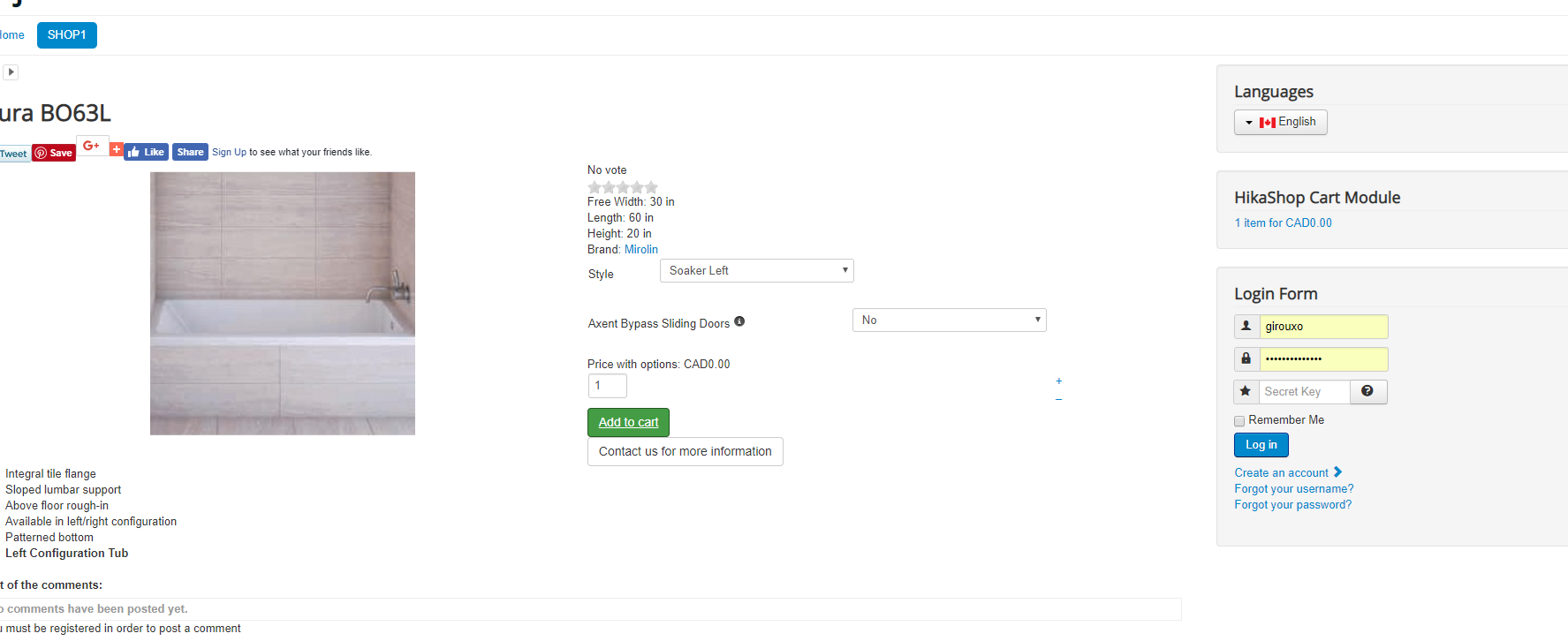
How to:
Under the heading Display>Views, select the column Product and then the active template you are using.
Edit the Option file and drill down to the section where it says
if($this->config->get('add_no_to_options', 0) && $selectionMethod != 'check')
change only the 0 to 1 as below
if($this->config->get('add_no_to_options', 1) && $selectionMethod != 'check')
and to get the default option value set to no you simply change this
if($this->config->get('select_option_default_value', 1) && $selectionMethod != 'check')
to this
if($this->config->get('select_option_default_value', 0) && $selectionMethod != 'check')
Just changing the value of 1 to 0
You will have to do this to every template you have active on your Joomla site if you want each Option you add to have a No selection so that the customer is not forced to add an option to his Product purchase and bonus is the Options that are selected as No will not show up in the cart which would potentially confuse the client. (In the example below you see that the Axent Bypass Sliding Doors is an option and the client selected no so on the right hand side in the cart you only see one item which is the Soaker left Bathtub variant without listing Options the client selected as No.
I still haven't figured out how to edit jtext so that NO becomes a custom name like "no thank you" but this is really making things simpler for me to add multiple options that the client can either select or opt out of.
Last edit: 7 years 10 months ago by sportsaction2000. Reason: added one extra change so that the default value for any option is no
Please Log in or Create an account to join the conversation.
7 years 10 months ago #300316
by nicolas
Replied by nicolas on topic Options with Variants do not show the variants description in Product listing.
Hi,
For the text, you should change the translation key in the option.php view file: HIKASHOP_NO
For example with MY_TRANSLATION_KEY
and then, in the HikaShop configuration, under the "languages" tab, edit your language, and in the "override" area you can add such line:
MY_TRANSLATION_KEY="no thank you"
For the text, you should change the translation key in the option.php view file: HIKASHOP_NO
For example with MY_TRANSLATION_KEY
and then, in the HikaShop configuration, under the "languages" tab, edit your language, and in the "override" area you can add such line:
MY_TRANSLATION_KEY="no thank you"
The following user(s) said Thank You: sportsaction2000
Please Log in or Create an account to join the conversation.
Time to create page: 0.216 seconds