

- Posts: 19
- Thank you received: 0
how to add different supplementen to 1 food article?
5 years 10 months ago #325893
by guyb
how to add different supplementen to 1 food article? was created by guyb
-- HikaShop version -- : 4.4.0
-- Joomla version -- : 3.9.22
-- PHP version -- : 7.3.12
-- Browser(s) name and version -- : firefox
Hi,
How can I create this kind of multiple choices that also increases the end-user price?
Thanks in advance.
Guy
PS the part 'PORTIE' is not important. I'm looking for a way to create the parts 'Kruiden' en 'Sausen' in HikaShop
-- Joomla version -- : 3.9.22
-- PHP version -- : 7.3.12
-- Browser(s) name and version -- : firefox
Hi,
How can I create this kind of multiple choices that also increases the end-user price?
Thanks in advance.
Guy
PS the part 'PORTIE' is not important. I'm looking for a way to create the parts 'Kruiden' en 'Sausen' in HikaShop
Please Log in or Create an account to join the conversation.

5 years 10 months ago #325916
by nicolas
Replied by nicolas on topic how to add different supplementen to 1 food article?
Hi,
You need to use the "options" system:
www.hikashop.com/support/documentation/i...ct-form.html#options
That will allow you to have a page like this with options that can increase the price of the product:
demo.hikashop.com/index.php/en/hikashop/...ct-page/with-options
In the HikaShop configuration, you'll find the setting "Product selection method" where you can choose if you want the options to display as a single dropdown, a radio selector, or a checkbox selector like what you have in the Kruiden and Sausen parts of your link.
Finally, if you need a different select method for different options, you can set that setting to "on a per product basis" and you'll then have a similar option in your option products setting page so that you can set that per option.
You need to use the "options" system:
www.hikashop.com/support/documentation/i...ct-form.html#options
That will allow you to have a page like this with options that can increase the price of the product:
demo.hikashop.com/index.php/en/hikashop/...ct-page/with-options
In the HikaShop configuration, you'll find the setting "Product selection method" where you can choose if you want the options to display as a single dropdown, a radio selector, or a checkbox selector like what you have in the Kruiden and Sausen parts of your link.
Finally, if you need a different select method for different options, you can set that setting to "on a per product basis" and you'll then have a similar option in your option products setting page so that you can set that per option.
Please Log in or Create an account to join the conversation.
5 years 10 months ago #325947
by guyb
Replied by guyb on topic how to add different supplementen to 1 food article?
Thank you.
another 3 questions:
1)do you like to have a separate ticket per question?
2)the total price of the article is not updated when I select my option-article. Suggestion how to show this total?
3)the space available for the quantity is to small, where / how can I enlarge that? And 2) to show somehow the total price applies also here.
Thanks in advance
Guy
another 3 questions:
1)do you like to have a separate ticket per question?
2)the total price of the article is not updated when I select my option-article. Suggestion how to show this total?
3)the space available for the quantity is to small, where / how can I enlarge that? And 2) to show somehow the total price applies also here.
Thanks in advance
Guy
Please Log in or Create an account to join the conversation.
5 years 10 months ago #325949
by nicolas
Replied by nicolas on topic how to add different supplementen to 1 food article?
Hi,
1. It's indeed better
2. This works fine on our end. Please provide a link to the product page with the issue so that we can look at the situation.
3. That's probably a CSS issue linked to the CSS of your Joomla template. Again, we'll need a link to that page to check on the situation.
3.2 " show somehow the total price applies also here" I'm sorry but I don't understand what you mean by that.
1. It's indeed better
2. This works fine on our end. Please provide a link to the product page with the issue so that we can look at the situation.
3. That's probably a CSS issue linked to the CSS of your Joomla template. Again, we'll need a link to that page to check on the situation.
3.2 " show somehow the total price applies also here" I'm sorry but I don't understand what you mean by that.
Please Log in or Create an account to join the conversation.
5 years 10 months ago #325999
by guyb
Replied by guyb on topic how to add different supplementen to 1 food article?
ok.
I'll expirement first with another template to see what the result is before getting back.
Thanks
Guy
I'll expirement first with another template to see what the result is before getting back.
Thanks
Guy
Please Log in or Create an account to join the conversation.
5 years 10 months ago #326238
by guyb
Replied by guyb on topic how to add different supplementen to 1 food article?
Hi,
I have orded some food for 2 persons:
1 mini friet + mayonaise + satekruiden + stoofvlees
1 mini friet + satekruiden + stoofvleessaus
How can the person who must prepare this food know what to do? Any suggestion?
Thanks in advance
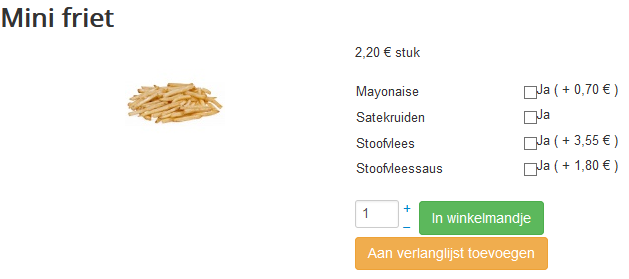
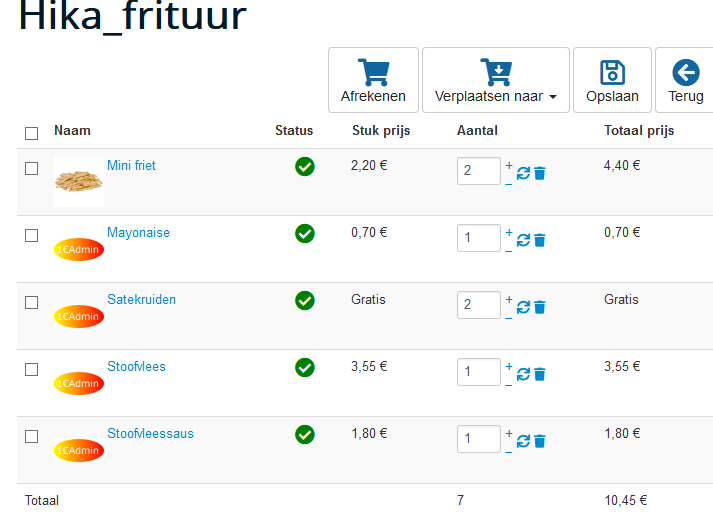
I have orded some food for 2 persons:
1 mini friet + mayonaise + satekruiden + stoofvlees
1 mini friet + satekruiden + stoofvleessaus
How can the person who must prepare this food know what to do? Any suggestion?
Thanks in advance
Please Log in or Create an account to join the conversation.
5 years 10 months ago #326277
by nicolas
Replied by nicolas on topic how to add different supplementen to 1 food article?
Hi,
Turn on the "group options with product" setting in the HikaShop configuration and it will work like you want.
Turn on the "group options with product" setting in the HikaShop configuration and it will work like you want.
The following user(s) said Thank You: guyb
Please Log in or Create an account to join the conversation.
5 years 10 months ago #326309
by guyb
Replied by guyb on topic how to add different supplementen to 1 food article?
perfect.
Thanks
Guy
Thanks
Guy
Please Log in or Create an account to join the conversation.
Time to create page: 0.204 seconds