
- Posts: 272
- Thank you received: 13
No error message displayed for custom radio field
- deltafidesign
-
 Topic Author
- Offline
Less
More
13 years 1 month ago - 13 years 1 month ago #118865
by deltafidesign
No error message displayed for custom radio field was created by deltafidesign
-- HikaShop version -- : 2.2.0
-- Joomla version -- : 3.1.5
-- PHP version -- : 5.1
I've created a custom radio field in user tab. I've created 2 values: "Yes" and "No". Field is mandatory.
"No" is disabled and default value is setted to "No". I've filled the Error Message with a variable that I want to translate and the tested my registration form.
If I do no click over the radio to set it to "Yes", I would expect that when I click on register button, my error message would be displayed but that's not. The page just reloads, no user is created (correctly) but no error message is displayed to inform user that he must click over "Yes".
What's wrong?
-- Joomla version -- : 3.1.5
-- PHP version -- : 5.1
I've created a custom radio field in user tab. I've created 2 values: "Yes" and "No". Field is mandatory.
"No" is disabled and default value is setted to "No". I've filled the Error Message with a variable that I want to translate and the tested my registration form.
If I do no click over the radio to set it to "Yes", I would expect that when I click on register button, my error message would be displayed but that's not. The page just reloads, no user is created (correctly) but no error message is displayed to inform user that he must click over "Yes".
What's wrong?
Last edit: 13 years 1 month ago by Jerome.
Please Log in or Create an account to join the conversation.

13 years 1 month ago #118898
by Jerome
Jerome - Obsidev.com
HikaMarket & HikaSerial developer / HikaShop core dev team.
Also helping the HikaShop support team when having some time or couldn't sleep.
By the way, do not send me private message, use the "contact us" form instead.
Replied by Jerome on topic No error message displayed for custom radio field
Hi,
I do not understand your problem and your configuration.
Please post screenshot of your custom field configuration.
Regards,
I do not understand your problem and your configuration.
Please post screenshot of your custom field configuration.
Regards,
Jerome - Obsidev.com
HikaMarket & HikaSerial developer / HikaShop core dev team.
Also helping the HikaShop support team when having some time or couldn't sleep.
By the way, do not send me private message, use the "contact us" form instead.
Please Log in or Create an account to join the conversation.
- deltafidesign
-
Topic Author
- Offline
Less
More
- Posts: 272
- Thank you received: 13
13 years 1 month ago #118912
by deltafidesign
Replied by deltafidesign on topic No error message displayed for custom radio field
Attached you can see the screenshot of my radio button.
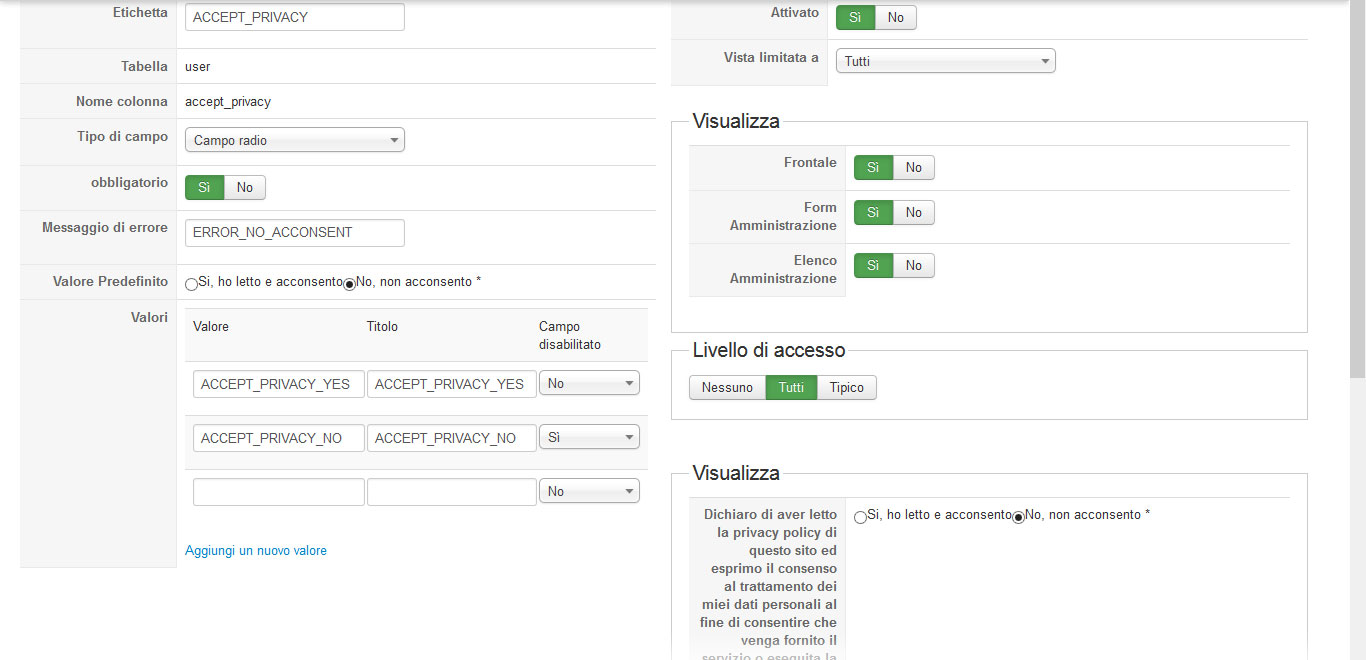
When I go to registration page, I fill all fields except the radio (just for testing) and when I click on register button, no error message inform me that I should fill that required field (maybe because it's already pre-filled with value "No"...?)
When I go to registration page, I fill all fields except the radio (just for testing) and when I click on register button, no error message inform me that I should fill that required field (maybe because it's already pre-filled with value "No"...?)
Please Log in or Create an account to join the conversation.
13 years 1 month ago #118916
by Jerome
Jerome - Obsidev.com
HikaMarket & HikaSerial developer / HikaShop core dev team.
Also helping the HikaShop support team when having some time or couldn't sleep.
By the way, do not send me private message, use the "contact us" form instead.
Replied by Jerome on topic No error message displayed for custom radio field
Hi,
Uses the values "1" (for yes) and "0" (for no). "ACCEPTED_PRIVACY_NO" is not considered as an empty value. So the result is logical.
Regards,
Uses the values "1" (for yes) and "0" (for no). "ACCEPTED_PRIVACY_NO" is not considered as an empty value. So the result is logical.
Regards,
Jerome - Obsidev.com
HikaMarket & HikaSerial developer / HikaShop core dev team.
Also helping the HikaShop support team when having some time or couldn't sleep.
By the way, do not send me private message, use the "contact us" form instead.
The following user(s) said Thank You: deltafidesign
Please Log in or Create an account to join the conversation.
- deltafidesign
-
Topic Author
- Offline
Less
More
- Posts: 272
- Thank you received: 13
13 years 1 month ago #118919
by deltafidesign
Replied by deltafidesign on topic No error message displayed for custom radio field
Tested as you suggested but still same issue. Just reload the page, no user created but no message of error displayed.
Please Log in or Create an account to join the conversation.
13 years 1 month ago #118957
by Jerome
Jerome - Obsidev.com
HikaMarket & HikaSerial developer / HikaShop core dev team.
Also helping the HikaShop support team when having some time or couldn't sleep.
By the way, do not send me private message, use the "contact us" form instead.
Replied by Jerome on topic No error message displayed for custom radio field
Hi,
Well, I missed something. "0" will not be considered as empty for the custom field system. You have to empty completely the value.
But at this moment it will not be possible to set the "no" as default, because it has an empty value.
The error message is printed when there is no value set in the custom field, so when the value is empty.
I recommend you to use a single checkbox with a value.
Regards,
Well, I missed something. "0" will not be considered as empty for the custom field system. You have to empty completely the value.
But at this moment it will not be possible to set the "no" as default, because it has an empty value.
The error message is printed when there is no value set in the custom field, so when the value is empty.
I recommend you to use a single checkbox with a value.
Regards,
Jerome - Obsidev.com
HikaMarket & HikaSerial developer / HikaShop core dev team.
Also helping the HikaShop support team when having some time or couldn't sleep.
By the way, do not send me private message, use the "contact us" form instead.
Please Log in or Create an account to join the conversation.
- deltafidesign
-
Topic Author
- Offline
Less
More
- Posts: 272
- Thank you received: 13
13 years 1 month ago #118960
by deltafidesign
Replied by deltafidesign on topic No error message displayed for custom radio field
Unfortunatly I cannot use a single value because italian laws want that I use something like that with 2 values.
Thanks anyway. Hope you can find a solution for my case in future.
Thanks anyway. Hope you can find a solution for my case in future.
Please Log in or Create an account to join the conversation.
Time to create page: 0.214 seconds