

- Posts: 80
- Thank you received: 0
Remove the "show carts option" in Customer Area
12 years 4 months ago #160326
by leonora
Remove the "show carts option" in Customer Area was created by leonora
-- url of the page with the problem -- :
mywebsite.com/mypage
-- HikaShop version -- : business
-- Joomla version -- : 3.1
-- PHP version -- : x.x.x
-- Browser(s) name and version -- : XXXXX x.x.x
-- Error-message(debug-mod must be tuned on) -- : Error_message
Hi,
I would like remove the option "Show the carts" in the Customer Area. I belive is not necessary for my shop.
How could I do this?
Thanks in advance
-- HikaShop version -- : business
-- Joomla version -- : 3.1
-- PHP version -- : x.x.x
-- Browser(s) name and version -- : XXXXX x.x.x
-- Error-message(debug-mod must be tuned on) -- : Error_message
Hi,
I would like remove the option "Show the carts" in the Customer Area. I belive is not necessary for my shop.
How could I do this?
Thanks in advance
Please Log in or Create an account to join the conversation.
Less
More
- Posts: 20
- Thank you received: 6
12 years 4 months ago #160334
by Garuda_One
Replied by Garuda_One on topic Remove the "show carts option" in Customer Area
Hi,
I think You can try this :
go to Hikashop->System->Configuration
then choose -> Features
You will just have to disabled the multi-carts option
I hope this will help You.
Best Regards
Garuda_One
I think You can try this :
go to Hikashop->System->Configuration
then choose -> Features
You will just have to disabled the multi-carts option
I hope this will help You.
Best Regards
Garuda_One
Please Log in or Create an account to join the conversation.
12 years 4 months ago #160336
by leonora
Replied by leonora on topic Remove the "show carts option" in Customer Area
Hi,
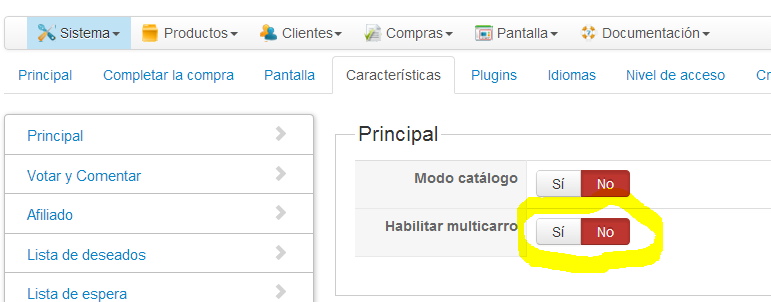
Thanks for your answer, but I have this option in the Features
but the User area shows the cart
How can I solve this?
Best regards
Leonora
Thanks for your answer, but I have this option in the Features
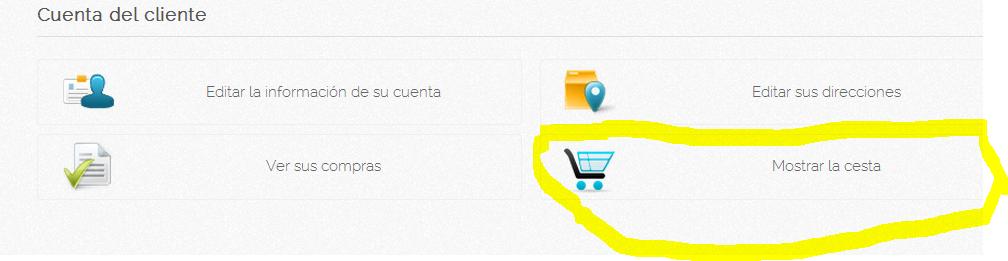
but the User area shows the cart
How can I solve this?
Best regards
Leonora
Please Log in or Create an account to join the conversation.

12 years 4 months ago #160355
by Xavier
Replied by Xavier on topic Remove the "show carts option" in Customer Area
Hi,
Thanks to replace the view "user / cpanel" content via the menu Display > Views by the following code:
And then, add the following css property in the hikashop frontend css file via the menu Configuration > Display > CSS
Thanks to replace the view "user / cpanel" content via the menu Display > Views by the following code:
Code:
<div class="hikashop_cpanel_main" id="hikashop_cpanel_main">
<div class="hikashop_cpanel_title" id="hikashop_cpanel_title">
<fieldset>
<div class="header hikashop_header_title"><h1><?php echo JText::_('CUSTOMER_ACCOUNT');?></h1></div>
</fieldset>
</div>
<div class="hikashopcpanel" id="hikashopcpanel">
<?php
foreach($this->buttons as $oneButton){
$url = hikashop_level($oneButton['level']) ? 'onclick="document.location.href=\''.$oneButton['link'].'\';"' : ''; ?>
<div <?php echo $url; ?> class="icon hikashop_cpanel_icon_div">
<a href="<?php echo hikashop_level($oneButton['level']) ? $oneButton['link'] : '#'; ?>">
<table class="hikashop_cpanel_icon_table">
<tr>
<td class="hikashop_cpanel_icon_image">
<span class="hikashop_cpanel_icon_image_span icon-48-<?php echo $oneButton['image']; ?>" title="<?php echo $oneButton['text']; ?>"> </span>
<span class="hikashop_cpanel_button_text"><?php echo $oneButton['text']; ?></span>
</td>
<td>
<div class="hikashop_cpanel_button_description">
<?php echo $oneButton['description']; ?>
</div>
</td>
</tr>
</table>
</a>
</div>
<?php } ?>
</div>
</div>
<div class="clear_both"></div>
And then, add the following css property in the hikashop frontend css file via the menu Configuration > Display > CSS
Code:
.hikashop_cpanel_icon_div_cart{display: none !important;}
Please Log in or Create an account to join the conversation.
12 years 3 months ago #163347
by leonora
Replied by leonora on topic Remove the "show carts option" in Customer Area
Hi:
I added the above code, but the cart continues showing.
Could you help me, please?
Thanks in advance!
Leonora.
I added the above code, but the cart continues showing.
Could you help me, please?
Thanks in advance!
Leonora.
Please Log in or Create an account to join the conversation.
12 years 3 months ago #163374
by Xavier
Replied by Xavier on topic Remove the "show carts option" in Customer Area
Hi,
That's maybe because you have not edited the view in the correct template, or that the css property has an override.
You can check that thanks to your browser console, here is some documentation to learn how to customize the display:
hikashop.com/support/support/documentati...ize-the-display.html
That's maybe because you have not edited the view in the correct template, or that the css property has an override.
You can check that thanks to your browser console, here is some documentation to learn how to customize the display:
hikashop.com/support/support/documentati...ize-the-display.html
The following user(s) said Thank You: leonora
Please Log in or Create an account to join the conversation.
Time to create page: 0.262 seconds