
- Posts: 15
- Thank you received: 0
Customer Email
- IconBrands
-
 Topic Author
- Offline
Less
More
12 years 3 weeks ago #173716
by IconBrands
Customer Email was created by IconBrands
-- HikaShop version -- : latest
-- Joomla version -- : latest
-- PHP version -- : 5.4.4
Dear Support
I want to make a few changes to the customer orders email , where can I do it ?
I have Hikashop Business 2.3.3
-- Joomla version -- : latest
-- PHP version -- : 5.4.4
Dear Support
I want to make a few changes to the customer orders email , where can I do it ?
I have Hikashop Business 2.3.3
Please Log in or Create an account to join the conversation.

12 years 3 weeks ago #173738
by Jerome
Jerome - Obsidev.com
HikaMarket & HikaSerial developer / HikaShop core dev team.
Replied by Jerome on topic Customer Email
Hi,
In the email edition part ; Using the menu "System > Emails"
www.hikashop.com/support/documentation/i...shop-email-form.html
Regards,
In the email edition part ; Using the menu "System > Emails"
www.hikashop.com/support/documentation/i...shop-email-form.html
Regards,
Jerome - Obsidev.com
HikaMarket & HikaSerial developer / HikaShop core dev team.
Please Log in or Create an account to join the conversation.
- IconBrands
-
Topic Author
- Offline
Less
More
- Posts: 15
- Thank you received: 0
12 years 3 weeks ago #174240
by IconBrands
Replied by IconBrands on topic Customer Email
Thanks for the reply but this not helping allot.
Which one off these ,will be the email that customer receives ?
Cron Report ; Order Administrator Notification ; order Creation Notification ;Order Status Notification ; Order Notification ; User Account ; User Account Administrator Notification ; Out of Stock ; Order Cancel ; Wait List Notification ; New Comment ; A Contact request has been made ; Subscription expired .
I want to add a specific message for the client in his order confirmation email.
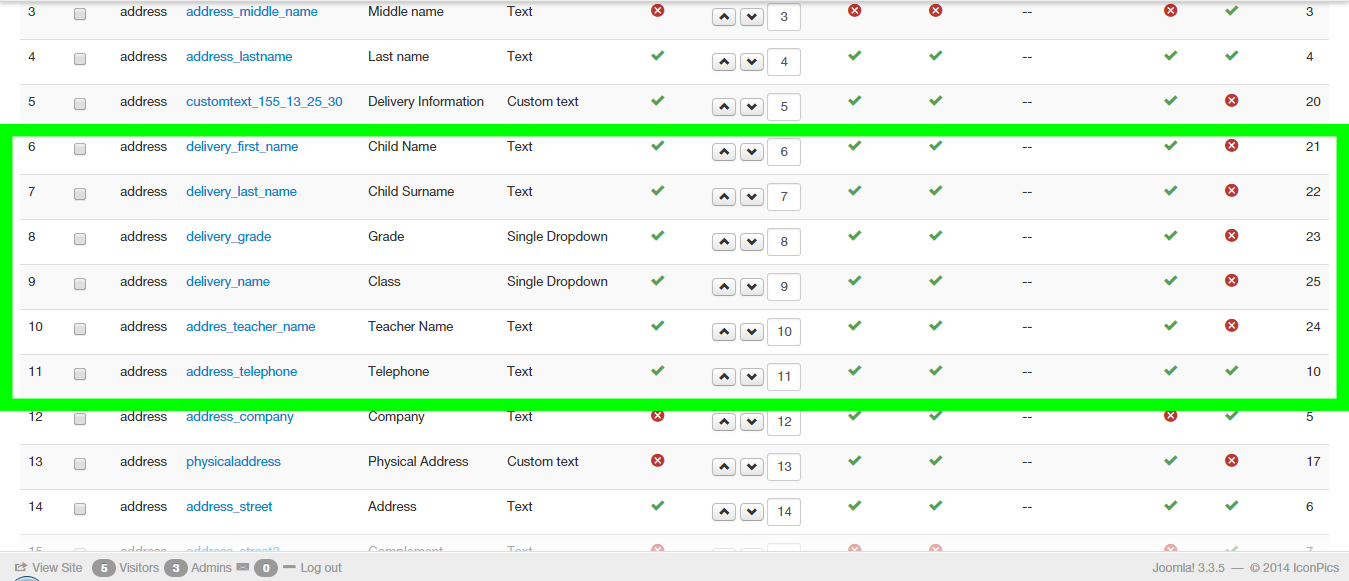
I also made specific required fields that the customer must fill in the registration process that needs to be entered into the Order Administrator Notification . Attach is screenshot of my custom fields . I mark my new fields in n green block.
If you need back end details to my site please let me know
Which one off these ,will be the email that customer receives ?
Cron Report ; Order Administrator Notification ; order Creation Notification ;Order Status Notification ; Order Notification ; User Account ; User Account Administrator Notification ; Out of Stock ; Order Cancel ; Wait List Notification ; New Comment ; A Contact request has been made ; Subscription expired .
I want to add a specific message for the client in his order confirmation email.
I also made specific required fields that the customer must fill in the registration process that needs to be entered into the Order Administrator Notification . Attach is screenshot of my custom fields . I mark my new fields in n green block.
If you need back end details to my site please let me know
Please Log in or Create an account to join the conversation.
12 years 2 weeks ago #174366
by Jerome
Jerome - Obsidev.com
HikaMarket & HikaSerial developer / HikaShop core dev team.
Replied by Jerome on topic Customer Email
Hi,
It depends on which email you are talking about.
"Order creation Notification" is used when an order is created.
"Order status Notification" is used when an order status has changed.
So, I guess that you want to edit the second email.
About your address custom fields, it depends what you want to display.
HikaShop use a template named "address_template" in order to know how the address is displayed in the front-end, backend and emails.
You can read more about the view override :
www.hikashop.com/support/documentation/i...ashop-view-form.html
But you can still add some PHP code in order to not use the "address_template" in your email and hard-code your own template.
Regards,
It depends on which email you are talking about.
"Order creation Notification" is used when an order is created.
"Order status Notification" is used when an order status has changed.
So, I guess that you want to edit the second email.
About your address custom fields, it depends what you want to display.
HikaShop use a template named "address_template" in order to know how the address is displayed in the front-end, backend and emails.
You can read more about the view override :
www.hikashop.com/support/documentation/i...ashop-view-form.html
But you can still add some PHP code in order to not use the "address_template" in your email and hard-code your own template.
Regards,
Jerome - Obsidev.com
HikaMarket & HikaSerial developer / HikaShop core dev team.
Please Log in or Create an account to join the conversation.

11 years 10 months ago #182369
by LIP Trade
Replied by LIP Trade on topic Customer Email
Hi
How to add some informations and image/logo in the customer mail template in HTML view ?
How to add some informations and image/logo in the customer mail template in HTML view ?
Please Log in or Create an account to join the conversation.

11 years 10 months ago #182374
by Xavier
Replied by Xavier on topic Customer Email
Hi,
You can edit the email via the menu System > Emails, and in the html part add the desired content.
You can edit the email via the menu System > Emails, and in the html part add the desired content.
The following user(s) said Thank You: LIP Trade
Please Log in or Create an account to join the conversation.
Time to create page: 0.219 seconds