
- Posts: 8
- Thank you received: 1
setInterval not on hikashop_checkout_page
- ChrisRolly
-
 Topic Author
- Offline
Less
More
11 years 7 months ago - 11 years 7 months ago #195819
by ChrisRolly
setInterval not on hikashop_checkout_page was created by ChrisRolly
-- url of the page with the problem -- :
scale-fpv.de/index.php/produkte/warenkorb
-- HikaShop version -- : Essential: 2.4.0
-- Joomla version -- : 3.4.1
-- Browser(s) name and version -- : Mozilla
Hello everyone,
I have wrote an small JavaScript function, to set the height of two DIVs dynamic, so that they looks like the same.
The Function work on every side of the page, but not in the hikashop_checkout_page.
the DIV was set is #content2_mdl_end see the code below.
So where is my mistake?
PS.: You only see the #content2_mdl_end div if you have anything in your card.
-- HikaShop version -- : Essential: 2.4.0
-- Joomla version -- : 3.4.1
-- Browser(s) name and version -- : Mozilla
Hello everyone,
I have wrote an small JavaScript function, to set the height of two DIVs dynamic, so that they looks like the same.
The Function work on every side of the page, but not in the hikashop_checkout_page.
the DIV was set is #content2_mdl_end see the code below.
Code:
var conToHeight = setInterval(function () {
var con2height = $('#content2').height() - 8;
$('#content2_mdl_end').height(con2height);
}, 500);
So where is my mistake?
PS.: You only see the #content2_mdl_end div if you have anything in your card.
Last edit: 11 years 7 months ago by ChrisRolly. Reason: Forget to say:
Please Log in or Create an account to join the conversation.

11 years 7 months ago #195821
by Jerome
Jerome - Obsidev.com
HikaMarket & HikaSerial developer / HikaShop core dev team.
Replied by Jerome on topic setInterval not on hikashop_checkout_page
Hi,
The link to your website does not work.
About your javascript issue, you should check your browser javascript console in order to see if you have errors.
Regards,
The link to your website does not work.
About your javascript issue, you should check your browser javascript console in order to see if you have errors.
Regards,
Jerome - Obsidev.com
HikaMarket & HikaSerial developer / HikaShop core dev team.
Please Log in or Create an account to join the conversation.
- ChrisRolly
-
Topic Author
- Offline
Less
More
- Posts: 8
- Thank you received: 1
11 years 7 months ago #195936
by ChrisRolly
Replied by ChrisRolly on topic setInterval not on hikashop_checkout_page
Hi,
about the link,
the link: scale-fpv.de/index.php/produkte/warenkorb
work if I klick in, but you see the problem only if you have something in your cart. So include something e.g. from scale-fpv.de/index.php/produkte/schrauben
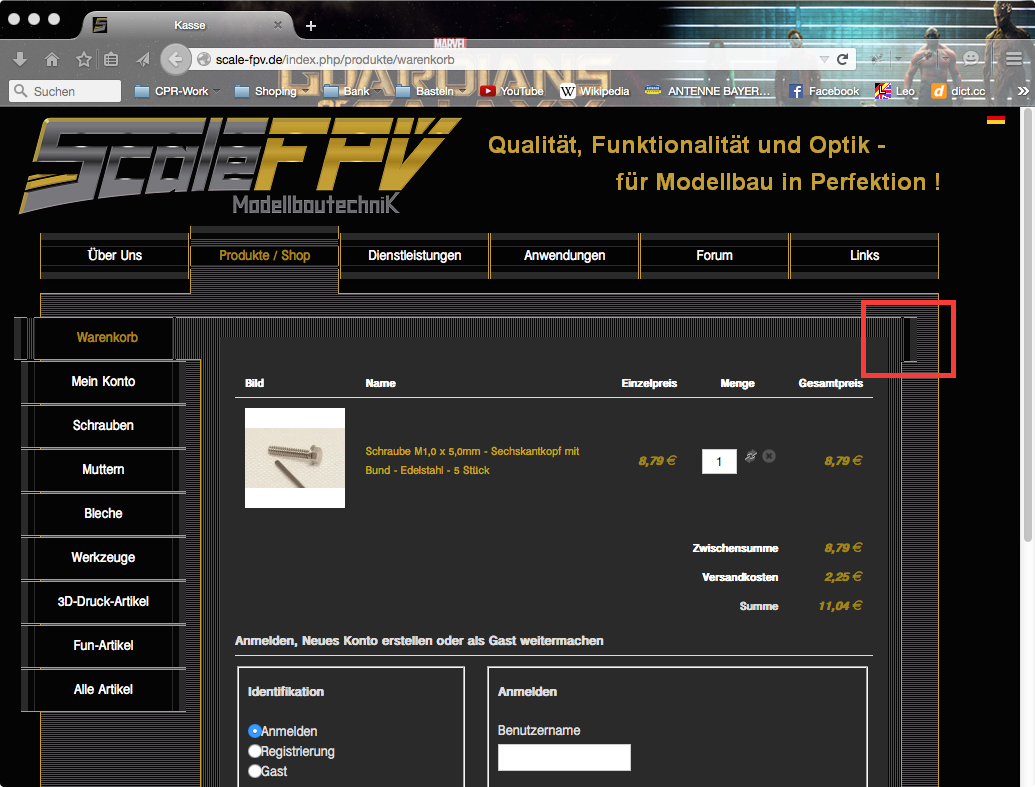
And in my console I have found a TypeError:
which is from warenkorb (Zeile 286, Spalte 5) and on line 286
about the link,
the link: scale-fpv.de/index.php/produkte/warenkorb
work if I klick in, but you see the problem only if you have something in your cart. So include something e.g. from scale-fpv.de/index.php/produkte/schrauben
And in my console I have found a TypeError:
Code:
TypeError: el is null
checked = el.checked,
Code:
function displayRegistration(el)
{
var value = el.value,
[b]286 checked = el.checked,[/b]
name = document.getElementById("hikashop_registration_name_line"),
username = document.getElementById("hikashop_registration_username_line"),
pwd = document.getElementById("hikashop_registration_password_line"),
pwd2 = document.getElementById("hikashop_registration_password2_line"),
registration_div = document.getElementById("hikashop_checkout_registration"),
login_div = document.getElementById("hikashop_checkout_login_form");
Please Log in or Create an account to join the conversation.
- ChrisRolly
-
Topic Author
- Offline
Less
More
- Posts: 8
- Thank you received: 1
11 years 7 months ago #195937
by ChrisRolly
Replied by ChrisRolly on topic setInterval not on hikashop_checkout_page
if someone is logged in, the script is running, as well on the cart.
Please Log in or Create an account to join the conversation.
11 years 7 months ago #195939
by Jerome
Jerome - Obsidev.com
HikaMarket & HikaSerial developer / HikaShop core dev team.
Replied by Jerome on topic setInterval not on hikashop_checkout_page
Hi,
Thanks for the report.
For the moment you can edit the file "components/com_hikashop/views/order/view.html.php" and replace
Into
To avoid the javascript issue.
The patch will also be in HikaShop and we will investigate on why the function is called with a wrong element.
Regards,
Thanks for the report.
For the moment you can edit the file "components/com_hikashop/views/order/view.html.php" and replace
Code:
$js = '
function displayRegistration(el)
{
Code:
$js = '
function displayRegistration(el)
{
if(!el) return;
The patch will also be in HikaShop and we will investigate on why the function is called with a wrong element.
Regards,
Jerome - Obsidev.com
HikaMarket & HikaSerial developer / HikaShop core dev team.
The following user(s) said Thank You: ChrisRolly
Please Log in or Create an account to join the conversation.
- ChrisRolly
-
Topic Author
- Offline
Less
More
- Posts: 8
- Thank you received: 1
11 years 7 months ago #196042
by ChrisRolly
Replied by ChrisRolly on topic setInterval not on hikashop_checkout_page
"components/com_hikashop/views/order/view.html.php" I coud not find the code in this file but in this one:
"components/com_hikashop/views/checkout/view.html.php"
and I changed it and it works very well, thank you very much.
"components/com_hikashop/views/checkout/view.html.php"
and I changed it and it works very well, thank you very much.
Please Log in or Create an account to join the conversation.
Time to create page: 0.226 seconds