
- Posts: 12
- Thank you received: 0
Issue with single dropdown on "edit profile" page
- andrewkatz
-
 Topic Author
- Offline
Less
More
10 years 4 months ago #242791
by andrewkatz
Issue with single dropdown on "edit profile" page was created by andrewkatz
-- HikaShop version -- : 2.6.3
-- Joomla version -- : 3.5.1
-- PHP version -- : 5.4.45
-- Browser(s) name and version -- : Chrome
-- Error-message(debug-mod must be tuned on) -- : none
I have entered the My Account menu and have edited the profile for the logged in user. I can edit all fields except for "Single Dropdown" types. When I click the dropdown to edit it, the data below the search box is totally empty. There are NO records showing up. I have 6 of these fields on this form and NONE of them work.
Why is the data not showing up when it works find on the user registration page?
-- Joomla version -- : 3.5.1
-- PHP version -- : 5.4.45
-- Browser(s) name and version -- : Chrome
-- Error-message(debug-mod must be tuned on) -- : none
I have entered the My Account menu and have edited the profile for the logged in user. I can edit all fields except for "Single Dropdown" types. When I click the dropdown to edit it, the data below the search box is totally empty. There are NO records showing up. I have 6 of these fields on this form and NONE of them work.
Why is the data not showing up when it works find on the user registration page?
Please Log in or Create an account to join the conversation.

10 years 4 months ago #242795
by lousyfool
Need help with customisations of layouts, style or other site development? PM me!
(Don't forget to turn on "E-mail notification of new messages" )
Replied by lousyfool on topic Issue with single dropdown on "edit profile" page
Hi,
What type of fields are these: Joomla user profile, or HikaShop custom fields of type "user" or "address"?
Does the issue persist if you alter and save the setting for "Use Chosen library" in the HikaShop system configuration under "Display"? ( www.hikashop.com/support/documentation/5...html#display_general )
If so and if it's about HikaShop custom fields, for anyone to be able to say more it would certainly be good if you posted a screenshot of the configuration of at least one of the custom fields.
What type of fields are these: Joomla user profile, or HikaShop custom fields of type "user" or "address"?
Does the issue persist if you alter and save the setting for "Use Chosen library" in the HikaShop system configuration under "Display"? ( www.hikashop.com/support/documentation/5...html#display_general )
If so and if it's about HikaShop custom fields, for anyone to be able to say more it would certainly be good if you posted a screenshot of the configuration of at least one of the custom fields.
Need help with customisations of layouts, style or other site development? PM me!
(Don't forget to turn on "E-mail notification of new messages" )
Please Log in or Create an account to join the conversation.
- andrewkatz
-
Topic Author
- Offline
Less
More
- Posts: 12
- Thank you received: 0
10 years 4 months ago #242888
by andrewkatz
Replied by andrewkatz on topic Issue with single dropdown on "edit profile" page
I changed the display setting to "Yes" and no effect on the field editing.
The fields in question are a Hikashop "user" filed type of "Single Dropdown". I have attached a screen shot of the configuration for one of the fields in question and also a screenshot of the edit screen for the profile too.
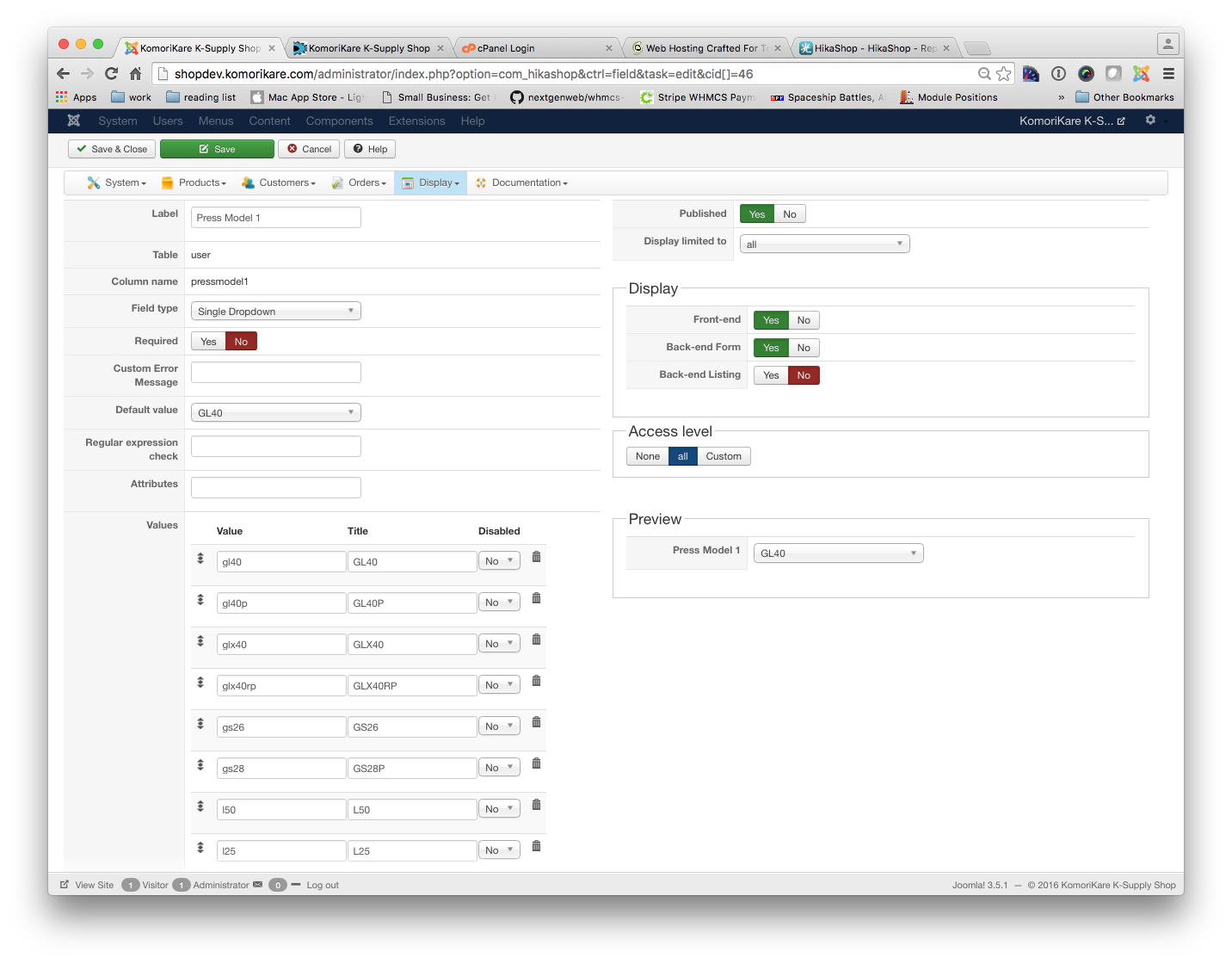
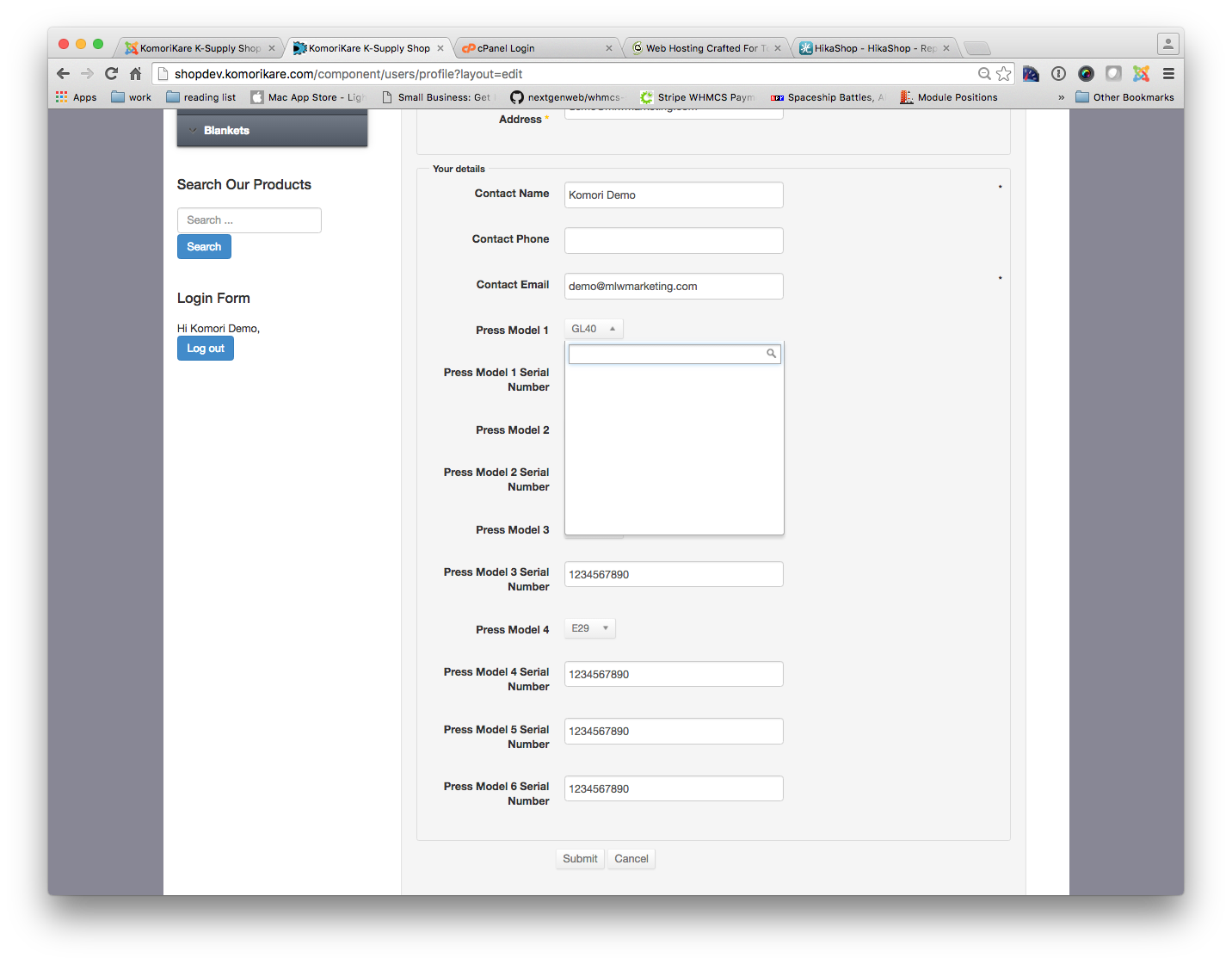
The fields in question are a Hikashop "user" filed type of "Single Dropdown". I have attached a screen shot of the configuration for one of the fields in question and also a screenshot of the edit screen for the profile too.
Please Log in or Create an account to join the conversation.

10 years 4 months ago #242898
by nicolas
Replied by nicolas on topic Issue with single dropdown on "edit profile" page
Hi,
I would recommend to keep the chosen setting turned off.
I've checked your user profile page and I do see the HTML of the dropdowns: take.ms/4MCZp
It's just hidden by the chosen system and thus turning off chosen should solve the problem.
Apparently, there is some CSS messing with the display of the dropdown with chosen on your website. Just removing the padding makes the elements appear:
take.ms/3hUEq
I would recommend to keep the chosen setting turned off.
I've checked your user profile page and I do see the HTML of the dropdowns: take.ms/4MCZp
It's just hidden by the chosen system and thus turning off chosen should solve the problem.
Apparently, there is some CSS messing with the display of the dropdown with chosen on your website. Just removing the padding makes the elements appear:
take.ms/3hUEq
Please Log in or Create an account to join the conversation.
- andrewkatz
-
Topic Author
- Offline
Less
More
- Posts: 12
- Thank you received: 0
10 years 4 months ago #243758
by andrewkatz
Replied by andrewkatz on topic Issue with single dropdown on "edit profile" page
So, I tried to add a "Padding: 0;" on that item. In order for it to work, the entire padding has to be completely removed.
Also, the list doesn't scroll down. It produces a really long drop down list.
How do I remove the padding entirely from that area? Just setting it to 0 doesn't work, so this is not the final solution to make these show up.
This setting is coming from the JUI library and not my template.
Also, the list doesn't scroll down. It produces a really long drop down list.
How do I remove the padding entirely from that area? Just setting it to 0 doesn't work, so this is not the final solution to make these show up.
This setting is coming from the JUI library and not my template.
Please Log in or Create an account to join the conversation.
10 years 4 months ago #243771
by nicolas
Replied by nicolas on topic Issue with single dropdown on "edit profile" page
Hi,
Removing the padding is just a small trick to prove you that HikaShop displays the dropdown.
The solution is not to remove the padding, as you saw since you still have issues with the dropdown.
The problem probably comes from an interaction between the template and chosen.
Turn off the "use chosen library" setting of the HikaShop configuration so that it doesn't use chosen and that should help.
Otherwise, keep that option activated and switch to the default template of Joomla temporarily and that should also make it work.
And this means that either you'll have to have your template provider look at the problem or turn off chosen to not have the problem.
If it still doesn't work with the default template of Joomla, then there is something else messing with chosen.
Removing the padding is just a small trick to prove you that HikaShop displays the dropdown.
The solution is not to remove the padding, as you saw since you still have issues with the dropdown.
The problem probably comes from an interaction between the template and chosen.
Turn off the "use chosen library" setting of the HikaShop configuration so that it doesn't use chosen and that should help.
Otherwise, keep that option activated and switch to the default template of Joomla temporarily and that should also make it work.
And this means that either you'll have to have your template provider look at the problem or turn off chosen to not have the problem.
If it still doesn't work with the default template of Joomla, then there is something else messing with chosen.
Please Log in or Create an account to join the conversation.
Time to create page: 0.222 seconds