

- Posts: 35
- Thank you received: 0
Add to cart legacy
9 years 7 months ago #262082
by rtmetalli
Add to cart legacy was created by rtmetalli
-- HikaShop version -- : 3.0.0
-- Joomla version -- : 3.6.5
-- PHP version -- : 5.6.23
hi, before updating the main site to the 3.0.0 version of hikashop, I'm doing a trial run on a test subfolder. I really like the Add to cart legacy option, except that when I set this function the button add to carrelo is displayed as a simple link losing its customization. How can I do to keep this option without losing the button style or at least create one different? I noticed that there are more options for type Extra CSS add to cart buttons but how does it work? I can have an explanation about?
take.ms/Bi60y
take.ms/ScOMH
take.ms/i5XXI
-- Joomla version -- : 3.6.5
-- PHP version -- : 5.6.23
hi, before updating the main site to the 3.0.0 version of hikashop, I'm doing a trial run on a test subfolder. I really like the Add to cart legacy option, except that when I set this function the button add to carrelo is displayed as a simple link losing its customization. How can I do to keep this option without losing the button style or at least create one different? I noticed that there are more options for type Extra CSS add to cart buttons but how does it work? I can have an explanation about?
take.ms/Bi60y
take.ms/ScOMH
take.ms/i5XXI
Please Log in or Create an account to join the conversation.

9 years 7 months ago #262085
by Jerome
Jerome - Obsidev.com
HikaMarket & HikaSerial developer / HikaShop core dev team.
Also helping the HikaShop support team when having some time or couldn't sleep.
By the way, do not send me private message, use the "contact us" form instead.
Replied by Jerome on topic Add to cart legacy
Hi,
I'm think you're mixing up the meaning of "legacy".
Legacy mean "old", it is the display of HikaShop 2.6.x
When you're not in "legacy", you're using the HikaShop 3.x style, with ajax and specific settings ; like the CSS options that you've pointed at in your last screenshot.
I'm afraid that you shouldn't let the fields empty but you have to put CSS classnames into it. You can see to use "hikashop_cart_button" if your template CSS have some style for it ; or check what you're template is using for the display.
The CSS settings for the new buttons :
www.hikashop.com/support/documentation/5...fig.html#display_css
More details about the new add to cart system :
www.hikashop.com/blog/367-hikashop-3-0-out.html#cart
More details about CSS and customization :
www.hikashop.com/support/documentation/1...the-display.html#css
Regards,
I'm think you're mixing up the meaning of "legacy".
Legacy mean "old", it is the display of HikaShop 2.6.x
When you're not in "legacy", you're using the HikaShop 3.x style, with ajax and specific settings ; like the CSS options that you've pointed at in your last screenshot.
I'm afraid that you shouldn't let the fields empty but you have to put CSS classnames into it. You can see to use "hikashop_cart_button" if your template CSS have some style for it ; or check what you're template is using for the display.
The CSS settings for the new buttons :
www.hikashop.com/support/documentation/5...fig.html#display_css
More details about the new add to cart system :
www.hikashop.com/blog/367-hikashop-3-0-out.html#cart
More details about CSS and customization :
www.hikashop.com/support/documentation/1...the-display.html#css
Regards,
Jerome - Obsidev.com
HikaMarket & HikaSerial developer / HikaShop core dev team.
Also helping the HikaShop support team when having some time or couldn't sleep.
By the way, do not send me private message, use the "contact us" form instead.
Please Log in or Create an account to join the conversation.

8 years 4 months ago - 8 years 4 months ago #292123
by NADEJDE
Replied by NADEJDE on topic Add to cart legacy
Thank you, it works.
Still, I was not aware that there is a new style pack. I mean, I heard something and, last year I think, I downloaded a new stile pack, but I saw no significant difference (it missed picturesand though?). I tried to upload it again now, and test it without the legacy settings, but it did not seem to make a difference. Legacy setting though works, but I kinda liked the interactive mode on add to cart.
I will look into it further.
L.E. I gave up to legacy settings, as they generate some problems, like minicart not updating. About the new (?) styles, I understand that I need to buy them again, right?
Paul
Still, I was not aware that there is a new style pack. I mean, I heard something and, last year I think, I downloaded a new stile pack, but I saw no significant difference (it missed picturesand though?). I tried to upload it again now, and test it without the legacy settings, but it did not seem to make a difference. Legacy setting though works, but I kinda liked the interactive mode on add to cart.
I will look into it further.
L.E. I gave up to legacy settings, as they generate some problems, like minicart not updating. About the new (?) styles, I understand that I need to buy them again, right?
Paul
Last edit: 8 years 4 months ago by NADEJDE.
Please Log in or Create an account to join the conversation.

8 years 4 months ago - 8 years 4 months ago #292159
by Philip
Replied by Philip on topic Add to cart legacy
Hello,
You don't have to buy it again, once you buy it you can update (there were some upgrade) but I don't understand how you can't see any differences on your frontend...
Can you provide a screenshot of your Display tab, in your Main HikaShop Configuration page.

And maybe an Url to analyse your css on your frontend website.
Awaiting news from you.
Regards
You don't have to buy it again, once you buy it you can update (there were some upgrade) but I don't understand how you can't see any differences on your frontend...
Can you provide a screenshot of your Display tab, in your Main HikaShop Configuration page.
And maybe an Url to analyse your css on your frontend website.
Awaiting news from you.
Regards
Last edit: 8 years 4 months ago by Philip.
Please Log in or Create an account to join the conversation.
8 years 4 months ago #292165
by NADEJDE
Replied by NADEJDE on topic Add to cart legacy
Well, it seems that I have the latest styles:
Status Name Location Type Version Date Author Folder Package ID ID
Styles pack for HikaShop
Site File 2.0.0 26 juin 2017 hikashop.com N/A 10300
For now, the buttons are set to be thise of the template, wich are... yeah, almost ok, please see the attachement for Display section.
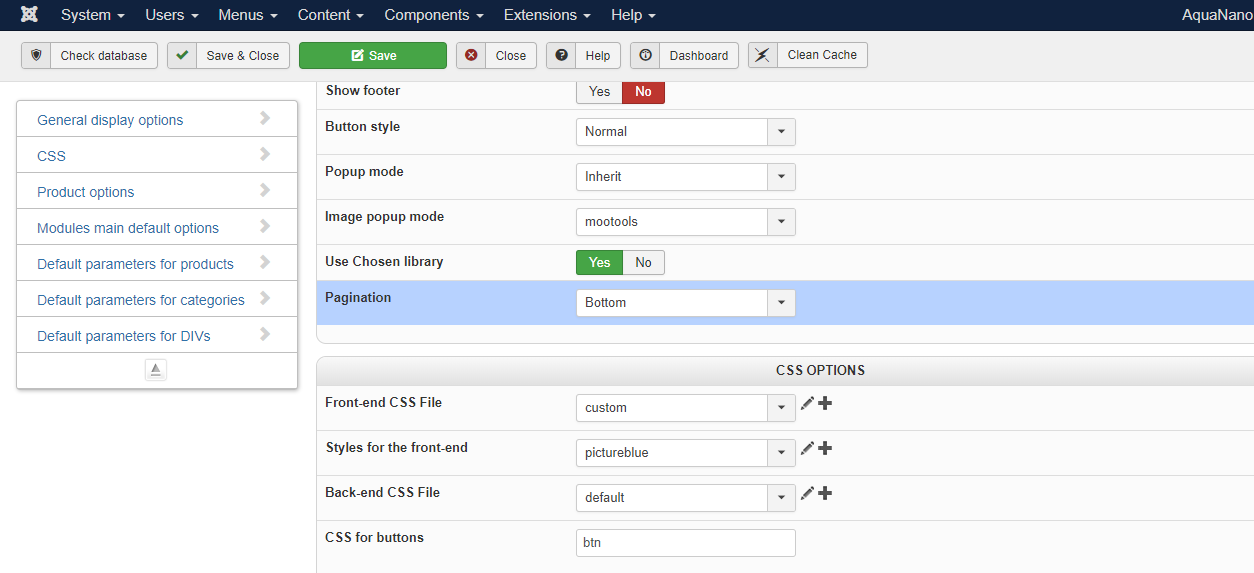
About link, I don't know what link to give you. Maybe this?
aquanano.ro/index.php/category/15-alte-m...e-coloidale-aquanano
You shouldn't have problems with the languge, it is mostly translated to english.
If you need them, I can send you by e-mail the credentials for Joomla backend.
Status Name Location Type Version Date Author Folder Package ID ID
Styles pack for HikaShop
Site File 2.0.0 26 juin 2017 hikashop.com N/A 10300
For now, the buttons are set to be thise of the template, wich are... yeah, almost ok, please see the attachement for Display section.
About link, I don't know what link to give you. Maybe this?
aquanano.ro/index.php/category/15-alte-m...e-coloidale-aquanano
You shouldn't have problems with the languge, it is mostly translated to english.
If you need them, I can send you by e-mail the credentials for Joomla backend.
Please Log in or Create an account to join the conversation.
8 years 4 months ago - 8 years 4 months ago #292172
by Philip
Replied by Philip on topic Add to cart legacy
Hello,
Now, I understand the root issue, you have to know that in new style pack, you haven't anymore picture blue or sand or else...
Images, ban or else were hard to manage with new grid system & responsive feature of HikaShop 3.
Sorry for this return.
Now you have to choose among these color listed in new style pack page :
blue, brown, green, orange, pink, purple and red.
Regards
Now, I understand the root issue, you have to know that in new style pack, you haven't anymore picture blue or sand or else...
Images, ban or else were hard to manage with new grid system & responsive feature of HikaShop 3.
Sorry for this return.
Now you have to choose among these color listed in new style pack page :
blue, brown, green, orange, pink, purple and red.
Regards
Last edit: 8 years 4 months ago by Philip.
Please Log in or Create an account to join the conversation.
Time to create page: 0.197 seconds