

- Posts: 966
- Thank you received: 11
Recaptcha Not Showing on Registration Page
8 years 11 months ago #279723
by MyWorld
Recaptcha Not Showing on Registration Page was created by MyWorld
-- HikaShop version -- : 3.2.0
-- Joomla version -- : 3.8.0
In "Users" I choose Recaptcha. I published the Recaptcha plugin and add the site key.
Any idea why the Recaptcha is not showing on the registration page?
Thanks
-- Joomla version -- : 3.8.0
In "Users" I choose Recaptcha. I published the Recaptcha plugin and add the site key.
Any idea why the Recaptcha is not showing on the registration page?
Thanks
Please Log in or Create an account to join the conversation.

8 years 11 months ago #279754
by nicolas
Replied by nicolas on topic Recaptcha Not Showing on Registration Page
Hi,
The recaptcha setting and the recaptcha plugin of Joomla are not compatible with the HikaShop registration page, only the Joomla one.
You should deactivate them and instead use HikaShop's:
www.hikashop.com/support/documentation/7...-with-recaptcha.html
It is compatible with both Joomla's and HikaShop's registration page.
The recaptcha setting and the recaptcha plugin of Joomla are not compatible with the HikaShop registration page, only the Joomla one.
You should deactivate them and instead use HikaShop's:
www.hikashop.com/support/documentation/7...-with-recaptcha.html
It is compatible with both Joomla's and HikaShop's registration page.
Please Log in or Create an account to join the conversation.
8 years 11 months ago #279827
by MyWorld
Replied by MyWorld on topic Recaptcha Not Showing on Registration Page
Thanks Nicolas.
Is it possible to move the Captcha at the very bottom of the page just above the submit button. It looks odd having it in the middle at the form. The Captach is usually at the end.
Thanks!
Is it possible to move the Captcha at the very bottom of the page just above the submit button. It looks odd having it in the middle at the form. The Captach is usually at the end.
Thanks!
Please Log in or Create an account to join the conversation.
8 years 11 months ago #279829
by nicolas
Replied by nicolas on topic Recaptcha Not Showing on Registration Page
Hi,
You can modify its position with the settings of the plugin.
You can modify its position with the settings of the plugin.
Please Log in or Create an account to join the conversation.
8 years 11 months ago #279924
by MyWorld
Replied by MyWorld on topic Recaptcha Not Showing on Registration Page
None of the options below that I choose moves the Recaptcha to the bottom after the address.
> Password
> Email
> Address
I thought that if I choose "Address" that would work but it places it under the password field as per below.
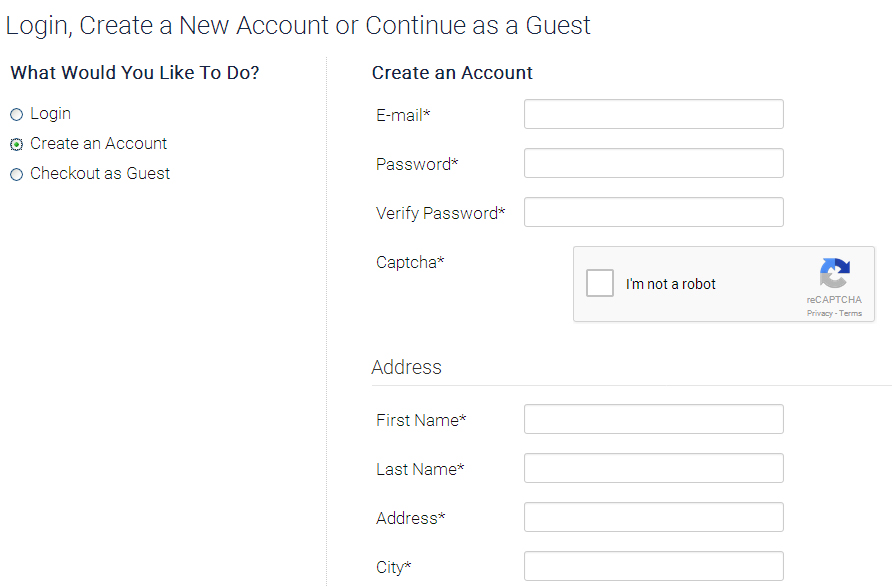
And when I choose "Address" it does not show at all on the registration form that I spoke about here: www.hikashop.com/forum/customers/892073-...-header-and-url.html
Thanks
> Password
> Address
I thought that if I choose "Address" that would work but it places it under the password field as per below.
And when I choose "Address" it does not show at all on the registration form that I spoke about here: www.hikashop.com/forum/customers/892073-...-header-and-url.html
Thanks
Please Log in or Create an account to join the conversation.
8 years 11 months ago #279956
by nicolas
Replied by nicolas on topic Recaptcha Not Showing on Registration Page
Hi,
The "display after" option of the plugin has a choice "address" specifically for that:
monosnap.com/file/fcGw58rvb3dzhIInM6zWVtxyP0N8Ma
The "display after" option of the plugin has a choice "address" specifically for that:
monosnap.com/file/fcGw58rvb3dzhIInM6zWVtxyP0N8Ma
Please Log in or Create an account to join the conversation.
8 years 11 months ago - 8 years 11 months ago #280426
by MyWorld
Replied by MyWorld on topic Recaptcha Not Showing on Registration Page
Hi Nicolas,
What I am saying is that although I choose "Address" the captcha is NOT going below the address, it's located as per the image above.
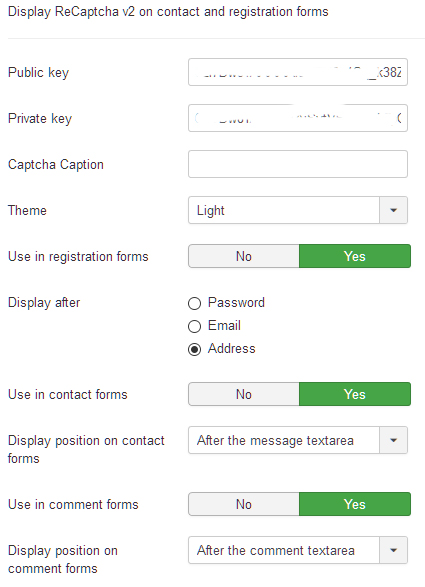
And when I choose "Address" the captcha does not show at all on the Registration page.
Thanks!
What I am saying is that although I choose "Address" the captcha is NOT going below the address, it's located as per the image above.
And when I choose "Address" the captcha does not show at all on the Registration page.
Thanks!
Last edit: 8 years 11 months ago by MyWorld.
Please Log in or Create an account to join the conversation.

8 years 11 months ago #280466
by Jerome
Jerome - Obsidev.com
HikaMarket & HikaSerial developer / HikaShop core dev team.
Also helping the HikaShop support team when having some time or couldn't sleep.
By the way, do not send me private message, use the "contact us" form instead.
Replied by Jerome on topic Recaptcha Not Showing on Registration Page
Hello,
In the plugin, comment that line
So it will avoid the rewrite of the variable $after and allow it to display the captcha in "end" position.
Regards,
In the plugin, comment that line
Code:
$after = ($this->params->get('fieldafter','password') == 'email') ? 'top' : 'middle';
Regards,
Jerome - Obsidev.com
HikaMarket & HikaSerial developer / HikaShop core dev team.
Also helping the HikaShop support team when having some time or couldn't sleep.
By the way, do not send me private message, use the "contact us" form instead.
Please Log in or Create an account to join the conversation.
8 years 11 months ago #280550
by MyWorld
Replied by MyWorld on topic Recaptcha Not Showing on Registration Page
Where is the file please? I went here but did not find that line of code:
/public_html/plugins/captcha/recaptcha/
Also, will it be overridden when it's updated?
Thanks!
/public_html/plugins/captcha/recaptcha/
Also, will it be overridden when it's updated?
Thanks!
Please Log in or Create an account to join the conversation.
8 years 11 months ago #280552
by nicolas
Replied by nicolas on topic Recaptcha Not Showing on Registration Page
Hi,
We've added the patch on our end. Download the install package of the plugin and install it and you'll get the modification.
We've added the patch on our end. Download the install package of the plugin and install it and you'll get the modification.
Please Log in or Create an account to join the conversation.
8 years 11 months ago - 8 years 11 months ago #280895
by MyWorld
Replied by MyWorld on topic Recaptcha Not Showing on Registration Page
Hi Nicolas,
The Captcha is now located at the bottom of the form on the checkout page. It does not show on the page as per the screenshot.
I was told to disable the other Captcha so I assume the "HikaShop ReCaptcha v2 " would show on all forms instead.
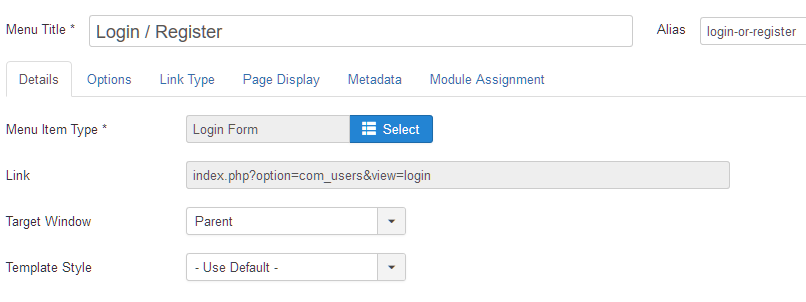
Thanks!
The Captcha is now located at the bottom of the form on the checkout page. It does not show on the page as per the screenshot.
I was told to disable the other Captcha so I assume the "HikaShop ReCaptcha v2 " would show on all forms instead.
Thanks!
Last edit: 8 years 11 months ago by MyWorld.
Please Log in or Create an account to join the conversation.
8 years 11 months ago #280920
by nicolas
Replied by nicolas on topic Recaptcha Not Showing on Registration Page
Hi,
I'm sorry but I understand what you mean ?
As per which screenshot it doesn't show ?
How did you configure the settings of the recaptcha plugin(with a screenshot), where did you expect it to show (with a screenshot) and where is it displaying (with a screenshot) ?
I'm sorry but I understand what you mean ?
As per which screenshot it doesn't show ?
How did you configure the settings of the recaptcha plugin(with a screenshot), where did you expect it to show (with a screenshot) and where is it displaying (with a screenshot) ?
Please Log in or Create an account to join the conversation.
8 years 11 months ago #281004
by MyWorld
www.hikashop.com/support/forum/customers...ion-page.html#280426
www.hikashop.com/forum/customers/892073-...-header-and-url.html
I was told to deactivate the Joomla recaptcha so I assumed the Hikashop one would work on all forms instead.
I hope this is clearer.
Thanks!
Replied by MyWorld on topic Recaptcha Not Showing on Registration Page
The recaptcha is configured as I indicated above here:How did you configure the settings of the recaptcha plugin(with a screenshot).
www.hikashop.com/support/forum/customers...ion-page.html#280426
I expected it to show at the bottom, before the telephone number, of the user registration page, the one I spoke about below but it is not showing at all.Where did you expect it to show (with a screenshot)
www.hikashop.com/forum/customers/892073-...-header-and-url.html
I was told to deactivate the Joomla recaptcha so I assumed the Hikashop one would work on all forms instead.
I hope this is clearer.
Thanks!
Please Log in or Create an account to join the conversation.
8 years 11 months ago #281025
by nicolas
Replied by nicolas on topic Recaptcha Not Showing on Registration Page
Hi,
Ok, now I see what you mean. I've reproduced the problem and added a patch to the plugin. Download it again and install it again and it should work fine.
Ok, now I see what you mean. I've reproduced the problem and added a patch to the plugin. Download it again and install it again and it should work fine.
Please Log in or Create an account to join the conversation.
8 years 11 months ago #281254
by MyWorld
Replied by MyWorld on topic Recaptcha Not Showing on Registration Page
Hi Nicolas,
It works fine now. Thank you.
It works fine now. Thank you.
Please Log in or Create an account to join the conversation.
Less
More
- Posts: 49
- Thank you received: 2
8 years 8 months ago #286276
by CorneliaML
Replied by CorneliaML on topic Recaptcha Not Showing on Registration Page
Hello,
I got the same problem, the Recaptcha is not showing at the bottom (underneath the address), it´s showing fine under the email adress or the password field.

Downloaded the plugin here: www.hikashop.com/support/documentation/7...-with-recaptcha.html
Best regards
Torsten
I got the same problem, the Recaptcha is not showing at the bottom (underneath the address), it´s showing fine under the email adress or the password field.
Downloaded the plugin here: www.hikashop.com/support/documentation/7...-with-recaptcha.html
Best regards
Torsten
Please Log in or Create an account to join the conversation.
8 years 8 months ago #286313
by nicolas
Replied by nicolas on topic Recaptcha Not Showing on Registration Page
Hi,
If you have the "checkout legacy" setting turned on in your HikaShop configuration, you might want to try turning it off in order to use the new checkout.
Also, make sure that the "Ask address on registration" setting is activated in the HikaShop configuration.
If you have the "checkout legacy" setting turned on in your HikaShop configuration, you might want to try turning it off in order to use the new checkout.
Also, make sure that the "Ask address on registration" setting is activated in the HikaShop configuration.
Please Log in or Create an account to join the conversation.
Less
More
- Posts: 49
- Thank you received: 2
8 years 8 months ago #286378
by CorneliaML
Replied by CorneliaML on topic Recaptcha Not Showing on Registration Page
Hi Nicolas,
thanks for the update, I´ve enabled the "Legacy checkout" to redirect the customer directly to the checkout as the customer can only order one product per order. Or is there another way to redirect the customer?
The "Ask address on registration" setting is already activated in the HikaShop configuration.
Many thanks
Torsten
thanks for the update, I´ve enabled the "Legacy checkout" to redirect the customer directly to the checkout as the customer can only order one product per order. Or is there another way to redirect the customer?
The "Ask address on registration" setting is already activated in the HikaShop configuration.
Many thanks
Torsten
Please Log in or Create an account to join the conversation.
8 years 8 months ago #286399
by nicolas
Replied by nicolas on topic Recaptcha Not Showing on Registration Page
Hi,
You can use the new checkout in that case. Just disable the cart module and/or the HikaShop cart notify plugin and the system will redirect to the checkout when you click on add to cart with the new checkout too.
You can use the new checkout in that case. Just disable the cart module and/or the HikaShop cart notify plugin and the system will redirect to the checkout when you click on add to cart with the new checkout too.
The following user(s) said Thank You: CorneliaML
Please Log in or Create an account to join the conversation.
Less
More
- Posts: 49
- Thank you received: 2
8 years 8 months ago #286490
by CorneliaML
Replied by CorneliaML on topic Recaptcha Not Showing on Registration Page
Thanks, Nicolas, I will give this one a try.
Best regards
Torsten
Best regards
Torsten
Please Log in or Create an account to join the conversation.
Time to create page: 0.437 seconds