

- Posts: 30
- Thank you received: 0
customer number
8 years 8 months ago #287287
by Oktavian
customer number was created by Oktavian
-- HikaShop version -- : 3.2.2
Hello I need help
How can I give a customer number manually ?
I have customers with customer numbers from another shop and I want to keep the customer numbers.
Greetings Oktavian
Hello I need help
How can I give a customer number manually ?
I have customers with customer numbers from another shop and I want to keep the customer numbers.
Greetings Oktavian
Please Log in or Create an account to join the conversation.

8 years 8 months ago #287294
by nicolas
Replied by nicolas on topic customer number
Hi,
You could create a custom field of the table "user" via the menu Display>Custom fields. That way, each user would have that field where you could fill in the customer number from your other shop.
You could create a custom field of the table "user" via the menu Display>Custom fields. That way, each user would have that field where you could fill in the customer number from your other shop.
Please Log in or Create an account to join the conversation.
8 years 8 months ago #287425
by Oktavian
Replied by Oktavian on topic customer number
Thanks next
How can I activate the automatic customer number assignment at Hilka Shop or how can I set the system to assign the customer number?
I have created the field and I can manually enter the numbers. Can the system automatically assign a customer number like other shops?
How can I activate the automatic customer number assignment at Hilka Shop or how can I set the system to assign the customer number?
I have created the field and I can manually enter the numbers. Can the system automatically assign a customer number like other shops?
Please Log in or Create an account to join the conversation.
8 years 8 months ago #287430
by nicolas
Replied by nicolas on topic customer number
Hi,
You could create a mass action of the type "user" with a trigger "after a user is created" with an action "update the values" where you would make the column of your custom field equal to the operation user_id (or some other kind of operation based on what you want).
You can configure mass actions via the menu System>Mass actions:
www.hikashop.com/support/documentation/167-massaction-form.html
You could create a mass action of the type "user" with a trigger "after a user is created" with an action "update the values" where you would make the column of your custom field equal to the operation user_id (or some other kind of operation based on what you want).
You can configure mass actions via the menu System>Mass actions:
www.hikashop.com/support/documentation/167-massaction-form.html
Please Log in or Create an account to join the conversation.
8 years 8 months ago #287519
by Oktavian
Replied by Oktavian on topic customer number
Thanks a question but I still have.
How do I get the customer number on an invoice ?
Best regards
Oktavian
How do I get the customer number on an invoice ?
Best regards
Oktavian
Please Log in or Create an account to join the conversation.
8 years 8 months ago #287525
by nicolas
Replied by nicolas on topic customer number
Hi,
You can edit the file "invoice" of the view "order" via the menu Display>Views and use such code:
<?php $this->element->customer->XXX; ?>
where XXX is the column name of your custom user field.
You can edit the file "invoice" of the view "order" via the menu Display>Views and use such code:
<?php $this->element->customer->XXX; ?>
where XXX is the column name of your custom user field.
Please Log in or Create an account to join the conversation.
8 years 8 months ago - 8 years 8 months ago #287612
by Oktavian
Replied by Oktavian on topic customer number
Is this ok ?
<fieldset class="hikashop_order_custom_fields_fieldset">
<legend><?php echo JText::_('ADDITIONAL_INFORMATION'); ?></legend>
<table class="hikashop_order_custom_fields_table adminlist" cellpadding="1" width="100%">
<?php foreach($fields as $fieldName => $oneExtraField) {
?>
<tr class="hikashop_order_custom_field_<?php echo $fieldName;?>_line">
<td class="key">
<?php echo $this->fieldsClass->getFieldName($oneExtraField);?>
<?php $this->element->customer->kundennummer; ?>
</td>
<td>
<?php echo $this->fieldsClass->show($oneExtraField,@$this->order->$fieldName); ?>
</td>
I can not I can not see the Customer Number field on the invoice
<fieldset class="hikashop_order_custom_fields_fieldset">
<legend><?php echo JText::_('ADDITIONAL_INFORMATION'); ?></legend>
<table class="hikashop_order_custom_fields_table adminlist" cellpadding="1" width="100%">
<?php foreach($fields as $fieldName => $oneExtraField) {
?>
<tr class="hikashop_order_custom_field_<?php echo $fieldName;?>_line">
<td class="key">
<?php echo $this->fieldsClass->getFieldName($oneExtraField);?>
<?php $this->element->customer->kundennummer; ?>
</td>
<td>
<?php echo $this->fieldsClass->show($oneExtraField,@$this->order->$fieldName); ?>
</td>
I can not I can not see the Customer Number field on the invoice
Last edit: 8 years 8 months ago by Oktavian.
Please Log in or Create an account to join the conversation.

Less
More
- Posts: 12953
- Thank you received: 1778
8 years 8 months ago #287619
by Mohamed Thelji
Replied by Mohamed Thelji on topic customer number
Hello,
Using that kind of code will be better to display it :
Instead of :
Using that kind of code will be better to display it :
Code:
<?php echo $this->element->customer->kundennummer; ?>
Code:
<?php $this->element->customer->kundennummer; ?>
Please Log in or Create an account to join the conversation.
8 years 8 months ago - 8 years 8 months ago #287697
by Oktavian
Replied by Oktavian on topic customer number
Hello,
I'm too stupid, I entered the code in two places.
In this two files I find. have in line 49 <?php echo $this->element->customer->kundennummer; ?>
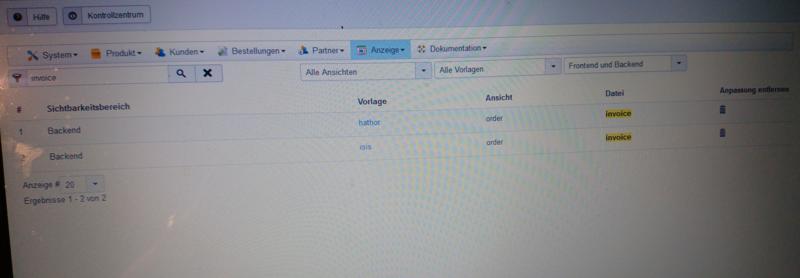
I still can not see the element kundennummer in the Invoice.
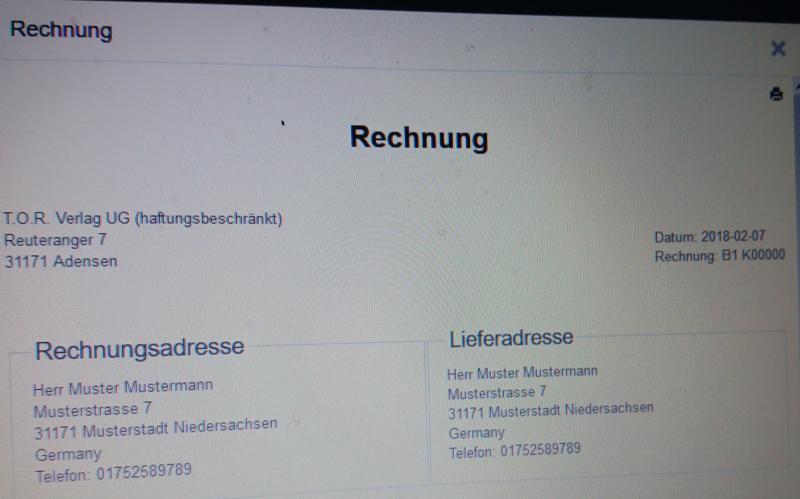
I'm too stupid, I entered the code in two places.
In this two files I find. have in line 49 <?php echo $this->element->customer->kundennummer; ?>
I still can not see the element kundennummer in the Invoice.
Last edit: 8 years 8 months ago by Oktavian.
Please Log in or Create an account to join the conversation.
8 years 8 months ago #287740
by nicolas
Replied by nicolas on topic customer number
Hi,
If you've added your code like you explained in www.hikashop.com/forum/customers/893704-...r-number.html#287612
then it means that your custom field will display for each custom order field of the order just after the label.
If you don't have any custom order field displaying in the invoice, then you won't see the value, it's normal.
You should put your code outside the "if" conditions of the view file or your risk your code to not run in some cases.
For example, try first adding it at the top of the file to make sure the code works.
If you've added your code like you explained in www.hikashop.com/forum/customers/893704-...r-number.html#287612
then it means that your custom field will display for each custom order field of the order just after the label.
If you don't have any custom order field displaying in the invoice, then you won't see the value, it's normal.
You should put your code outside the "if" conditions of the view file or your risk your code to not run in some cases.
For example, try first adding it at the top of the file to make sure the code works.
Please Log in or Create an account to join the conversation.
8 years 8 months ago #287743
by Oktavian
Replied by Oktavian on topic customer number
That works fine.
how do i get the term customer number (Kundennummer) under invoice number (Rechnungsnummer)
The customer number is now next to the invoice number.
Where can I determine the look of the invoice number?
The invoice number is now But would have to be continuous because the last invoice number in the old shop was B00000893
Thanks Oktavian
how do i get the term customer number (Kundennummer) under invoice number (Rechnungsnummer)
The customer number is now next to the invoice number.
Where can I determine the look of the invoice number?
The invoice number is now But would have to be continuous because the last invoice number in the old shop was B00000893
Thanks Oktavian
This attachment is hidden for guests.
Please log in or register to see it.
Please log in or register to see it.
Please Log in or Create an account to join the conversation.
8 years 8 months ago #287748
by nicolas
Replied by nicolas on topic customer number
Hi,
Just add a <br/> tag before your code so that it goes to the next line.
You can change the invoice number format with the setting of the same name in the HikaShop configuration:
www.hikashop.com/support/documentation/5...nfig.html#main_order
Just add a <br/> tag before your code so that it goes to the next line.
You can change the invoice number format with the setting of the same name in the HikaShop configuration:
www.hikashop.com/support/documentation/5...nfig.html#main_order
Please Log in or Create an account to join the conversation.
8 years 8 months ago #287821
by Oktavian
Replied by Oktavian on topic customer number
Thanks it works 
Please Log in or Create an account to join the conversation.
Time to create page: 0.449 seconds