
- Posts: 158
- Thank you received: 5
Formatting the User Control Panel
- serbofleconcepts
-
 Topic Author
- Offline
Less
More
4 years 7 months ago #340618
by serbofleconcepts
Formatting the User Control Panel was created by serbofleconcepts
-- Joomla version -- : 3.10.5
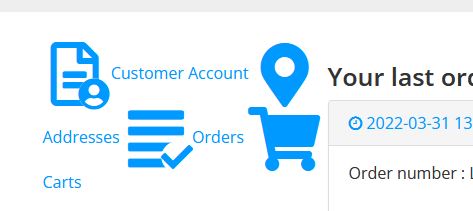
I'm having a small issue with the Hikashop User Control Panel. The icons for the various elements are not displaying in a list but one after the other. I'm trying to find a way to edit the code cleanly to fix this - can you please help.
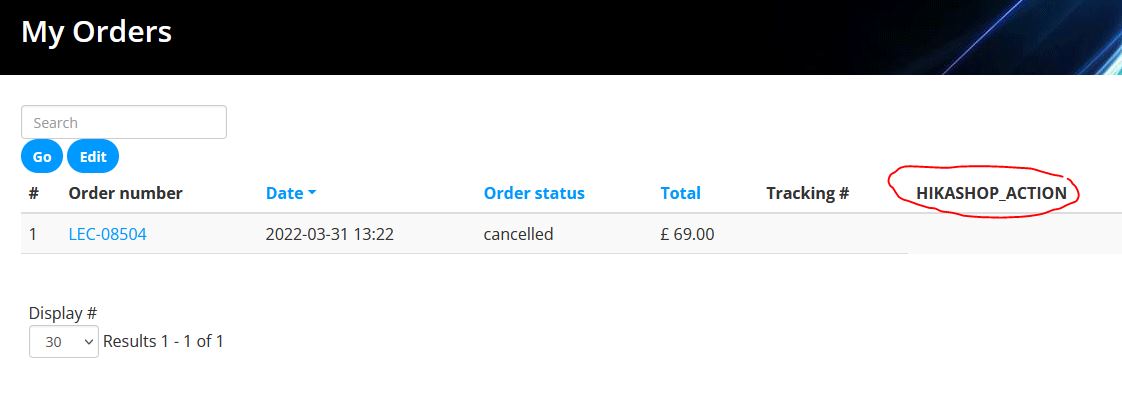
A 2nd issue is the orders page - it has an unformatted title "HIKASHOP_ACTION". What is this and can I remove it?
I'm having a small issue with the Hikashop User Control Panel. The icons for the various elements are not displaying in a list but one after the other. I'm trying to find a way to edit the code cleanly to fix this - can you please help.
A 2nd issue is the orders page - it has an unformatted title "HIKASHOP_ACTION". What is this and can I remove it?
Please Log in or Create an account to join the conversation.

4 years 7 months ago #340619
by nicolas
Replied by nicolas on topic Formatting the User Control Panel
Hi,
It's probable that either you have an old frontend CSS or an old view override.
Check if you have the file templates/YOUR_TEMPLATE/html/user/cpanel.php
If you do, try renaming it and see if that helps. If it does, then reapply your customizations to the new version of the cpanel view file via the Display>Views menu.
Otherwise, check the "frontend CSS" setting of the HikaShop configuration. If it's not set to "default", it means you have custom CSS based on an old version of the frontend CSS file of HikaShop.
If you can, fallback to default, check that it fixes the problem and then reapply your changes to the new version of the default CSS.
Regarding the "HIKASHOP_ACTION" text, it means you have both:
- an old view override of order / listing. You can check it via the menu Display>Views.
- an old version of the your language files. You can check that via the "Languages" tab of the HikaShop configuration. There, you could just add a translation override for it, if you don't want to load the latest version of the HikaShop language file from our server.
It's probable that either you have an old frontend CSS or an old view override.
Check if you have the file templates/YOUR_TEMPLATE/html/user/cpanel.php
If you do, try renaming it and see if that helps. If it does, then reapply your customizations to the new version of the cpanel view file via the Display>Views menu.
Otherwise, check the "frontend CSS" setting of the HikaShop configuration. If it's not set to "default", it means you have custom CSS based on an old version of the frontend CSS file of HikaShop.
If you can, fallback to default, check that it fixes the problem and then reapply your changes to the new version of the default CSS.
Regarding the "HIKASHOP_ACTION" text, it means you have both:
- an old view override of order / listing. You can check it via the menu Display>Views.
- an old version of the your language files. You can check that via the "Languages" tab of the HikaShop configuration. There, you could just add a translation override for it, if you don't want to load the latest version of the HikaShop language file from our server.
Please Log in or Create an account to join the conversation.
- serbofleconcepts
-
Topic Author
- Offline
Less
More
- Posts: 158
- Thank you received: 5
4 years 7 months ago #340624
by serbofleconcepts
Replied by serbofleconcepts on topic Formatting the User Control Panel
Thank you Nicolas.
I don't have the folder .../user/
Nor can I find the cpanel.php file in any of the template/html folders?
Anyway, it looks like I don't have any customisations on that file;
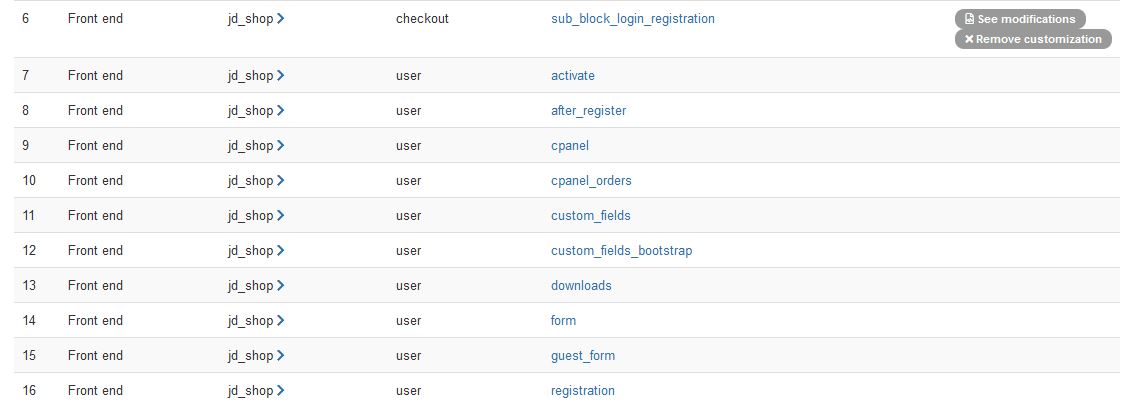
What content is supposed to be under the HIKASHOP_ACTION title so I know what to add to the language file?
I don't have the folder .../user/
Nor can I find the cpanel.php file in any of the template/html folders?
Anyway, it looks like I don't have any customisations on that file;
What content is supposed to be under the HIKASHOP_ACTION title so I know what to add to the language file?
Please Log in or Create an account to join the conversation.
4 years 7 months ago #340649
by nicolas
Replied by nicolas on topic Formatting the User Control Panel
Hi,
Note that there are two questions here. The cpanel view override was for your first question with the icons. And as I said, if it's not a view override, then it's a CSS issue.
Regarding the HIKASHOP_ACTION text, there is no HIKASHOP_ACTION in the order / listing view file of HikaShop's recent versions. In fact, the view doesn't look like this at all so you must have a view override there. I suppose you did this to add the tracking column. Or you're using a really old version of HikaShop.
Anyways, the text for that translation key is "Action", like this:
HIKASHOP_ACTION="Action"
That's because this column used to display the print button, reorder button, etc.
Note that there are two questions here. The cpanel view override was for your first question with the icons. And as I said, if it's not a view override, then it's a CSS issue.
Regarding the HIKASHOP_ACTION text, there is no HIKASHOP_ACTION in the order / listing view file of HikaShop's recent versions. In fact, the view doesn't look like this at all so you must have a view override there. I suppose you did this to add the tracking column. Or you're using a really old version of HikaShop.
Anyways, the text for that translation key is "Action", like this:
HIKASHOP_ACTION="Action"
That's because this column used to display the print button, reorder button, etc.
Please Log in or Create an account to join the conversation.
- serbofleconcepts
-
Topic Author
- Offline
Less
More
- Posts: 158
- Thank you received: 5
4 years 7 months ago #340665
by serbofleconcepts
Replied by serbofleconcepts on topic Formatting the User Control Panel
OK, I fixed the css by editing the hikashop css file directly (not ideal but only a small change).
I also added the language translation as you suggested.
Thank you for your help.
I also added the language translation as you suggested.
Thank you for your help.
Please Log in or Create an account to join the conversation.
Time to create page: 0.096 seconds